Which is Better for Running LLMs locally: NVIDIA RTX 6000 Ada 48GB or NVIDIA RTX 4000 Ada 20GB x4? Ultimate Benchmark Analysis
Introduction
The world of large language models (LLMs) is rapidly evolving, with new models showing incredible capabilities every day. But running these powerful LLMs often requires specialized hardware and can be a challenge for developers. In this article, we'll dive deep into the performance of two popular NVIDIA GPUs - the RTX 6000 Ada 48GB and the RTX 4000 Ada 20GB (x4). We'll analyze their performance with different LLM configurations and help you decide which one is the best fit for your needs.
Comparison of NVIDIA RTX 6000 Ada 48GB and NVIDIA RTX 4000 Ada 20GB x4
Think of these GPUs like two powerful engines, each suited for different types of workloads. The RTX 6000 Ada 48GB is a single, powerful card, and the RTX 4000 Ada 20GB (x4) is a team of four smaller but still mighty GPUs. Let's see how they perform in the arena of LLM inference.
Performance Analysis: Token Generation and Processing
We'll assess the performance of each GPU by measuring two key metrics:
- Token Generation: How fast each GPU can generate new text tokens (the building blocks of words).
- Token Processing: How quickly each GPU can process existing tokens.
Note: The data used in this analysis comes from real-world benchmarks conducted in the following repositories: Repository Link 1 and Repository Link 2.
Llama 3 8B Model
- Q4KM Quantization: (Quantization is a technique to reduce the size of models while maintaining performance. Think of it as compressing a file to save space.)
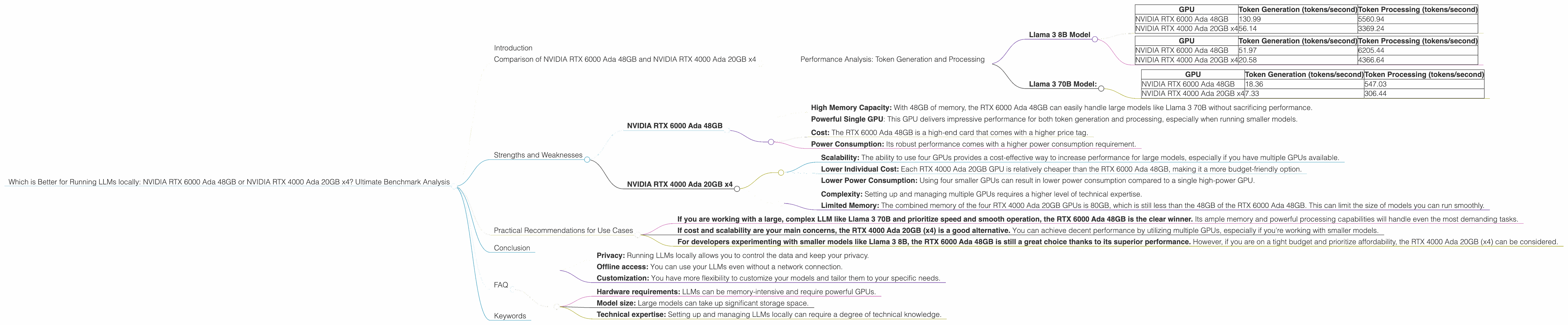
| GPU | Token Generation (tokens/second) | Token Processing (tokens/second) |
|---|---|---|
| NVIDIA RTX 6000 Ada 48GB | 130.99 | 5560.94 |
| NVIDIA RTX 4000 Ada 20GB x4 | 56.14 | 3369.24 |
- F16 Precision: (F16 is a smaller data format than Q4KM, which can increase speed but may cause a slight reduction in accuracy.)
| GPU | Token Generation (tokens/second) | Token Processing (tokens/second) |
|---|---|---|
| NVIDIA RTX 6000 Ada 48GB | 51.97 | 6205.44 |
| NVIDIA RTX 4000 Ada 20GB x4 | 20.58 | 4366.64 |
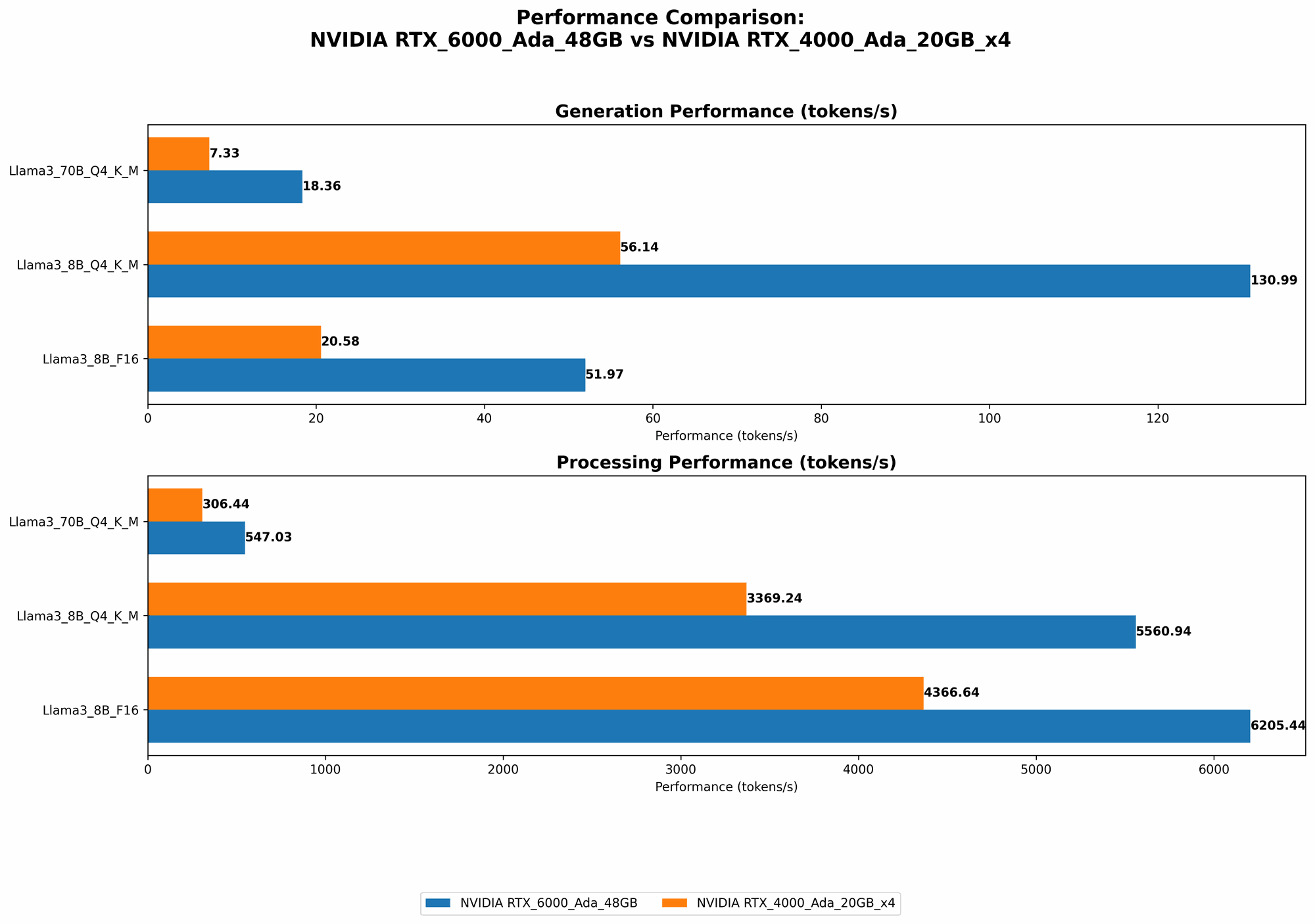
Analysis: For the Llama 3 8B model, the RTX 6000 Ada 48GB shines in both token generation and processing, especially with Q4KM quantization. This makes it an ideal choice for interactive applications where speed is paramount. The RTX 4000 Ada 20GB x4 provides a strong performance but is outperformed by the RTX 6000 Ada 48GB.
Llama 3 70B Model:
- Q4KM Quantization:
| GPU | Token Generation (tokens/second) | Token Processing (tokens/second) |
|---|---|---|
| NVIDIA RTX 6000 Ada 48GB | 18.36 | 547.03 |
| NVIDIA RTX 4000 Ada 20GB x4 | 7.33 | 306.44 |
- F16 Precision: (No data available for F16 precision at this time for both devices.)
Analysis: The RTX 6000 Ada 48GB again demonstrates its superiority in handling the larger Llama 3 70B model due to its generous memory capacity. It's about 2.5 times faster in token generation and processing compared to the RTX 4000 Ada 20GB x4.
Strengths and Weaknesses
Let's break down the top strengths and weaknesses of each GPU to help you make an informed decision:
NVIDIA RTX 6000 Ada 48GB
Strengths:
- High Memory Capacity: With 48GB of memory, the RTX 6000 Ada 48GB can easily handle large models like Llama 3 70B without sacrificing performance.
- Powerful Single GPU: This GPU delivers impressive performance for both token generation and processing, especially when running smaller models.
Weaknesses:
- Cost: The RTX 6000 Ada 48GB is a high-end card that comes with a higher price tag.
- Power Consumption: Its robust performance comes with a higher power consumption requirement.
NVIDIA RTX 4000 Ada 20GB x4
Strengths:
- Scalability: The ability to use four GPUs provides a cost-effective way to increase performance for large models, especially if you have multiple GPUs available.
- Lower Individual Cost: Each RTX 4000 Ada 20GB GPU is relatively cheaper than the RTX 6000 Ada 48GB, making it a more budget-friendly option.
- Lower Power Consumption: Using four smaller GPUs can result in lower power consumption compared to a single high-power GPU.
Weaknesses:
- Complexity: Setting up and managing multiple GPUs requires a higher level of technical expertise.
- Limited Memory: The combined memory of the four RTX 4000 Ada 20GB GPUs is 80GB, which is still less than the 48GB of the RTX 6000 Ada 48GB. This can limit the size of models you can run smoothly.
Practical Recommendations for Use Cases
Now, let's translate the performance data into real-world scenarios:
- If you are working with a large, complex LLM like Llama 3 70B and prioritize speed and smooth operation, the RTX 6000 Ada 48GB is the clear winner. Its ample memory and powerful processing capabilities will handle even the most demanding tasks.
- If cost and scalability are your main concerns, the RTX 4000 Ada 20GB (x4) is a good alternative. You can achieve decent performance by utilizing multiple GPUs, especially if you're working with smaller models.
- For developers experimenting with smaller models like Llama 3 8B, the RTX 6000 Ada 48GB is still a great choice thanks to its superior performance. However, if you are on a tight budget and prioritize affordability, the RTX 4000 Ada 20GB (x4) can be considered.
Conclusion
Choosing the right GPU for running LLMs locally depends heavily on your specific use case and budget. The RTX 6000 Ada 48GB is a top-tier, single-GPU solution for high-performance applications, while the RTX 4000 Ada 20GB (x4) offers a more scalable and budget-friendly option. With the information provided in this article, you can make an informed choice that best suits your needs and embark on your own LLM adventures!
FAQ
What are the benefits of running LLMs locally?
- Privacy: Running LLMs locally allows you to control the data and keep your privacy.
- Offline access: You can use your LLMs even without a network connection.
- Customization: You have more flexibility to customize your models and tailor them to your specific needs.
What is quantization?
Quantization is a technique used to reduce the size of LLM models without significant performance loss. It involves converting the model parameters (weights) to smaller data formats. Think of it like compressing an image to save space, but for LLMs.
Are there any other GPUs that could be considered besides the RTX 6000 Ada 48GB and RTX 4000 Ada 20GB (x4)?
Yes, other GPUs like the RTX 4090 or the A100 GPU can also be used for running LLMs locally. Their performance and features may differ, so it's essential to compare them based on your specific requirements.
Can I run LLMs on my CPU?
You can run LLMs on a CPU, but it will be significantly slower and may not be suitable for complex models or real-time applications.
What are some of the popular LLM models available for local use?
Popular open-source models include Llama 2, GPT-Neo, and GPT-J. Commercial models like GPT-3 and PaLM are also available, but they typically require a paid subscription.
What are some of the challenges of running LLMs locally?
- Hardware requirements: LLMs can be memory-intensive and require powerful GPUs.
- Model size: Large models can take up significant storage space.
- Technical expertise: Setting up and managing LLMs locally can require a degree of technical knowledge.
Keywords
LLM, GPU, NVIDIA, RTX 6000 Ada 48GB, RTX 4000 Ada 20GB, Llama 3, Token Generation, Token Processing, Q4KM Quantization, F16 Precision, Performance Benchmark, Local Inference, GPU Benchmark, Scalability, Memory Capacity, Cost, Power Consumption, Model Size, Open-Source, Paid Subscription