Which is Better for Running LLMs locally: NVIDIA RTX 6000 Ada 48GB or NVIDIA A40 48GB? Ultimate Benchmark Analysis
Introduction
The world of Large Language Models (LLMs) is exploding, and with it, the need for powerful hardware to run them locally. Whether you're a developer, researcher, or simply someone who wants to experiment with the latest AI technology, choosing the right GPU can make a huge difference in performance and efficiency.
This article goes head-to-head with two leading GPUs, the NVIDIA RTX 6000 Ada 48GB and the NVIDIA A40 48GB, to see which one reigns supreme when it comes to running LLMs locally. We'll analyze their performance on a variety of Llama 3 models, exploring factors like token speed, processing power, and quantization techniques. By the end, you'll have a clear understanding of which GPU best suits your LLM needs.
Comparison of NVIDIA RTX 6000 Ada 48GB and NVIDIA A40 48GB
What are NVIDIA RTX 6000 Ada 48GB and NVIDIA A40 48GB?
Both the NVIDIA RTX 6000 Ada 48GB and NVIDIA A40 48GB are powerful GPUs designed for demanding workloads like AI training and inference. They share some key features, including 48GB of HBM2e memory and a massive number of CUDA cores. However, they have distinct strengths and weaknesses, particularly in the context of running LLMs.
Key Features and Differences:
| Feature | NVIDIA RTX 6000 Ada 48GB | NVIDIA A40 48GB |
|---|---|---|
| GPU Architecture | Ada Lovelace | Ampere |
| CUDA Cores | 14,208 | 7,680 |
| Memory | 48GB HBM2e | 48GB HBM2e |
| Memory Bandwidth | 1.2 TB/s | 1.08 TB/s |
| TDP | 300W | 300W |
| Typical Use Cases | AI training, inference, professional visualization | Data center, AI training, inference |
Performance Analysis: Llama 3 Model Inference
Let's dive into the performance numbers of these GPUs using the Llama 3 model. We'll focus on both token generation speed and model processing.
Token Speed (Tokens/second) Generation
| Model | RTX 6000 Ada 48GB | A40 48GB |
|---|---|---|
| Llama 3 8B Q4KM | 130.99 | 88.95 |
| Llama 3 8B F16 | 51.97 | 33.95 |
| Llama 3 70B Q4KM | 18.36 | 12.08 |
| Llama 3 70B F16 | N/A | N/A |
Processing Power (Tokens/second) Processing
| Model | RTX 6000 Ada 48GB | A40 48GB |
|---|---|---|
| Llama 3 8B Q4KM | 5560.94 | 3240.95 |
| Llama 3 8B F16 | 6205.44 | 4043.05 |
| Llama 3 70B Q4KM | 547.03 | 239.92 |
| Llama 3 70B F16 | N/A | N/A |
Strengths and Weaknesses
NVIDIA RTX 6000 Ada 48GB:
Strengths:
- Higher performance: The RTX 6000 Ada 48GB consistently outperforms the A40 in both token generation and processing speed, particularly with smaller Llama 3 models. This is likely due to the Ada architecture's efficiency and increased CUDA cores.
- More memory bandwidth: The RTX 6000 Ada 48GB has a higher memory bandwidth, resulting in faster data transfers and potentially improved performance with larger models.
Weaknesses:
- Higher power consumption: The RTX 6000 Ada 48GB's higher performance comes at the cost of greater power consumption, which may be a concern for some users.
- Higher price: This card is typically more expensive than the A40, which could be a major deciding factor for budget-conscious users.
NVIDIA A40 48GB:
Strengths:
- Lower price: The A40 is generally more affordable than the RTX 6000 Ada 48GB, making it a more attractive option for those on a tighter budget.
- Excellent value: While the A40's performance isn't as high as the RTX 6000 Ada 48GB, it still delivers strong results, particularly with larger models. Its lower price point offers great value for its capabilities.
Weaknesses:
- Lower performance: Compared to the RTX 6000 Ada 48GB, the A40 generally demonstrates lower performance in both token generation and processing speed, especially with smaller models.
- Less memory bandwidth: The A40's lower memory bandwidth could potentially lead to slower performance with larger models that demand more data transfer.
Practical Recommendations for Use Cases
RTX 6000 Ada 48GB:
- Ideal for: Developers and researchers working with smaller LLM models (like Llama 3 8B) who prioritize the fastest possible performance. It's also a strong choice for those who need maximum processing power and require the speed advantages of higher memory bandwidth.
- Consider if: You have a budget for a premium GPU and value performance above all else.
A40 48GB:
- Ideal for: Users and developers running larger LLM models (like Llama 3 70B) where the processing power of the A40 excels. Its lower price point makes it a great option for those who want a powerful GPU without breaking the bank.
- Consider if: You prioritize affordability over absolute peak performance.
Quantization: Making LLMs Run Faster and More Efficiently
Quantization is a technique used to reduce the size of an LLM model while maintaining its accuracy. Think of it like compressing a video file without losing too much visual quality. Quantization works by representing numbers with fewer bits. For example, instead of using 32 bits to represent a number, you might use 16 or 8. This significantly reduces the amount of memory required to store the model and potentially improves inference speed.
How Quantization Affects Performance
- Q4KM: This quantization scheme uses 4 bits to represent the weights (K) and activations (M) of the model. This results in a smaller model and generally faster inference speeds than using other quantization schemes.
- F16: This scheme utilizes half-precision floating-point numbers (16 bits), offering a balance between model size reduction and performance.
Quantization in NVIDIA RTX 6000 Ada 48GB vs. NVIDIA A40 48GB
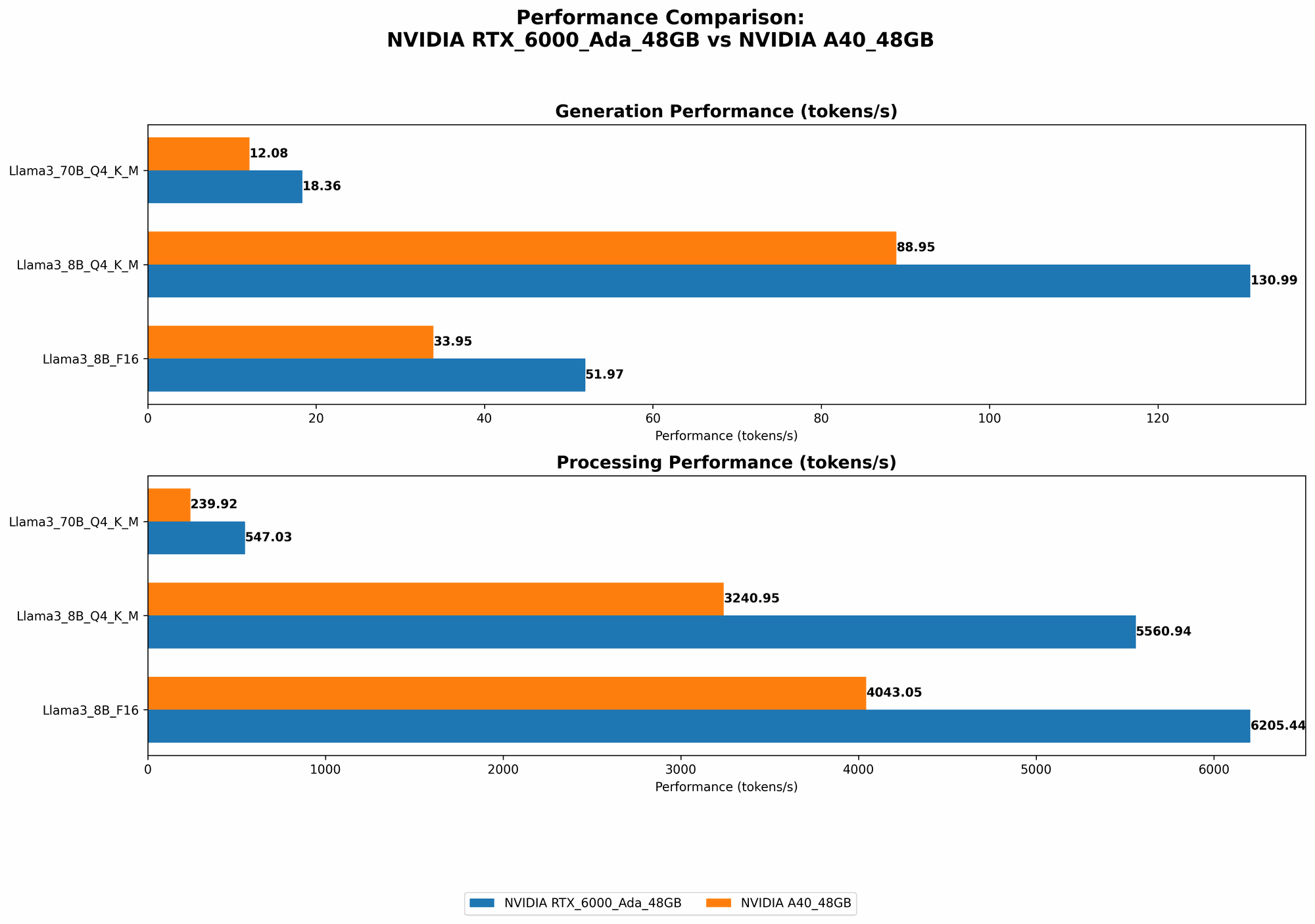
As you can see from the benchmark data, the RTX 6000 Ada 48GB generally performs better with quantization than the A40 48GB. In fact, for the Llama 3 8B model, the RTX 6000 Ada 48GB sees a substantial performance boost when using Q4KM compared to F16. This suggests that the Ada architecture is particularly well-suited for quantized models. This benefit is less pronounced with the larger Llama 3 70B model, indicating that the A40 might be a better choice for larger models using Q4KM quantization.
Conclusion
When it comes to running LLMs locally, both the NVIDIA RTX 6000 Ada 48GB and NVIDIA A40 48GB offer impressive capabilities.
- The RTX 6000 Ada 48GB stands out for its remarkably high performance, particularly with smaller models, due to its advanced Ada architecture and high memory bandwidth. However, its higher price and power consumption are factors to consider.
- The A40 48GB is a value champion, offering a powerful solution at a more affordable price point. Its performance is very competitive, especially with larger models. However, its lower memory bandwidth and overall speed compared to the RTX 6000 Ada 48GB could be a limiting factor for some use cases.
Remember: The best GPU for you ultimately depends on your specific needs, budget, and the size of the LLM you're planning to run.
FAQ
Q: What are the benefits of running LLMs locally?
A: Running LLMs locally offers several advantages:
- Privacy: You retain control over your data and don't have to rely on cloud services.
- Reduced latency: Local execution eliminates the need for network requests, resulting in faster responses.
- Customization: You have more flexibility to modify and fine-tune the model to suit your specific purposes.
Q: What are the drawbacks of running LLMs locally?
A: There are some challenges to running LLMs locally:
- Hardware requirements: Powerful GPUs are required for optimal performance, which can be expensive.
- Technical expertise: Setting up and optimizing local LLM environments can be technically demanding.
- Model size: Large LLM models can require significant storage space.
Q: How do I choose the right GPU for my needs?
A: The best GPU for you depends on several factors:
- Model size: Larger models demand more processing power and memory.
- Budget: GPUs vary significantly in price.
- Performance requirements: Do you need the absolute fastest performance, or is a more affordable option acceptable?
Q: What are some other popular GPUs for running LLMs locally?
A: In addition to the RTX 6000 Ada 48GB and A40 48GB, other popular GPUs for running LLMs include:
- NVIDIA GeForce RTX 4090: A very powerful GPU with high performance, albeit at a high price.
- AMD Radeon RX 7900 XT: A strong competitor to the RTX 4090, offering impressive performance at a potentially lower price.
- Google TPU v4: Google's specialized AI accelerators offer exceptional performance for large LLMs.
Q: How do I get started with running LLMs locally?
A: There are several resources to help you get started:
- llama.cpp: An open-source C++ implementation of LLMs that runs efficiently on GPUs.
- Hugging Face Transformers: A popular Python library that provides tools for working with a wide range of pre-trained LLMs.
- Google Colab: A free cloud-based environment that provides access to GPUs for experimentation.
Keywords:
NVIDIA RTX 6000 Ada 48GB, NVIDIA A40 48GB, LLM, Large Language Model, GPU, Token Speed, Processing Power, Quantization, Q4KM, F16, Inference, Llama 3, Benchmark, Performance, Ada Architecture, Ampere Architecture, Memory Bandwidth, CUDA Cores, Local, Cloud, Hugging Face, Transformers, llama.cpp, Google Colab.