Which is Better for Running LLMs locally: NVIDIA RTX 5000 Ada 32GB or NVIDIA A40 48GB? Ultimate Benchmark Analysis
Introduction
The world of Large Language Models (LLMs) is exploding, with new models and applications popping up every day. While cloud-based services like OpenAI's ChatGPT offer convenient access, running LLMs locally provides greater control, privacy, and cost-effectiveness. This is where powerful GPUs come in.
But with a plethora of options available, choosing the right GPU for your LLM needs can be daunting. In this article, we'll delve deep into the performance comparison of two popular GPUs: NVIDIA RTX5000Ada32GB and NVIDIA A4048GB, specifically for running Llama 3 models locally. We'll dissect their strengths and weaknesses based on real-world benchmarks, helping you make an informed decision based on your specific requirements.
Buckle up, because this ride is going to be a wild one! 🏎️
NVIDIA RTX5000Ada32GB vs. NVIDIA A4048GB: A Head-to-Head Showdown
Let's get down to business! We're going to compare these two titans of the GPU world in their ability to handle Llama 3 models, focusing on token generation and processing speeds. We'll use the tokens per second (tokens/s) metric as our primary performance indicator.
Understanding the Data
Before diving into the numbers, let's clarify the jargon.
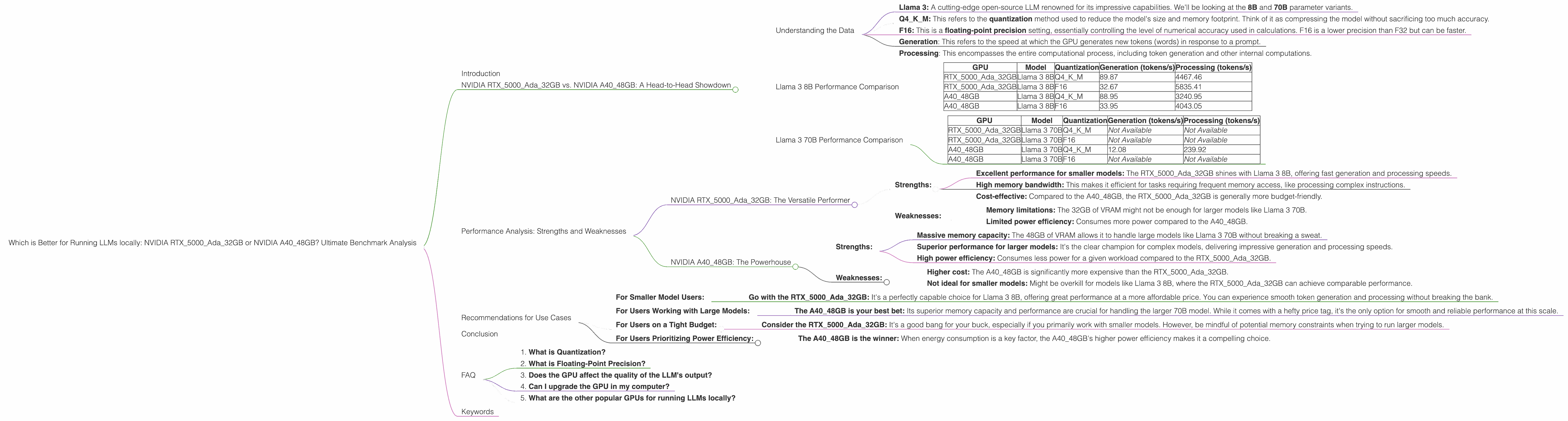
- Llama 3: A cutting-edge open-source LLM renowned for its impressive capabilities. We'll be looking at the 8B and 70B parameter variants.
- Q4KM: This refers to the quantization method used to reduce the model's size and memory footprint. Think of it as compressing the model without sacrificing too much accuracy.
- F16: This is a floating-point precision setting, essentially controlling the level of numerical accuracy used in calculations. F16 is a lower precision than F32 but can be faster.
- Generation: This refers to the speed at which the GPU generates new tokens (words) in response to a prompt.
- Processing: This encompasses the entire computational process, including token generation and other internal computations.
Llama 3 8B Performance Comparison
The 8B model, while smaller, is a great starting point for exploring the capabilities of LLMs locally. Here's how our contenders perform:
| GPU | Model | Quantization | Generation (tokens/s) | Processing (tokens/s) |
|---|---|---|---|---|
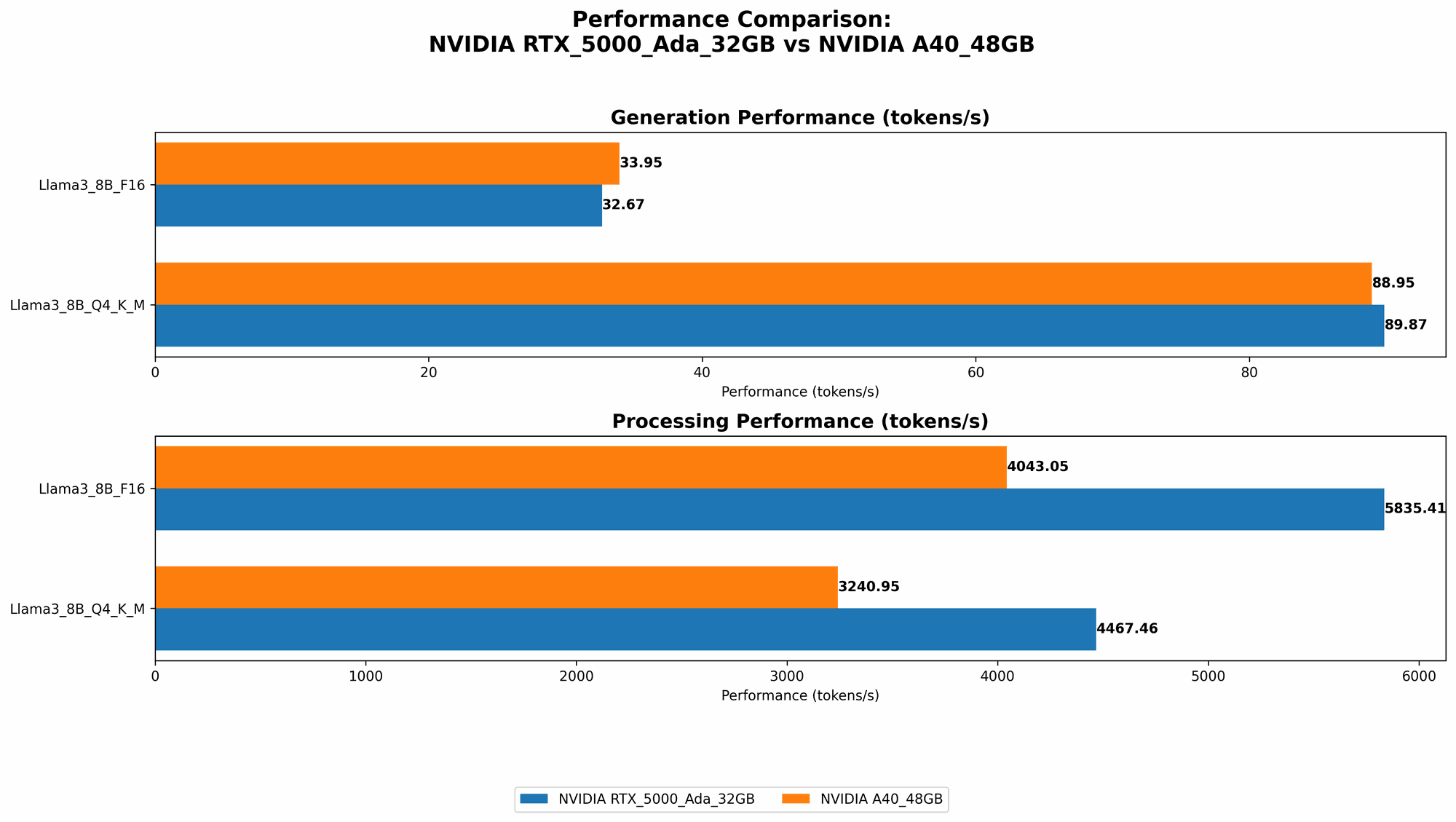
| RTX5000Ada_32GB | Llama 3 8B | Q4KM | 89.87 | 4467.46 |
| RTX5000Ada_32GB | Llama 3 8B | F16 | 32.67 | 5835.41 |
| A40_48GB | Llama 3 8B | Q4KM | 88.95 | 3240.95 |
| A40_48GB | Llama 3 8B | F16 | 33.95 | 4043.05 |
Observations:
- RTX5000Ada32GB shows a slight edge over A4048GB in Q4KM quantization for both generation and processing speeds, though the difference is negligible.
- Both GPUs perform similarly in F16 precision, with A40_48GB having a slightly better generation speed but a lower processing speed.
- The noticeable advantage of RTX5000Ada_32GB in F16 processing speed is likely due to its higher memory bandwidth.
Key Takeaway: For the 8B model, both GPUs offer comparable performance. The choice depends on your specific needs: prioritize generation speed with RTX5000Ada32GB and F16 precision, or processing speed with RTX5000Ada32GB and Q4KM quantization.
Llama 3 70B Performance Comparison
Now things are getting serious! The 70B model pushes GPUs to their limits. Let's see how our contenders fare.
| GPU | Model | Quantization | Generation (tokens/s) | Processing (tokens/s) |
|---|---|---|---|---|
| RTX5000Ada_32GB | Llama 3 70B | Q4KM | Not Available | Not Available |
| RTX5000Ada_32GB | Llama 3 70B | F16 | Not Available | Not Available |
| A40_48GB | Llama 3 70B | Q4KM | 12.08 | 239.92 |
| A40_48GB | Llama 3 70B | F16 | Not Available | Not Available |
Observations:
- RTX5000Ada_32GB doesn't have data for the 70B model. This suggests that it might encounter memory limitations or struggle to maintain acceptable performance with this larger model.
- A4048GB demonstrates its power by handling the 70B model with Q4K_M quantization. While the generation speed is significantly slower than the 8B model, the processing speed is still impressive considering the model's complexity.
Key Takeaway: The A4048GB emerges as the clear winner for running the 70B model due to its massive memory capacity and performance. The RTX5000Ada32GB struggles with this larger model, likely due to memory constraints.
Performance Analysis: Strengths and Weaknesses
Now that we've seen the numbers, let's dive into a deeper analysis and understand the strengths and weaknesses of each GPU.
NVIDIA RTX5000Ada_32GB: The Versatile Performer
- Strengths:
- Excellent performance for smaller models: The RTX5000Ada_32GB shines with Llama 3 8B, offering fast generation and processing speeds.
- High memory bandwidth: This makes it efficient for tasks requiring frequent memory access, like processing complex instructions.
- Cost-effective: Compared to the A4048GB, the RTX5000Ada32GB is generally more budget-friendly.
- Weaknesses:
- Memory limitations: The 32GB of VRAM might not be enough for larger models like Llama 3 70B.
- Limited power efficiency: Consumes more power compared to the A40_48GB.
NVIDIA A40_48GB: The Powerhouse
- Strengths:
- Massive memory capacity: The 48GB of VRAM allows it to handle large models like Llama 3 70B without breaking a sweat.
- Superior performance for larger models: It's the clear champion for complex models, delivering impressive generation and processing speeds.
- High power efficiency: Consumes less power for a given workload compared to the RTX5000Ada_32GB.
- Weaknesses:
- Higher cost: The A4048GB is significantly more expensive than the RTX5000Ada32GB.
- Not ideal for smaller models: Might be overkill for models like Llama 3 8B, where the RTX5000Ada_32GB can achieve comparable performance.
Recommendations for Use Cases
Let's summarize everything and help you choose the right GPU based on your specific use case.
For Smaller Model Users:
- Go with the RTX5000Ada_32GB: It's a perfectly capable choice for Llama 3 8B, offering great performance at a more affordable price. You can experience smooth token generation and processing without breaking the bank.
For Users Working with Large Models:
- The A40_48GB is your best bet: Its superior memory capacity and performance are crucial for handling the larger 70B model. While it comes with a hefty price tag, it's the only option for smooth and reliable performance at this scale.
For Users on a Tight Budget:
- Consider the RTX5000Ada_32GB: It's a good bang for your buck, especially if you primarily work with smaller models. However, be mindful of potential memory constraints when trying to run larger models.
For Users Prioritizing Power Efficiency:
- The A4048GB is the winner: When energy consumption is a key factor, the A4048GB's higher power efficiency makes it a compelling choice.
Conclusion
Choosing the right GPU for running LLMs locally is a crucial decision, balancing performance, cost, and memory requirements. The RTX5000Ada32GB is a solid choice for smaller models like Llama 3 8B, offering a balance of performance and affordability. For the larger 70B model, however, the A4048GB reigns supreme with its massive memory capacity and exceptional power.
Ultimately, the best GPU for you depends on your specific needs and budget. Weigh the pros and cons carefully and choose the one that's best suited for your LLM endeavors.
FAQ
1. What is Quantization?
Quantization is a technique used to reduce the size of a model without sacrificing too much accuracy. Think of it like compressing a file. By using fewer bits to represent data, we can drastically shrink the model's size, making it easier to store and load. This is especially important for large models like Llama 3 70B, which can consume a lot of memory.
2. What is Floating-Point Precision?
Floating-point precision defines the level of accuracy used in mathematical calculations. Higher precision (like F32) means more accurate results, but at the cost of speed. Lower precision (like F16) is faster but might lead to slight inaccuracies in calculations. For LLMs, F16 precision is often sufficient, offering a good balance between speed and accuracy.
3. Does the GPU affect the quality of the LLM's output?
Not directly. The GPU affects how fast the model processes information, but the LLM's output quality is primarily determined by the model itself (e.g., the parameters and training data).
4. Can I upgrade the GPU in my computer?
Yes, in most cases it's possible. However, ensure that your motherboard and power supply are compatible with the new GPU. You'll also need to make sure you have enough physical space in your computer case.
5. What are the other popular GPUs for running LLMs locally?
Many other powerful GPUs are suitable for running LLMs locally, such as the NVIDIA GeForce RTX 4090, AMD Radeon RX 7900 XT, and the NVIDIA A100.
Keywords
LLM, Large Language Model, GPU, NVIDIA, RTX5000Ada32GB, A4048GB, Llama 3, token generation, processing, performance, benchmark, quantization, floating-point precision, memory, cost, power efficiency, usage, recommendation, comparison, local, inference, cloud-based, ChatGPT, open-source, model, parameter, efficiency, performance analysis, practical use cases