Which is Better for Running LLMs locally: NVIDIA RTX 4000 Ada 20GB or NVIDIA RTX 4000 Ada 20GB x4? Ultimate Benchmark Analysis
Introduction
Have you ever dreamed of running a powerful LLM (Large Language Model) like Llama 3 on your own computer? The world of AI has become increasingly accessible, allowing you to experience the magic of LLMs firsthand. However, choosing the right GPU can be a complex decision. Enter the NVIDIA RTX4000Ada20GB and its quad-GPU sibling, the RTX4000Ada20GB_x4. But which one reigns supreme for unleashing the potential of LLMs? This article dives deep into an ultimate benchmark analysis, comparing their performance, strengths, and weaknesses to help you make the best choice for your LLM journey.
Understanding the Players: RTX4000Ada20GB vs. RTX4000Ada20GB_x4
The RTX4000Ada20GB is a powerhouse of a single GPU, equipped with 20GB of GDDR6 memory and the latest Ada Lovelace architecture. It's known for its impressive performance, particularly in demanding tasks like AI and deep learning. On the other hand, the RTX4000Ada20GB_x4 packs a punch by combining four of these GPUs in a single system. This setup unleashes the true potential of parallel processing, allowing you to tackle even more complex AI workloads.
Performance Analysis: An In-Depth Look at Token Speed Generation and Processing
Comparison of RTX4000Ada20GB and RTX4000Ada20GB_x4 on Llama 3 Model
To truly understand the difference, we need to see how these GPUs perform on a real-world LLM workload. We will be focusing on the Llama 3 model in this analysis. Let's delve into the numbers:
Note: Due to limited data, this analysis will only cover Llama 3 8B and 70B models. Results may vary depending on the model, its quantization level (Q4/K/M or F16), and the type of operation (generation or processing).
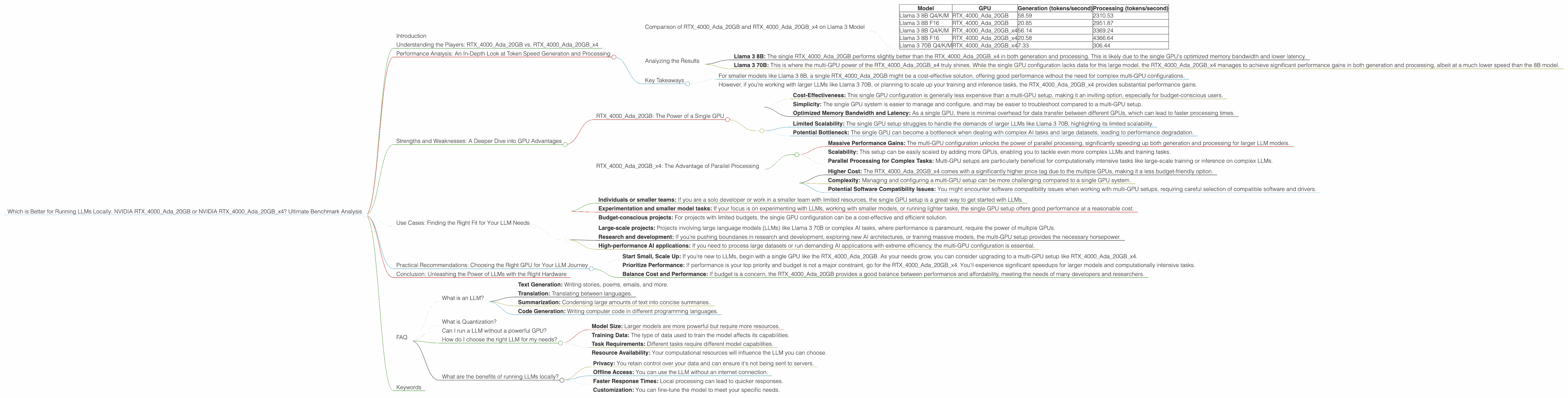
| Model | GPU | Generation (tokens/second) | Processing (tokens/second) |
|---|---|---|---|
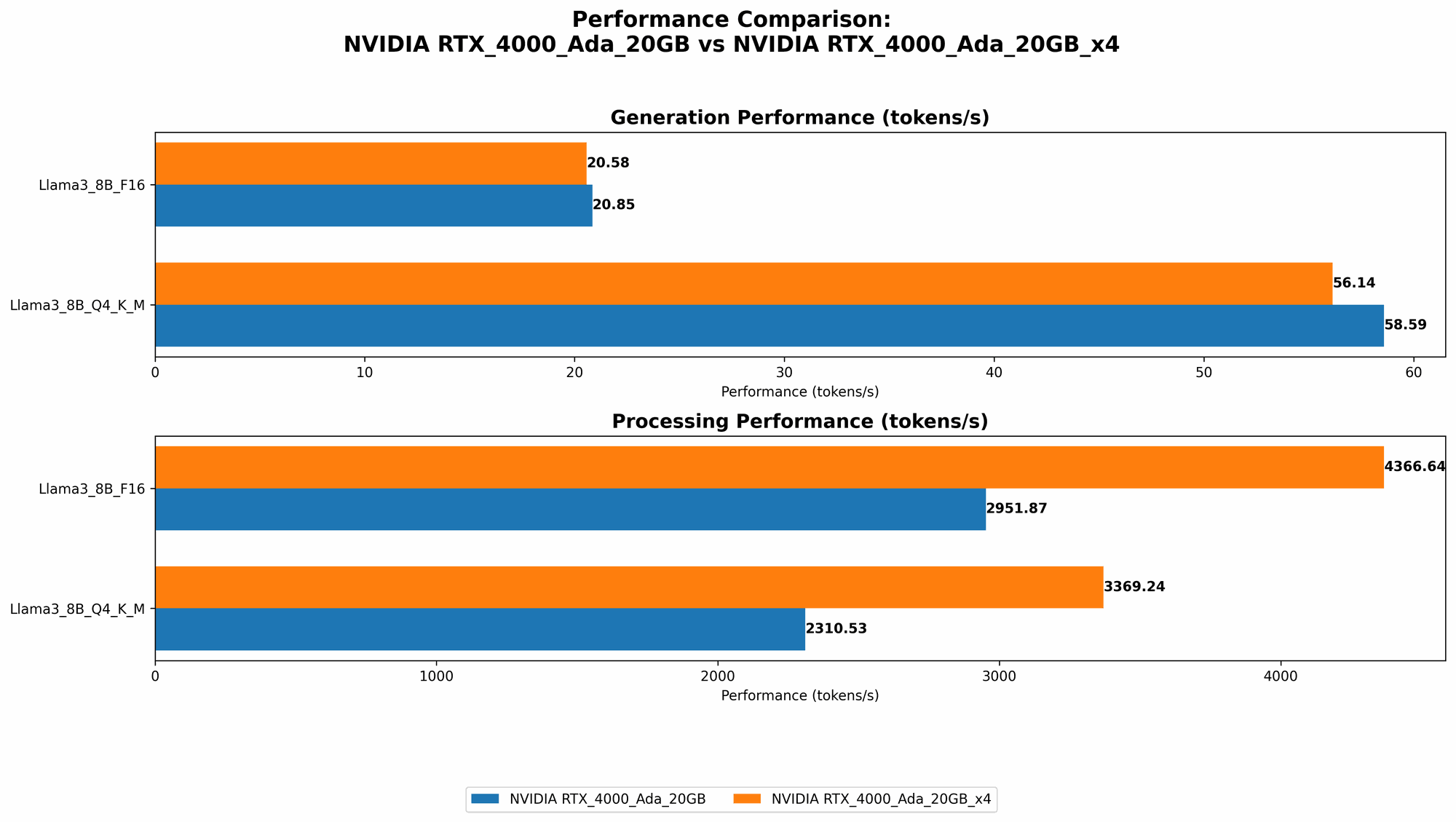
| Llama 3 8B Q4/K/M | RTX4000Ada_20GB | 58.59 | 2310.53 |
| Llama 3 8B F16 | RTX4000Ada_20GB | 20.85 | 2951.87 |
| Llama 3 8B Q4/K/M | RTX4000Ada20GBx4 | 56.14 | 3369.24 |
| Llama 3 8B F16 | RTX4000Ada20GBx4 | 20.58 | 4366.64 |
| Llama 3 70B Q4/K/M | RTX4000Ada20GBx4 | 7.33 | 306.44 |
Generation refers to the speed at which the LLM can generate new text, while processing refers to its ability to handle tasks like understanding and interpreting existing text.
Analyzing the Results
The numbers tell a compelling story.
- Llama 3 8B: The single RTX4000Ada20GB performs slightly better than the RTX4000Ada20GB_x4 in both generation and processing. This is likely due to the single GPU's optimized memory bandwidth and lower latency.
- Llama 3 70B: This is where the multi-GPU power of the RTX4000Ada20GBx4 truly shines. While the single GPU configuration lacks data for this large model, the RTX4000Ada20GBx4 manages to achieve significant performance gains in both generation and processing, albeit at a much lower speed than the 8B model.
Key Takeaways
- For smaller models like Llama 3 8B, a single RTX4000Ada_20GB might be a cost-effective solution, offering good performance without the need for complex multi-GPU configurations.
- However, if you're working with larger LLMs like Llama 3 70B, or planning to scale up your training and inference tasks, the RTX4000Ada20GBx4 provides substantial performance gains.
Strengths and Weaknesses: A Deeper Dive into GPU Advantages
RTX4000Ada_20GB: The Power of a Single GPU
Strengths:
- Cost-Effectiveness: This single GPU configuration is generally less expensive than a multi-GPU setup, making it an inviting option, especially for budget-conscious users.
- Simplicity: The single GPU system is easier to manage and configure, and may be easier to troubleshoot compared to a multi-GPU setup.
- Optimized Memory Bandwidth and Latency: As a single GPU, there is minimal overhead for data transfer between different GPUs, which can lead to faster processing times.
Weaknesses:
- Limited Scalability: The single GPU setup struggles to handle the demands of larger LLMs like Llama 3 70B, highlighting its limited scalability.
- Potential Bottleneck: The single GPU can become a bottleneck when dealing with complex AI tasks and large datasets, leading to performance degradation.
RTX4000Ada20GBx4: The Advantage of Parallel Processing
Strengths:
- Massive Performance Gains: The multi-GPU configuration unlocks the power of parallel processing, significantly speeding up both generation and processing for larger LLM models.
- Scalability: This setup can be easily scaled by adding more GPUs, enabling you to tackle even more complex LLMs and training tasks.
- Parallel Processing for Complex Tasks: Multi-GPU setups are particularly beneficial for computationally intensive tasks like large-scale training or inference on complex LLMs.
Weaknesses:
- Higher Cost: The RTX4000Ada20GBx4 comes with a significantly higher price tag due to the multiple GPUs, making it a less budget-friendly option.
- Complexity: Managing and configuring a multi-GPU setup can be more challenging compared to a single GPU system.
- Potential Software Compatibility Issues: You might encounter software compatibility issues when working with multi-GPU setups, requiring careful selection of compatible software and drivers.
Use Cases: Finding the Right Fit for Your LLM Needs
The choice between RTX4000Ada20GB and RTX4000Ada20GB_x4 ultimately depends on your specific needs and budget.
Single GPU (RTX4000Ada_20GB) is ideal for:
- Individuals or smaller teams: If you are a solo developer or work in a smaller team with limited resources, the single GPU setup is a great way to get started with LLMs.
- Experimentation and smaller model tasks: If your focus is on experimenting with LLMs, working with smaller models, or running lighter tasks, the single GPU setup offers good performance at a reasonable cost.
- Budget-conscious projects: For projects with limited budgets, the single GPU configuration can be a cost-effective and efficient solution.
Multi-GPU (RTX4000Ada20GBx4) is ideal for:
- Large-scale projects: Projects involving large language models (LLMs) like Llama 3 70B or complex AI tasks, where performance is paramount, require the power of multiple GPUs.
- Research and development: If you're pushing boundaries in research and development, exploring new AI architectures, or training massive models, the multi-GPU setup provides the necessary horsepower.
- High-performance AI applications: If you need to process large datasets or run demanding AI applications with extreme efficiency, the multi-GPU configuration is essential.
Practical Recommendations: Choosing the Right GPU for Your LLM Journey
- Start Small, Scale Up: If you're new to LLMs, begin with a single GPU like the RTX4000Ada20GB. As your needs grow, you can consider upgrading to a multi-GPU setup like RTX4000Ada20GB_x4.
- Prioritize Performance: If performance is your top priority and budget is not a major constraint, go for the RTX4000Ada20GBx4. You'll experience significant speedups for larger models and computationally intensive tasks.
- Balance Cost and Performance: If budget is a concern, the RTX4000Ada_20GB provides a good balance between performance and affordability, meeting the needs of many developers and researchers.
Conclusion: Unleashing the Power of LLMs with the Right Hardware
In the world of LLMs, choosing the right GPU can dramatically impact your experience. While both the RTX4000Ada20GB and RTX4000Ada20GB_x4 offer formidable performance, understanding their strengths and weaknesses is crucial for making the best decision. The single GPU setup is a cost-effective option for smaller models and experimentation, while the multi-GPU setup reigns supreme for larger LLMs and demanding AI tasks. Ultimately, the best GPU for you depends on your budget, project scale, and performance demands. With the right hardware, you can unlock the full potential of LLMs and embark on a journey of exploration and innovation.
FAQ
What is an LLM?
LLMs, or Large Language Models, are a type of artificial intelligence that excels at understanding and generating human-like text. They are trained on massive datasets of text and code, enabling them to perform tasks like:
- Text Generation: Writing stories, poems, emails, and more.
- Translation: Translating between languages.
- Summarization: Condensing large amounts of text into concise summaries.
- Code Generation: Writing computer code in different programming languages.
What is Quantization?
Quantization is a technique used to reduce the size of LLM models, making them more efficient to run on devices with limited memory. This involves representing the model's weights and activations with lower precision data types, which can significantly decrease storage space and processing time.
Can I run a LLM without a powerful GPU?
You can run smaller LLMs on CPUs, but performance will be significantly slower compared to GPUs. GPUs are specifically designed for parallel processing, which is essential for the speed and efficiency of LLMs.
How do I choose the right LLM for my needs?
The right LLM for you depends on the specific task you want to accomplish. Consider factors like:
- Model Size: Larger models are more powerful but require more resources.
- Training Data: The type of data used to train the model affects its capabilities.
- Task Requirements: Different tasks require different model capabilities.
- Resource Availability: Your computational resources will influence the LLM you can choose.
What are the benefits of running LLMs locally?
There are many benefits to running LLMs locally:
- Privacy: You retain control over your data and can ensure it's not being sent to servers.
- Offline Access: You can use the LLM without an internet connection.
- Faster Response Times: Local processing can lead to quicker responses.
- Customization: You can fine-tune the model to meet your specific needs.
Keywords
LLMs, Large Language Models, GPU, NVIDIA, RTX4000Ada20GB, RTX4000Ada20GB_x4, Generation, Processing, Token Speed, Performance, Analysis, Benchmark, Comparison, Llama 3, Quantization, Use Cases, Recommendations, AI, Deep Learning, Parallel Processing, Cost-Effectiveness, Scalability, Memory Bandwidth, Latency, Software Compatibility, Budget, Privacy, Offline Access, Customization.