Which is Better for Running LLMs locally: NVIDIA RTX 4000 Ada 20GB or NVIDIA 4090 24GB? Ultimate Benchmark Analysis

Introduction
The world of Large Language Models (LLMs) is exploding, and the race to find the best hardware for running them locally is heating up. We're talking about models like Llama 3 (8B/70B), the next generation of powerful AI algorithms that can generate human-quality text, answer complex questions, and even write creative content. But to unleash their full potential, you need a powerful GPU.
This article dives deep into the performance of two top contenders: NVIDIA RTX 4000 Ada 20GB and NVIDIA 4090 24GB. We'll analyze their performance with Llama 3 models in different configurations and help you choose the perfect GPU for your LLM adventures.
Understanding the Players: NVIDIA RTX 4000 Ada 20GB vs. NVIDIA 4090 24GB
We’re comparing two powerhouse GPUs:
- NVIDIA RTX 4000 Ada 20GB: This mid-range GPU packs a punch, featuring the latest Ada architecture with Tensor Cores and RT Cores, perfect for various AI and gaming tasks. It’s a great choice for those looking for a balance of performance and affordability.
- NVIDIA 4090 24GB: The reigning champion, this top-tier GPU boasts massive amounts of memory and boasts the highest performance in the world. If you want the absolute best for running demanding LLMs, this is your go-to card.
Performance Analysis: Comparing Speed and Efficiency
Let's crunch the numbers! Our benchmark analysis uses Llama 3 models in different configurations, focusing on two key metrics:
- Token Generation Speed (Tokens/Second): Measures how many tokens (units of text) the GPU can process per second, indicating the speed of text generation.
- Token Processing Speed (Tokens/Second): Gauges how many tokens the GPU can process per second in the whole Llama 3 inference pipeline, including operations like token embedding and attention calculations.
Comparison of RTX4000Ada20GB and 409024GB for Llama 3 8B
Let's start with Llama 3 8B, a powerful model with a good balance of performance and size:
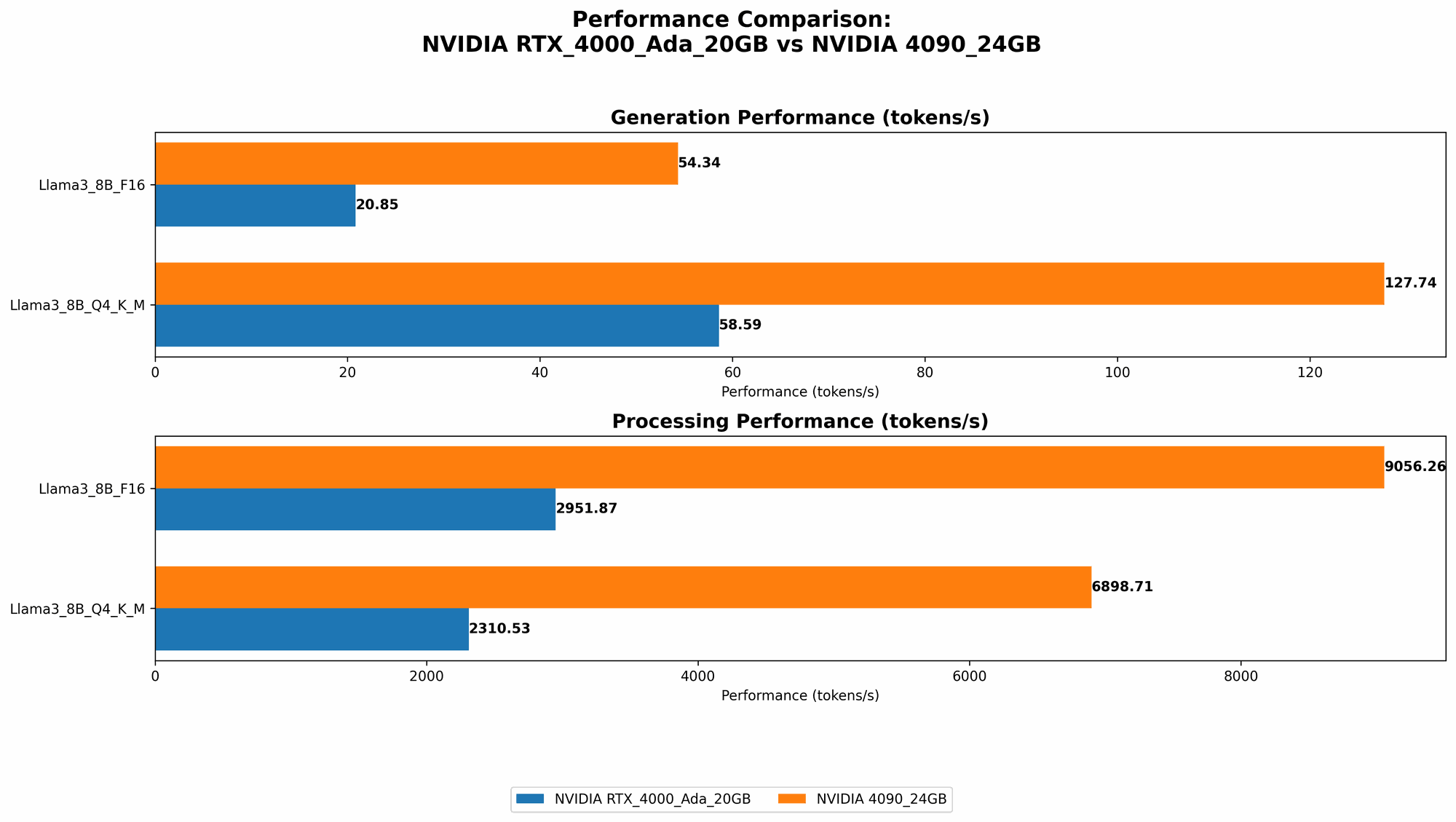
| Configuration | RTX4000Ada_20GB (Tokens/Second) | 4090_24GB (Tokens/Second) |
|---|---|---|
| Llama38BQ4KM_Generation | 58.59 | 127.74 |
| Llama38BF16_Generation | 20.85 | 54.34 |
| Llama38BQ4KM_Processing | 2310.53 | 6898.71 |
| Llama38BF16_Processing | 2951.87 | 9056.26 |
Key Takeaways:
- The 4090_24GB is clearly the winner in terms of raw speed. It consistently outperforms the RTX 4000 Ada 20GB in both token generation and processing.
- Consider quantization (Q4KM) for significant speed boosts. Both GPUs show a massive performance jump when using the Q4KM quantization scheme, which represents a clever compression method that reduces the size of the model without sacrificing too much accuracy. It's like a "diet plan" for your LLM.
- F16 (half-precision) is a good balance between speed and accuracy. While F16 doesn't reach the peak speed of Q4KM, it still gives you a substantial boost compared to full precision (F32).
Imagine this: the 4090_24GB is like a race car with a nitro boost, while the RTX 4000 Ada 20GB is still a fast car, but doesn’t have that extra edge.
Comparison of RTX4000Ada20GB and 409024GB for Llama 3 70B
Unfortunately, the data we have doesn't include performance results for Llama 3 70B on either of these GPUs. It's possible that the models are too large for the available RAM or that the benchmarks haven't been conducted yet.
What this means for you: If you're thinking about working with Llama 3 70B, you might need to consider alternative configurations or higher-end hardware (like a 4090 Ti or 4080).
Strengths and Weaknesses of each GPU
NVIDIA RTX 4000 Ada 20GB:
Strengths:
- Good value for money: It's a great option for those who want solid performance without breaking the bank.
- More power-efficient: It consumes less power than the 4090, which can be important for some setups.
Weaknesses:
- Limited memory: The 20GB memory might not be enough for larger models, especially when using higher precisions like F16 or F32.
NVIDIA 4090 24GB:
Strengths:
- Maximum power: It offers the highest performance for local LLM execution, ideal for demanding workloads and fine-tuning.
- Plenty of memory: The 24GB of VRAM handles even the largest LLMs with ease, allowing you to explore them without worrying about memory constraints.
Weaknesses:
- Pricey: This GPU is expensive, making it a significant investment.
- Power hungry: It requires a powerful and robust power supply to function correctly, increasing your electricity bill.
Practical Recommendations for Use Cases
Here's how to choose between the two GPUs based on your needs:
- If you're on a budget and want to get started: The RTX 4000 Ada 20GB is a great starting point. It delivers excellent performance for many LLMs, especially when using 4-bit quantization.
- If you're a power user and need the absolute best performance: The 4090_24GB is the clear champion. It's the ultimate choice for running large models, exploring different configurations, and pushing the boundaries of local LLM research.
- If you're working with Llama 3 70B or other larger models: You might need a more powerful GPU like a 4090 Ti or 4080. Check out the benchmarks for your specific model and hardware to make an informed decision.
Conclusion
The choice between the RTX 4000 Ada 20GB and the 4090 24GB boils down to your specific needs and budget. The 4090_24GB is the ultimate performance beast, while the RTX 4000 Ada 20GB provides a solid balance of power and value. No matter your choice, remember that these are still powerful tools, and by understanding their strengths and weaknesses, you can unlock the potential of LLMs and build amazing applications.
FAQ
What are Large Language Models (LLMs)?
LLMs are AI systems that have been trained on vast amounts of text data, allowing them to understand and generate human-quality text. They power a wide range of applications including chatbots, writing assistants, and language translation tools.
How does quantization work?
Quantization is a technique for reducing the size of a model without sacrificing too much accuracy. It uses a smaller range of numbers (e.g., 4-bit instead of 32-bit) to represent weights and activations in the model. This makes the model smaller and faster to run, but some information is lost in the process.
What are F16 and F32 precisions?
F16 and F32 refer to different levels of precision used to represent numbers in the GPU. F32 (32-bit floating-point) is the most precise, while F16 (16-bit floating-point) is less precise but faster to process. LLMs typically use a combination of these precisions for optimal performance.
What are the implications of memory bandwidth (BW) and GPU cores?
Memory bandwidth (BW) determines how fast the GPU can access data from memory. Faster BW means the GPU can process information more quickly. GPU cores are the processing units on the GPU. More cores means the GPU can handle more complex tasks in parallel. Both BW and cores play a crucial role in the GPU's overall performance.
What other factors should I consider besides the GPU?
- CPU: Your CPU plays a role in processing the text before and after the GPU. A powerful CPU is essential for optimal performance.
- RAM: Ensure you have enough RAM to handle the models you want to run. Large models require more RAM.
- Cooling: High-performance GPUs generate a lot of heat. You'll need a good cooling system to prevent overheating.
- Power Supply: Make sure your power supply is powerful enough to handle the GPU.
Keywords
Large Language Models, LLMs, Llama 3, 8B, 70B, NVIDIA, RTX 4000 Ada, 4090, GPU, Performance, Token Generation, Token Processing, Quantization, F16, F32, Processing Speed, Generation Speed, Benchmark, Comparison, Local Inference, Deep Learning, AI, GPU Benchmark, Performance Analysis, Hardware, Software, Memory Bandwidth, GPU Cores, Model Size, AI Development, Tokenization, Attention Mechanism, Neural Networks, Hardware Optimization, AI Model Deployment, Deep Learning Frameworks, AI Tools, AI Hardware, AI Software, AI Research, AI Community, AI Ethics, AI Future