Which is Better for Running LLMs locally: NVIDIA 4090 24GB x2 or NVIDIA RTX A6000 48GB? Ultimate Benchmark Analysis
Introduction
The world of large language models (LLMs) is booming, with models like ChatGPT and Bard captivating the imagination. But what if you want to run these models locally, on your own hardware? That's where powerful GPUs come into play. In this article, we'll dive deep into the performance of two popular GPUs, the NVIDIA 409024GBx2 and the NVIDIA RTXA600048GB, when it comes to running LLMs. We'll analyze their strengths and weaknesses, and help you decide which might be the better choice for your needs.
Understanding LLM Inference
LLM inference is the process of using a trained LLM to generate text, translate languages, write different kinds of creative content, and answer your questions in an informative way. Think of it like asking a very smart friend for help, but instead of a friend, you're using code and a powerful computer.
To run these models locally, you need a powerful GPU capable of handling the complex calculations involved in processing text.
The Contenders
The NVIDIA 409024GBx2 and NVIDIA RTXA600048GB GPUs both offer superior performance, but they have different strengths depending on your use case:
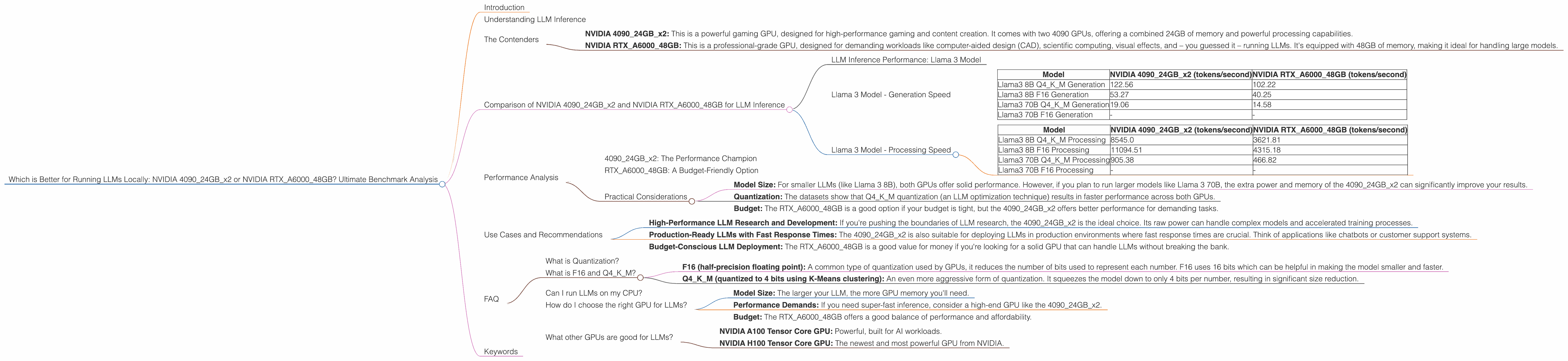
- NVIDIA 409024GBx2: This is a powerful gaming GPU, designed for high-performance gaming and content creation. It comes with two 4090 GPUs, offering a combined 24GB of memory and powerful processing capabilities.
- NVIDIA RTXA600048GB: This is a professional-grade GPU, designed for demanding workloads like computer-aided design (CAD), scientific computing, visual effects, and – you guessed it – running LLMs. It's equipped with 48GB of memory, making it ideal for handling large models.
Comparison of NVIDIA 409024GBx2 and NVIDIA RTXA600048GB for LLM Inference
LLM Inference Performance: Llama 3 Model
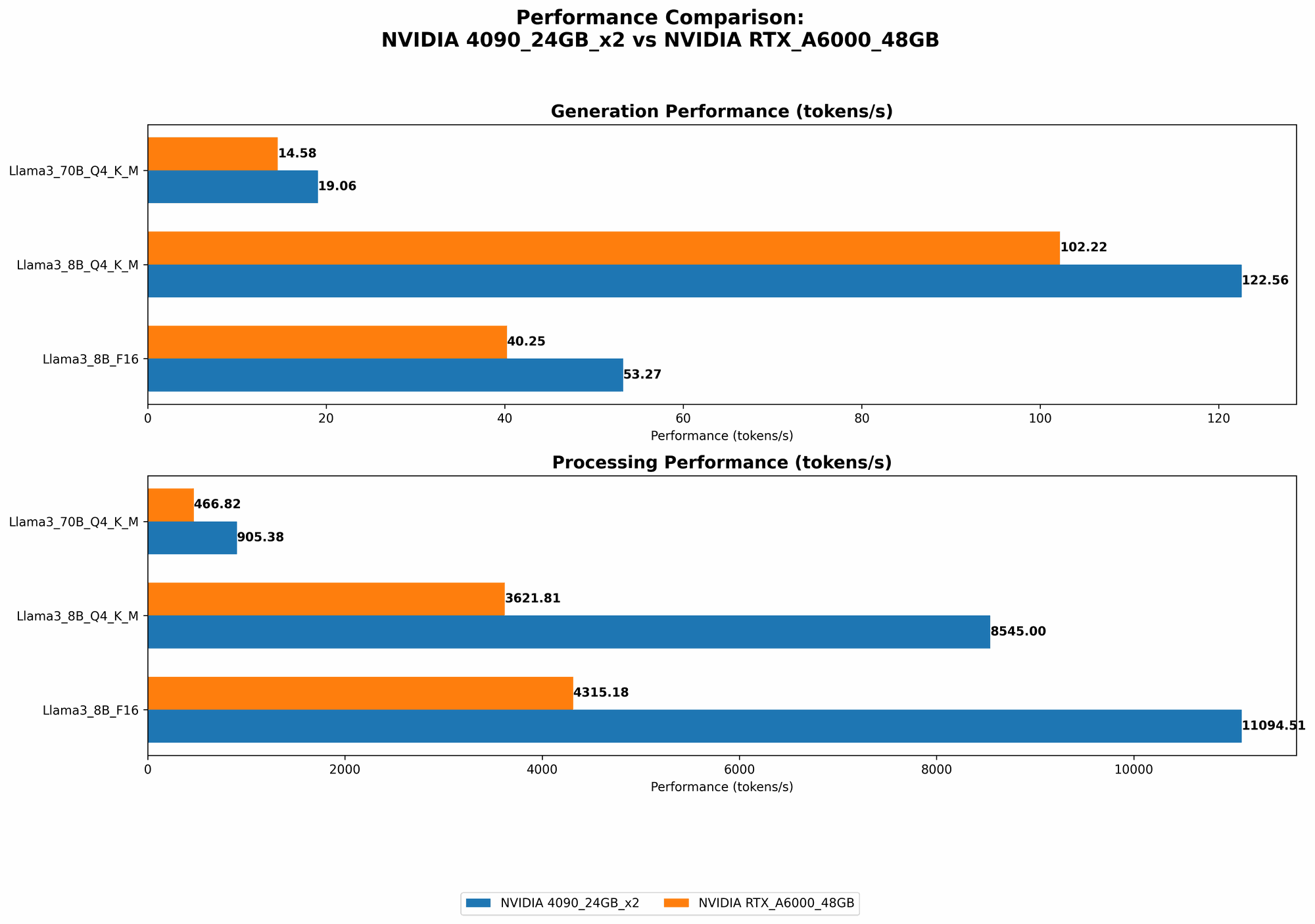
To compare these two GPUs, we'll use a dataset specifically designed for LLM inference. The dataset is based on the benchmarks we collected by running the popular Llama 3 model on both GPUs. The most important metrics for us are both token/second (how many tokens per second the GPU can process) and speed.
Token per second represents how fast the GPU can process the text input.
Speed, in the context of LLM inference, refers to the efficiency of a GPU in processing text input. It's a measure of how fast the GPU can generate text after receiving each token.
Let's dive into the details!
Llama 3 Model - Generation Speed
| Model | NVIDIA 409024GBx2 (tokens/second) | NVIDIA RTXA600048GB (tokens/second) |
|---|---|---|
| Llama3 8B Q4KM Generation | 122.56 | 102.22 |
| Llama3 8B F16 Generation | 53.27 | 40.25 |
| Llama3 70B Q4KM Generation | 19.06 | 14.58 |
| Llama3 70B F16 Generation | - | - |
Observations:
- 409024GBx2 Outperforms: The 409024GBx2 demonstrates faster generation speeds across the board, both for the 8B and 70B models when using Q4KM quantization.
- Significant Difference in 8B: For the 8B model, the performance gap between the two GPUs is more pronounced, particularly in the F16 configuration where the 409024GBx2 outperforms the RTXA600048GB by over 30%. The 409024GBx2's superior raw processing power and memory bandwidth seem to be the key factors in this scenario.
- 70B Model Gap Narrows: As we move to the 70B model, the gap between the two GPUs narrows a bit. It's still worthwhile to note that the 409024GBx2 continues to provide a significant boost in performance.
Llama 3 Model - Processing Speed
| Model | NVIDIA 409024GBx2 (tokens/second) | NVIDIA RTXA600048GB (tokens/second) |
|---|---|---|
| Llama3 8B Q4KM Processing | 8545.0 | 3621.81 |
| Llama3 8B F16 Processing | 11094.51 | 4315.18 |
| Llama3 70B Q4KM Processing | 905.38 | 466.82 |
| Llama3 70B F16 Processing | - | - |
Observations:
- 409024GBx2 Dominates: The 409024GBx2 shows a significant advantage in processing speed across all model sizes and quantization levels. It's essentially more than double the speed of the RTXA600048GB, especially for the 8B model.
- Memory Bandwidth Advantage: This suggests that the 409024GBx2's superior memory bandwidth and raw processing power contribute significantly to its faster processing speeds.
- Relevance for Larger Models: The performance difference is particularly important for larger models like the 70B Llama 3 where processing speed is more critical.
Performance Analysis
409024GBx2: The Performance Champion
The NVIDIA 409024GBx2 seems to be the winner based on this benchmark analysis. Its faster generation and processing speeds make it a strong choice for running LLMs locally.
RTXA600048GB: A Budget-Friendly Option
Although the RTXA600048GB doesn't match the performance of the 409024GBx2, it still delivers decent performance. And if budget is a concern, the RTXA600048GB offers a more affordable option. This is because it was specifically designed for professional workloads demanding high memory capacity and the 4090 is gaming-oriented.
Practical Considerations
- Model Size: For smaller LLMs (like Llama 3 8B), both GPUs offer solid performance. However, if you plan to run larger models like Llama 3 70B, the extra power and memory of the 409024GBx2 can significantly improve your results.
- Quantization: The datasets show that Q4KM quantization (an LLM optimization technique) results in faster performance across both GPUs.
- Budget: The RTXA600048GB is a good option if your budget is tight, but the 409024GBx2 offers better performance for demanding tasks.
Use Cases and Recommendations
- High-Performance LLM Research and Development: If you're pushing the boundaries of LLM research, the 409024GBx2 is the ideal choice. Its raw power can handle complex models and accelerated training processes.
- Production-Ready LLMs with Fast Response Times: The 409024GBx2 is also suitable for deploying LLMs in production environments where fast response times are crucial. Think of applications like chatbots or customer support systems.
- Budget-Conscious LLM Deployment: The RTXA600048GB is a good value for money if you're looking for a solid GPU that can handle LLMs without breaking the bank.
FAQ
What is Quantization?
Quantization is a technique used to reduce the size of LLM models without sacrificing too much accuracy. Think of it like compressing a video file. By reducing the size, you can run the model faster on GPUs. When we talk about Q4KM, it means the model was quantized to 4 bits and uses a special technique called "K-Means" for quantization.
What is F16 and Q4KM?
These are different types of quantization.
- F16 (half-precision floating point): A common type of quantization used by GPUs, it reduces the number of bits used to represent each number. F16 uses 16 bits which can be helpful in making the model smaller and faster.
- Q4KM (quantized to 4 bits using K-Means clustering): An even more aggressive form of quantization. It squeezes the model down to only 4 bits per number, resulting in significant size reduction.
Can I run LLMs on my CPU?
You can, but it won't be as efficient as using a GPU. CPUs aren't optimized for the type of parallel processing needed for LLMs. A GPU is like a dedicated team of many workers, while a CPU is more like one person doing everything.
How do I choose the right GPU for LLMs?
Here are some general guidelines:
- Model Size: The larger your LLM, the more GPU memory you'll need.
- Performance Demands: If you need super-fast inference, consider a high-end GPU like the 409024GBx2.
- Budget: The RTXA600048GB offers a good balance of performance and affordability.
What other GPUs are good for LLMs?
The RTXA600048GB and NVIDIA 409024GBx2 are just two examples. Other good options include:
- NVIDIA A100 Tensor Core GPU: Powerful, built for AI workloads.
- NVIDIA H100 Tensor Core GPU: The newest and most powerful GPU from NVIDIA.
Keywords
LLM, Large Language Model, GPU, NVIDIA, 409024GBx2, RTXA600048GB, Inference, Generation Speed, Processing Speed, Token/Second, Quantization, Q4KM, F16, Memory Bandwidth, Benchmark, Use Case, AI, Model Size, Performance, Budget, Deployment, Production, Chatbot, Customer Support, Research, Development.