Which is Better for Running LLMs locally: NVIDIA 4090 24GB x2 or NVIDIA RTX 4000 Ada 20GB x4? Ultimate Benchmark Analysis
Introduction
The world of Large Language Models (LLMs) is rapidly evolving, with new models being released and updated constantly. These models are pushing the boundaries of what's possible with artificial intelligence, but they also demand powerful hardware to run efficiently. If you're a developer or enthusiast looking to run LLMs locally for research, experimentation, or just the sheer joy of it, you'll need to consider the right hardware setup. This article will dive deep into the performance of two popular GPU configurations: NVIDIA 409024GBx2 and NVIDIA RTX4000Ada20GBx4 specifically for running LLMs. We'll analyze their strengths and weaknesses, provide benchmarks, and help you determine which setup is the best fit for your needs.
Imagine LLMs as the brains of a super-powered AI, and GPUs as the muscles that help them think faster. This article will act as your personal trainer, guiding you through the world of LLM hardware and helping you choose the best "workout" for your needs.
Performance Analysis: A Tale of Two Titans
NVIDIA 409024GBx2: The Heavyweight Champion
The NVIDIA 4090_24GB, renowned for its sheer processing power, is commonly considered a top-tier GPU. Using two of these in tandem creates a formidable setup, designed to handle the demanding computations of LLMs without breaking a sweat. Let's see how this powerhouse performs:
Generation Speed:
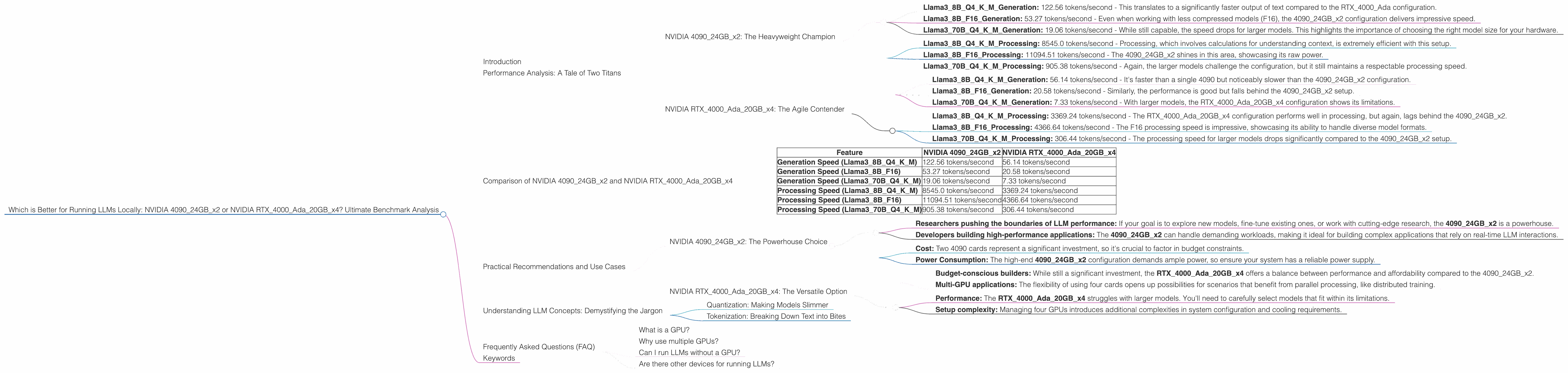
- Llama38BQ4KMGeneration: 122.56 tokens/second - This translates to a significantly faster output of text compared to the RTX4000_Ada configuration.
- Llama38BF16Generation: 53.27 tokens/second - Even when working with less compressed models (F16), the 409024GB_x2 configuration delivers impressive speed.
- Llama370BQ4KM_Generation: 19.06 tokens/second - While still capable, the speed drops for larger models. This highlights the importance of choosing the right model size for your hardware.
Processing Speed:
- Llama38BQ4KM_Processing: 8545.0 tokens/second - Processing, which involves calculations for understanding context, is extremely efficient with this setup.
- Llama38BF16Processing: 11094.51 tokens/second - The 409024GB_x2 shines in this area, showcasing its raw power.
- Llama370BQ4KM_Processing: 905.38 tokens/second - Again, the larger models challenge the configuration, but it still maintains a respectable processing speed.
NVIDIA RTX4000Ada20GBx4: The Agile Contender
Don't underestimate the RTX4000Ada_20GB. While individual cards may have slightly less processing power than the 4090, having four of these in parallel provides a distinct advantage in certain scenarios. Let's explore its capabilities:
Generation Speed:
- Llama38BQ4KMGeneration: 56.14 tokens/second - It's faster than a single 4090 but noticeably slower than the 409024GB_x2 configuration.
- Llama38BF16Generation: 20.58 tokens/second - Similarly, the performance is good but falls behind the 409024GB_x2 setup.
- Llama370BQ4KMGeneration: 7.33 tokens/second - With larger models, the RTX4000Ada20GB_x4 configuration shows its limitations.
Processing Speed:
- Llama38BQ4KMProcessing: 3369.24 tokens/second - The RTX4000Ada20GBx4 configuration performs well in processing, but again, lags behind the 409024GB_x2.
- Llama38BF16_Processing: 4366.64 tokens/second - The F16 processing speed is impressive, showcasing its ability to handle diverse model formats.
- Llama370BQ4KMProcessing: 306.44 tokens/second - The processing speed for larger models drops significantly compared to the 409024GB_x2 setup.
Comparison of NVIDIA 409024GBx2 and NVIDIA RTX4000Ada20GBx4
| Feature | NVIDIA 409024GBx2 | NVIDIA RTX4000Ada20GBx4 |
|---|---|---|
| Generation Speed (Llama38BQ4KM) | 122.56 tokens/second | 56.14 tokens/second |
| Generation Speed (Llama38BF16) | 53.27 tokens/second | 20.58 tokens/second |
| Generation Speed (Llama370BQ4KM) | 19.06 tokens/second | 7.33 tokens/second |
| Processing Speed (Llama38BQ4KM) | 8545.0 tokens/second | 3369.24 tokens/second |
| Processing Speed (Llama38BF16) | 11094.51 tokens/second | 4366.64 tokens/second |
| Processing Speed (Llama370BQ4KM) | 905.38 tokens/second | 306.44 tokens/second |
Key Observations:
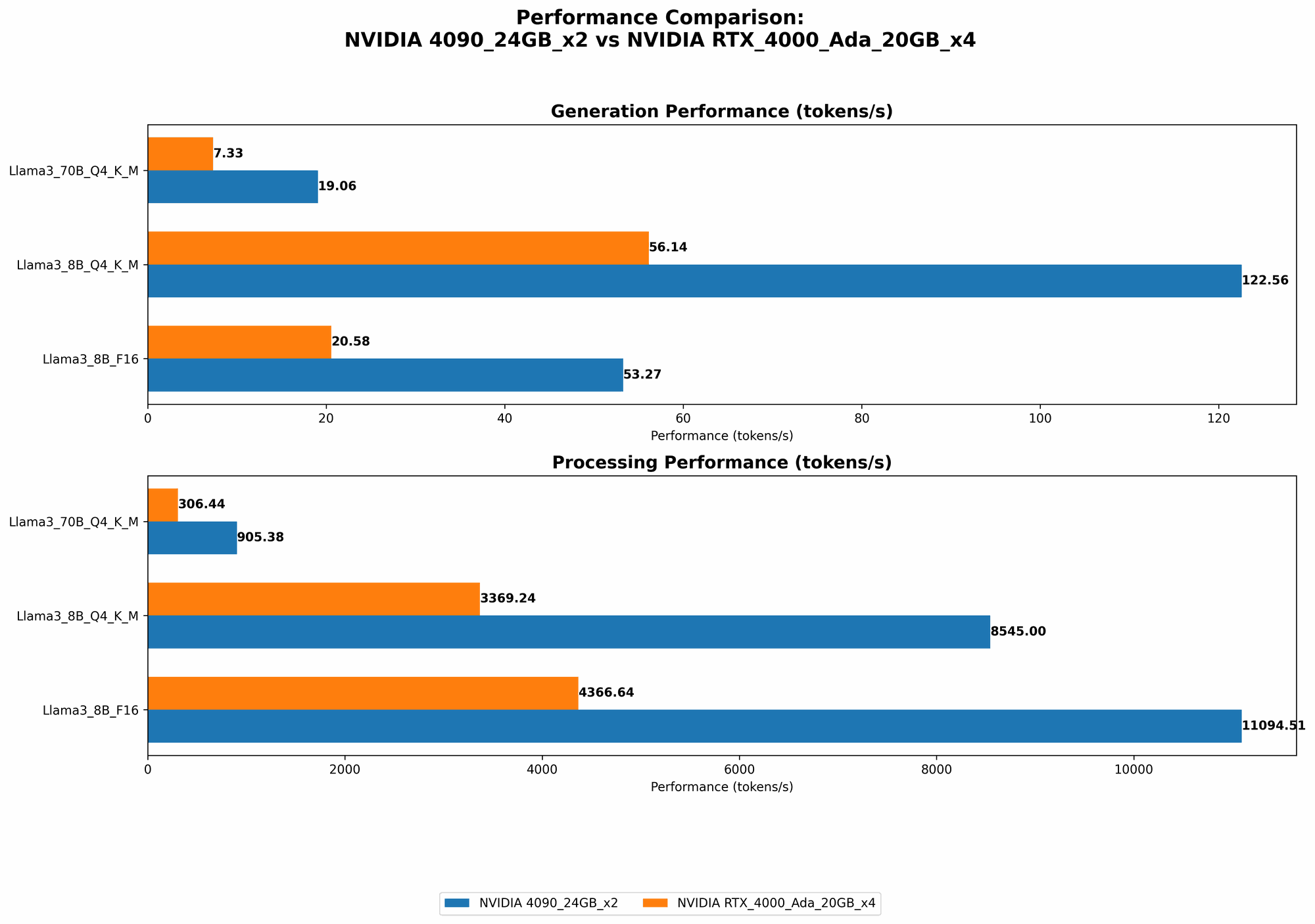
- The 409024GBx2 consistently outperforms the RTX4000Ada20GBx4 configuration in both generation and processing speed, particularly for smaller models.
- Both configurations struggle with larger models, highlighting the need for careful model selection based on hardware capabilities.
- The 409024GBx2 offers greater raw power, making it ideal for pushing the limits of LLM performance.
- The RTX4000Ada20GBx4 provides more flexibility in terms of multi-GPU setup, potentially making it useful for scenarios requiring parallel computing.
Practical Recommendations and Use Cases
NVIDIA 409024GBx2: The Powerhouse Choice
Best for:
- Researchers pushing the boundaries of LLM performance: If your goal is to explore new models, fine-tune existing ones, or work with cutting-edge research, the 409024GBx2 is a powerhouse.
- Developers building high-performance applications: The 409024GBx2 can handle demanding workloads, making it ideal for building complex applications that rely on real-time LLM interactions.
Consider:
- Cost: Two 4090 cards represent a significant investment, so it's crucial to factor in budget constraints.
- Power Consumption: The high-end 409024GBx2 configuration demands ample power, so ensure your system has a reliable power supply.
NVIDIA RTX4000Ada20GBx4: The Versatile Option
Best for:
- Budget-conscious builders: While still a significant investment, the RTX4000Ada20GBx4 offers a balance between performance and affordability compared to the 409024GBx2.
- Multi-GPU applications: The flexibility of using four cards opens up possibilities for scenarios that benefit from parallel processing, like distributed training.
Consider:
- Performance: The RTX4000Ada20GBx4 struggles with larger models. You'll need to carefully select models that fit within its limitations.
- Setup complexity: Managing four GPUs introduces additional complexities in system configuration and cooling requirements.
Understanding LLM Concepts: Demystifying the Jargon
Quantization: Making Models Slimmer
LLMs can be massive, demanding significant memory resources. Quantization is like a diet for LLMs, helping to reduce their size and memory footprint. Think of it as compressing a high-resolution image. You lose some detail, but the overall image is still recognizable and much smaller. In LLM terms, quantization helps you compress the model without significantly impacting its accuracy. The Q4KM models utilize quantization to significantly reduce memory requirements, making them more efficient.
Tokenization: Breaking Down Text into Bites
Tokenization is the process of breaking down text into smaller units called tokens, which LLMs can understand. Imagine a sentence as a cake, and tokens are the individual slices. Each token represents a word, punctuation mark, or even a part of a word. Tokenization is essential because LLMs process text by analyzing these individual tokens.
Frequently Asked Questions (FAQ)
What is a GPU?
A Graphics Processing Unit (GPU) is a specialized electronic circuit designed for accelerating the creation of images, videos, and other visual content. They're also excellent at parallel computation, which makes them perfect for running LLMs.
Why use multiple GPUs?
Multiple GPUs provide more processing power by working together. This is like having multiple brains to solve a complex problem. Each GPU can tackle different parts of the task simultaneously, leading to faster results.
Can I run LLMs without a GPU?
Yes, but it will be significantly slower. CPUs (Central Processing Units) are designed for general purpose tasks, while GPUs are optimized for high-performance computing.
Are there other devices for running LLMs?
Yes! Devices like the Apple M1 and M2 chips are gaining popularity for their efficiency in running smaller LLMs.
Keywords
LLMs, Large Language Models, NVIDIA 4090, NVIDIA RTX 4000 Ada, GPU, Tokens/second, Generation Speed, Processing Speed, Quantization, Tokenization, Local Inference, Performance Benchmark, Hardware Comparison