Which is Better for Running LLMs locally: NVIDIA 4090 24GB x2 or NVIDIA A40 48GB? Ultimate Benchmark Analysis
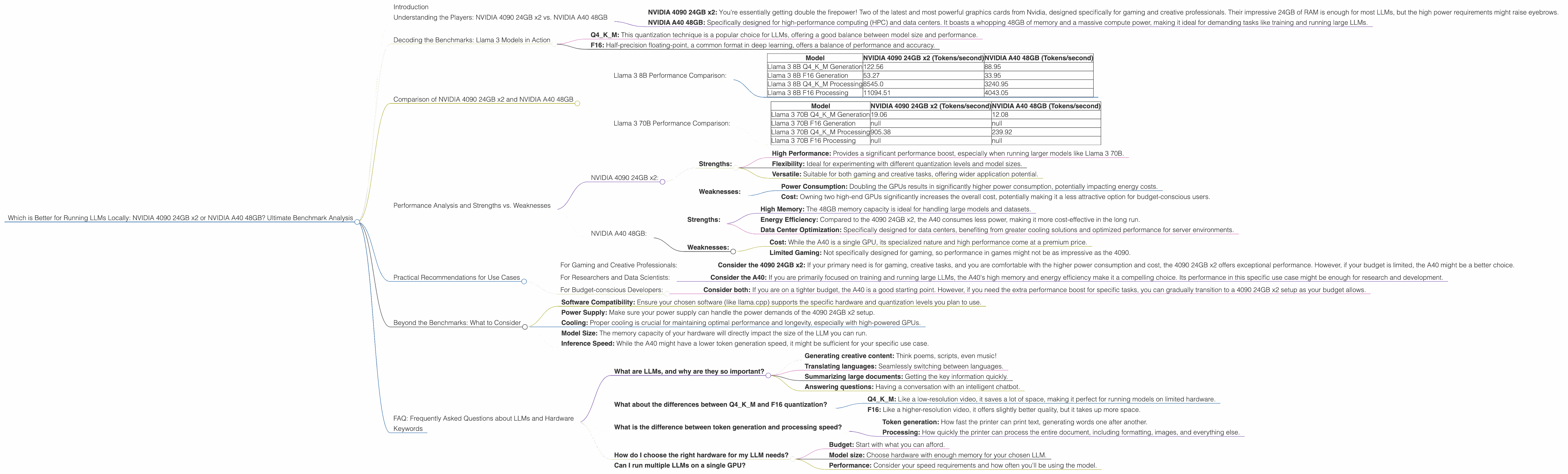
Introduction
The world of large language models (LLMs) is rapidly evolving, with powerful models like Llama 3 offering impressive capabilities like text generation, translation, and summarization. While cloud-based services like OpenAI and Google provide access to LLMs, running models locally opens up possibilities for customization, privacy, and faster inference. But which hardware setup is best for unleashing the full potential of these locally-run LLMs? This article dives into the performance comparison of two popular gaming and professional-grade GPUs: NVIDIA 4090 24GB x2 (two 4090s) and NVIDIA A40 48GB. We'll analyze their performance on various Llama 3 model sizes and configurations, helping you make an informed decision based on specific needs.
Understanding the Players: NVIDIA 4090 24GB x2 vs. NVIDIA A40 48GB
Let's quickly introduce our contenders:
- NVIDIA 4090 24GB x2: You're essentially getting double the firepower! Two of the latest and most powerful graphics cards from Nvidia, designed specifically for gaming and creative professionals. Their impressive 24GB of RAM is enough for most LLMs, but the high power requirements might raise eyebrows.
- NVIDIA A40 48GB: Specifically designed for high-performance computing (HPC) and data centers. It boasts a whopping 48GB of memory and a massive compute power, making it ideal for demanding tasks like training and running large LLMs.
Decoding the Benchmarks: Llama 3 Models in Action
We'll be focusing on the Llama 3 model family (8B and 70B) using various quantization levels (Q4KM and F16), as they illustrate different trade-offs in performance and memory footprints. For the uninitiated, quantization is a technique that reduces the size of the model by representing numbers with less precision, thereby reducing memory usage and increasing inference speeds.
- Q4KM: This quantization technique is a popular choice for LLMs, offering a good balance between model size and performance.
- F16: Half-precision floating-point, a common format in deep learning, offers a balance of performance and accuracy.
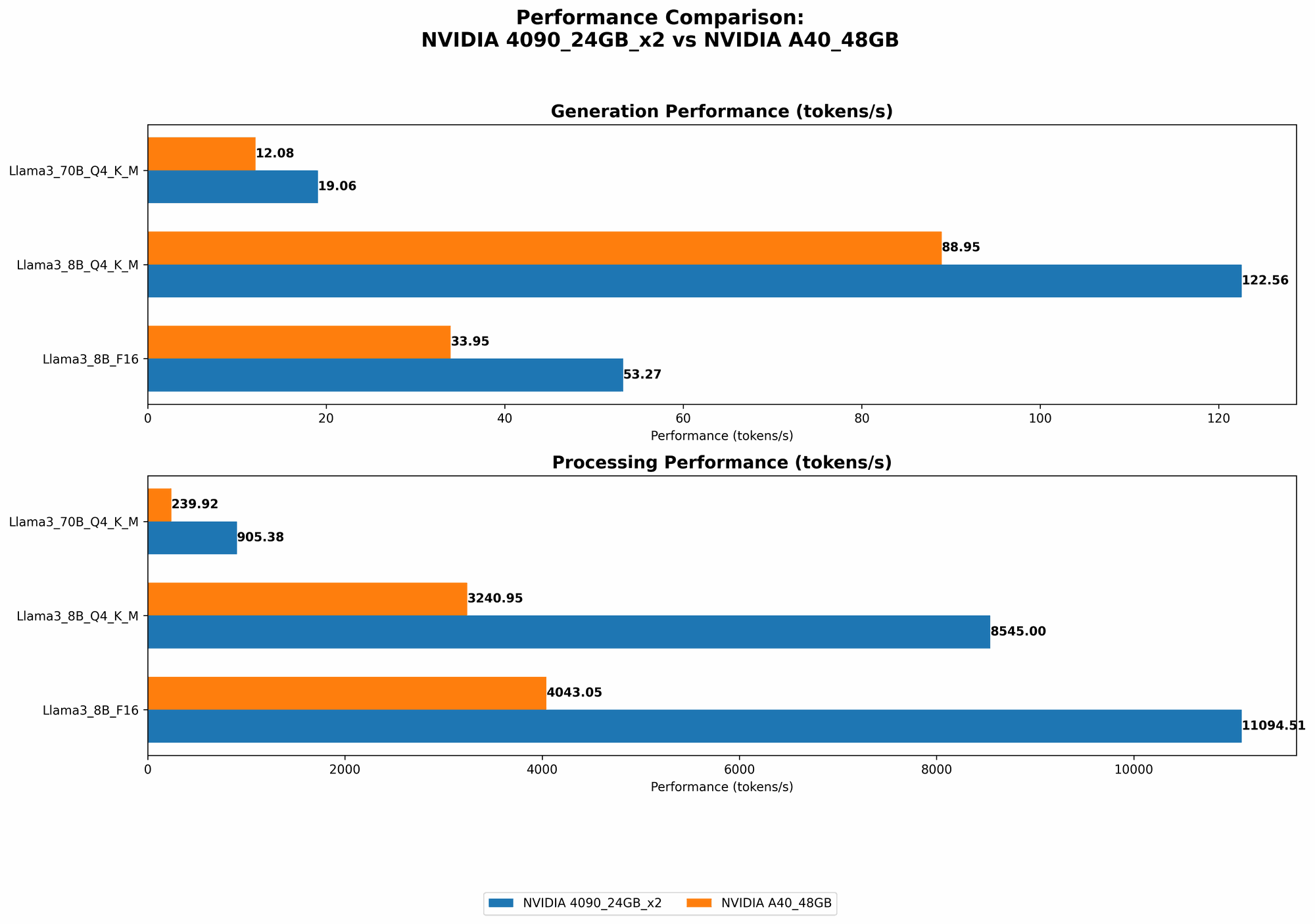
We will analyze both token generation (how fast the model generates text) and processing speed (how quickly it can process input).
Comparison of NVIDIA 4090 24GB x2 and NVIDIA A40 48GB
Llama 3 8B Performance Comparison:
| Model | NVIDIA 4090 24GB x2 (Tokens/second) | NVIDIA A40 48GB (Tokens/second) |
|---|---|---|
| Llama 3 8B Q4KM Generation | 122.56 | 88.95 |
| Llama 3 8B F16 Generation | 53.27 | 33.95 |
| Llama 3 8B Q4KM Processing | 8545.0 | 3240.95 |
| Llama 3 8B F16 Processing | 11094.51 | 4043.05 |
Analysis:
- Token Generation: The NVIDIA 4090 24GB x2 emerges as the clear winner, generating tokens significantly faster than the A40, particularly with Q4KM quantization. Imagine it like this: if the A40 is a racehorse, the 4090 24GB x2 is a cheetah!
- Processing: The 4090 24GB x2 maintains its lead, showcasing remarkably faster processing speed for both F16 and Q4KM configurations. This translates to quicker responses and overall smoother operation when interacting with the LLM.
Llama 3 70B Performance Comparison:
| Model | NVIDIA 4090 24GB x2 (Tokens/second) | NVIDIA A40 48GB (Tokens/second) |
|---|---|---|
| Llama 3 70B Q4KM Generation | 19.06 | 12.08 |
| Llama 3 70B F16 Generation | null | null |
| Llama 3 70B Q4KM Processing | 905.38 | 239.92 |
| Llama 3 70B F16 Processing | null | null |
Analysis:
- Token Generation: The 4090 24GB x2 again demonstrates its superior performance, outpacing the A40 in token generation.
- Processing: The 4090 24GB x2 maintains its dominance, showcasing a much faster processing speed for the Llama 3 70B Q4KM model.
Performance Analysis and Strengths vs. Weaknesses
NVIDIA 4090 24GB x2:
- Strengths:
- High Performance: Provides a significant performance boost, especially when running larger models like Llama 3 70B.
- Flexibility: Ideal for experimenting with different quantization levels and model sizes.
- Versatile: Suitable for both gaming and creative tasks, offering wider application potential.
- Weaknesses:
- Power Consumption: Doubling the GPUs results in significantly higher power consumption, potentially impacting energy costs.
- Cost: Owning two high-end GPUs significantly increases the overall cost, potentially making it a less attractive option for budget-conscious users.
NVIDIA A40 48GB:
- Strengths:
- High Memory: The 48GB memory capacity is ideal for handling large models and datasets.
- Energy Efficiency: Compared to the 4090 24GB x2, the A40 consumes less power, making it more cost-effective in the long run.
- Data Center Optimization: Specifically designed for data centers, benefiting from greater cooling solutions and optimized performance for server environments.
- Weaknesses:
- Cost: While the A40 is a single GPU, its specialized nature and high performance come at a premium price.
- Limited Gaming: Not specifically designed for gaming, so performance in games might not be as impressive as the 4090.
Practical Recommendations for Use Cases
For Gaming and Creative Professionals:
- Consider the 4090 24GB x2: If your primary need is for gaming, creative tasks, and you are comfortable with the higher power consumption and cost, the 4090 24GB x2 offers exceptional performance. However, if your budget is limited, the A40 might be a better choice.
For Researchers and Data Scientists:
- Consider the A40: If you are primarily focused on training and running large LLMs, the A40's high memory and energy efficiency make it a compelling choice. Its performance in this specific use case might be enough for research and development.
For Budget-conscious Developers:
- Consider both: If you are on a tighter budget, the A40 is a good starting point. However, if you need the extra performance boost for specific tasks, you can gradually transition to a 4090 24GB x2 setup as your budget allows.
Beyond the Benchmarks: What to Consider
- Software Compatibility: Ensure your chosen software (like llama.cpp) supports the specific hardware and quantization levels you plan to use.
- Power Supply: Make sure your power supply can handle the power demands of the 4090 24GB x2 setup.
- Cooling: Proper cooling is crucial for maintaining optimal performance and longevity, especially with high-powered GPUs.
- Model Size: The memory capacity of your hardware will directly impact the size of the LLM you can run.
- Inference Speed: While the A40 might have a lower token generation speed, it might be sufficient for your specific use case.
FAQ: Frequently Asked Questions about LLMs and Hardware
What are LLMs, and why are they so important?
Let's break it down. LLMs are like incredibly intelligent computer programs trained on vast amounts of text data. They can understand and generate human-like language, making them incredibly versatile for tasks like:
- Generating creative content: Think poems, scripts, even music!
- Translating languages: Seamlessly switching between languages.
- Summarizing large documents: Getting the key information quickly.
- Answering questions: Having a conversation with an intelligent chatbot.
LLMs are changing the way we interact with technology, opening up new possibilities for various fields, like education, research, and entertainment.
What about the differences between Q4KM and F16 quantization?
Think of it like this: quantization is like compressing a video. You lose some quality, but you get a smaller file size.
- Q4KM: Like a low-resolution video, it saves a lot of space, making it perfect for running models on limited hardware.
- F16: Like a higher-resolution video, it offers slightly better quality, but it takes up more space.
What is the difference between token generation and processing speed?
Imagine a printer:
- Token generation: How fast the printer can print text, generating words one after another.
- Processing: How quickly the printer can process the entire document, including formatting, images, and everything else.
How do I choose the right hardware for my LLM needs?
Here's a simple guide:
- Budget: Start with what you can afford.
- Model size: Choose hardware with enough memory for your chosen LLM.
- Performance: Consider your speed requirements and how often you'll be using the model.
Can I run multiple LLMs on a single GPU?
Yes, you can run multiple LLMs on a single GPU, though performance might be slightly lower compared to running them individually. It also depends on the specific models and your GPU's memory capacity.
Keywords
LLMs, Large Language Models, Llama 3, NVIDIA 4090, NVIDIA A40, GPU, GPU Performance, Token Generation, Processing Speed, Quantization, Q4KM, F16, Benchmark, Comparison, Local Inference, Hardware Recommendations, Gaming, Data Science, Research, Development, Budget, Power Consumption, Memory Capacity, Software Compatibility, Cooling, FAQ