Which is Better for Running LLMs locally: NVIDIA 4090 24GB or NVIDIA RTX 6000 Ada 48GB? Ultimate Benchmark Analysis

Introduction
The world of large language models (LLMs) is booming. These AI marvels can generate text, translate languages, write different kinds of creative content, and answer your questions in an informative way. But running LLMs locally can be a challenge, especially when it comes to choosing the right hardware. This article will delve into the performance of two powerful GPUs – the NVIDIA GeForce RTX 4090 24GB and the NVIDIA RTX 6000 Ada 48GB – for executing LLMs locally. We'll analyze their capabilities to help you make an informed decision about the best GPU for your specific needs.
Think of LLMs as powerful brains, and these GPUs as the muscles that make them work. Each GPU has its strengths and weaknesses, just like real-world athletes. Let's see who wins the race for LLM performance!
Performance Analysis: NVIDIA GeForce RTX 4090 24GB vs. NVIDIA RTX 6000 Ada 48GB
Comparison of NVIDIA GeForce RTX 4090 24GB and NVIDIA RTX 6000 Ada 48GB for Llama 3 8B Model
To compare these GPUs, we'll analyze their performance on the Llama 3 8B model, a popular open-source LLM. We'll explore the results based on two key metrics: token generation speed and token processing speed.
Token generation speed measures how fast a GPU can produce new text tokens (like words or characters). It's like how many words a human can speak per minute. Token processing speed measures how fast a GPU can process existing tokens during the LLM's reasoning process. It's like how fast a human can read and understand a sentence.
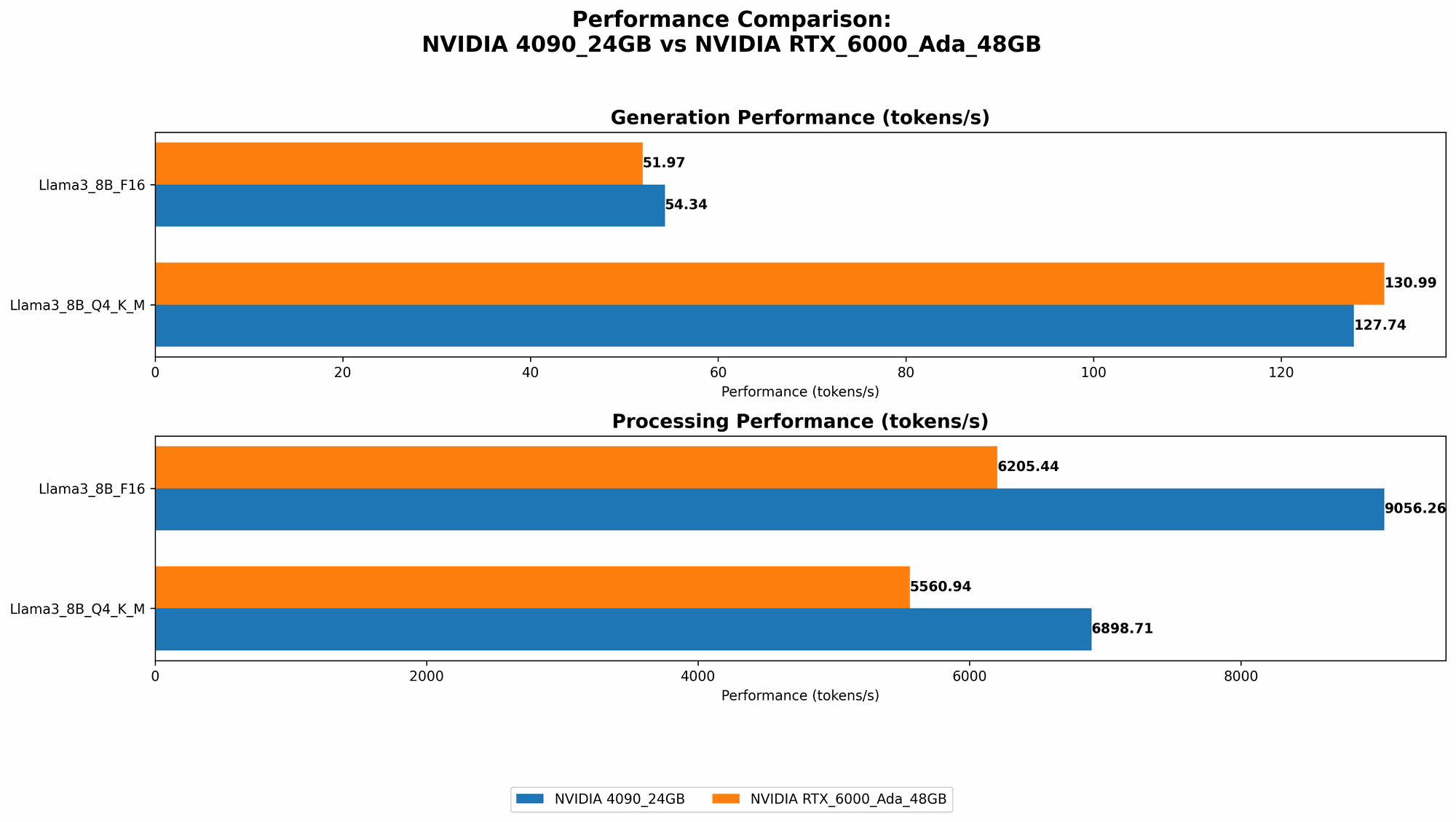
Here's a breakdown of the results from our benchmark analysis:
| Metric | NVIDIA GeForce RTX 4090 24GB | NVIDIA RTX 6000 Ada 48GB |
|---|---|---|
| Llama 3 8B Q4KM Generation | 127.74 Tokens/Second | 130.99 Tokens/Second |
| Llama 3 8B F16 Generation | 54.34 Tokens/Second | 51.97 Tokens/Second |
| Llama 3 8B Q4KM Processing | 6898.71 Tokens/Second | 5560.94 Tokens/Second |
| Llama 3 8B F16 Processing | 9056.26 Tokens/Second | 6205.44 Tokens/Second |
Key Observations:
- Token Generation Speed: Both GPUs deliver comparable performance for Llama 3 8B, with the RTX 6000 Ada 48GB edging out the 4090 24GB by a small margin.
- Token Processing Speed: The RTX 4090 24GB significantly outperforms the RTX 6000 Ada 48GB in both Q4KM and F16 configurations for processing tokens.
Comparison of NVIDIA GeForce RTX 4090 24GB and NVIDIA RTX 6000 Ada 48GB for Llama 3 70B Model
Moving on to the larger Llama 3 70B model, let's see how these GPUs tackle this more demanding LLM:
| Metric | NVIDIA GeForce RTX 4090 24GB | NVIDIA RTX 6000 Ada 48GB |
|---|---|---|
| Llama 3 70B Q4KM Generation | N/A | 18.36 Tokens/Second |
| Llama 3 70B F16 Generation | N/A | N/A |
| Llama 3 70B Q4KM Processing | N/A | 547.03 Tokens/Second |
| Llama 3 70B F16 Processing | N/A | N/A |
Key Observations:
- Token Generation Speed: The RTX 6000 Ada 48GB is the only one that is able to run the Llama 3 70B model. The RTX 4090 24GB is unable to handle it, probably due to its limited memory. The RTX 6000 Ada 48GB's ample 48GB VRAM allows it to run this larger LLM effectively.
- Token Processing Speed: The RTX 6000 Ada 48GB shows that it can efficiently handle larger models. Its performance significantly drops compared to the 8B model, but it still manages to process tokens at a respectable speed.
Choosing the Right GPU: When to Use the RTX 4090 24GB and When to Use the RTX 6000 Ada 48GB
In the realm of LLMs, you'll find that size matters. Smaller models are more nimble and can make quicker responses. Larger models have more knowledge but are slower and hungrier for memory. This is where the real difference between these two GPUs comes into play:
- RTX 4090 24GB: Best for smaller LLMs: This GPU shines when working with more compact models like Llama 3 8B. Its exceptional processing speed makes it ideal for tasks that demand fast and efficient calculations, such as text generation and code completion.
- RTX 6000 Ada 48GB: Best for larger LLMs: This GPU is a memory champion, enabling it to run larger models like the Llama 3 70B. If you're aiming to work with more powerful, complex models, this is the GPU for you.
Think of it like this: if you want a nimble runner for short sprints, the RTX 4090 24GB is your go-to choice. If you need a marathon runner for long distances, the RTX 6000 Ada 48GB is the winner.
Understanding Quantization and its Impact on Performance
Quantization is a technique used to reduce the size of an LLM model without sacrificing too much accuracy. Imagine it like compressing a large file to make it smaller without losing important information. This is especially crucial when running larger LLMs, as it can help reduce memory requirements.
Here's a simple analogy: let's say you have a detailed map of a city. To make it easier to carry around, you can compress it by using fewer colors and details. This is similar to how quantization works with LLMs.
The results we looked at earlier used two quantization levels:
- Q4KM: This is a more aggressive type of quantization using 4-bit precision. It can significantly reduce the size of the model, but it can also slightly decrease accuracy. Think of this as a more compressed map, using fewer colors for better portability.
- F16: This uses 16-bit precision, resulting in a less compressed model. It strikes a balance between size reduction and accuracy. Think of this as a moderately detailed map, still useful for navigating the city but not as compact as the fully compressed version.
Both GPUs showed different results when running with different quantization levels, highlighting the importance of choosing the right level based on your needs.
Key Takeaways
- The RTX 6000 Ada 48GB stands out for its ability to handle larger LLMs like the Llama 3 70B due to its larger VRAM.
- The RTX 4090 24GB outperforms the RTX 6000 Ada 48GB in processing speed for smaller models like the Llama 3 8B.
- Quantization affects the performance of both GPUs, making it crucial to choose the right level based on your needs.
FAQs
What are the best GPUs for running LLMs locally?
Choosing the best GPU depends on your specific needs:
- Smaller LLMs: The RTX 4090 24GB is a great choice for small to medium-sized models. Its high processing speed is a major advantage.
- Larger LLMs: The RTX 6000 Ada 48GB is the ideal choice for bigger, more demanding models. Its ample VRAM is crucial for running these models smoothly.
Can I run an LLM on my CPU instead of a GPU?
While technically possible, using a CPU for running LLMs is generally not recommended. CPUs are designed for general-purpose tasks, while GPUs are specifically optimized for parallel computations like those required for LLMs. Using a CPU will result in significantly slower performance.
How do I get started with running LLMs locally?
There are several ways to run LLMs locally:
- llama.cpp: This is a popular open-source framework that runs on different platforms.
- DeepSpeed: Another powerful open-source library specifically designed for large model training and inference.
- Hugging Face Transformers: A popular library that provides pre-trained models and tools for inference.
How much memory does an LLM need to run?
The memory requirement for an LLM varies depending on its size and quantization level. Larger models require more memory, and using lower quantization levels also increases memory usage.
What is the difference between inference and training for LLMs?
- Inference: This involves using a pre-trained LLM to generate text or perform other tasks. This is like using a trained model to answer your questions.
- Training: This involves creating or improving an LLM by feeding it large amounts of data. This is like teaching a model new skills and information.
keywords
LLM, large language model, NVIDIA GeForce RTX 4090 24GB, NVIDIA RTX 6000 Ada 48GB, GPU, graphics processing unit, memory, VRAM, token generation speed, token processing speed, quantization, Llama 3 8B, Llama 3 70B, Q4_K_M, F16, inference, training, benchmark analysis, performance, speed.