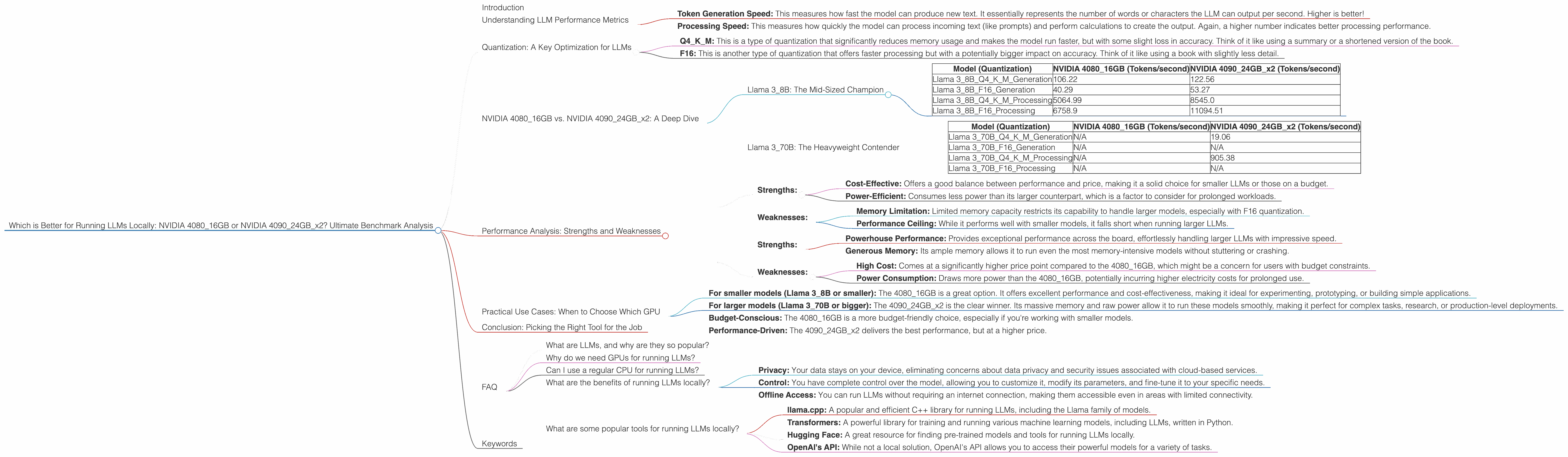
Which is Better for Running LLMs locally: NVIDIA 4080 16GB or NVIDIA 4090 24GB x2? Ultimate Benchmark Analysis
Introduction
The world of Large Language Models (LLMs) is rapidly evolving, and running these powerful AI models locally is becoming increasingly accessible. But with a variety of hardware options available, choosing the right setup can be tricky. Today, we'll dive deep into a head-to-head comparison of two popular GPUs: the NVIDIA 408016GB and the NVIDIA 409024GB_x2, to see which one reigns supreme for local LLM deployment. We'll be looking specifically at their performance with Llama 3 models, analyzing generation and processing speeds under different quantization levels.
Think of LLMs like a super-intelligent team of writers, capable of generating human-quality text, translating languages, writing different kinds of creative content, and answering your questions in an informative way. But just like any team, they need the right tools to shine. That's where powerful GPUs like the 4080 and 4090 come in.
Understanding LLM Performance Metrics
Before we plunge into the numbers, let's ensure we're all speaking the same language. When evaluating LLM performance, we'll be looking at two key metrics:
- Token Generation Speed: This measures how fast the model can produce new text. It essentially represents the number of words or characters the LLM can output per second. Higher is better!
- Processing Speed: This measures how quickly the model can process incoming text (like prompts) and perform calculations to create the output. Again, a higher number indicates better processing performance.
Quantization: A Key Optimization for LLMs
Now, let's unpack a crucial concept in LLM optimization: quantization. Imagine you have a giant library filled with books. Each book represents a piece of information the model needs to understand. Quantization is like creating smaller versions of those books, using fewer pages and words, but still retaining the essential information.
- Q4KM: This is a type of quantization that significantly reduces memory usage and makes the model run faster, but with some slight loss in accuracy. Think of it like using a summary or a shortened version of the book.
- F16: This is another type of quantization that offers faster processing but with a potentially bigger impact on accuracy. Think of it like using a book with slightly less detail.
NVIDIA 408016GB vs. NVIDIA 409024GB_x2: A Deep Dive
Now, let's get to the heart of the matter: comparing the NVIDIA 408016GB with the NVIDIA 409024GB_x2 for running Llama 3 models.
Llama 3_8B: The Mid-Sized Champion
Let's start with Llama 38B, a popular model that offers a good balance between performance and size. This model is perfect for experimenting with LLMs and building simple applications, especially in combination with the Q4K_M quantization.
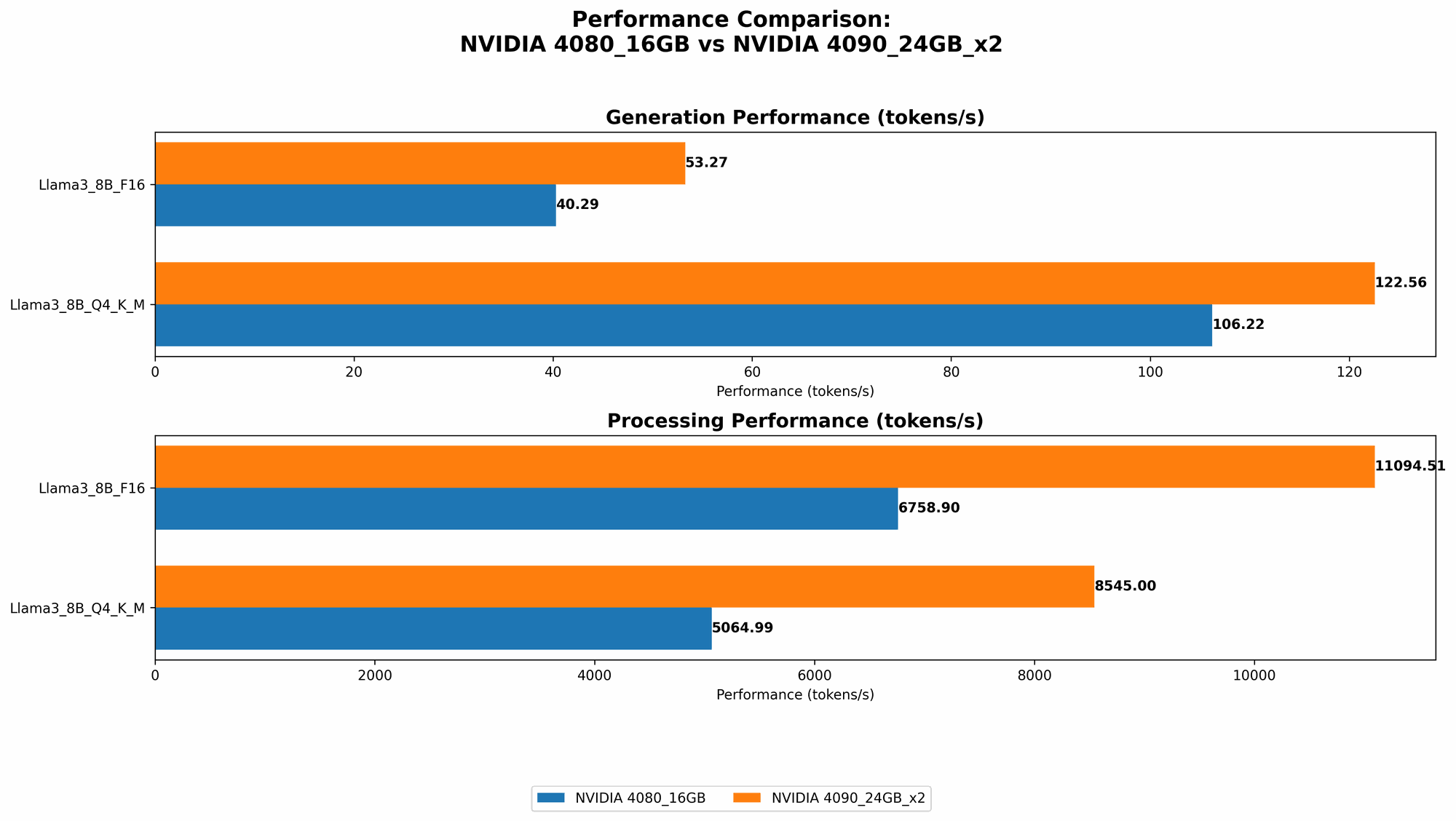
Table 1: Performance Comparison for Llama 3_8B
| Model (Quantization) | NVIDIA 4080_16GB (Tokens/second) | NVIDIA 409024GBx2 (Tokens/second) |
|---|---|---|
| Llama 38BQ4KM_Generation | 106.22 | 122.56 |
| Llama 38BF16_Generation | 40.29 | 53.27 |
| Llama 38BQ4KM_Processing | 5064.99 | 8545.0 |
| Llama 38BF16_Processing | 6758.9 | 11094.51 |
Analysis:
- Generation Speed: The 409024GBx2 consistently outperforms the 408016GB in both Q4K_M and F16 quantization. This is due to its higher compute power and larger memory capacity, allowing it to handle the model's operations more efficiently.
- Processing Speed: The 409024GBx2 also dominates in processing speed, with noticeably faster performance, particularly with F16 quantization.
- Overall: For Llama 38B, the 409024GB_x2 is a clear winner. It provides a significant performance boost, making it ideal for applications that require fast response times and high-quality results.
Llama 3_70B: The Heavyweight Contender
Let's step up to the more demanding Llama 3_70B model. This beast packs a whopping 70 billion parameters, making it suitable for complex tasks and generating surprisingly detailed responses.
Table 2: Performance Comparison for Llama 3_70B
| Model (Quantization) | NVIDIA 4080_16GB (Tokens/second) | NVIDIA 409024GBx2 (Tokens/second) |
|---|---|---|
| Llama 370BQ4KM_Generation | N/A | 19.06 |
| Llama 370BF16_Generation | N/A | N/A |
| Llama 370BQ4KM_Processing | N/A | 905.38 |
| Llama 370BF16_Processing | N/A | N/A |
Analysis:
- Memory Bottleneck: The 408016GB does not have enough memory to run Llama 370B effectively. This is especially true for the F16 quantization, which requires significantly more memory.
- 409024GBx2 Reigns Supreme: The 409024GBx2, with its double the memory capacity and higher compute power, handles the 70B model with relative ease. It showcases impressive speeds for both generation and processing, even with Q4KM quantization.
Performance Analysis: Strengths and Weaknesses
NVIDIA 4080_16GB:
- Strengths:
- Cost-Effective: Offers a good balance between performance and price, making it a solid choice for smaller LLMs or those on a budget.
- Power-Efficient: Consumes less power than its larger counterpart, which is a factor to consider for prolonged workloads.
- Weaknesses:
- Memory Limitation: Limited memory capacity restricts its capability to handle larger models, especially with F16 quantization.
- Performance Ceiling: While it performs well with smaller models, it falls short when running larger LLMs.
NVIDIA 409024GBx2:
- Strengths:
- Powerhouse Performance: Provides exceptional performance across the board, effortlessly handling larger LLMs with impressive speed.
- Generous Memory: Its ample memory allows it to run even the most memory-intensive models without stuttering or crashing.
- Weaknesses:
- High Cost: Comes at a significantly higher price point compared to the 408016GB, which might be a concern for users with budget constraints.
- Power Consumption: Draws more power than the 408016GB, potentially incurring higher electricity costs for prolonged use.
Practical Use Cases: When to Choose Which GPU
Here's a breakdown of use cases based on your LLM needs and budget:
- For smaller models (Llama 38B or smaller): The 408016GB is a great option. It offers excellent performance and cost-effectiveness, making it ideal for experimenting, prototyping, or building simple applications.
- For larger models (Llama 370B or bigger): The 409024GB_x2 is the clear winner. Its massive memory and raw power allow it to run these models smoothly, making it perfect for complex tasks, research, or production-level deployments.
- Budget-Conscious: The 4080_16GB is a more budget-friendly choice, especially if you're working with smaller models.
- Performance-Driven: The 409024GBx2 delivers the best performance, but at a higher price.
Conclusion: Picking the Right Tool for the Job
Choosing between the NVIDIA 408016GB and NVIDIA 409024GBx2 depends on your specific use case, model size, and budget. If you're working with smaller models or are budget-conscious, the 408016GB offers a good balance of performance and price. However, if you need to push the limits with large LLMs, the 409024GBx2 is the way to go, delivering exceptional performance even for memory-intensive models.
FAQ
What are LLMs, and why are they so popular?
LLMs are large language models that have revolutionized artificial intelligence capabilities. They can generate human-like text, translate languages, write different kinds of creative content, and answer your questions in an informative way. Think of them as super-smart AI writing assistants, with a vast knowledge base and the ability to process and understand information like never before.
Why do we need GPUs for running LLMs?
LLMs are computationally intensive. They require massive amounts of processing power and memory to handle the complex calculations involved in generating text and making predictions. GPUs, with their parallel processing capabilities and large memory capacity, are perfect for accelerating these operations, making local LLM deployments more feasible.
Can I use a regular CPU for running LLMs?
You can, but it will be significantly slower. GPUs are designed for parallel computing and offer much higher performance than CPUs for LLMs. Think of it like comparing a single-lane road to a multi-lane highway. The GPU is like the highway, allowing data to flow much faster and handle more complex tasks.
What are the benefits of running LLMs locally?
Running LLMs locally provides several advantages:
- Privacy: Your data stays on your device, eliminating concerns about data privacy and security issues associated with cloud-based services.
- Control: You have complete control over the model, allowing you to customize it, modify its parameters, and fine-tune it to your specific needs.
- Offline Access: You can run LLMs without requiring an internet connection, making them accessible even in areas with limited connectivity.
What are some popular tools for running LLMs locally?
There are many tools available for running LLMs locally, including:
- llama.cpp: A popular and efficient C++ library for running LLMs, including the Llama family of models.
- Transformers: A powerful library for training and running various machine learning models, including LLMs, written in Python.
- Hugging Face: A great resource for finding pre-trained models and tools for running LLMs locally.
- OpenAI's API: While not a local solution, OpenAI's API allows you to access their powerful models for a variety of tasks.
Keywords
LLM, Large Language Model, Llama 3, NVIDIA, GPU, 4080, 4090, 16GB, 24GB, performance, benchmark, comparison, generation speed, processing speed, quantization, Q4KM, F16, memory, local deployment, AI, artificial intelligence, computer science, deep learning, token, tokens per second, speed, accuracy, cost, power consumption, use case, application, research, developer, developer tools, cloud computing, open source, AI tools, machine learning, natural language processing, NLP