Which is Better for Running LLMs locally: NVIDIA 4080 16GB or NVIDIA 3090 24GB? Ultimate Benchmark Analysis

Introduction
Large Language Models (LLMs) are revolutionizing the way we interact with technology. From generating creative text and translating languages to writing code and summarizing complex information, LLMs are becoming increasingly powerful and ubiquitous. But with their growing size and complexity, running LLMs locally can be a challenge. This is where the choice of hardware comes into play. In the realm of dedicated GPUs, the NVIDIA 408016GB and NVIDIA 309024GB stand as contenders for this task. This article dives deep into the performance of these two GPUs, examining the benchmark results and offering insights into their strengths and weaknesses when running LLMs locally.
Understanding LLM Performance Metrics: Tokens and Inference
Before diving into the comparison, let's get our terminology straight. When we talk about LLM performance, one crucial metric is tokens per second (tokens/s). A token is basically a unit of language, like a word or punctuation mark. When an LLM processes text, it breaks it down into tokens. The higher the tokens/s, the faster the model can process information and generate responses.
Think of it like this: Imagine an LLM is a translator. Each word or punctuation mark is a "token" that it needs to translate. A GPU with higher tokens/s is like a faster translator, able to handle more tokens per second and give you the translation faster.
NVIDIA 408016GB vs NVIDIA 309024GB - A Head-to-Head Comparison
We'll be focusing on the Llama 3 family of LLMs, specifically the 8B and 70B models. For the 70B models, there are no publicly available benchmark results for these specific GPUs, so we'll only be comparing the 8B model's performance.
We'll be looking at two key aspects of LLM performance: generation (creating text) and processing (comprehending and manipulating the text). Our data comes from the following sources:
- Performance of llama.cpp on various devices by ggerganov
- GPU Benchmarks on LLM Inference by XiongjieDai
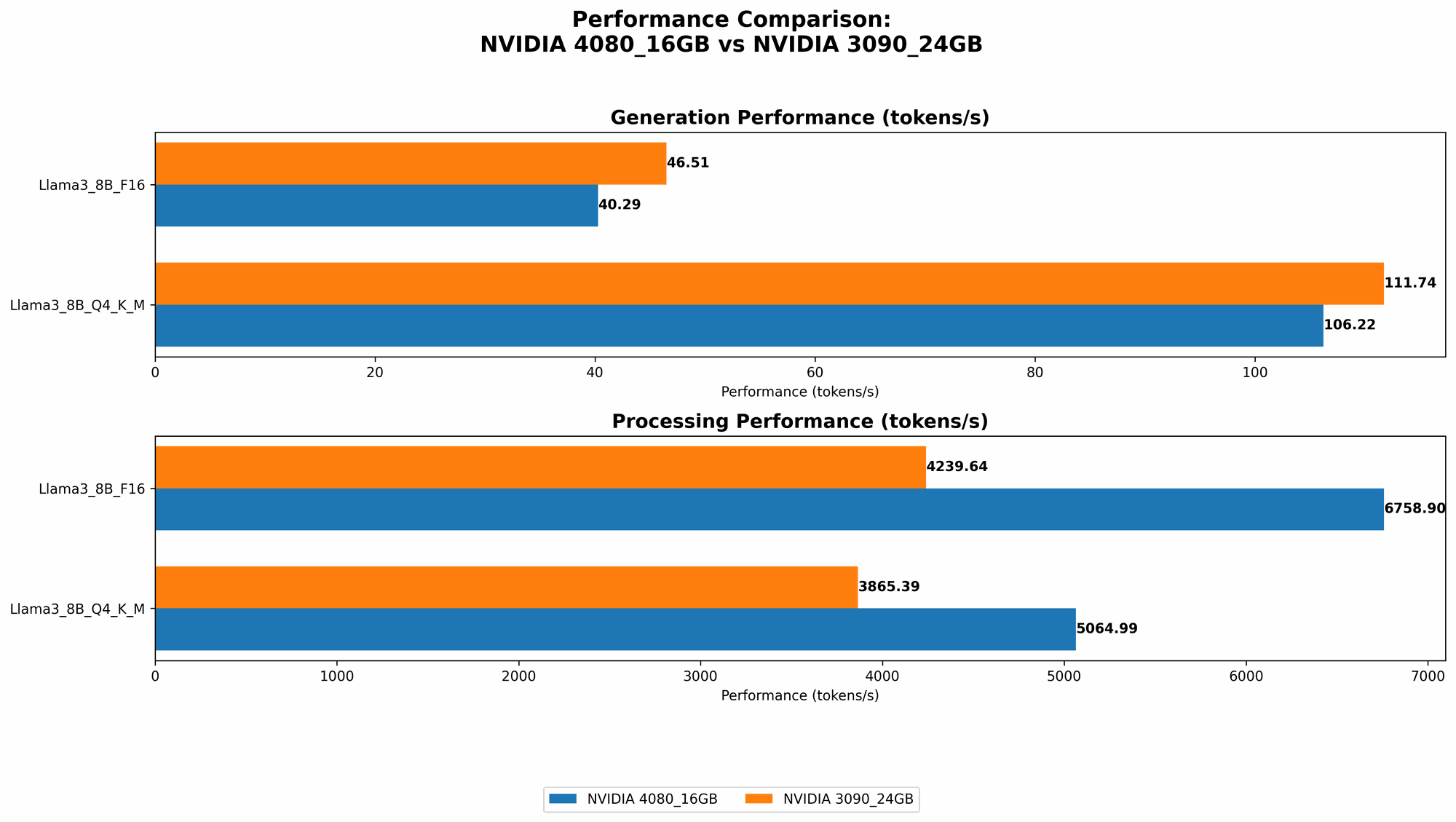
Comparison of NVIDIA 408016GB and NVIDIA 309024GB for Llama 3 (8B model):
| LLM Model | NVIDIA 4080_16GB (tokens/s) | NVIDIA 3090_24GB (tokens/s) |
|---|---|---|
| Llama 3 8B Q4KM Generation | 106.22 | 111.74 |
| Llama 3 8B F16 Generation | 40.29 | 46.51 |
| Llama 3 8B Q4KM Processing | 5064.99 | 3865.39 |
| Llama 3 8B F16 Processing | 6758.9 | 4239.64 |
Performance Analysis:
Generation:
- NVIDIA 309024GB emerges as the winner in terms of generation speed, beating the 408016GB in both Q4KM and F16 configurations. For example, the 309024GB can generate about 5 tokens/s more than the 408016GB in the Q4KM configuration, a difference that can add up over long text generations.
Processing:
- NVIDIA 408016GB takes the lead in processing speed, demonstrating notably higher tokens/s than the 309024GB in both Q4KM and F16 configurations. The 408016GB achieves a significant lead of over 1200 tokens/s in the Q4K_M configuration, translating to faster text comprehension and manipulation.
Strengths and Weaknesses:
NVIDIA 4080_16GB:
- Strengths: Strong processing power, ideal for tasks involving complex text manipulation or large datasets.
- Weaknesses: Lags slightly behind the 3090_24GB in text generation speed, potentially causing slower response times for applications like chatbots or creative writing.
NVIDIA 3090_24GB:
- Strength: Faster generation speed for creating text quicker, making it well-suited for real-time applications like conversational AI or interactive text generation.
- Weaknesses: Slightly slower processing performance compared to the 4080_16GB, potentially impacting tasks requiring complex language understanding or manipulation.
Practical Recommendations:
Choose the NVIDIA 4080_16GB if:
- You prioritize tasks that involve extensive text processing, like summarizing large documents, or generating creative content with complex logic.
- You value greater processing speed over generation speed.
Choose the NVIDIA 3090_24GB if:
- You need faster text generation, like in real-time chatbots, interactive storytelling, or rapid content creation applications.
- You prioritize faster responses over in-depth text comprehension.
Quantization: A Key to LLM Efficiency
Let's break down the "Q4KM" and "F16" configurations mentioned earlier. These refer to different quantization techniques. Quantization is a method of reducing the size of an LLM's model by using fewer bits to represent its weights and activations. This results in lower storage requirements and faster loading times, leading to potentially faster inference.
- Q4KM stands for 4-bit quantization, with "K" representing the kernel (the core of the model), "M" the matrix multiplications, and "Generation" the text generation process.
- F16 refers to using 16-bit floating-point numbers, a more traditional representation for model weights and activations, but typically leading to larger model sizes and possibly slower inference.
So, in our results, you see that the 408016GB and 309024GB perform significantly better in the Q4KM configuration (for both generation and processing) compared to F16. This highlights the importance of choosing the right quantization method to maximize performance.
Beyond Numbers: The Importance of Memory
While the number of tokens/s is crucial, it's not the only factor in LLM performance. The amount of memory (RAM) available on the GPU also plays a vital role. The larger the LLM, the more memory it requires to operate efficiently.
- The NVIDIA 4080_16GB offers 16GB of GDDR6X memory. This means that it can hold more data in its memory, allowing it to handle larger LLMs without excessive swapping, which can significantly impact performance.
- The NVIDIA 3090_24GB boasts 24GB of GDDR6X memory, making it a strong contender for running very large LLMs.
In essence, the 408016GB might be a better choice for users who are primarily focused on smaller LLMs, while the 309024GB shines for those working with massive models.
The Future of Running LLMs Locally: A Look Ahead
The landscape of LLM development is constantly evolving. With models becoming increasingly massive, the demand for powerful GPUs will only grow. We're likely to see even more specialized hardware emerge in the future, specifically optimized for running LLMs efficiently.
However, running these models locally might not always be the most practical approach. The cost of high-end GPUs can be prohibitive for many individuals and organizations. Alternatively, cloud services are increasingly becoming the go-to solution, offering scalable resources and a cost-effective way to access and run LLMs.
FAQs:
Q: What is an LLM?
A: An LLM, or Large Language Model, is a type of artificial intelligence (AI) that can understand and generate human-like text. It learns from massive amounts of text data and can perform tasks like translation, question answering, and writing creative content.
Q: Should I build my own LLM or use a cloud service?
A: It depends on your specific needs. If you need complete control over your model and have the resources to train and maintain it, building your own LLM might be a good option. But for most users, cloud services like Google Cloud or AWS offer a more cost-effective and efficient solution.
Q: Can I run any LLM locally?
A: Not all LLMs can be run locally, especially those with massive sizes like the 175B-parameter GPT-3 model. The hardware required to run such models is not readily available to most individuals. Smaller LLMs like the 8B-parameter Llama 3 might be more feasible depending on your GPU.
Q: Should I choose a GPU with more RAM?
A: Generally speaking, yes. More RAM means the GPU can store a larger LLM model in its memory, leading to better performance. However, consider your specific LLM size and the memory requirements of your other applications.
Keywords: NVIDIA 408016GB, NVIDIA 309024GB, LLM, large language models, GPU, benchmark, performance, tokens/s, generation, processing, quantization, Q4KM, F16, memory, cloud services, Llama 3, 8B, 70B, AI, inference