Which is Better for Running LLMs locally: NVIDIA 4070 Ti 12GB or NVIDIA A100 PCIe 80GB? Ultimate Benchmark Analysis
Introduction
The world of large language models (LLMs) is exploding, with models like ChatGPT and Bard capturing headlines and changing how we interact with technology. But what about running these powerful models locally? For developers and enthusiasts eager to experiment and push the boundaries of AI, having the right hardware is crucial.
This article dives deep into a head-to-head comparison of two popular GPUs: the NVIDIA 4070 Ti 12GB and the NVIDIA A100 PCIe 80GB. We'll analyze their performance running different Llama 3 models: the 8B and 70B variants. We'll explore how these GPUs handle both text generation (creating text) and text processing (understanding and analyzing text), ultimately helping you choose the right tool for your AI projects.
Understanding the Players
NVIDIA 4070 Ti 12GB - The Gaming Champ
The 4070 Ti is a powerhouse in the world of gaming, known for its impressive performance and affordability. It's designed to deliver smooth gameplay at high resolutions and frame rates. While not specifically designed for AI workloads, its CUDA cores and memory bandwidth make it a decent option for running LLMs on a budget.
NVIDIA A100 PCIe 80GB - The AI Heavyweight
The A100 is a beast of a GPU. It's specifically designed for AI tasks, boasting a high-speed Tensor Core engine and massive memory capacity. It's the choice for demanding applications like deep learning and natural language processing. Expect top-notch performance for both generation and processing, but at a significant price premium.
Performance Analysis: Llama 3 8B and 70B Benchmark Results
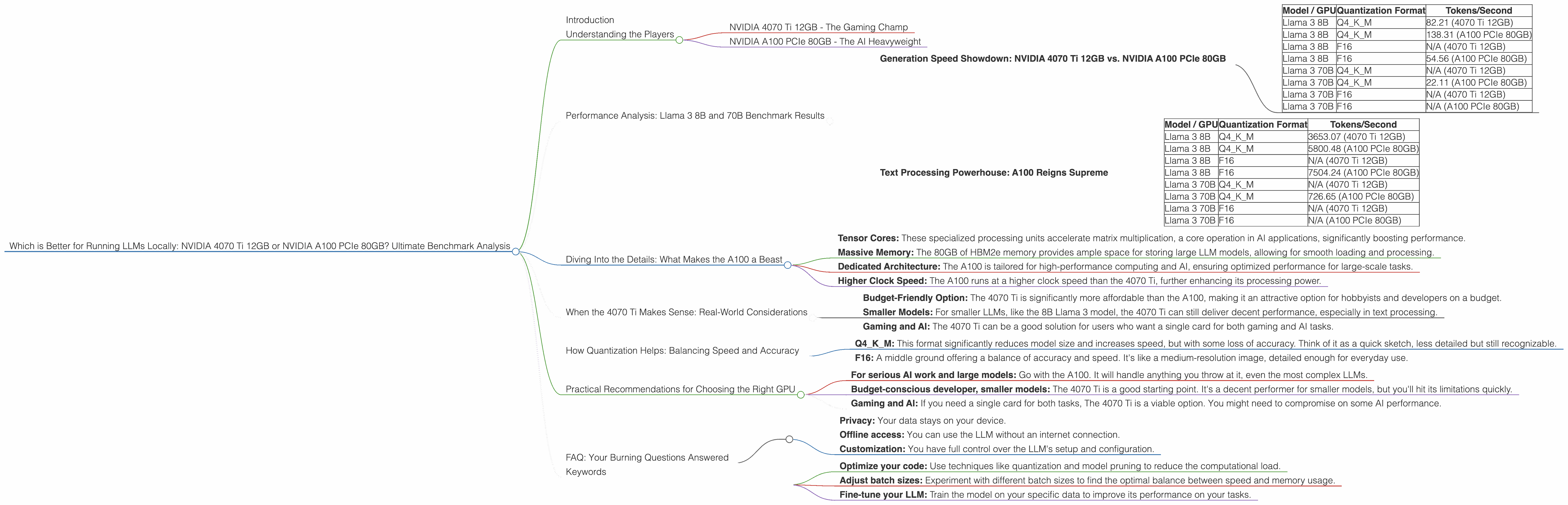
Generation Speed Showdown: NVIDIA 4070 Ti 12GB vs. NVIDIA A100 PCIe 80GB
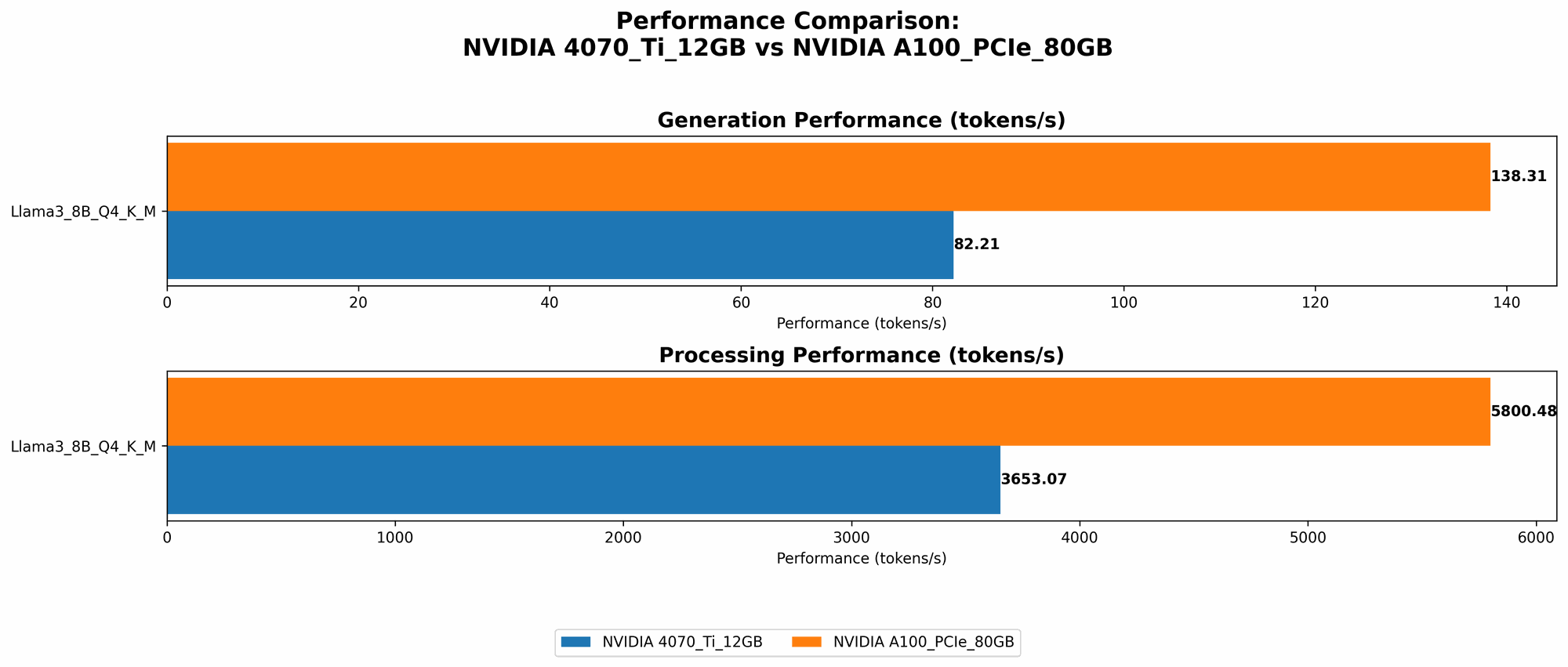
The table below showcases the token generation speed of the two GPUs for the Llama 3 8B model in different quantization formats.
| Model / GPU | Quantization Format | Tokens/Second |
|---|---|---|
| Llama 3 8B | Q4KM | 82.21 (4070 Ti 12GB) |
| Llama 3 8B | Q4KM | 138.31 (A100 PCIe 80GB) |
| Llama 3 8B | F16 | N/A (4070 Ti 12GB) |
| Llama 3 8B | F16 | 54.56 (A100 PCIe 80GB) |
| Llama 3 70B | Q4KM | N/A (4070 Ti 12GB) |
| Llama 3 70B | Q4KM | 22.11 (A100 PCIe 80GB) |
| Llama 3 70B | F16 | N/A (4070 Ti 12GB) |
| Llama 3 70B | F16 | N/A (A100 PCIe 80GB) |
Key Observations:
- A100 Dominates: The A100 consistently outperforms the 4070 Ti in token generation, significantly faster across all tested configurations.
- Quantization Matters: Although the A100 excels in both Q4KM and F16, the 4070 Ti 12GB is missing data for F16, which is a common format for balancing accuracy and speed.
- Larger Models are a Challenge: The 70B model reveals the 4070 Ti's limitations. It lacks data for both Q4KM and F16, indicating potentially inadequate memory and processing power. On the other hand, the A100 still manages to deliver results, but significantly slower than the 8B model.
Analogies: Think of it like sprinter vs. marathon runner. The 4070 Ti is a sprinter, fast with smaller models; the A100 is a marathon runner, capable of handling larger workloads, even if slower on short bursts.
Text Processing Powerhouse: A100 Reigns Supreme
The following table details the text processing capabilities of the two GPUs, measured in tokens/second.
| Model / GPU | Quantization Format | Tokens/Second |
|---|---|---|
| Llama 3 8B | Q4KM | 3653.07 (4070 Ti 12GB) |
| Llama 3 8B | Q4KM | 5800.48 (A100 PCIe 80GB) |
| Llama 3 8B | F16 | N/A (4070 Ti 12GB) |
| Llama 3 8B | F16 | 7504.24 (A100 PCIe 80GB) |
| Llama 3 70B | Q4KM | N/A (4070 Ti 12GB) |
| Llama 3 70B | Q4KM | 726.65 (A100 PCIe 80GB) |
| Llama 3 70B | F16 | N/A (4070 Ti 12GB) |
| Llama 3 70B | F16 | N/A (A100 PCIe 80GB) |
Key Observations:
- A100's Text Processing Muscle: The A100 demonstrates exceptional text processing speed, outperforming the 4070 Ti in all scenarios, with a significant gap in performance.
- The 4070 Ti Struggle: Again, data is missing for the 4070 Ti 12GB for both F16 and 70B models, highlighting its limitations with larger models and more demanding tasks.
- A100's Consistency: Even with the 70B model, the A100 can handle text processing effectively, demonstrating its capability for more complex tasks compared to the 4070 Ti.
Think of it like this: Imagine processing a simple text document vs. a complex research paper. The 4070 Ti is good with short, simple tasks, while the A100 can handle the heavy lifting of larger and more complex documents.
Diving Into the Details: What Makes the A100 a Beast
The NVIDIA A100 PCIe 80GB's dominance boils down to a combination of factors:
- Tensor Cores: These specialized processing units accelerate matrix multiplication, a core operation in AI applications, significantly boosting performance.
- Massive Memory: The 80GB of HBM2e memory provides ample space for storing large LLM models, allowing for smooth loading and processing.
- Dedicated Architecture: The A100 is tailored for high-performance computing and AI, ensuring optimized performance for large-scale tasks.
- Higher Clock Speed: The A100 runs at a higher clock speed than the 4070 Ti, further enhancing its processing power.
When the 4070 Ti Makes Sense: Real-World Considerations
While the A100 reigns supreme in terms of raw power, the 4070 Ti isn't entirely useless. Here are some scenarios where it might be a better choice:
- Budget-Friendly Option: The 4070 Ti is significantly more affordable than the A100, making it an attractive option for hobbyists and developers on a budget.
- Smaller Models: For smaller LLMs, like the 8B Llama 3 model, the 4070 Ti can still deliver decent performance, especially in text processing.
- Gaming and AI: The 4070 Ti can be a good solution for users who want a single card for both gaming and AI tasks.
How Quantization Helps: Balancing Speed and Accuracy
Quantization is a technique used to reduce the size of LLM models while maintaining acceptable accuracy. It's like replacing a high-resolution image with a lower-resolution version, saving space but sacrificing some detail.
- Q4KM: This format significantly reduces model size and increases speed, but with some loss of accuracy. Think of it as a quick sketch, less detailed but still recognizable.
- F16: A middle ground offering a balance of accuracy and speed. It's like a medium-resolution image, detailed enough for everyday use.
The A100 excels in both Q4KM and F16, showcasing its adaptability. The 4070 Ti, however, only performs in Q4KM, indicating its limited ability to handle more complex quantization formats.
Practical Recommendations for Choosing the Right GPU
Here's a breakdown to help you decide:
- For serious AI work and large models: Go with the A100. It will handle anything you throw at it, even the most complex LLMs.
- Budget-conscious developer, smaller models: The 4070 Ti is a good starting point. It's a decent performer for smaller models, but you'll hit its limitations quickly.
- Gaming and AI: If you need a single card for both tasks, The 4070 Ti is a viable option. You might need to compromise on some AI performance.
FAQ: Your Burning Questions Answered
Q: What's the best way to run LLMs locally?
A: The ideal setup depends on your budget and needs. For the best performance with large models, the A100 is the clear winner. However, the 4070 Ti is a solid choice for smaller models and users on a budget.
Q: Do I need a high-end GPU for LLMs?
A: It depends! Larger models require more processing power and memory. For more demanding tasks, a high-end GPU like the A100 is essential. However, for smaller models, a mid-range GPU like the 4070 Ti might suffice.
Q: What are the advantages of running LLMs locally?
A:
* Privacy: Your data stays on your device.
* Offline access: You can use the LLM without an internet connection.
* Customization: You have full control over the LLM's setup and configuration.
Q: How can I improve the performance of my existing GPU?
A: * Optimize your code: Use techniques like quantization and model pruning to reduce the computational load. * Adjust batch sizes: Experiment with different batch sizes to find the optimal balance between speed and memory usage. * Fine-tune your LLM: Train the model on your specific data to improve its performance on your tasks.
Q: Is it feasible to run a 13B model on a 4070 Ti?
A: It's possible, but depending on the LLM and your specific goals, performance might be a significant concern. The 4070 Ti might be better suited for smaller 7B models.
Q: How do I choose an LLM for my project?
A: Consider your specific goals, budget, and hardware capabilities. Smaller models are often faster and more affordable, while larger models offer better performance in demanding tasks.
Keywords
LLMs, large language models, NVIDIA 4070 Ti 12GB, NVIDIA A100 PCIe 80GB, GPU, CUDA, Tensor Cores, Llama 3, 8B, 70B, generation speed, text processing, quantization, Q4KM, F16, benchmark, performance, AI, deep learning, natural language processing, local, offline, budget, gaming, hardware, comparison, analysis, recommendation