Which is Better for Running LLMs locally: NVIDIA 3090 24GB x2 or NVIDIA L40S 48GB? Ultimate Benchmark Analysis

Introduction
You've got your hands on a powerful NVIDIA GPU, eager to unleash the potential of large language models (LLMs) on your own machine. But which beast of a card, the NVIDIA 309024GBx2 or the NVIDIA L40S_48GB, will conquer the text generation battlefield and become your local LLM champion? This article delves into the epic showdown between these GPUs, uncovering their performance strengths and weaknesses in the realm of local LLM inference.
This clash of titans focuses on running Llama 3 models locally, exploring different quantization levels (Q4KM and F16) for both the 8B and 70B variants. We'll dissect the benchmark data like a team of AI archeologists, revealing the secrets of token generation and processing speeds, and guiding you towards the ideal GPU for your LLM adventures.
Let's dive in!
Performance Analysis: Token Generation and Processing
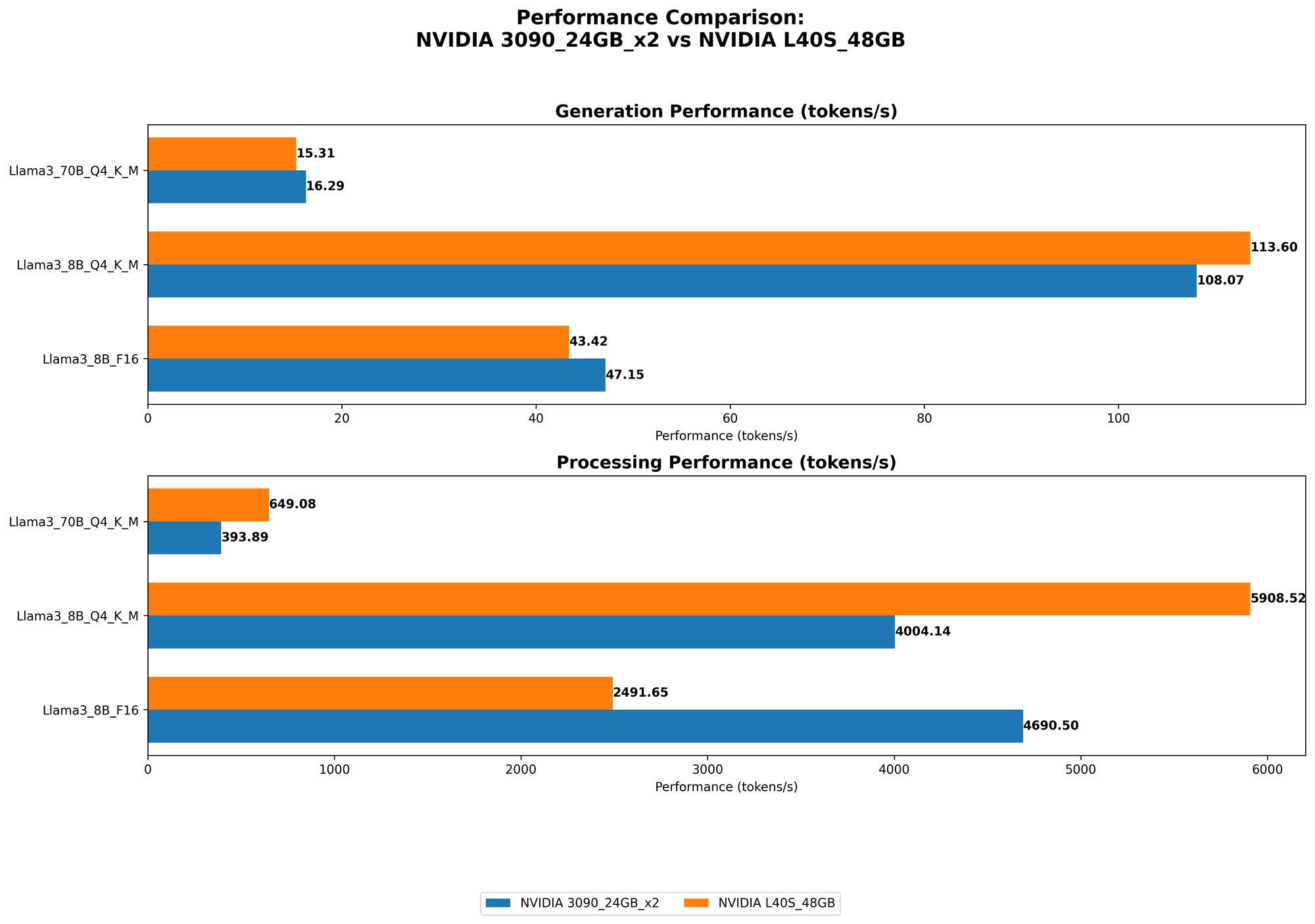
Comparison of NVIDIA 309024GBx2 and NVIDIA L40S_48GB for Llama 3 Model Inference
Time to break down the battlefield! We'll analyze the performance of each GPU for token generation (the process of creating new text based on a prompt) and processing (handling the internal calculations required for generating the text).
Llama 3 8B Model: A Battle of Titans
Let's start with the lightweight champion, the Llama 3 8B model! This model strikes a balance between performance and size, making it ideal for experimenting with LLMs on a budget.
Token Generation Performance:
| GPU | Q4KM Generation (tokens/second) | F16 Generation (tokens/second) |
|---|---|---|
| NVIDIA 309024GBx2 | 108.07 | 47.15 |
| NVIDIA L40S_48GB | 113.6 | 43.42 |
Analysis:
- The L40S48GB edges out the 309024GBx2 in Q4KM token generation, delivering an approximate 5% performance boost. This suggests that the L40S48GB might be better suited for tasks like rapid text generation or interactive applications.
- However, when it comes to F16 generation, the 309024GBx2 takes the lead, showcasing slightly faster speeds. This could be due to the 309024GBx2's optimized memory configuration, or perhaps the L40S_48GB has been optimized for other workloads.
Token Processing Performance:
| GPU | Q4KM Processing (tokens/second) | F16 Processing (tokens/second) |
|---|---|---|
| NVIDIA 309024GBx2 | 4004.14 | 4690.5 |
| NVIDIA L40S_48GB | 5908.52 | 2491.65 |
Analysis:
- In the realm of Q4KM processing, the L40S48GB emerges as the clear winner, boasting a significant 47% speed advantage over the 309024GBx2. This suggests that the L40S48GB excels at handling the complex internal operations required for processing text.
- However, the 309024GBx2 outperforms the L40S48GB in F16 processing. This suggests that the 309024GB_x2's architecture (with its multiple GPUs) might be more efficient for processing text data in F16 format.
What does this mean for your LLM adventures?
- If you're primarily focused on generating text with the Llama 3 8B model using Q4KM quantization, the L40S_48GB is a solid choice for maximizing performance and speed.
- But if you're using F16 quantization or focusing heavily on processing speed, the 309024GBx2 might be a better fit for your needs.
Llama 3 70B Model: Unleashing the Heavyweight Champion
Now we step into the heavyweight division, with the mighty Llama 3 70B model! This model is a text generation behemoth, capable of producing truly impressive results. But can your GPU handle the workload?
Token Generation Performance:
| GPU | Q4KM Generation (tokens/second) | F16 Generation (tokens/second) |
|---|---|---|
| NVIDIA 309024GBx2 | 16.29 | Not available |
| NVIDIA L40S_48GB | 15.31 | Not available |
Analysis:
- The token generation speed for the Llama 3 70B model is considerably slower compared to the 8B variant, as expected given the much larger size of the model.
- The 309024GBx2 edges out the L40S48GB in Q4K_M token generation, although the difference is minor.
Token Processing Performance:
| GPU | Q4KM Processing (tokens/second) | F16 Processing (tokens/second) |
|---|---|---|
| NVIDIA 309024GBx2 | 393.89 | Not available |
| NVIDIA L40S_48GB | 649.08 | Not available |
Analysis:
- The L40S48GB demonstrates a significant advantage in Q4K_M processing speed, showcasing its power to handle complex computations.
What does this mean for your LLM adventures?
- For the Llama 3 70B model, the L40S_48GB offers superior performance in terms of token generation and processing speed. However, it's important to note that both GPUs struggle to handle the sheer size of the model, resulting in noticeable slowdown.
Quantization: A Simplified Explanation
Think of quantization as a way to "compress" the model, making it more manageable for smaller GPUs. It's like transforming a massive HD picture into a smaller, more efficient JPEG. Q4KM quantization represents a higher level of compression compared to F16, sacrificing some accuracy for increased performance.
A Real-World Analogy:
Imagine you're building a Lego tower. You can use large, detailed bricks (F16 model) or smaller, less intricate ones (Q4KM model). The smaller bricks let you build a taller tower with less effort, but you might lose some detail.
Choosing the Right GPU: A Practical Guide
Now that we've dissected the performance data, let's translate it into practical recommendations for real-world use cases.
For the Llama 3 8B Model:
- If you're on a budget and prioritize speed for Q4KM generation (like rapid text generation or chatbots), the L40S_48GB is a compelling choice.
- If you prioritize F16 generation or processing speed, the 309024GBx2 might be a better fit.
For the Llama 3 70B Model:
- The L40S_48GB emerges as the superior choice due to its improved performance in both generation and processing. However, expect noticeable delays compared to the 8B model, especially in F16 mode.
Factors to Consider Beyond Benchmark Data:
- Budget: The L40S48GB would likely represent a higher initial investment compared to the 309024GB_x2 setup.
- Power Consumption: Consider the power consumption of your chosen GPU and the efficiency of your cooling system. The L40S_48GB might require a more robust power supply and cooling setup.
- Additional Features: Do you need features like Tensor Cores or Ray Tracing? The L40S_48GB might offer a broader set of features due to its newer architecture.
FAQ: Demystifying the LLM World
Q: What is the best GPU for running the Llama 3 13B model?
A: Unfortunately, the benchmark data provided doesn't include results for the Llama 3 13B model. However, based on the trend observed with the 8B and 70B models, the L40S_48GB is likely to offer superior performance for both token generation and processing.
Q: Does it matter if I use Q4KM or F16 quantization?
A: Choosing the right quantization level depends on your priority - speed versus accuracy. Q4KM offers faster speeds but might compromise accuracy, whereas F16 strikes a balance between both.
Q: Can I run LLMs on a CPU?
A: While possible, running large LLMs on a CPU is generally not recommended due to significantly slower performance. GPUs are designed for parallel processing, making them ideal for handling the demanding calculations involved in LLM inference.
Q: What are the limitations of running LLMs locally?
A: Local LLM inference can be resource-intensive, requiring powerful hardware and potentially leading to slowdowns or instability, particularly when using large models. The size of the model, quantization level, and user-defined parameters can all influence performance.
Q: What are the advantages of running LLMs locally?
A: Local LLM inference offers greater privacy and control over the data, as you don't have to rely on cloud services. It can be advantageous for user-sensitive applications or when internet connectivity is limited.
Q: What are some alternative GPUs for local LLM inference?
A: While this article focuses on comparing the 309024GBx2 and L40S_48GB, other powerful GPUs from NVIDIA (like the RTX 4090) or AMD (like the Radeon RX 7900 XTX) might also be suitable for running LLMs locally.
Keywords:
NVIDIA 309024GBx2, NVIDIA L40S48GB, Llama 3, LLM, GPU, Inference, Token Generation, Token Processing, Quantization, Q4K_M, F16, Benchmark, Performance, Speed, Comparison, Local, AI, Text Generation, Deep Learning, Machine Learning, GPU Benchmarking, Data Analysis, Recommendation, FAQ, Advantages, Disadvantages, Alternatives, Budget, Power Consumption, Features.