Which is Better for Running LLMs locally: NVIDIA 3090 24GB x2 or NVIDIA A100 PCIe 80GB? Ultimate Benchmark Analysis
Introduction
The world of Large Language Models (LLMs) is exploding, with innovative breakthroughs happening every day. These AI marvels are changing the way we interact with technology, from generating realistic text to translating languages and even writing code. But running these demanding models can be a challenge, especially if you want to do it locally on your own machine.
This article will compare two popular GPU choices for running LLMs locally: NVIDIA GeForce RTX 3090 24GB (x2) and NVIDIA A100 PCIe 80GB. We'll analyze their performance, strengths, and weaknesses using real-world benchmarks, providing you with the information you need to decide which GPU is right for your LLM projects.
Performance Analysis: A Deep Dive into Token Speed and Memory
To get a clear picture of these GPUs' capabilities, we'll analyze their performance when running two popular open-source LLMs: Llama 3 8B and Llama 3 70B. We'll focus on two crucial metrics: Token Speed and Processing Speed.
Token Speed: The Race to Generate Words
Token speed measures how quickly the GPU can generate new text tokens, representing individual words or punctuation marks.
Think of it like this: Imagine you have a massive vocabulary, and you need to find the right words to form a sentence. The faster your GPU can search for and select these words, the quicker you can complete your sentence.
Here's a breakdown of the results:
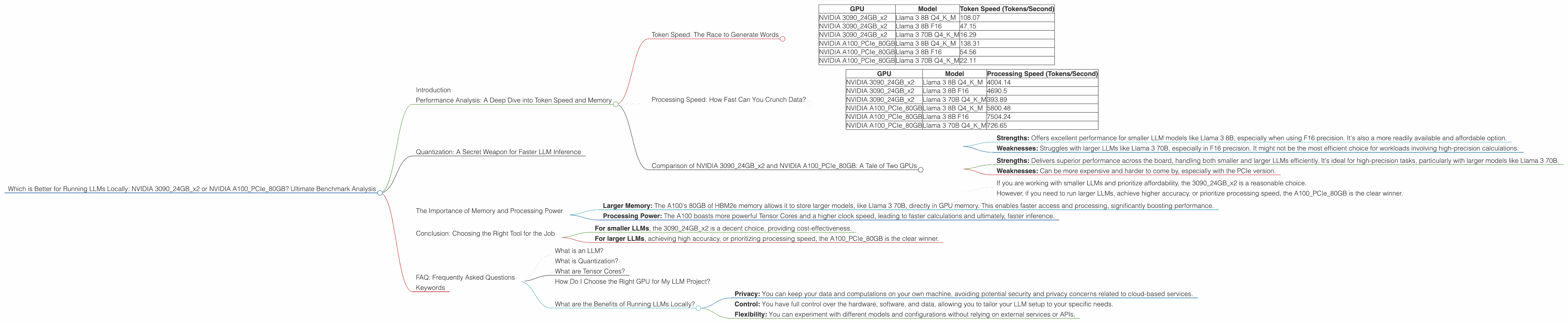
| GPU | Model | Token Speed (Tokens/Second) |
|---|---|---|
| NVIDIA 309024GBx2 | Llama 3 8B Q4KM | 108.07 |
| NVIDIA 309024GBx2 | Llama 3 8B F16 | 47.15 |
| NVIDIA 309024GBx2 | Llama 3 70B Q4KM | 16.29 |
| NVIDIA A100PCIe80GB | Llama 3 8B Q4KM | 138.31 |
| NVIDIA A100PCIe80GB | Llama 3 8B F16 | 54.56 |
| NVIDIA A100PCIe80GB | Llama 3 70B Q4KM | 22.11 |
Key Takeaways:
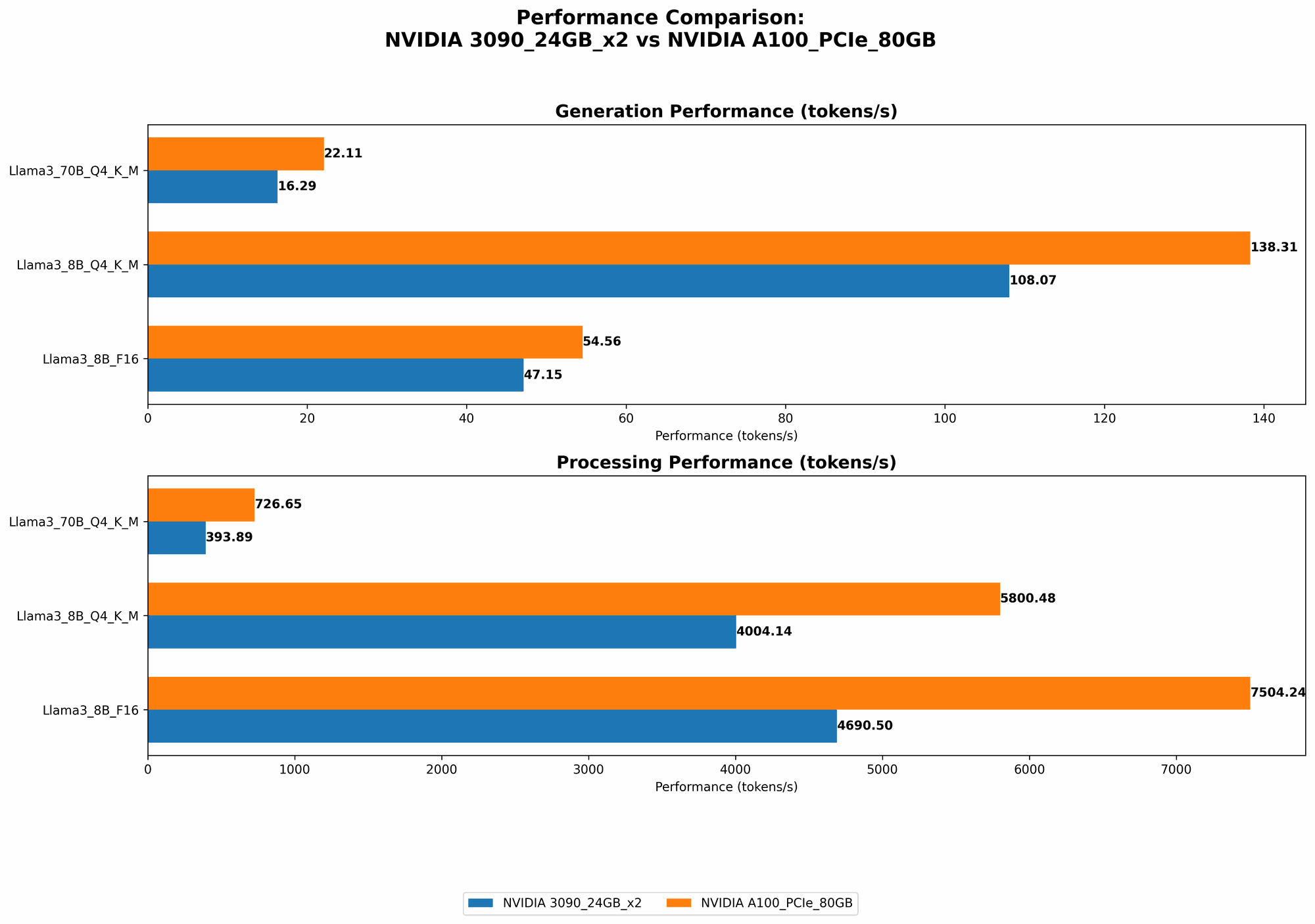
- The A100 consistently outperforms the 309024GBx2 in token speed for both Llama 3 8B and 70B. For the Llama 3 8B Q4KM model, the A100 achieves a 28% higher token speed than the 309024GBx2.
- The A100 also shows superior token speed for the F16 configuration, although the difference is smaller.
- It's important to note that F16 represents a lower-precision configuration, resulting in a faster but less accurate model. Q4KM, on the other hand, uses a higher precision, leading to higher accuracy but slower processing.
Processing Speed: How Fast Can You Crunch Data?
Processing speed measures the efficiency at which the GPU can process the input data and generate output.
Visualize it like this: Imagine you have a massive dataset to analyze. The faster your GPU can process this data, the sooner you can get meaningful insights and results.
Here's a comparison of the processing speeds:
| GPU | Model | Processing Speed (Tokens/Second) |
|---|---|---|
| NVIDIA 309024GBx2 | Llama 3 8B Q4KM | 4004.14 |
| NVIDIA 309024GBx2 | Llama 3 8B F16 | 4690.5 |
| NVIDIA 309024GBx2 | Llama 3 70B Q4KM | 393.89 |
| NVIDIA A100PCIe80GB | Llama 3 8B Q4KM | 5800.48 |
| NVIDIA A100PCIe80GB | Llama 3 8B F16 | 7504.24 |
| NVIDIA A100PCIe80GB | Llama 3 70B Q4KM | 726.65 |
Key Takeaways:
- The A100 outperforms the 309024GBx2 in processing speed across all tested configurations. This means the A100 can handle larger amounts of data and complete tasks faster.
- The difference in processing speed between the two GPUs is even more significant than the difference in token speed. For the Llama 3 8B Q4KM, the A100 achieves a 45% faster processing speed than the 309024GBx2.
Comparison of NVIDIA 309024GBx2 and NVIDIA A100PCIe80GB: A Tale of Two GPUs
Both the NVIDIA 309024GBx2 and the NVIDIA A100PCIe80GB are powerful GPUs, but they cater to different needs and use cases.
NVIDIA 309024GBx2:
- Strengths: Offers excellent performance for smaller LLM models like Llama 3 8B, especially when using F16 precision. It's also a more readily available and affordable option.
- Weaknesses: Struggles with larger LLMs like Llama 3 70B, especially in F16 precision. It might not be the most efficient choice for workloads involving high-precision calculations.
NVIDIA A100PCIe80GB:
- Strengths: Delivers superior performance across the board, handling both smaller and larger LLMs efficiently. It's ideal for high-precision tasks, particularly with larger models like Llama 3 70B.
- Weaknesses: Can be more expensive and harder to come by, especially with the PCIe version.
Choosing the Right GPU:
- If you are working with smaller LLMs and prioritize affordability, the 309024GBx2 is a reasonable choice.
- However, if you need to run larger LLMs, achieve higher accuracy, or prioritize processing speed, the A100PCIe80GB is the clear winner.
Quantization: A Secret Weapon for Faster LLM Inference
Imagine transforming a complex recipe into a simplified version, using fewer ingredients but still preserving the core flavors. This is what quantization does for LLMs, reducing the model size and complexity while maintaining accuracy.
Think of it like this: You have a detailed blueprint of a complex building, but you want to share it with someone who doesn't understand all the technical details. So, you create a simplified version, highlighting the essential elements without sacrificing the overall understanding.
Quantization achieves this by reducing the number of bits used to represent the model's weights and activations. This smaller representation requires less memory and enables faster inference.
Q4KM Quantization:
This technique uses 4-bit precision for weights and activations. While it leads to faster inference, it can sometimes sacrifice accuracy compared to F16 precision.
Example: Notice how the Q4KM configuration of Llama 3 8B on the A100 achieves a significantly higher token speed compared to F16.
The Importance of Memory and Processing Power
The A100's superior performance in processing and token speed can be attributed to its larger memory (80GB) and processing power compared to the 309024GBx2.
- Larger Memory: The A100's 80GB of HBM2e memory allows it to store larger models, like Llama 3 70B, directly in GPU memory. This enables faster access and processing, significantly boosting performance.
- Processing Power: The A100 boasts more powerful Tensor Cores and a higher clock speed, leading to faster calculations and ultimately, faster inference.
A100's Performance: A Real-World Perspective
Imagine you're building a skyscraper with advanced tools and a massive team. You're able to complete the project quickly and efficiently, delivering a towering structure that stands tall.
Similarly, the A100's superior processing power and memory provide a significant advantage in running complex LLMs, allowing you to complete complex tasks faster and achieve impressive results.
Conclusion: Choosing the Right Tool for the Job
When deciding between the NVIDIA 309024GBx2 and the NVIDIA A100PCIe80GB, you need to consider your specific needs and budget.
- For smaller LLMs, the 309024GBx2 is a decent choice, providing cost-effectiveness.
- For larger LLMs, achieving high accuracy, or prioritizing processing speed, the A100PCIe80GB is the clear winner.
Ultimately, the best GPU for your LLM project will depend on your individual needs and priorities. By carefully analyzing your requirements and comparing the strengths and weaknesses of these GPUs, you can make an informed decision and choose the right tool for the job.
FAQ: Frequently Asked Questions
What is an LLM?
An LLM, or Large Language Model, is a sophisticated type of artificial intelligence that excels at understanding and generating human-like text. These models are trained on massive amounts of data, allowing them to perform various tasks, such as generating creative content, translating languages, writing code, and answering questions.
What is Quantization?
Quantization is a technique used to optimize LLMs by reducing the size and complexity of the model without sacrificing accuracy. It involves reducing the number of bits used to represent the model's weights and activations, resulting in faster inference and reduced memory footprint.
What are Tensor Cores?
Tensor Cores are specialized hardware units found in modern GPUs, designed to accelerate matrix multiplication operations, which are essential for running LLM models. These cores provide a significant boost in performance, especially for tasks involving massive amounts of data.
How Do I Choose the Right GPU for My LLM Project?
To choose the right GPU, consider the size of the LLM you're working with, the level of accuracy you require, and your budget. If you're working with smaller LLMs and prioritize affordability, a 309024GBx2 might be a good option. For larger LLMs and high-precision tasks, the A100PCIe80GB is the superior choice.
What are the Benefits of Running LLMs Locally?
Running LLMs locally offers several benefits, including:
- Privacy: You can keep your data and computations on your own machine, avoiding potential security and privacy concerns related to cloud-based services.
- Control: You have full control over the hardware, software, and data, allowing you to tailor your LLM setup to your specific needs.
- Flexibility: You can experiment with different models and configurations without relying on external services or APIs.
Keywords
LLM, Large Language Model, GPU, NVIDIA, 309024GBx2, A100PCIe80GB, Token Speed, Processing Speed, Quatization, Q4KM, F16, Memory, Tensor Cores, Performance, Inference, Benchmark Analysis, Comparison, Locally, Run.