Which is Better for Running LLMs locally: NVIDIA 3090 24GB or NVIDIA RTX A6000 48GB? Ultimate Benchmark Analysis
Introduction
The world of Large Language Models (LLMs) is booming, and with it, the demand for powerful hardware capable of running these complex models locally is increasing rapidly. Imagine generating creative text formats, translating languages in real-time, or even writing code with just a few prompts – all on your own machine. This is the promise of LLMs, and choosing the right hardware is crucial to unlock their full potential.
This article will delve into the performance comparison between two popular GPUs – the NVIDIA GeForce RTX 3090 24GB and the NVIDIA RTX A6000 48GB – in the context of local LLM execution. We'll analyze their strengths and weaknesses, examine their performance with different LLM models, and ultimately help you decide which GPU is best suited for your LLM endeavors.
The Battlefield: NVIDIA GeForce RTX 3090 24GB vs. NVIDIA RTX A6000 48GB
This is a clash of titans in the GPU world. Both the RTX 3090 and the RTX A6000 are powerhouses, each boasting unique strengths for specific applications.
NVIDIA GeForce RTX 3090 24GB: This card was originally designed for gamers, but its raw power has made it a popular choice for AI and machine learning tasks. It offers a mix of high performance and affordability compared to the A6000.
NVIDIA RTX A6000 48GB: This card was specifically designed for professional workloads, including AI and scientific computing. Its key advantage is its massive 48GB of memory, which allows it to handle larger and more complex models.
Performance Analysis: Token Speed Generation & Processing
Comparison of NVIDIA 309024GB and NVIDIA RTXA6000_48GB for Llama3 8B Model
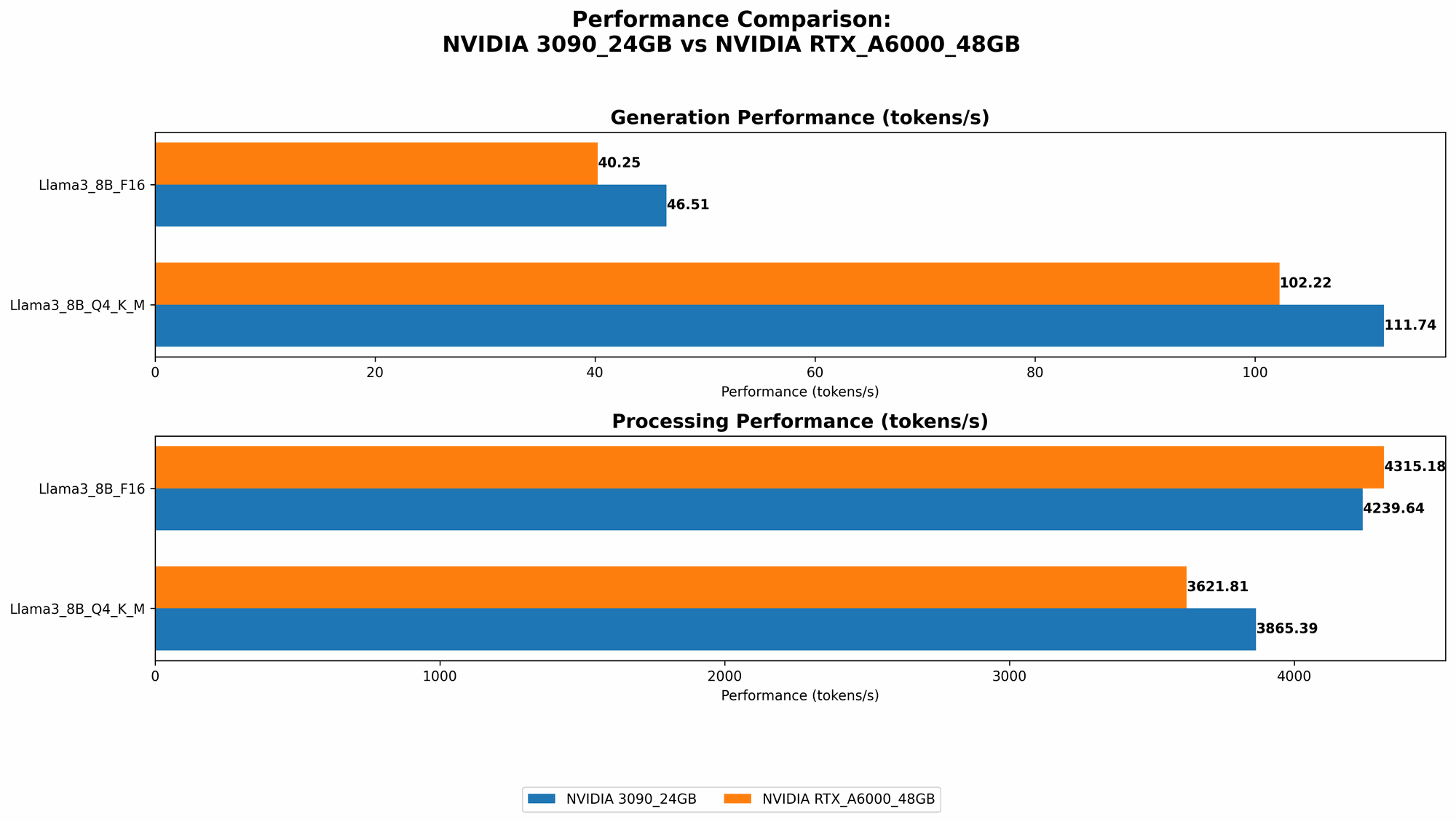
Let's dive into the numbers and see how these two GPUs perform with the Llama3 8B model, a popular open-source LLM. The "Q4KM" format refers to quantization – a technique that reduces model size and memory usage, making it faster to run. "F16" represents a 16-bit floating-point format used for calculations.
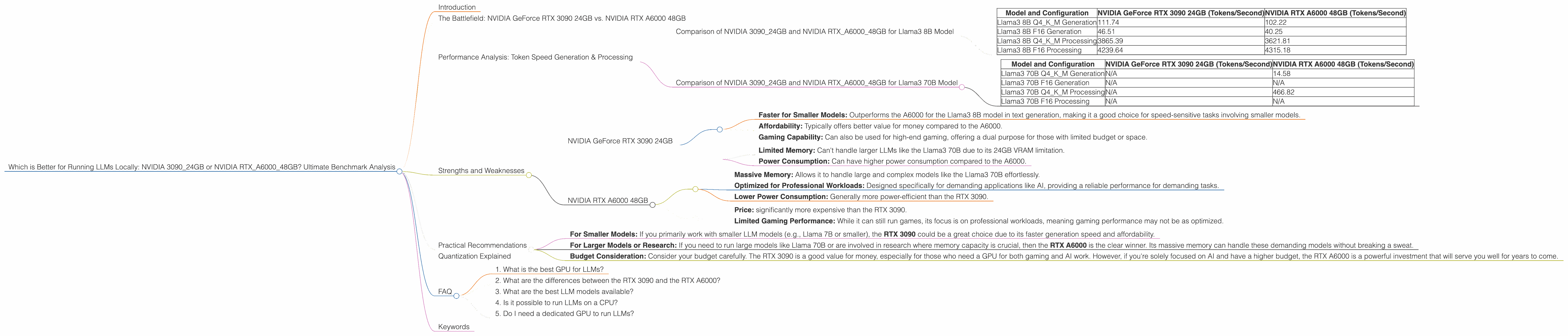
| Model and Configuration | NVIDIA GeForce RTX 3090 24GB (Tokens/Second) | NVIDIA RTX A6000 48GB (Tokens/Second) |
|---|---|---|
| Llama3 8B Q4KM Generation | 111.74 | 102.22 |
| Llama3 8B F16 Generation | 46.51 | 40.25 |
| Llama3 8B Q4KM Processing | 3865.39 | 3621.81 |
| Llama3 8B F16 Processing | 4239.64 | 4315.18 |
Key Takeaways:
- Generation Speed: The RTX 3090 edges out the A6000 slightly in both Q4KM and F16 configurations when generating tokens. This means the 3090 can produce text at a faster rate, potentially leading to a more responsive experience.
- Processing Speed: Both GPUs are on par in terms of processing speed, indicating they handle the internal calculations of the model equally well.
Comparison of NVIDIA 309024GB and NVIDIA RTXA6000_48GB for Llama3 70B Model
Now, let's see how these GPUs perform with the larger Llama3 70B model.
| Model and Configuration | NVIDIA GeForce RTX 3090 24GB (Tokens/Second) | NVIDIA RTX A6000 48GB (Tokens/Second) |
|---|---|---|
| Llama3 70B Q4KM Generation | N/A | 14.58 |
| Llama3 70B F16 Generation | N/A | N/A |
| Llama3 70B Q4KM Processing | N/A | 466.82 |
| Llama3 70B F16 Processing | N/A | N/A |
Key Takeaways:
- Memory is King: The RTX 3090 (with only 24GB of VRAM) was unable to handle the Llama3 70B model, even with the more efficient Q4KM quantization. The A6000, with its generous 48GB of memory, is able to run the model comfortably. This highlights the importance of memory capacity, particularly when dealing with larger models.
Strengths and Weaknesses
NVIDIA GeForce RTX 3090 24GB
Strengths:
- Faster for Smaller Models: Outperforms the A6000 for the Llama3 8B model in text generation, making it a good choice for speed-sensitive tasks involving smaller models.
- Affordability: Typically offers better value for money compared to the A6000.
- Gaming Capability: Can also be used for high-end gaming, offering a dual purpose for those with limited budget or space.
Weaknesses:
- Limited Memory: Can't handle larger LLMs like the Llama3 70B due to its 24GB VRAM limitation.
- Power Consumption: Can have higher power consumption compared to the A6000.
NVIDIA RTX A6000 48GB
Strengths:
- Massive Memory: Allows it to handle large and complex models like the Llama3 70B effortlessly.
- Optimized for Professional Workloads: Designed specifically for demanding applications like AI, providing a reliable performance for demanding tasks.
- Lower Power Consumption: Generally more power-efficient than the RTX 3090.
Weaknesses:
- Price: significantly more expensive than the RTX 3090.
- Limited Gaming Performance: While it can still run games, its focus is on professional workloads, meaning gaming performance may not be as optimized.
Practical Recommendations
For Smaller Models: If you primarily work with smaller LLM models (e.g., Llama 7B or smaller), the RTX 3090 could be a great choice due to its faster generation speed and affordability.
For Larger Models or Research: If you need to run large models like Llama 70B or are involved in research where memory capacity is crucial, then the RTX A6000 is the clear winner. Its massive memory can handle these demanding models without breaking a sweat.
Budget Consideration: Consider your budget carefully. The RTX 3090 is a good value for money, especially for those who need a GPU for both gaming and AI work. However, if you're solely focused on AI and have a higher budget, the RTX A6000 is a powerful investment that will serve you well for years to come.
Quantization Explained
Quantization is a technique used to reduce the size of LLMs without sacrificing too much accuracy. Imagine you have a giant book filled with complex numbers. Quantization is like rewriting that book with simpler numbers, making it smaller and easier to carry around. But you might lose some details in the process.
In the context of LLMs, we use lower precision numbers (like Q4KM) to represent the model's weights. This makes the model smaller and faster to run but can slightly impact its accuracy. However, the performance gains are usually worth the trade-off for many applications.
FAQ
1. What is the best GPU for LLMs?
There's no single "best" GPU for LLMs – it all depends on your specific use case. If you primarily work with smaller models, the RTX 3090 is a good option. For larger models, the RTX A6000 is the way to go.
2. What are the differences between the RTX 3090 and the RTX A6000?
The key difference is memory: the RTX A6000 has 48GB of VRAM, while the RTX 3090 has 24GB. This means the A6000 can handle larger and more demanding models. The RTX 3090 is generally faster for smaller models and offers better value for money.
3. What are the best LLM models available?
There are many popular open-source LLMs available, including Llama, GPT-Neo, and BLOOM. The best model for you will depend on your specific needs – for example, if you need a model for text generation, translation, or code completion.
4. Is it possible to run LLMs on a CPU?
Yes, but it will be significantly slower than running them on a GPU. CPUs are not as well-suited for the parallel processing required for LLMs.
5. Do I need a dedicated GPU to run LLMs?
While not strictly necessary, a dedicated GPU will significantly accelerate your LLM performance, making it practical for many applications.
Keywords
LLMs, large language models, NVIDIA GeForce RTX 3090 24GB, NVIDIA RTX A6000 48GB, performance comparison, token speed, generation, processing, Llama3 8B, Llama3 70B, Q4KM, quantization, F16, memory capacity, strengths, weaknesses, practical recommendations, AI, machine learning, GPU, VRAM, budget, gaming, research, CPU, dedicated GPU, open-source models.