Which is Better for Running LLMs locally: NVIDIA 3090 24GB or NVIDIA A100 PCIe 80GB? Ultimate Benchmark Analysis
Introduction
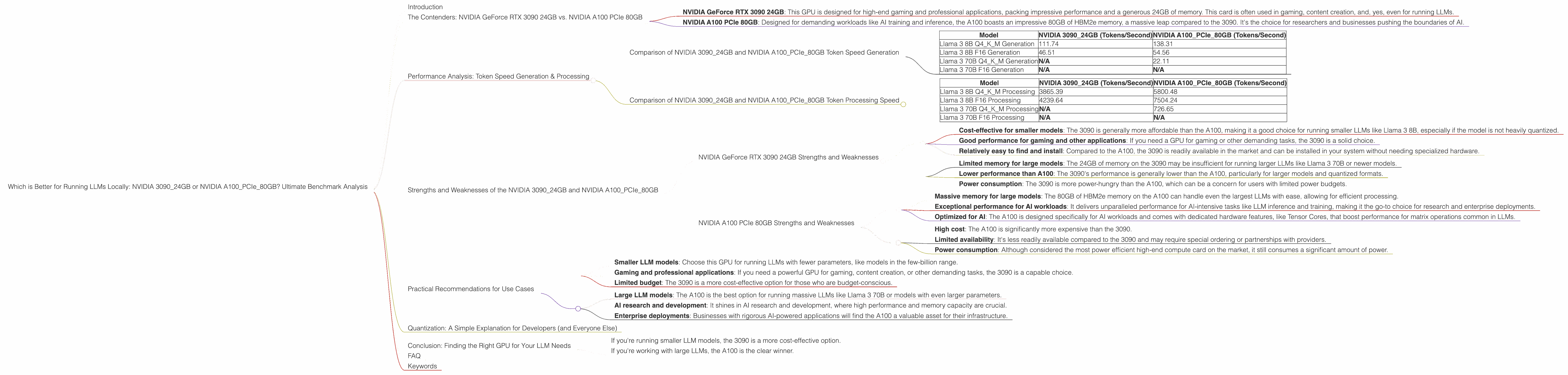
The world of large language models (LLMs) is rapidly evolving, with new models and applications emerging daily. This has created a growing demand for powerful hardware that can handle the computational demands of running these models locally. Two popular choices for this task are the NVIDIA GeForce RTX 3090 24GB and the NVIDIA A100 PCIe 80GB GPUs.
But which one is better for running LLMs, and what are the trade-offs involved? This article delves into the ultimate benchmark analysis of these two powerful GPUs and provides insights into their strengths and limitations for different LLM use cases.
The Contenders: NVIDIA GeForce RTX 3090 24GB vs. NVIDIA A100 PCIe 80GB
The NVIDIA GeForce RTX 3090 24GB, a gaming graphics card powerhouse, and the NVIDIA A100 PCIe 80GB, a data center workhorse, represent two different approaches to GPU power.
NVIDIA GeForce RTX 3090 24GB: This GPU is designed for high-end gaming and professional applications, packing impressive performance and a generous 24GB of memory. This card is often used in gaming, content creation, and, yes, even for running LLMs.
NVIDIA A100 PCIe 80GB: Designed for demanding workloads like AI training and inference, the A100 boasts an impressive 80GB of HBM2e memory, a massive leap compared to the 3090. It's the choice for researchers and businesses pushing the boundaries of AI.
Performance Analysis: Token Speed Generation & Processing
Comparison of NVIDIA 309024GB and NVIDIA A100PCIe_80GB Token Speed Generation
Let's jump right into the numbers. We'll be focusing on the token speed generation and processing for two popular LLM models: Llama 3 8B and Llama 3 70B. We'll examine both models with different quantization formats - Q4KM (4-bit quantization with kernel and matrix multiplication) and F16 (16-bit floating-point).
| Model | NVIDIA 3090_24GB (Tokens/Second) | NVIDIA A100PCIe80GB (Tokens/Second) |
|---|---|---|
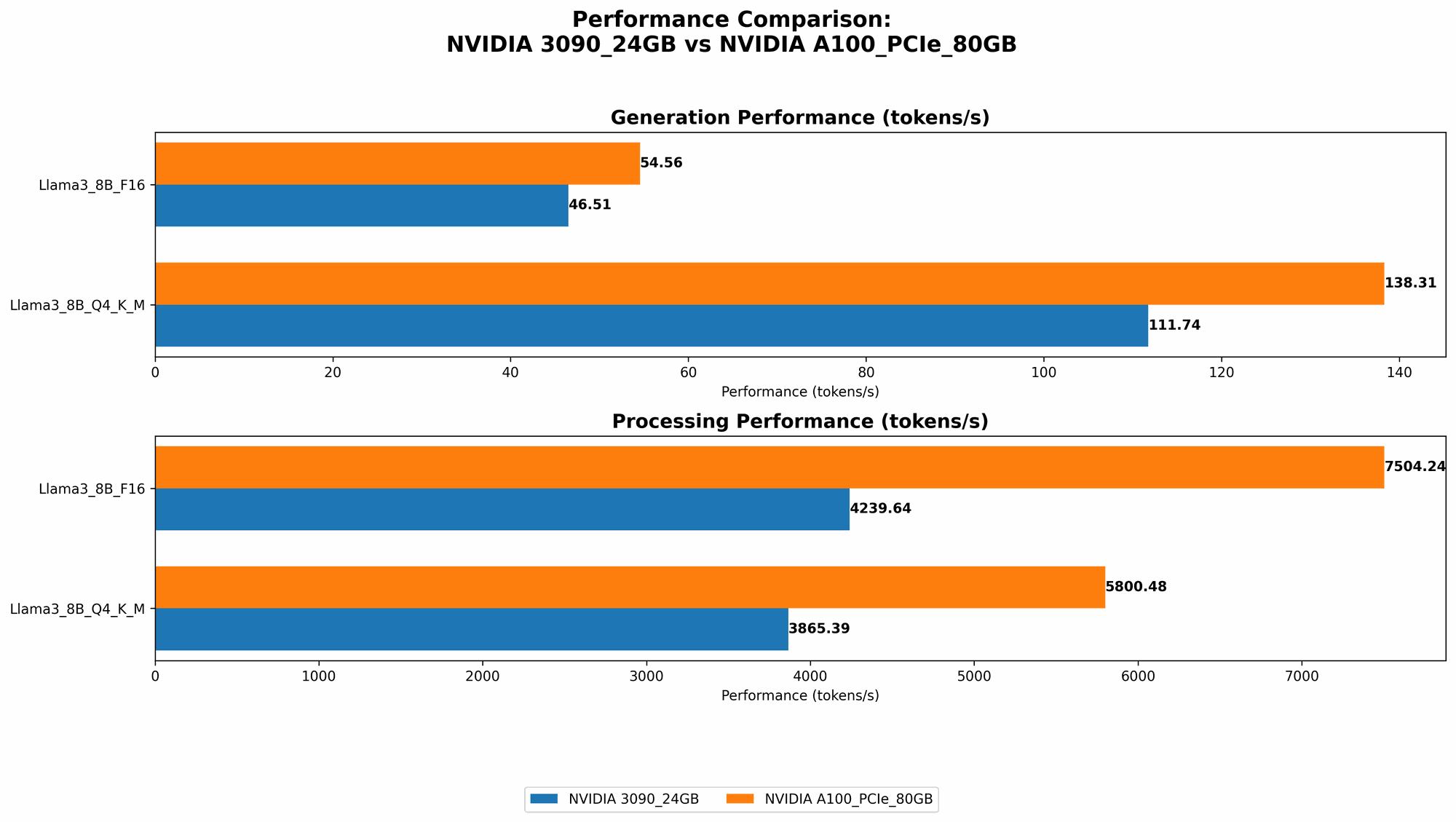
| Llama 3 8B Q4KM Generation | 111.74 | 138.31 |
| Llama 3 8B F16 Generation | 46.51 | 54.56 |
| Llama 3 70B Q4KM Generation | N/A | 22.11 |
| Llama 3 70B F16 Generation | N/A | N/A |
Observations:
- Smaller Model - Llama 3 8B: The A100 consistently outperforms the 3090 in token speed generation for both Q4KM and F16 formats, with an approximate 20%-30% increase in performance.
- Larger Model - Llama 3 70B: The A100 can handle the 70B model with Q4KM, while the 3090 cannot (data not available). This is where the A100's larger memory shines, enabling it to load and process a larger model.
Comparison of NVIDIA 309024GB and NVIDIA A100PCIe_80GB Token Processing Speed
| Model | NVIDIA 3090_24GB (Tokens/Second) | NVIDIA A100PCIe80GB (Tokens/Second) |
|---|---|---|
| Llama 3 8B Q4KM Processing | 3865.39 | 5800.48 |
| Llama 3 8B F16 Processing | 4239.64 | 7504.24 |
| Llama 3 70B Q4KM Processing | N/A | 726.65 |
| Llama 3 70B F16 Processing | N/A | N/A |
Observations:
- Smaller Model - Llama 3 8B: Similar to the generation performance, the A100 excels in processing speed, offering approximately 50% faster token processing compared to the 3090 for both Q4KM and F16.
- Larger Model - Llama 3 70B: The A100 again demonstrates its capability with the larger model, exhibiting a significant processing speed.
Strengths and Weaknesses of the NVIDIA 309024GB and NVIDIA A100PCIe_80GB
NVIDIA GeForce RTX 3090 24GB Strengths and Weaknesses
Strengths:
- Cost-effective for smaller models: The 3090 is generally more affordable than the A100, making it a good choice for running smaller LLMs like Llama 3 8B, especially if the model is not heavily quantized.
- Good performance for gaming and other applications: If you need a GPU for gaming or other demanding tasks, the 3090 is a solid choice.
- Relatively easy to find and install: Compared to the A100, the 3090 is readily available in the market and can be installed in your system without needing specialized hardware.
Weaknesses:
- Limited memory for large models: The 24GB of memory on the 3090 may be insufficient for running larger LLMs like Llama 3 70B or newer models.
- Lower performance than A100: The 3090's performance is generally lower than the A100, particularly for larger models and quantized formats.
- Power consumption: The 3090 is more power-hungry than the A100, which can be a concern for users with limited power budgets.
NVIDIA A100 PCIe 80GB Strengths and Weaknesses
Strengths:
- Massive memory for large models: The 80GB of HBM2e memory on the A100 can handle even the largest LLMs with ease, allowing for efficient processing.
- Exceptional performance for AI workloads: It delivers unparalleled performance for AI-intensive tasks like LLM inference and training, making it the go-to choice for research and enterprise deployments.
- Optimized for AI: The A100 is designed specifically for AI workloads and comes with dedicated hardware features, like Tensor Cores, that boost performance for matrix operations common in LLMs.
Weaknesses:
- High cost: The A100 is significantly more expensive than the 3090.
- Limited availability: It's less readily available compared to the 3090 and may require special ordering or partnerships with providers.
- Power consumption: Although considered the most power efficient high-end compute card on the market, it still consumes a significant amount of power.
Practical Recommendations for Use Cases
Use the NVIDIA 3090_24GB for:
- Smaller LLM models: Choose this GPU for running LLMs with fewer parameters, like models in the few-billion range.
- Gaming and professional applications: If you need a powerful GPU for gaming, content creation, or other demanding tasks, the 3090 is a capable choice.
- Limited budget: The 3090 is a more cost-effective option for those who are budget-conscious.
Use the NVIDIA A100PCIe80GB for:
- Large LLM models: The A100 is the best option for running massive LLMs like Llama 3 70B or models with even larger parameters.
- AI research and development: It shines in AI research and development, where high performance and memory capacity are crucial.
- Enterprise deployments: Businesses with rigorous AI-powered applications will find the A100 a valuable asset for their infrastructure.
Quantization: A Simple Explanation for Developers (and Everyone Else)
Imagine you have a massive library filled with books. Each book represents a piece of information, a word or a phrase. Now, imagine you want to compress those books into a smaller space to save room. You could replace each book with a smaller, more compact version, using fewer materials.
This is similar to quantization. Imagine a single piece of information in an LLM model, a number representing a word. Quantization is like taking that number and representing it with fewer digits, making it smaller and more efficient.
Q4KM Quantization:
This method uses 4 bits to represent each piece of information. Now, imagine instead of using all the digits in a book, you use only four digits for every word in the library. It saves a lot of space but might lose some nuance in the information. This can be a trade-off for performance.
F16 (16-bit floating-point):
This format uses 16 bits to represent each piece of information. It's a compromise between accuracy and compactness.
Key Takeaway: Quantization allows us to run LLMs more efficiently by reducing the amount of memory needed. It's like having a smaller library but still retaining the information you need. The trade-off is that some details might be lost.
Conclusion: Finding the Right GPU for Your LLM Needs
The choice between the NVIDIA GeForce RTX 3090 24GB and the NVIDIA A100 PCIe 80GB depends on your specific needs and budget.
- If you're running smaller LLM models, the 3090 is a more cost-effective option.
- If you're working with large LLMs, the A100 is the clear winner.
The A100's massive memory, performance, and AI-optimized design make it ideal for researchers and businesses who demand the best performance possible. The 3090, on the other hand, provides excellent performance and value for running smaller models or for gaming and other professional applications.
FAQ
Q: Can I run LLMs on a CPU instead of a GPU?
A: While it is possible to run LLMs on a CPU, it's considerably slower and less efficient. GPUs excel at parallel computation, making them much better suited for the complex tasks of LLMs.
Q: Are there other GPUs I can use for running LLMs?
A: The NVIDIA A100 is the flagship for AI workloads, but there are many other alternatives, including the NVIDIA A40, A30, and even gaming card like the 4090. You can also find excellent options from companies like Intel and AMD.
Q: How do I choose the right LLM for my needs?
A: The ideal LLM depends on your specific application. Consider factors such as size, performance, and specialization. For example, if you need a model for language translation, you might choose a model trained specifically for this task.
Q: What is the future of LLMs and GPU hardware?
A: The future of LLMs is full of exciting possibilities, with advancements in model size, performance, and applications. We can expect to see even more powerful GPUs designed specifically for AI workloads, contributing to the rapid evolution of this field.
Keywords
LLM, Large Language Model, GPU, Graphics Processing Unit, NVIDIA GeForce RTX 3090 24GB, NVIDIA A100 PCIe 80GB, AI, Artificial Intelligence, Token Speed Generation, Token Processing, Quantization, Q4KM, F16, Llama 3 8B, Llama 3 70B, Benchmark, Performance, Comparison, Cost, Memory, Applications, Use Cases, Future of LLMs.