Which is Better for Running LLMs locally: NVIDIA 3090 24GB or NVIDIA 4090 24GB? Ultimate Benchmark Analysis
Introduction
The world of Large Language Models (LLMs) is booming, with new models and applications emerging daily. If you're a developer or AI enthusiast, you might be wondering how to run these powerful models locally. Running LLMs locally can be a great way to experiment with these models, fine-tune them, and even create your own applications. But before you start, you need to choose the right hardware.
This article will dive into the performance comparison of two popular high-end graphics cards, the NVIDIA 309024GB and the NVIDIA 409024GB, for running LLMs locally. We'll look at their performance with popular models like Llama 3 8B and Llama 3 70B, and help you determine which card is the better choice for your needs.
NVIDIA 309024GB vs. NVIDIA 409024GB for LLMs: A Deep Dive
The NVIDIA 309024GB and 409024GB are two of the most powerful graphics cards available, known for their immense processing power and large memory. Let's see how they perform with LLMs.
Comparison of NVIDIA 309024GB and NVIDIA 409024GB for Llama 3 8B
Data:
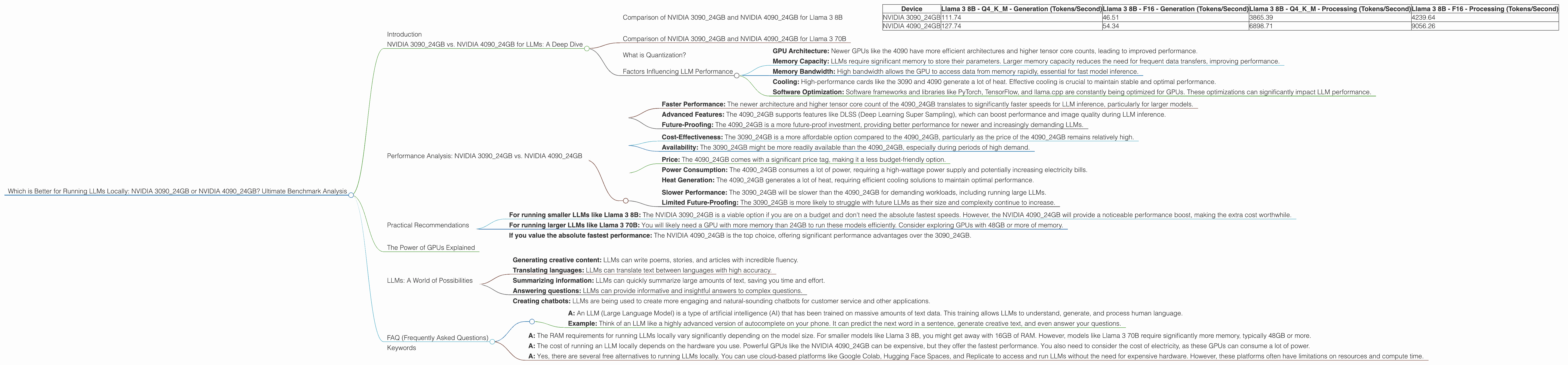
| Device | Llama 3 8B - Q4KM - Generation (Tokens/Second) | Llama 3 8B - F16 - Generation (Tokens/Second) | Llama 3 8B - Q4KM - Processing (Tokens/Second) | Llama 3 8B - F16 - Processing (Tokens/Second) |
|---|---|---|---|---|
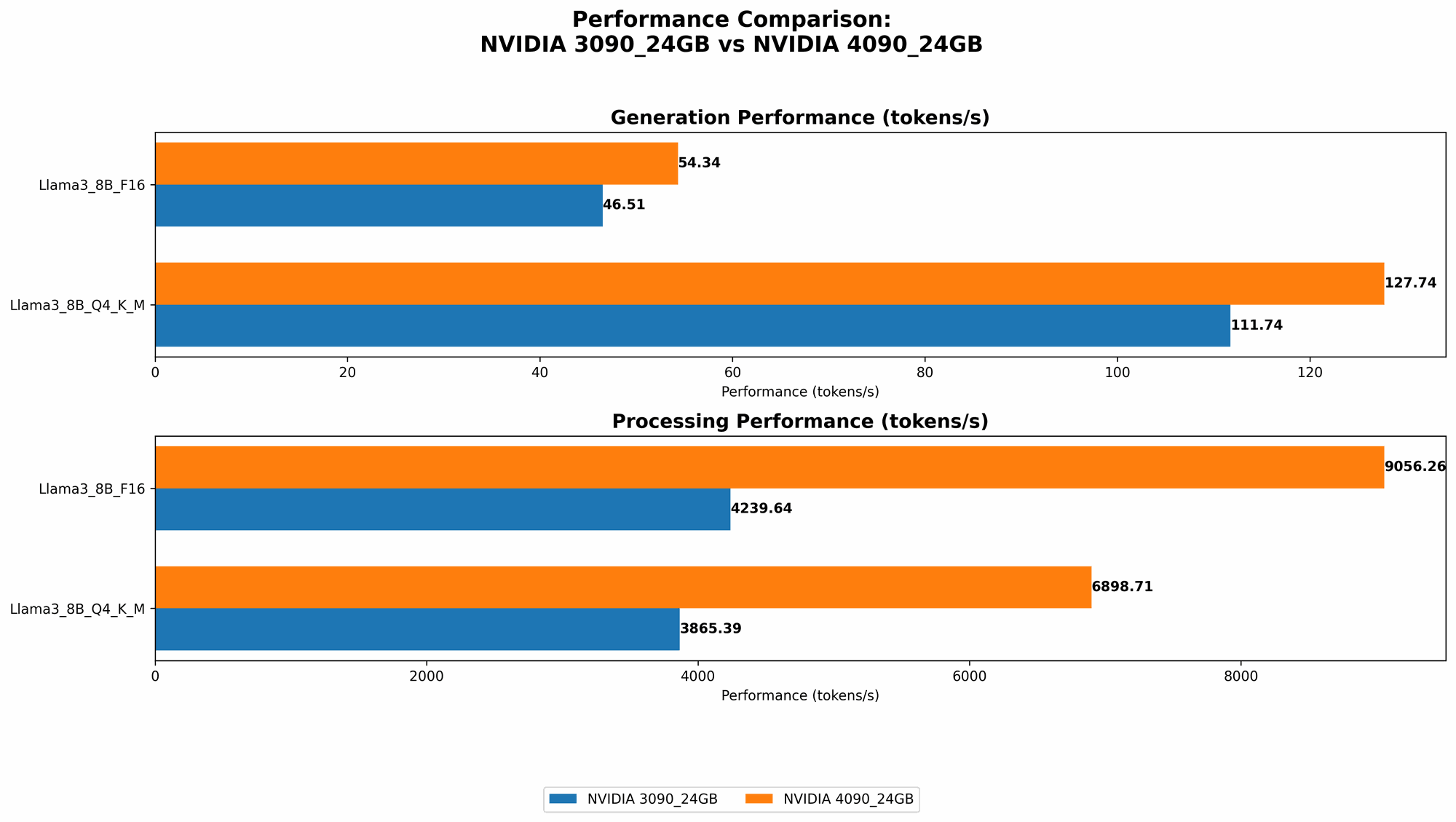
| NVIDIA 3090_24GB | 111.74 | 46.51 | 3865.39 | 4239.64 |
| NVIDIA 4090_24GB | 127.74 | 54.34 | 6898.71 | 9056.26 |
Analysis:
The NVIDIA 409024GB significantly outperforms the NVIDIA 309024GB for both the quantized (Q4KM) and the F16 precision implementations of Llama 3 8B.
Generation:
- NVIDIA 409024GB: Generates about 14.3% more tokens per second in Q4KM precision compared to the 309024GB.
- NVIDIA 409024GB: Generates about 17% more tokens per second in F16 precision compared to the 309024GB.
Processing:
- NVIDIA 409024GB: Processes about 78% more tokens per second in Q4KM precision compared to the 309024GB.
- NVIDIA 409024GB: Processes about 113% more tokens per second in F16 precision compared to the 309024GB.
Conclusion:
For Llama 3 8B the NVIDIA 409024GB is clearly the better choice, offering significantly faster speeds for both generation and processing. If you are working with this model and need the fastest possible performance, then the 409024GB is the way to go.
Comparison of NVIDIA 309024GB and NVIDIA 409024GB for Llama 3 70B
Data:
Unfortunately, we don't have benchmark data for Llama 3 70B on either the NVIDIA 309024GB or the NVIDIA 409024GB. It is likely that running a model of this size requires a very large amount of memory, potentially exceeding even the 24GB available on these cards.
What is Quantization?
Quantization is a technique used to reduce the size of LLMs, which can lead to faster inference speed and lower memory requirements. Think of it like compressing a large image file. By using fewer bits to represent the numerical parameters of the model, we can significantly reduce its size.
Factors Influencing LLM Performance
The performance of an LLM on a GPU is influenced by a variety of factors including:
- GPU Architecture: Newer GPUs like the 4090 have more efficient architectures and higher tensor core counts, leading to improved performance.
- Memory Capacity: LLMs require significant memory to store their parameters. Larger memory capacity reduces the need for frequent data transfers, improving performance.
- Memory Bandwidth: High bandwidth allows the GPU to access data from memory rapidly, essential for fast model inference.
- Cooling: High-performance cards like the 3090 and 4090 generate a lot of heat. Effective cooling is crucial to maintain stable and optimal performance.
- Software Optimization: Software frameworks and libraries like PyTorch, TensorFlow, and llama.cpp are constantly being optimized for GPUs. These optimizations can significantly impact LLM performance.
Performance Analysis: NVIDIA 309024GB vs. NVIDIA 409024GB
Strengths of NVIDIA 4090_24GB:
- Faster Performance: The newer architecture and higher tensor core count of the 4090_24GB translates to significantly faster speeds for LLM inference, particularly for larger models.
- Advanced Features: The 4090_24GB supports features like DLSS (Deep Learning Super Sampling), which can boost performance and image quality during LLM inference.
- Future-Proofing: The 4090_24GB is a more future-proof investment, providing better performance for newer and increasingly demanding LLMs.
Strengths of NVIDIA 3090_24GB:
- Cost-Effectiveness: The 309024GB is a more affordable option compared to the 409024GB, particularly as the price of the 4090_24GB remains relatively high.
- Availability: The 309024GB might be more readily available than the 409024GB, especially during periods of high demand.
Weaknesses of NVIDIA 4090_24GB:
- Price: The 4090_24GB comes with a significant price tag, making it a less budget-friendly option.
- Power Consumption: The 4090_24GB consumes a lot of power, requiring a high-wattage power supply and potentially increasing electricity bills.
- Heat Generation: The 4090_24GB generates a lot of heat, requiring efficient cooling solutions to maintain optimal performance.
Weaknesses of NVIDIA 3090_24GB:
- Slower Performance: The 309024GB will be slower than the 409024GB for demanding workloads, including running large LLMs.
- Limited Future-Proofing: The 3090_24GB is more likely to struggle with future LLMs as their size and complexity continue to increase.
Practical Recommendations
- For running smaller LLMs like Llama 3 8B: The NVIDIA 309024GB is a viable option if you are on a budget and don't need the absolute fastest speeds. However, the NVIDIA 409024GB will provide a noticeable performance boost, making the extra cost worthwhile.
- For running larger LLMs like Llama 3 70B: You will likely need a GPU with more memory than 24GB to run these models efficiently. Consider exploring GPUs with 48GB or more of memory.
- If you value the absolute fastest performance: The NVIDIA 409024GB is the top choice, offering significant performance advantages over the 309024GB.
The Power of GPUs Explained
Imagine a super-fast computer with a massive amount of storage. Now imagine this computer being optimized to perform trillions of tiny mathematical operations at lightning speed, specifically designed for machine learning tasks. That's essentially what a GPU is!
GPUs excel at parallel processing, making them ideal for tasks like training and running large language models that involve complex calculations on vast amounts of data.
LLMs: A World of Possibilities
LLMs are having a profound impact on AI. They can be used for a wide range of applications including:
- Generating creative content: LLMs can write poems, stories, and articles with incredible fluency.
- Translating languages: LLMs can translate text between languages with high accuracy.
- Summarizing information: LLMs can quickly summarize large amounts of text, saving you time and effort.
- Answering questions: LLMs can provide informative and insightful answers to complex questions.
- Creating chatbots: LLMs are being used to create more engaging and natural-sounding chatbots for customer service and other applications.
FAQ (Frequently Asked Questions)
Q: What is an LLM?
- A: An LLM (Large Language Model) is a type of artificial intelligence (AI) that has been trained on massive amounts of text data. This training allows LLMs to understand, generate, and process human language.
- Example: Think of an LLM like a highly advanced version of autocomplete on your phone. It can predict the next word in a sentence, generate creative text, and even answer your questions.
Q: How much RAM do I need to run an LLM locally?
- A: The RAM requirements for running LLMs locally vary significantly depending on the model size. For smaller models like Llama 3 8B, you might get away with 16GB of RAM. However, models like Llama 3 70B require significantly more memory, typically 48GB or more.
Q: What is the cost of running an LLM locally?
- A: The cost of running an LLM locally depends on the hardware you use. Powerful GPUs like the NVIDIA 4090_24GB can be expensive, but they offer the fastest performance. You also need to consider the cost of electricity, as these GPUs can consume a lot of power.
Q: Are there free alternatives to running LLMs locally?
- A: Yes, there are several free alternatives to running LLMs locally. You can use cloud-based platforms like Google Colab, Hugging Face Spaces, and Replicate to access and run LLMs without the need for expensive hardware. However, these platforms often have limitations on resources and compute time.
Keywords
Large Language Model, LLM, NVIDIA 309024GB, NVIDIA 409024GB, GPU, Graphics Card, Llama 3, Token Generation, Token Processing, CPU, RAM, Quantization, Inference Speed, GPU Benchmark, AI, Machine Learning, Local LLM, Text Generation, Chatbot, Language Model, Model Size, Memory, Performance, Power Consumption, Cost, Cloud Computing, Google Colab, Hugging Face Spaces, Replicate, GPT-3, ChatGPT, Bard.