Which is Better for Running LLMs locally: NVIDIA 3080 10GB or NVIDIA A100 SXM 80GB? Ultimate Benchmark Analysis
Introduction
Running large language models (LLMs) locally can be incredibly powerful, opening up exciting possibilities for personal projects, offline experimentation, and even commercial applications. But choosing the right hardware for this task can be a daunting endeavor, especially when considering two popular GPU options: the NVIDIA GeForce RTX 3080 10GB and the NVIDIA A100 SXM 80GB.
This article dives deep into the capabilities of these GPUs, providing a comprehensive analysis of their performance when running LLMs. We'll explore the pros and cons of each GPU, focusing specifically on their ability to run Llama 3, a popular and powerful open-source LLM. By comparing their performance on different model sizes and quantization levels, we'll offer insights to help you make an informed decision for your specific needs.
Performance Analysis: 308010GB vs. A100SXM_80GB
Let's get down to business! We'll analyze the performance of these GPUs, considering these key factors:
- Model Size: How well do these GPUs handle different LLM sizes, like the 8B and 70B Llama models?
- Quantization: How efficient are the GPUs with different quantization levels, such as Q4/K/M (4-bit quantization) and F16 (half-precision floating point)?
- Model Operations: We'll assess their performance in both "Generation" (text generation) and "Processing" (embedding generation or other contextual tasks).
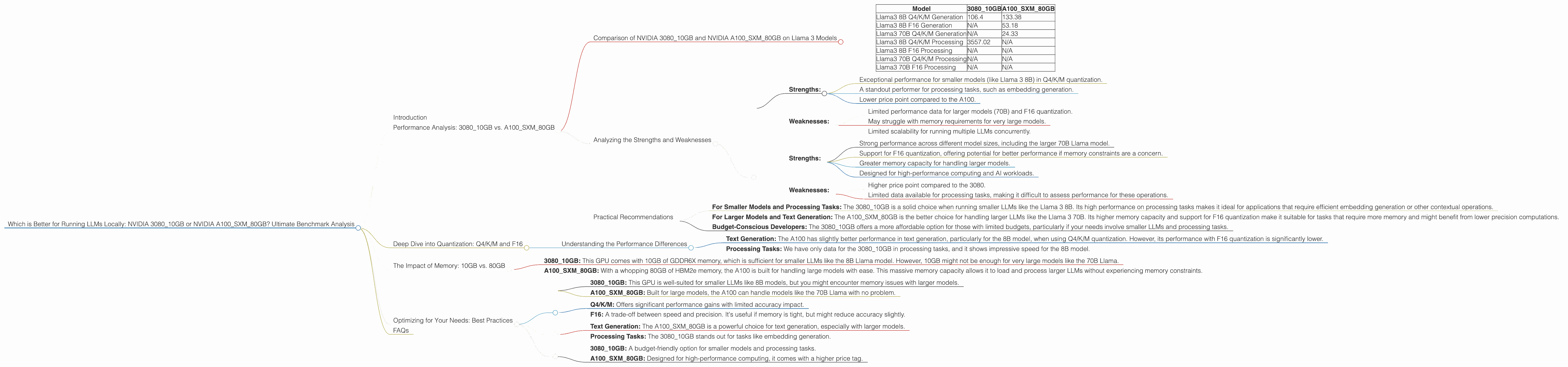
Comparison of NVIDIA 308010GB and NVIDIA A100SXM_80GB on Llama 3 Models
Let's start with the key performance numbers:
Table 1: Llama 3 Model Performance (Tokens/Second)
| Model | 3080_10GB | A100SXM80GB |
|---|---|---|
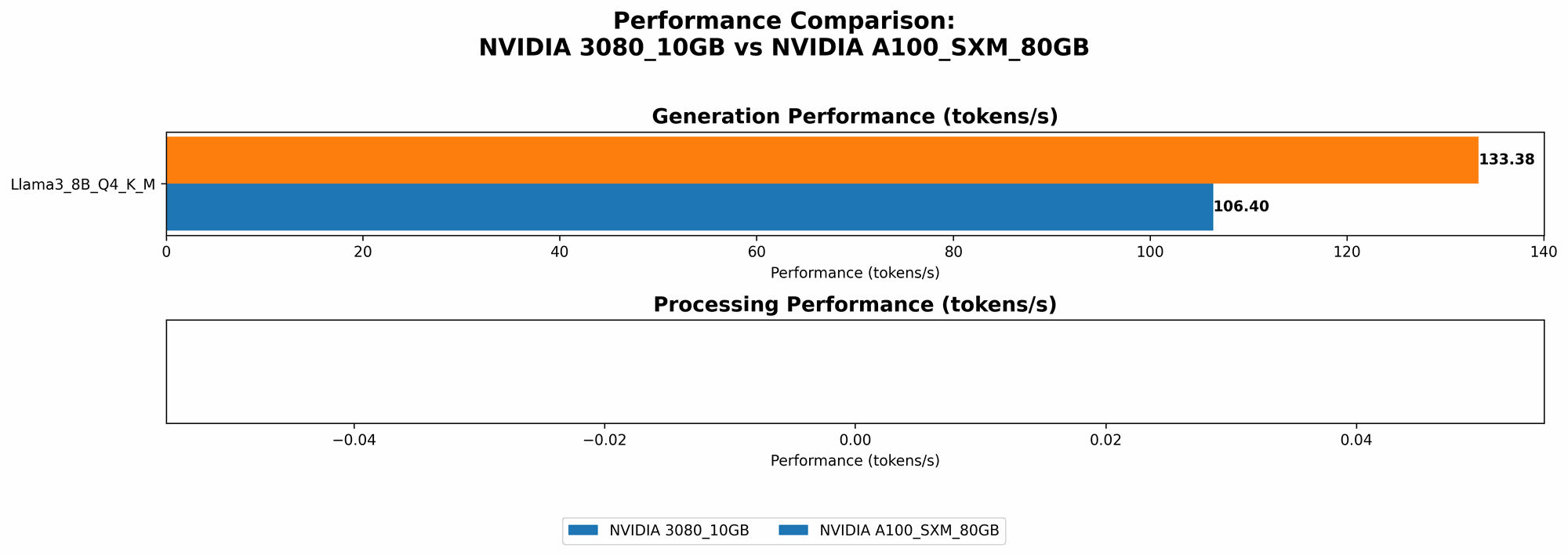
| Llama3 8B Q4/K/M Generation | 106.4 | 133.38 |
| Llama3 8B F16 Generation | N/A | 53.18 |
| Llama3 70B Q4/K/M Generation | N/A | 24.33 |
| Llama3 8B Q4/K/M Processing | 3557.02 | N/A |
| Llama3 8B F16 Processing | N/A | N/A |
| Llama3 70B Q4/K/M Processing | N/A | N/A |
| Llama3 70B F16 Processing | N/A | N/A |
Key Observations:
- 308010GB: The 308010GB shows excellent performance for the Llama 3 8B model, particularly in Q4/K/M quantization. It excels in processing tasks, with a significant lead over the A100 for the 8B model in that category. However, it doesn't have results for larger models (70B) or F16 quantization.
- A100SXM80GB: The A100 shines with its power, capable of handling both the 8B and 70B Llama models. It even offers F16 quantization for the 8B model, albeit with a performance drop compared to Q4/K/M. However, it lacks data for processing operations, leaving some questions about its capabilities in that area.
Analyzing the Strengths and Weaknesses
NVIDIA 3080_10GB:
Strengths:
- Exceptional performance for smaller models (like Llama 3 8B) in Q4/K/M quantization.
- A standout performer for processing tasks, such as embedding generation.
- Lower price point compared to the A100.
Weaknesses:
- Limited performance data for larger models (70B) and F16 quantization.
- May struggle with memory requirements for very large models.
- Limited scalability for running multiple LLMs concurrently.
NVIDIA A100SXM80GB:
Strengths:
- Strong performance across different model sizes, including the larger 70B Llama model.
- Support for F16 quantization, offering potential for better performance if memory constraints are a concern.
- Greater memory capacity for handling larger models.
- Designed for high-performance computing and AI workloads.
Weaknesses:
- Higher price point compared to the 3080.
- Limited data available for processing tasks, making it difficult to assess performance for these operations.
Practical Recommendations
Choosing the Right GPU:
- For Smaller Models and Processing Tasks: The 3080_10GB is a solid choice when running smaller LLMs like the Llama 3 8B. Its high performance on processing tasks makes it ideal for applications that require efficient embedding generation or other contextual operations.
- For Larger Models and Text Generation: The A100SXM80GB is the better choice for handling larger LLMs like the Llama 3 70B. Its higher memory capacity and support for F16 quantization make it suitable for tasks that require more memory and might benefit from lower precision computations.
- Budget-Conscious Developers: The 3080_10GB offers a more affordable option for those with limited budgets, particularly if your needs involve smaller LLMs and processing tasks.
Deep Dive into Quantization: Q4/K/M and F16
What is Quantization?
Imagine you have a map with detailed information, but you want to create a smaller, more portable version. Quantization is like that – it reduces the precision of data, making the model smaller and potentially faster.
- Q4/K/M: This technique uses 4 bits to represent each value in the model's internal representations. Think of it as using a simpler, more compact map.
- F16: This uses half-precision floating-point numbers for calculations, which keeps some precision but also significantly reduces memory requirements. This is like using a map with slightly less detail but still mostly accurate.
How does it Impact Performance?
- Q4/K/M: You can often get a significant performance boost with Q4/K/M, as it allows the GPU to process data faster. It's especially useful for smaller models.
- F16: F16 can be faster than using full-precision floating-point numbers (FP32), but it might slightly reduce the model's accuracy, particularly for complex tasks. It can be a good compromise when memory is a concern.
In Our Benchmarks:
- The 3080_10GB shows impressive results with Q4/K/M.
- The A100SXM80GB also supports Q4/K/M and offers F16 quantization, providing flexibility for those with memory constraints.
Understanding the Performance Differences
- Text Generation: The A100 has slightly better performance in text generation, particularly for the 8B model, when using Q4/K/M quantization. However, its performance with F16 quantization is significantly lower.
- Processing Tasks: We have only data for the 3080_10GB in processing tasks, and it shows impressive speed for the 8B model.
The Impact of Memory: 10GB vs. 80GB
- 3080_10GB: This GPU comes with 10GB of GDDR6X memory, which is sufficient for smaller LLMs like the 8B Llama model. However, 10GB might not be enough for very large models like the 70B Llama.
- A100SXM80GB: With a whopping 80GB of HBM2e memory, the A100 is built for handling large models with ease. This massive memory capacity allows it to load and process larger LLMs without experiencing memory constraints.
Imagine you're trying to build a house. The 308010GB has a small toolbox, perfect for smaller jobs, while the A10080GB has a massive warehouse of tools, ready for any project.
Optimizing for Your Needs: Best Practices
1. Evaluate Model Size:
- 3080_10GB: This GPU is well-suited for smaller LLMs like 8B models, but you might encounter memory issues with larger models.
- A100SXM80GB: Built for large models, the A100 can handle models like the 70B Llama with no problem.
2. Understand Quantization:
- Q4/K/M: Offers significant performance gains with limited accuracy impact.
- F16: A trade-off between speed and precision. It's useful if memory is tight, but might reduce accuracy slightly.
3. Consider Your Use Case:
- Text Generation: The A100SXM80GB is a powerful choice for text generation, especially with larger models.
- Processing Tasks: The 3080_10GB stands out for tasks like embedding generation.
4. Budget Constraints:
- 3080_10GB: A budget-friendly option for smaller models and processing tasks.
- A100SXM80GB: Designed for high-performance computing, it comes with a higher price tag.
FAQs
1. What is an LLM?
An LLM (Large Language Model) is a type of artificial intelligence that excels at understanding and generating human-like text. Popular examples include ChatGPT, Bard, and Llama.
2. Why run LLMs locally?
Running LLMs locally allows you to have complete control over your data, avoid internet connectivity issues, and potentially achieve faster processing speeds for certain tasks.
3. Can I use other GPU options?
Yes, there are many other GPUs available, each with its own strengths and weaknesses. The specific GPU you choose will depend on your needs and budget.
4. What are the best tools for running LLMs locally?
There are several tools available for running LLMs locally, including llama.cpp, GPTQ for quantizing models, and AI frameworks like PyTorch and TensorFlow.
5. How do I choose the right model for my project?
The best LLM for your project depends on its size, its intended purpose, and your budget. Consider the trade-offs between performance, model size, and accuracy.
Keywords: LLM, large language model, NVIDIA 308010GB, NVIDIA A100SXM_80GB, GPU, benchmark, performance, Llama 3, quantization, Q4/K/M, F16, processing, generation, text generation, embedding generation, memory, budget, local, run, AI, machine learning, developer, geek