Which is Better for Running LLMs locally: NVIDIA 3080 10GB or NVIDIA 4090 24GB? Ultimate Benchmark Analysis

Introduction
The world of large language models (LLMs) is exploding, and with it comes the need for powerful hardware to run these computationally demanding models. Whether you're a developer experimenting with cutting-edge AI or a hobbyist wanting to explore the capabilities of LLMs, the choice of your GPU can significantly impact your experience.
In this comprehensive analysis, we'll pit two popular GPUs, the NVIDIA 3080 10GB and the NVIDIA 4090 24GB, against each other, to see which one reigns supreme in the realm of local LLM deployment. We'll go beyond superficial comparisons and dive into the meticulous benchmarks for popular LLM models like Llama 3, focusing on their performance in both token generation and processing.
Buckle up, because we're about to embark on a journey through the world of high-performance computing, and let's see which GPU truly deserves the title of "LLM Champion"!
Comparing NVIDIA 3080 10GB and NVIDIA 4090 24GB for LLM Performance
Understanding the Battlefield: 3080 vs. 4090
Before we dive into the specifics, let's understand the key differences between these two GPUs:
- NVIDIA 3080 10GB: This GPU was a powerhouse when it launched, offering excellent performance for gaming and creative tasks. However, it's now considered "last-gen" and its 10GB VRAM can become a bottleneck for larger LLM models. Think of it as a trusty old sedan – reliable, but maybe not as flashy as the newer models.
- NVIDIA 4090 24GB: This is the current top-of-the-line GPU from NVIDIA, packed with a massive 24GB VRAM and significantly boosted processing power. It's like a high-performance sports car, designed to handle the most demanding tasks with ease.
Llama 3 Model Performance: Token Generation and Processing
Let's delve into the heart of our comparison: how these GPUs perform with the popular Llama 3 LLM. We'll analyze both token generation (the process of producing text outputs) and token processing (the internal computations behind the scenes).
Llama 3 8B Model Performance
| Model and Settings | NVIDIA 3080 10GB (tokens/second) | NVIDIA 4090 24GB (tokens/second) |
|---|---|---|
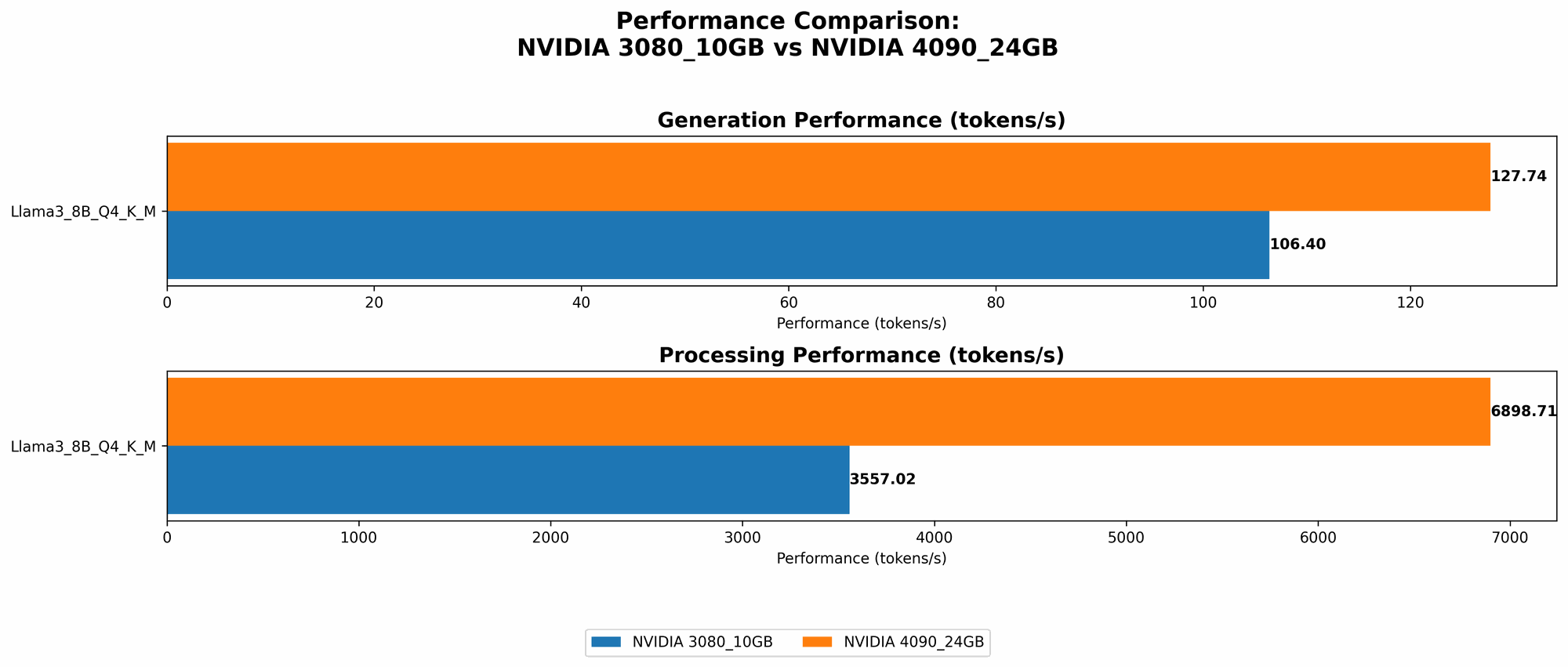
| Llama 3 8B Q4KM Generation | 106.4 | 127.74 |
| Llama 3 8B F16 Generation | N/A | 54.34 |
| Llama 3 8B Q4KM Processing | 3557.02 | 6898.71 |
| Llama 3 8B F16 Processing | N/A | 9056.26 |
Observations:
- Clear Performance Advantage: The 4090 clearly outperforms the 3080 across the board. This is particularly true for the F16 settings, which take advantage of the 4090's increased CUDA cores and memory bandwidth.
- Larger Model Limitations: We don't have data for the 70B Llama 3 models on either GPU. This is likely due to the 3080's limited VRAM and potential memory limitations even for the 4090.
Why These Numbers Matter
Imagine a "token" as a single word or punctuation mark in a sentence. Generating text at a higher rate of tokens per second means you get faster responses from your LLM. This is crucial for interactive applications where responsiveness matters. The 4090's speed advantage is like having a super-fast internet connection, allowing you to work with language models in real time, while the 3080 might feel like a slow dial-up connection.
Performance Breakdown: Strengths and Weaknesses
NVIDIA 3080 10GB: Strengths and Weaknesses
Strengths:
- Cost-Effective: The 3080 is still a capable GPU that offers good bang for the buck, especially if you don't need the extreme performance of the 4090.
- Reliable: It's a proven performer, suitable for less demanding LLMs or smaller models.
Weaknesses:
- VRAM Bottleneck: The 10GB VRAM can limit its use for larger LLMs, especially with more demanding settings like F16.
- Limited Future-Proofing: It's not ideal for future-proofing as the LLM landscape evolves to larger and more complex models.
NVIDIA 4090 24GB: Strengths and Weaknesses
Strengths:
- Ultimate Performance: The 4090 delivers the fastest token generation and processing speeds, making it perfect for demanding LLMs and high-speed research.
- Future-Proofing: With its massive memory, it can handle even larger LLMs that will emerge in the future.
Weaknesses:
- Cost: The 4090 comes with a premium price tag, making it less budget-friendly than the 3080.
- Power Consumption: It's a power-hungry beast, requiring a robust PSU and potentially increasing your energy bills.
Practical Use Cases: Picking the Right GPU
Here's a breakdown of how to pick the right GPU based on your needs:
- Students and Hobbyists: For casual experimentation with LLMs and smaller models, the 3080 is a good starting point. You can still explore the world of LLMs without breaking the bank.
- Professional Developers: If you're working with large LLMs, especially 70B or larger models, the 4090 is your best bet. Its performance and memory capacity will ensure smooth operation.
- Heavy-Duty Research: For pushing the boundaries of LLM research, the 4090 is the clear winner. You'll need its massive VRAM and processing power to handle the most demanding workloads.
Conclusion: Choosing Your LLM Companion
So, who wins the battle for the ultimate LLM companion? It depends on your individual needs and budget. If you're looking for a cost-effective solution for smaller LLMs, the 3080 is a solid choice. But if you need the raw power and future-proofing for large LLMs, the 4090 reigns supreme.
Remember, the world of LLMs is constantly evolving, and the demands for hardware will only increase. Investing in a powerful GPU like the 4090 might be the wise move for the long term, ensuring you're equipped to handle the next generation of LLMs.
FAQ
What is quantization and why does it matter?
Imagine you have a super-detailed photograph with billions of colors. Quantization is like reducing the number of colors in that image. The photograph still looks good, but it takes up less space. In LLMs, quantization reduces the size of the model by using fewer bits to represent the numbers. This makes the model smaller and faster to run, especially on GPUs with limited memory.
What are the limitations of running LLMs locally?
While local deployment offers control and privacy, it has its drawbacks:
- Hardware Requirements: Running complex LLMs locally requires powerful GPUs and ample memory. Depending on the models you use, you might need to invest in high-end hardware.
- Model Size: Even with powerful GPUs, you might face limitations in running extremely large LLMs that exceed your hardware's memory capacity.
- Energy Consumption: Running LLMs locally can be energy-intensive, especially with top-tier GPUs like the 4090.
Can I use a cloud platform instead of running LLMs locally?
Absolutely! Cloud platforms like Google Cloud, AWS, and Azure offer powerful and scalable infrastructure for running LLMs. They provide access to top-of-the-line GPUs and manage the hardware for you, allowing you to focus on your LLM applications.
Keywords
NVIDIA 3080, NVIDIA 4090, LLM, large language model, token generation, token processing, Llama 3, GPU, GPU benchmarks, VRAM, CUDA cores, performance, cost, power consumption, local deployment, cloud platforms, quantization, use cases, developer, hobbyist, research