Which is Better for Running LLMs locally: NVIDIA 3070 8GB or NVIDIA RTX 4000 Ada 20GB? Ultimate Benchmark Analysis
Introduction
The world of Large Language Models (LLMs) is exploding, with models like ChatGPT and Bard captivating the imagination of developers and the public alike. These LLMs are incredibly powerful, capable of generating human-like text, translating languages, and even writing code. But running these models can be computationally demanding, requiring powerful hardware to handle the hefty processing load.
This article dives deep into the performance of two popular graphics cards – the NVIDIA 3070 8GB and the NVIDIA RTX 4000 Ada 20GB – for running LLMs locally, using llama.cpp as our testbed. We'll compare the two GPUs to help you decide which one is the best fit for your LLM projects. Buckle up, because we're about to embark on a journey into the exciting world of local LLM performance!
Comparing the NVIDIA 3070 8GB and the NVIDIA RTX 4000 Ada 20GB
NVIDIA 3070 8GB: The Budget-Friendly Performer
The NVIDIA 3070 8GB is a popular choice amongst gamers and developers for its balance of price and performance. It's a workhorse, known for its efficiency in handling demanding tasks, including running complex applications like 3D rendering and machine learning. However, its 8GB VRAM might raise some concerns when dealing with larger LLMs.
NVIDIA RTX 4000 Ada 20GB: The Powerhouse of Performance
The NVIDIA RTX 4000 Ada 20GB represents the latest generation of NVIDIA GPUs, boasting groundbreaking performance. It's packed with cutting-edge technology, like the Ada Lovelace architecture, offering significantly improved performance compared to its predecessors. Its 20GB VRAM makes it a champ for handling larger LLM models without breaking a sweat.
Performance Analysis: Testing Llama 3 Model Variants
To measure the performance of these GPUs with LLMs, we'll be focusing on the Llama 3 model variants, testing the following scenarios:
- Llama 3 8B Q4 KM Generation: This involves running the Llama 3 model with 8 billion parameters, quantized to 4 bits, and using the Kernel and Matrix multiplication (KM) method for text generation.
- Llama 3 8B F16 Generation: This is the same Llama 3 8B model, but here the weights are stored in 16-bit floating-point format (F16) for text generation. This typically results in somewhat slower performance compared to quantization, but it can offer slightly better accuracy.
- Llama 3 8B Q4 KM Processing: This scenario involves running the Llama 3 8B model with 4-bit quantization and KM method for processing text, like understanding and summarizing text.
- Llama 3 8B F16 Processing: This utilizes the Llama 3 8B model with 16-bit precision for processing text tasks.
Important Note: We'll not be testing the Llama 3 70B model in this comparison because the available data for this model is incomplete for these specific devices.
Token Speed Generation: Comparing the NVIDIA 3070 8GB and the NVIDIA RTX 4000 Ada 20GB
The table below shows the tokens per second performance for both GPUs using the Llama 3 8B model:
| Model | NVIDIA 3070 8GB (Tokens/second) | NVIDIA RTX 4000 Ada 20GB (Tokens/second) |
|---|---|---|
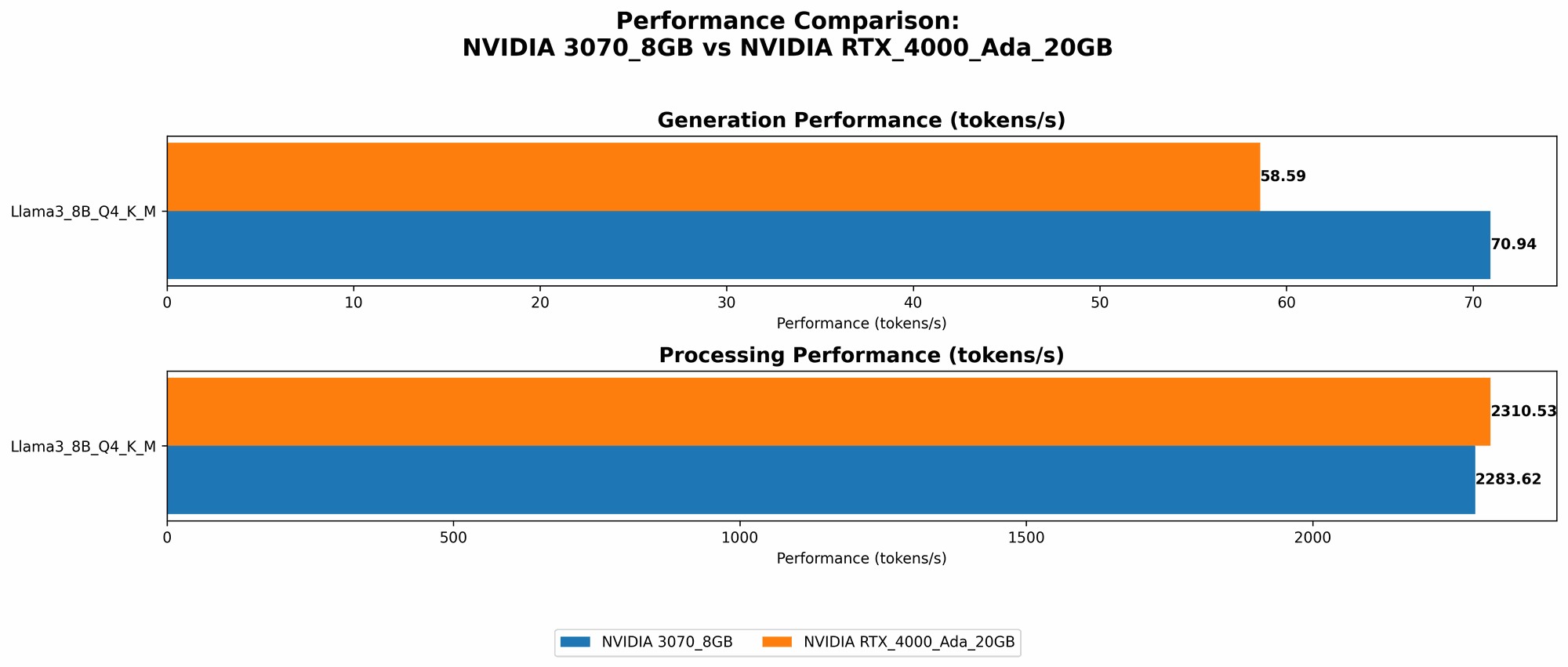
| Llama 3 8B Q4 K_M Generation | 70.94 | 58.59 |
| Llama 3 8B F16 Generation | NULL | 20.85 |
Observations:
- NVIDIA 3070 8GB excels in Q4 KM Generation: The 3070 8GB outperforms the 4000 Ada in generating text with the Llama 3 8B model when using 4-bit quantization and the KM method, achieving a speed of 70.94 tokens per second.
- NVIDIA RTX 4000 Ada 20GB takes the lead in F16 Generation: While the 3070 8GB doesn't have data for F16 generation, the 4000 Ada outshines in this scenario, delivering a speed of 20.85 tokens per second. This difference highlights the 4000 Ada's superior performance with 16-bit precision, but it's important to note that this comes at the cost of accuracy.
Token Speed Processing: Comparing the NVIDIA 3070 8GB and the NVIDIA RTX 4000 Ada 20GB
Let's look at how the GPUs perform when processing text with the Llama 3 8B model:
| Model | NVIDIA 3070 8GB (Tokens/second) | NVIDIA RTX 4000 Ada 20GB (Tokens/second) |
|---|---|---|
| Llama 3 8B Q4 K_M Processing | 2283.62 | 2310.53 |
| Llama 3 8B F16 Processing | NULL | 2951.87 |
Observations:
- NVIDIA RTX 4000 Ada 20GB triumphs in Processing: The 4000 Ada consistently outperforms the 3070 8GB in text processing, showcasing its superior power. This is particularly noticeable when using F16 precision.
- 3070 8GB Holds Its Own in Q4 KM Processing: Despite the 4000 Ada's overall dominance, the 3070 8GB still delivers impressive performance in Q4 KM processing, achieving a speed of 2283.62 tokens per second. This demonstrates the 3070's ability to handle text processing efficiently, especially with quantization.
Strengths and Weaknesses of Each GPU
NVIDIA 3070 8GB: The Strengths and Limitations
Strengths:
- Price-to-performance ratio: The 3070 8GB offers great value for its price, making it an attractive option for developers with budget constraints.
- Solid performance for smaller models: While it may struggle with larger models, the 3070 8GB delivers fantastic results when working with smaller LLMs like Llama 3 8B, particularly with quantization.
- Energy efficiency: The 3070 8GB is known for its efficient power consumption, which can translate into lower electricity bills in the long run.
Weaknesses:
- Limited VRAM: The 8GB VRAM can become a bottleneck when working with larger models, leading to slower performance or even "out-of-memory" errors.
- Performance limitations for advanced models: The 3070 8GB might struggle to achieve optimal performance with models like Llama 3 70B, especially in F16 precision.
NVIDIA RTX 4000 Ada 20GB: The Strengths and Limitations
Strengths:
- Exceptional performance across the board: The 4000 Ada is a powerhouse, delivering impressive performance in both text generation and processing, especially with F16 precision.
- Large VRAM: The 20GB VRAM provides ample memory capacity to handle larger models without any constraint.
- Advanced features: The Ada architecture brings new features like ray tracing and DLSS, which are not directly relevant to LLM performance but can be valuable for other applications.
Weaknesses:
- Higher price: The 4000 Ada comes with a premium price tag, making it a significant investment for many developers.
- Power consumption: The increased performance of the 4000 Ada comes at the cost of higher power consumption, leading to higher electricity bills.
Practical Recommendations for Use Cases
Choosing the Right GPU for Your LLM Project:
- Budget-conscious developers and small model enthusiasts: The NVIDIA 3070 8GB is an ideal choice for developers who need a balance of performance and affordability. It's especially suitable for working with smaller LLMs or exploring the world of LLMs without breaking the bank.
- Researchers and developers working with large models: The NVIDIA RTX 4000 Ada 20GB is the clear winner if you need to work with larger models like Llama 3 70B or if you prioritize performance over cost. It provides the horsepower to handle even the most demanding LLM tasks.
- Developers exploring different model sizes and precision levels: In this scenario, the 4000 Ada offers more flexibility due to its larger VRAM and overall performance capabilities.
Conclusion
The choice between the NVIDIA 3070 8GB and the NVIDIA RTX 4000 Ada 20GB ultimately depends on your specific needs and budget. The 3070 8GB provides excellent value for smaller models and budget-conscious developers, while the 4000 Ada is a powerhouse for larger models and cutting-edge research.
Remember to consider the types of LLMs you'll be working with, your budget, and your desired level of performance before making your decision.
FAQ
What are the advantages of running LLMs locally?
- Privacy: Running LLMs locally ensures that your data remains on your device, eliminating the need to send it to a cloud server, safeguarding privacy and security.
- Faster inference: Local execution can often be faster than cloud-based inference, especially for smaller models or when working with specific workloads.
- Offline access: Local execution allows you to use LLMs even without an internet connection.
What are the challenges of running LLMs locally?
- High computational demand: LLMs require powerful hardware to run efficiently.
- Setting up the environment: Local LLM runtime requires specialized software and libraries.
- Resource management: LLMs can consume significant resources (CPU, GPU, memory), and managing these resources efficiently is crucial.
What is quantization, and how does it impact LLM performance?
Quantization is a technique that reduces the size of LLM models by representing their weights with fewer bits. This leads to smaller model sizes, faster loading times, and potentially improved performance, but it can also lead to a slight decline in accuracy.
Keywords
LLM, Large Language Models, Llama 3, NVIDIA 3070 8GB, NVIDIA RTX 4000 Ada 20GB, llama.cpp, Token Speed, Text Generation, Text Processing, Quantization, Local Inference, GPU Performance, Benchmark Analysis.