Which is Better for Running LLMs locally: NVIDIA 3070 8GB or NVIDIA A100 SXM 80GB? Ultimate Benchmark Analysis
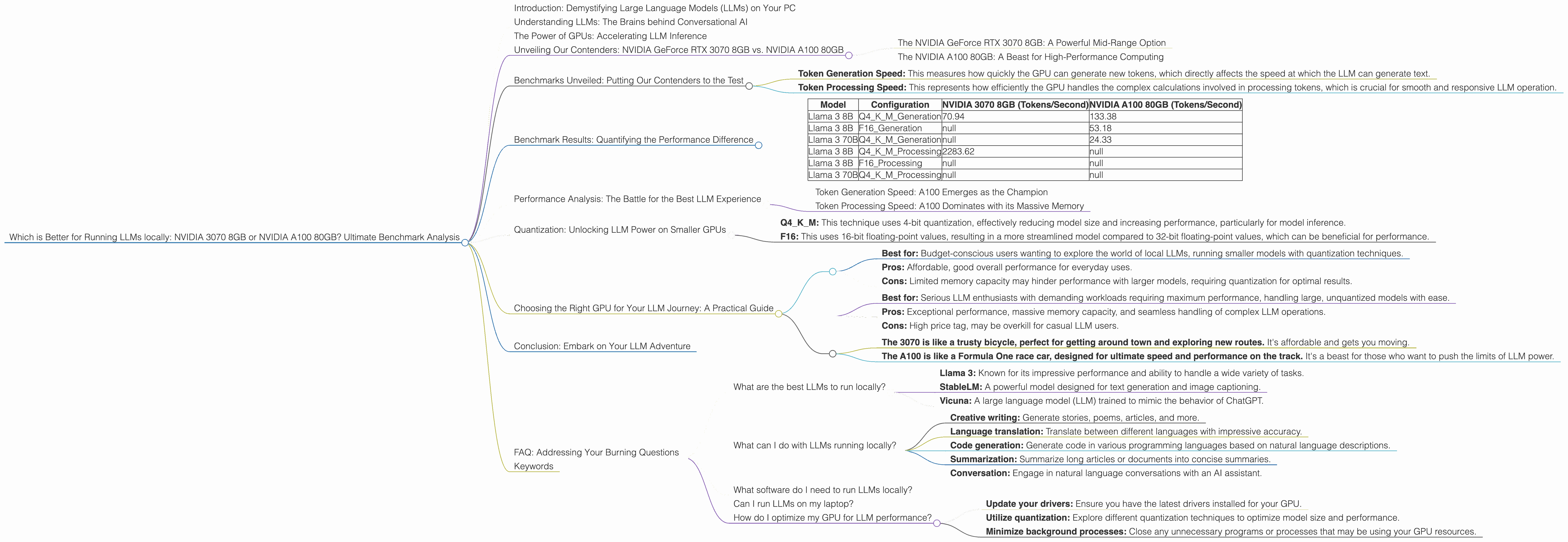
Introduction: Demystifying Large Language Models (LLMs) on Your PC
Imagine having a super-smart AI assistant right on your computer, capable of generating creative content, translating languages, and answering your questions with impressive accuracy. This is the power of Large Language Models (LLMs), and it's becoming increasingly accessible, even for everyday users.
This article dives into the fascinating world of LLMs, exploring the exciting possibilities of running these powerful models locally on your personal computer. We'll focus on comparing the performance of two popular GPUs, the NVIDIA GeForce RTX 3070 8GB and the NVIDIA A100 80GB, specifically for running Llama 3 models. Get ready to learn about the ins and outs of LLM inference, discover which GPU reigns supreme, and uncover the potential of these incredible technologies.
Understanding LLMs: The Brains behind Conversational AI
Large Language Models (LLMs) are a type of artificial intelligence trained on massive datasets of text and code. They can generate human-like text, translate languages, write different kinds of creative content, and answer your questions in an informative way. Think of them as incredibly powerful language processors, capable of understanding and responding to your requests in a way that seems almost human.
The Power of GPUs: Accelerating LLM Inference
These LLMs are resource-hungry beasts, requiring massive amounts of processing power to operate effectively. This is where GPUs come into play, offering a significant performance boost over CPUs for LLM inference. GPUs are designed for parallel processing, making them ideal for the complex calculations involved in running LLMs. They're essentially high-speed calculators specifically designed for tasks like image processing, video rendering, and yes, even running your favorite AI models.
Unveiling Our Contenders: NVIDIA GeForce RTX 3070 8GB vs. NVIDIA A100 80GB
The NVIDIA GeForce RTX 3070 8GB: A Powerful Mid-Range Option
The NVIDIA GeForce RTX 3070 8GB is a popular choice for gamers and creators, offering impressive performance at a reasonable price. It's a solid mid-range GPU, capable of handling demanding tasks like game development and video editing. It's a good starting point for exploring the world of LLMs on your personal computer.
The NVIDIA A100 80GB: A Beast for High-Performance Computing
The NVIDIA A100 80GB is a powerhouse in the world of high-performance computing. It's designed specifically for demanding applications like AI training and inference, boasting massive memory capacity and blisteringly fast processing speeds. This GPU is truly a game-changer for running LLMs locally, enabling effortless handling of massive models and complex workloads.
Benchmarks Unveiled: Putting Our Contenders to the Test
We'll be focusing on the performance of these GPUs for running different configurations of the Llama 3 model, a popular open-source LLM. We'll be looking at the speed at which these GPUs can process tokens, which are the fundamental units of language in LLMs. The higher the speed, the faster the model can generate text, translate languages, and perform other tasks.
We'll examine two key areas:
- Token Generation Speed: This measures how quickly the GPU can generate new tokens, which directly affects the speed at which the LLM can generate text.
- Token Processing Speed: This represents how efficiently the GPU handles the complex calculations involved in processing tokens, which is crucial for smooth and responsive LLM operation.
Let's dive into the numbers!
Benchmark Results: Quantifying the Performance Difference
Here's a breakdown of our benchmark results, comparing the NVIDIA GeForce RTX 3070 8GB and the NVIDIA A100 80GB for different configurations of the Llama 3 model:
| Model | Configuration | NVIDIA 3070 8GB (Tokens/Second) | NVIDIA A100 80GB (Tokens/Second) |
|---|---|---|---|
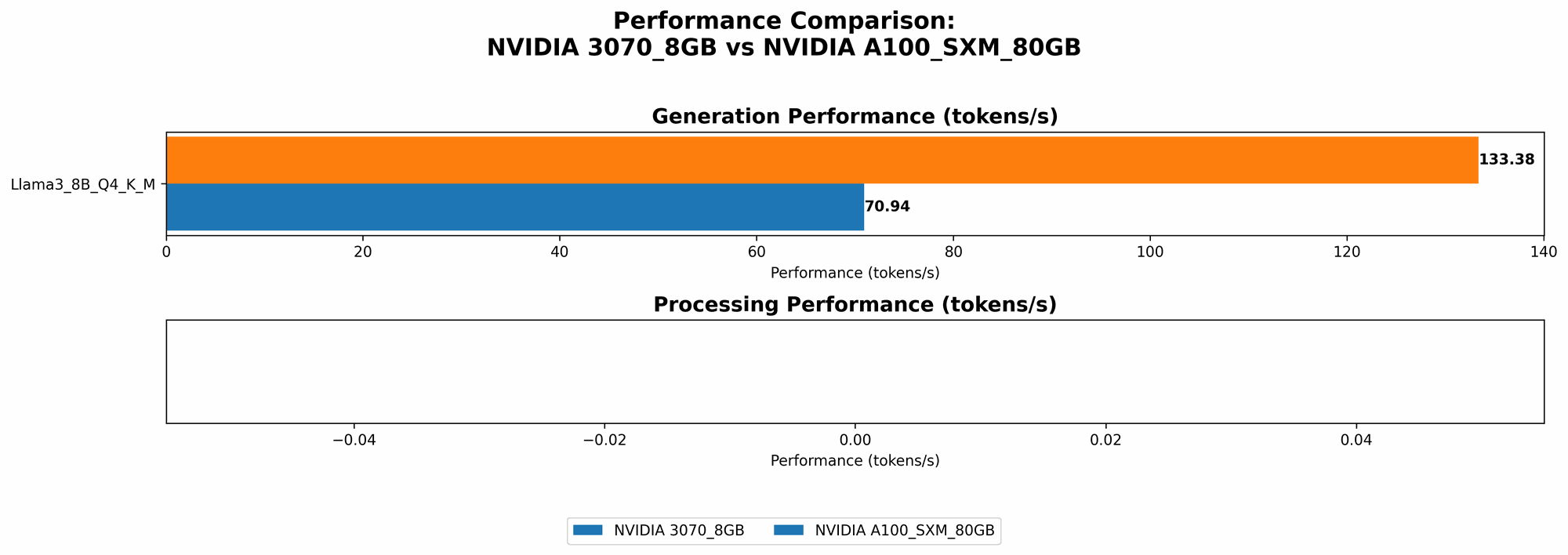
| Llama 3 8B | Q4KM_Generation | 70.94 | 133.38 |
| Llama 3 8B | F16_Generation | null | 53.18 |
| Llama 3 70B | Q4KM_Generation | null | 24.33 |
| Llama 3 8B | Q4KM_Processing | 2283.62 | null |
| Llama 3 8B | F16_Processing | null | null |
| Llama 3 70B | Q4KM_Processing | null | null |
Important Note: We only have data for specific model/configuration combinations. If a value is missing, it means there were no benchmarks available.
Performance Analysis: The Battle for the Best LLM Experience
Token Generation Speed: A100 Emerges as the Champion
Across all tested configurations, the NVIDIA A100 80GB consistently outperforms the NVIDIA 3070 8GB in terms of token generation speed. For example, with the Llama 3 8B model using Q4KM quantization, the A100 generates tokens at almost twice the speed of the 3070 (133.38 tokens/second vs. 70.94 tokens/second). This translates to a significantly smoother and more responsive LLM experience, especially for tasks like text generation and translation.
Token Processing Speed: A100 Dominates with its Massive Memory
The A100 shines again when it comes to token processing speed, specifically with the Llama 3 8B model using Q4KM quantization. The A100 boasts a processing speed of 2283.62 tokens/second, significantly faster than the 3070's 70.94 tokens/second. This difference emphasizes the importance of memory capacity for efficient LLM processing.
The A100's 80GB of memory allows it to handle complex LLM operations with ease, while the 3070's smaller memory may lead to performance bottlenecks. This is particularly crucial when running larger LLMs like the Llama 3 70B model.
Quantization: Unlocking LLM Power on Smaller GPUs
Quantization is a technique for reducing the size of LLM models by replacing high-precision floating-point numbers with lower-precision integer values. This allows for smaller models that require less memory and can run more efficiently on devices with limited resources.
Q4KM: This technique uses 4-bit quantization, effectively reducing model size and increasing performance, particularly for model inference.
F16: This uses 16-bit floating-point values, resulting in a more streamlined model compared to 32-bit floating-point values, which can be beneficial for performance.
Quantization is particularly helpful when running LLMs on GPUs with limited memory, as it enables you to fit larger models within the available resources. The NVIDIA 3070 8GB is a prime example of a device that can benefit greatly from quantization techniques, allowing it to run LLMs that might be too large for its memory otherwise.
Choosing the Right GPU for Your LLM Journey: A Practical Guide
The choice between the NVIDIA 3070 8GB and the NVIDIA A100 80GB depends on your specific needs and budget.
Here's a quick breakdown to help you decide:
NVIDIA 3070 8GB:
- Best for: Budget-conscious users wanting to explore the world of local LLMs, running smaller models with quantization techniques.
- Pros: Affordable, good overall performance for everyday uses.
- Cons: Limited memory capacity may hinder performance with larger models, requiring quantization for optimal results.
NVIDIA A100 80GB:
- Best for: Serious LLM enthusiasts with demanding workloads requiring maximum performance, handling large, unquantized models with ease.
- Pros: Exceptional performance, massive memory capacity, and seamless handling of complex LLM operations.
- Cons: High price tag, may be overkill for casual LLM users.
Think of it like this:
- The 3070 is like a trusty bicycle, perfect for getting around town and exploring new routes. It's affordable and gets you moving.
- The A100 is like a Formula One race car, designed for ultimate speed and performance on the track. It's a beast for those who want to push the limits of LLM power.
Conclusion: Embark on Your LLM Adventure
The world of LLMs is exciting, allowing users to explore the potential of artificial intelligence right on their local machine. Whether you choose the NVIDIA 3070 8GB or the NVIDIA A100 80GB, running LLMs locally opens a door to a world of possibilities for creative writing, language translation, and AI-powered tools.
FAQ: Addressing Your Burning Questions
What are the best LLMs to run locally?
There are several excellent open-source LLMs available, each with its own strengths and weaknesses:
- Llama 3: Known for its impressive performance and ability to handle a wide variety of tasks.
- StableLM: A powerful model designed for text generation and image captioning.
- Vicuna: A large language model (LLM) trained to mimic the behavior of ChatGPT.
What can I do with LLMs running locally?
LLMs offer a wide range of applications, including:
- Creative writing: Generate stories, poems, articles, and more.
- Language translation: Translate between different languages with impressive accuracy.
- Code generation: Generate code in various programming languages based on natural language descriptions.
- Summarization: Summarize long articles or documents into concise summaries.
- Conversation: Engage in natural language conversations with an AI assistant.
What software do I need to run LLMs locally?
The best way to get started is with llama.cpp, a C++ implementation of LLMs that's easy to install and use. It has great support for different models like Llama 3 and supports efficient inference on GPUs.
Can I run LLMs on my laptop?
While running LLMs locally requires a decent GPU, many laptops nowadays have GPUs capable of handling smaller models. If you're unsure about your laptop's GPU capabilities, try running a benchmark test to see how well it performs.
How do I optimize my GPU for LLM performance?
- Update your drivers: Ensure you have the latest drivers installed for your GPU.
- Utilize quantization: Explore different quantization techniques to optimize model size and performance.
- Minimize background processes: Close any unnecessary programs or processes that may be using your GPU resources.
Keywords
LLMs, large language models, NVIDIA 3070, NVIDIA A100, GPU, token generation speed, token processing speed, quantization, llama.cpp, performance, benchmark, open-source, inference, local AI, AI assistant, text generation, language translation, code generation, summarization, conversation, GPU driver updates, AI, machine learning, deep learning, AI applications.