Which is Better for Running LLMs locally: NVIDIA 3070 8GB or NVIDIA 3080 Ti 12GB? Ultimate Benchmark Analysis

Introduction
You've got your hands on a powerful NVIDIA GPU, ready to unleash the potential of large language models (LLMs) locally. But with so many options, it's easy to get lost in the technical details and wonder: which GPU is the ultimate champion for running LLMs locally? In this deep dive, we'll put two powerhouse GPUs – the NVIDIA GeForce RTX 3070 8GB and the NVIDIA GeForce RTX 3080 Ti 12GB – head-to-head to determine the champion for running various Llama 3 models. We'll analyze their speeds, capabilities, and limitations, helping you make the right choice for your LLM needs.
Imagine training a model that could understand and respond to your questions like a knowledgeable friend, or build a chatbot that interacts with users naturally. LLMs offer incredible potential for various applications, and running them locally grants you freedom and control over your data.
Performance Analysis: 3070 8GB vs. 3080 Ti 12GB
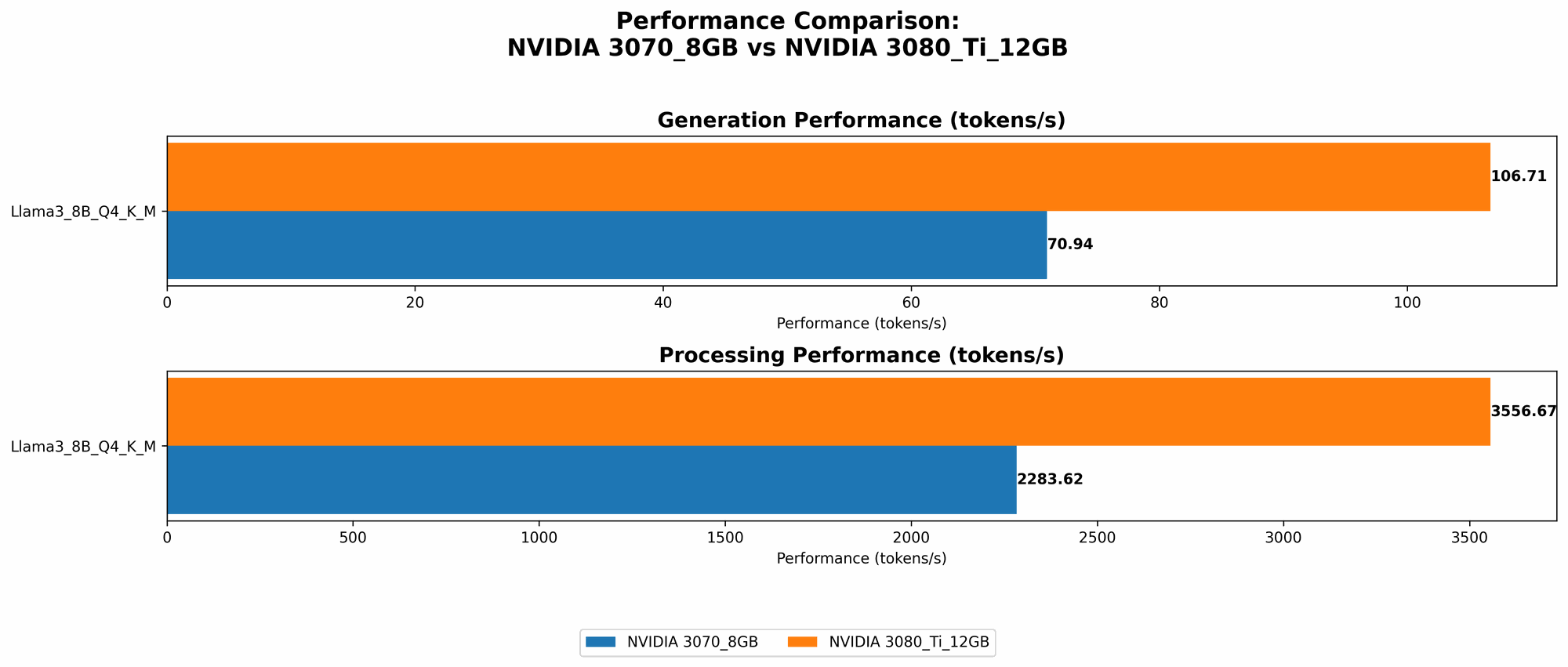
We'll delve into the performance of each GPU by analyzing their token generation and processing speeds for different Llama 3 model configurations. We'll use the following metrics:
- Q4KM: Quantization level 4 with Kernel, Matrix, and Model parallelism. This configuration balances speed and accuracy.
- F16: A more optimal configuration that utilizes FP16 data type, potentially leading to faster performance but might come with some accuracy loss.
Token Generation: Generating Text with Llama 3 Models
The table below presents the token generation speeds, measured in tokens per second, for each GPU and model configuration:
| GPU Model | Llama 3 Model | Tokens/Second |
|---|---|---|
| 3070 8GB | Llama 3 8B Q4KM_Generation | 70.94 |
| 3080 Ti 12GB | Llama 3 8B Q4KM_Generation | 106.71 |
Key Findings:
- The 3080 Ti 12GB clearly outperforms the 3070 8GB in token generation speed, achieving approximately 50% higher speed.
- This performance difference indicates that the 3080 Ti 12GB is better suited for applications that require rapid text generation, such as real-time chatbots or content creation tools.
- The 3070 8GB, while slower, still provides a solid performance for smaller models, making it a viable option for budget-conscious users.
Practical Applications:
- If you're building a chatbot or a conversational AI, the 3080 Ti 12GB's faster token generation would ensure a smoother and more responsive user experience.
- The 3070 8GB is a good choice for experimenting with smaller LLM models or for applications where speed is not a critical factor.
Token Processing: Handling Large Amounts of Text Data
Token processing involves understanding and manipulating text, essential for tasks such as summarization, translation, and question answering. The table below shows the performance comparison for different Llama 3 models:
| GPU Model | Llama 3 Model | Tokens/Second |
|---|---|---|
| 3070 8GB | Llama 3 8B Q4KM_Processing | 2283.62 |
| 3080 Ti 12GB | Llama 3 8B Q4KM_Processing | 3556.67 |
Key Findings:
- The 3080 Ti 12GB again outperforms the 3070 8GB in token processing speed, showing a 55% improvement.
- This performance difference suggests that the 3080 Ti 12GB is better suited for tasks involving large amounts of text data that require fast processing.
- The 3070 8GB performs well for smaller datasets, making it suitable for applications with limited processing demands.
Practical Applications:
- The 3080 Ti 12GB is the ideal choice for tasks like document summarization, translation of large texts, and answering complex questions, where the processing speed is crucial.
- The 3070 8GB is suitable for smaller-scale tasks, like summarizing short articles or analyzing smaller chunks of text.
Comparison of 3070 8GB and 3080 Ti 12GB: Strengths and Weaknesses
Let's summarize the strengths and weaknesses of each GPU to provide a clear picture of their suitability for different use cases:
NVIDIA GeForce RTX 3070 8GB
Strengths:
- Affordable: The 3070 8GB is typically more budget-friendly compared to the 3080 Ti 12GB.
- Solid Performance for Smaller Models: It provides respectable performance for smaller LLM models, making it a good option for experimentation and budget-conscious users.
- Less Power Consumption: Generally consumes less power compared to the 3080 Ti 12GB, which can be advantageous for energy efficiency.
Weaknesses:
- Limited Memory: Its 8GB VRAM can be a bottleneck for larger models, especially with higher memory requirements, leading to slower performance or even crashes.
- Slower Text Generation and Processing: Its performance lags behind the 3080 Ti 12GB for both text generation and processing tasks, especially when dealing with larger datasets.
NVIDIA GeForce RTX 3080 Ti 12GB
Strengths:
- High-Performance: Offers the highest performance among the two GPUs, significantly faster in both token generation and processing tasks.
- Larger Memory: Its 12GB VRAM can handle larger LLM models with higher memory requirements, allowing for greater model capacity.
- Suitable for Complex Tasks: Its high performance makes it ideal for complex tasks involving large datasets, such as document summarization, translation, and question answering.
Weaknesses:
- Higher Cost: The 3080 Ti 12GB comes at a higher price, making it a less budget-friendly option.
- Higher Power Consumption: Consumes more power than the 3070 8GB, impacting energy efficiency and potentially increasing electricity bills.
Choosing the Right GPU: A Practical Guide
The choice between the 3070 8GB and the 3080 Ti 12GB ultimately depends on your specific needs and budget. Here's a breakdown to help you make the right decision:
Go for the 3080 Ti 12GB if:
- You need high-performance for large models: If you are working with large LLM models and require fast text generation and processing, the 3080 Ti 12GB is the clear choice.
- You prioritize speed and accuracy: If your applications demand quick responses, optimal performance, and accurate results, the 3080 Ti 12GB's speed and larger memory will be beneficial.
- You have a larger budget: If you're willing to invest in a premium GPU that delivers the best possible performance, the 3080 Ti 12GB is worth considering.
Go for the 3070 8GB if:
- You have a limited budget: The 3070 8GB is a more affordable option for users who are budget-conscious.
- You're working with smaller models: If your applications involve smaller LLM models, the 3070 8GB can provide adequate performance for most tasks.
- You prioritize energy efficiency: The 3070 8GB's lower power consumption can be advantageous if energy efficiency is a crucial factor.
Final Verdict: The Ultimate Champion
Both the 3070 8GB and the 3080 Ti 12GB are powerful GPUs that can efficiently run LLM models locally. But the 3080 Ti 12GB emerges as the ultimate champion for running large LLM models locally due to its superior performance, larger memory capacity, and its ability to handle complex tasks with ease. However, the 3070 8GB remains a viable option for users on a tight budget or who need to run smaller models effectively. Ultimately, the best GPU for you depends on your specific needs, budget, and use cases.
FAQ: LLMs and GPUs
Q: What are LLMs?
A: LLMs are large language models, a type of artificial intelligence that can understand and generate human-like text. Think of them as complex algorithms trained on vast amounts of data, allowing them to perform tasks like summarizing articles, translating languages, and generating creative content.
Q: What is "Quantization?"
A: Quantization is a technique used to reduce the size of a model without significantly sacrificing its performance. Think of it like reducing the number of colors in a picture; it makes the file smaller, but it might slightly affect the image's quality. Quantization helps smaller GPUs run larger models.
Q: What is "Kernel, Matrix, and Model Parallelism?"
A: These techniques help distribute the processing load of a model across multiple units (like GPU cores), allowing for faster execution. Think of it like dividing a large task among several people; it gets done faster than having one person handle it alone.
Q: What is "FP16?"
A: FP16 stands for "floating-point 16-bit." It's a way of representing numbers with less precision, which can make calculations faster. It's often used for LLMs on GPUs to speed up training and inference.
Q: What is "VRAM?"
A: VRAM or Video RAM is a specific type of RAM used by GPUs to store instructions and data that need to be processed quickly. Think of it as the GPU's own memory, so the larger it is, the more data it can handle.
Q: Can I run LLMs on my CPU?
A: You can, but it's generally much slower than using a GPU. CPUs are designed for general-purpose computing, while GPUs are optimized for parallel processing, making them ideal for LLMs.
Q: What are some other GPUs suitable for running LLMs?
A: Other capable GPUs include the NVIDIA A100, H100, and RTX 40 series (like the 4080 and 4090). These are even more powerful than the 3080 Ti but come at a higher price.
Q: What are some popular LLM frameworks?
A: Popular frameworks include TensorFlow, PyTorch, and Hugging Face Transformers. They provide libraries and tools to build and deploy LLM models.
Keywords
LLMs, large language models, NVIDIA, GeForce RTX 3070, 3080 Ti, GPU, token generation, token processing, speed, memory, performance, benchmark, analysis, comparison, AI, machine learning, deep learning, Llama 3, model, framework, TensorFlow, PyTorch, Hugging Face Transformers, quantization, FP16, VRAM, processing parallelism, local AI, conversational AI, chatbot.