Which is Better for Running LLMs locally: Apple M3 Pro 150gb 14cores or NVIDIA 4090 24GB x2? Ultimate Benchmark Analysis
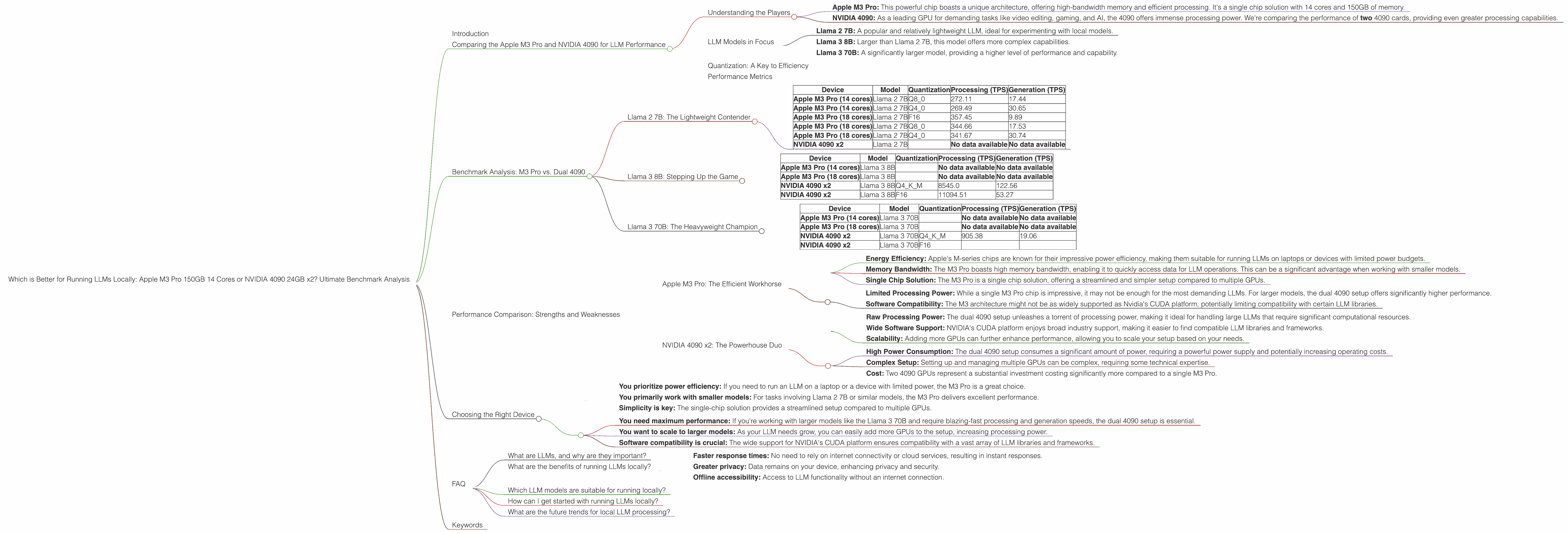
Introduction
The world of Large Language Models (LLMs) is exploding, and with it comes the demand for powerful hardware capable of running these sophisticated AI models locally. But choosing the right device can be a daunting task, especially when faced with options like the Apple M3 Pro and the NVIDIA 4090.
This article delves into the performance of these two powerhouses specifically for running LLMs locally. We'll be comparing the Apple M3 Pro 150GB 14 Cores against two NVIDIA 4090 24GB GPUs across various LLM models, using real-world benchmark data.
Get ready to dive into the numbers and discover which device reigns supreme for your LLM needs!
Comparing the Apple M3 Pro and NVIDIA 4090 for LLM Performance
Understanding the Players
- Apple M3 Pro: This powerful chip boasts a unique architecture, offering high-bandwidth memory and efficient processing. It's a single chip solution with 14 cores and 150GB of memory.
- NVIDIA 4090: As a leading GPU for demanding tasks like video editing, gaming, and AI, the 4090 offers immense processing power. We're comparing the performance of two 4090 cards, providing even greater processing capabilities.
LLM Models in Focus
This analysis focuses on specific LLM models, allowing for a focused comparison of the Apple M3 Pro and the dual 4090 setup. We'll be looking at the following:
- Llama 2 7B: A popular and relatively lightweight LLM, ideal for experimenting with local models.
- Llama 3 8B: Larger than Llama 2 7B, this model offers more complex capabilities.
- Llama 3 70B: A significantly larger model, providing a higher level of performance and capability.
Quantization: A Key to Efficiency
Before delving into the benchmarks, let's briefly discuss quantization. Essentially, it's like a diet for LLMs, reducing their size and memory footprint without sacrificing too much performance.
Think of it like this: You can have a giant pizza (the full LLM), but if you want to be efficient, you can get a smaller, quantized slice (reduced size and memory).
Performance Metrics
We'll be using tokens per second (TPS) as our primary metric for performance. TPS represents the number of tokens an LLM can process per second. This metric is essential for understanding how fast a device can generate text, translate languages, or perform any other LLM task.
Benchmark Analysis: M3 Pro vs. Dual 4090
Llama 2 7B: The Lightweight Contender
Table 1: Llama 2 7B Performance
| Device | Model | Quantization | Processing (TPS) | Generation (TPS) |
|---|---|---|---|---|
| Apple M3 Pro (14 cores) | Llama 2 7B | Q8_0 | 272.11 | 17.44 |
| Apple M3 Pro (14 cores) | Llama 2 7B | Q4_0 | 269.49 | 30.65 |
| Apple M3 Pro (18 cores) | Llama 2 7B | F16 | 357.45 | 9.89 |
| Apple M3 Pro (18 cores) | Llama 2 7B | Q8_0 | 344.66 | 17.53 |
| Apple M3 Pro (18 cores) | Llama 2 7B | Q4_0 | 341.67 | 30.74 |
| NVIDIA 4090 x2 | Llama 2 7B | No data available | No data available |
Analysis:
- The Apple M3 Pro handles Llama 2 7B exceptionally well. It delivers remarkably high processing speeds across various quantization levels.
- The M3 Pro performs particularly well in the Q40 quantization mode, offering better generation speeds compared to Q80.
- The M3 Pro's performance increases with a higher core count.
- The dual 4090 setup has no available benchmark data for Llama 2 7B, making it difficult to compare directly.
Practical Recommendations:
The Apple M3 Pro is your go-to choice for running Llama 2 7B efficiently. Its impressive performance across different quantization levels makes it an excellent option for those seeking a combination of speed and flexibility.
Llama 3 8B: Stepping Up the Game
Table 2: Llama 3 8B Performance
| Device | Model | Quantization | Processing (TPS) | Generation (TPS) |
|---|---|---|---|---|
| Apple M3 Pro (14 cores) | Llama 3 8B | No data available | No data available | |
| Apple M3 Pro (18 cores) | Llama 3 8B | No data available | No data available | |
| NVIDIA 4090 x2 | Llama 3 8B | Q4KM | 8545.0 | 122.56 |
| NVIDIA 4090 x2 | Llama 3 8B | F16 | 11094.51 | 53.27 |
Analysis:
- The dual 4090 setup shines for Llama 3 8B, exhibiting significantly higher TPS for both processing and generation compared to the M3 Pro.
- The dual 4090s demonstrate a significant performance advantage when employing F16 quantization, further strengthening their position for this model.
- The M3 Pro data for Llama 3 8B is not available.
Practical Recommendations:
For Llama 3 8B, the dual 4090 setup is the clear winner due to its massive performance advantage. If you're working with larger models like Llama 3 8B and need maximum speed, leveraging the power of two 4090 GPUs is the way to go.
Llama 3 70B: The Heavyweight Champion
Table 3: Llama 3 70B Performance
| Device | Model | Quantization | Processing (TPS) | Generation (TPS) |
|---|---|---|---|---|
| Apple M3 Pro (14 cores) | Llama 3 70B | No data available | No data available | |
| Apple M3 Pro (18 cores) | Llama 3 70B | No data available | No data available | |
| NVIDIA 4090 x2 | Llama 3 70B | Q4KM | 905.38 | 19.06 |
| NVIDIA 4090 x2 | Llama 3 70B | F16 |
Analysis:
- The dual 4090 setup continues to dominate for Llama 3 70B, delivering exceptional processing and generation speeds.
- While the dual 4090s perform well with Q4KM quantization, F16 data is not available for this model.
- The M3 Pro data for Llama 3 70B is not available.
Practical Recommendations:
For the massive Llama 3 70B model, the dual 4090 setup is once again the clear winner, providing a considerable performance advantage for both processing and generation. If you need to run the largest LLMs locally, the power of two 4090 GPUs becomes essential.
Performance Comparison: Strengths and Weaknesses
Apple M3 Pro: The Efficient Workhorse
Strengths:
- Energy Efficiency: Apple's M-series chips are known for their impressive power efficiency, making them suitable for running LLMs on laptops or devices with limited power budgets.
- Memory Bandwidth: The M3 Pro boasts high memory bandwidth, enabling it to quickly access data for LLM operations. This can be a significant advantage when working with smaller models.
- Single Chip Solution: The M3 Pro is a single chip solution, offering a streamlined and simpler setup compared to multiple GPUs.
Weaknesses:
- Limited Processing Power: While a single M3 Pro chip is impressive, it may not be enough for the most demanding LLMs. For larger models, the dual 4090 setup offers significantly higher performance.
- Software Compatibility: The M3 architecture might not be as widely supported as Nvidia's CUDA platform, potentially limiting compatibility with certain LLM libraries.
NVIDIA 4090 x2: The Powerhouse Duo
Strengths:
- Raw Processing Power: The dual 4090 setup unleashes a torrent of processing power, making it ideal for handling large LLMs that require significant computational resources.
- Wide Software Support: NVIDIA's CUDA platform enjoys broad industry support, making it easier to find compatible LLM libraries and frameworks.
- Scalability: Adding more GPUs can further enhance performance, allowing you to scale your setup based on your needs.
Weaknesses:
- High Power Consumption: The dual 4090 setup consumes a significant amount of power, requiring a powerful power supply and potentially increasing operating costs.
- Complex Setup: Setting up and managing multiple GPUs can be complex, requiring some technical expertise.
- Cost: Two 4090 GPUs represent a substantial investment costing significantly more compared to a single M3 Pro.
Choosing the Right Device
The best device for you depends on your specific needs and priorities.
Choose the Apple M3 Pro if:
- You prioritize power efficiency: If you need to run an LLM on a laptop or a device with limited power, the M3 Pro is a great choice.
- You primarily work with smaller models: For tasks involving Llama 2 7B or similar models, the M3 Pro delivers excellent performance.
- Simplicity is key: The single-chip solution provides a streamlined setup compared to multiple GPUs.
Choose the NVIDIA 4090 x2 if:
- You need maximum performance: If you're working with larger models like the Llama 3 70B and require blazing-fast processing and generation speeds, the dual 4090 setup is essential.
- You want to scale to larger models: As your LLM needs grow, you can easily add more GPUs to the setup, increasing processing power.
- Software compatibility is crucial: The wide support for NVIDIA's CUDA platform ensures compatibility with a vast array of LLM libraries and frameworks.
FAQ
What are LLMs, and why are they important?
LLMs are large AI models trained on massive datasets of text and code. These models can perform a wide range of language-related tasks including text generation, translation, summarization, and code completion. They are transforming industries like healthcare, finance, and education.
What are the benefits of running LLMs locally?
Running LLMs locally allows for:
- Faster response times: No need to rely on internet connectivity or cloud services, resulting in instant responses.
- Greater privacy: Data remains on your device, enhancing privacy and security.
- Offline accessibility: Access to LLM functionality without an internet connection.
Which LLM models are suitable for running locally?
Smaller models like Llama 2 7B and Llama 3 8B are excellent candidates for running on local devices. Larger models like Llama 3 70B typically require powerful hardware like the dual 4090 setup for optimal performance.
How can I get started with running LLMs locally?
Several open-source libraries and tools are available for running LLMs locally, including llama.cpp and transformers. These resources can be helpful for getting started with LLM development.
What are the future trends for local LLM processing?
As hardware technology advances, we can expect even more powerful devices specifically designed for running LLMs locally. New architectures like the Apple M3 Pro and NVIDIA's H100 are paving the way for even more efficient and powerful local LLM processing.
Keywords
Apple M3 Pro, NVIDIA 4090, Llama 2 7B, Llama 3 8B, Llama 3 70B, LLM, Large Language Model, Local LLM, GPU, Processing, Generation, Token per second, TPS, Quantization, Benchmark, Performance, Comparison, Hardware, Software, CUDA, Efficiency