Which is Better for Running LLMs locally: Apple M3 Max 400gb 40cores or NVIDIA 4090 24GB x2? Ultimate Benchmark Analysis
Introduction
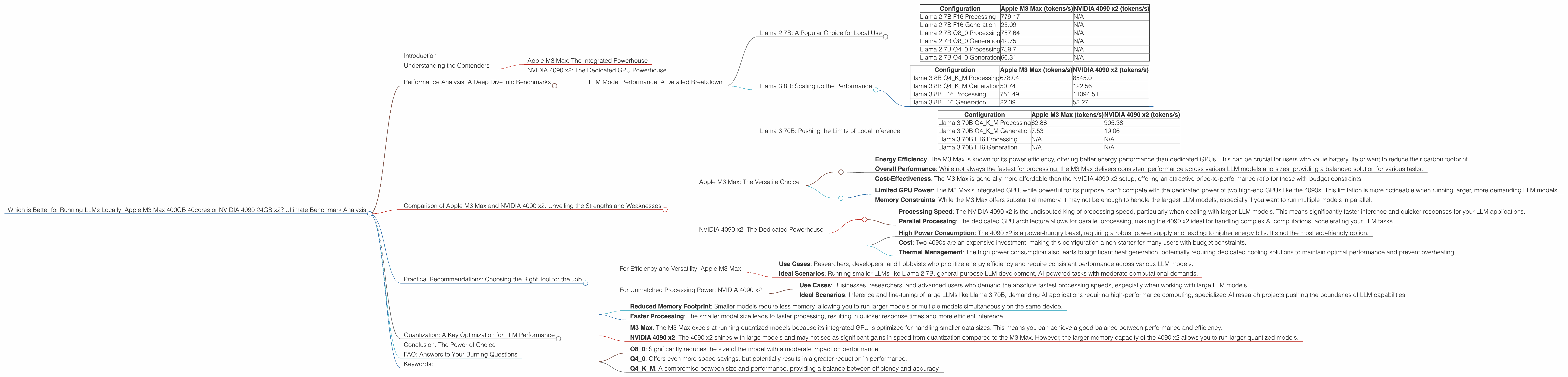
The world of Large Language Models (LLMs) is exploding, and with it, the demand for powerful hardware to run these models locally. But choosing the right hardware can be a daunting task, especially when comparing the latest Apple Silicon processors like the M3 Max with the powerful NVIDIA 4090 GPUs. This article dives deep into the performance of these two contenders, analyzing their strengths and weaknesses when running different LLM models. We'll use real-world benchmarks to provide you with the information you need to make an informed decision.
Understanding the Contenders
Apple M3 Max: The Integrated Powerhouse
The Apple M3 Max is a beast of a chip, boasting 40 cores dedicated to computation and massive amounts of memory. It's designed to be an incredibly efficient powerhouse, optimized for both CPU-intensive tasks and the demands of AI workloads. The M3 Max is integrated into Apple's Mac lineup, offering a powerful and relatively compact option for running LLMs.
NVIDIA 4090 x2: The Dedicated GPU Powerhouse
The NVIDIA 4090 is the current king of the GPU world. When paired with a second 4090, you're looking at a massive amount of dedicated processing power designed for tasks like AI inference. These GPUs are optimized for parallel processing, making them ideal for tackling the complex calculations required by LLMs.
Performance Analysis: A Deep Dive into Benchmarks
To compare these titans, we'll analyze real-world benchmarks focusing on tokens per second (tokens/s), a crucial metric for measuring the speed of LLM processing and generation.
NOTE: Some LLM models and configurations lacked data in the benchmarks we used. We'll clearly state when data is missing to provide a balanced analysis.
LLM Model Performance: A Detailed Breakdown
Let's take a close look at the performance of each device with various LLM models and configurations:
Llama 2 7B: A Popular Choice for Local Use
| Configuration | Apple M3 Max (tokens/s) | NVIDIA 4090 x2 (tokens/s) |
|---|---|---|
| Llama 2 7B F16 Processing | 779.17 | N/A |
| Llama 2 7B F16 Generation | 25.09 | N/A |
| Llama 2 7B Q8_0 Processing | 757.64 | N/A |
| Llama 2 7B Q8_0 Generation | 42.75 | N/A |
| Llama 2 7B Q4_0 Processing | 759.7 | N/A |
| Llama 2 7B Q4_0 Generation | 66.31 | N/A |
Analysis: The M3 Max demonstrates strong performance with the Llama 2 7B model across various configurations (F16, Q80, and Q40). The NVIDIA 4090 x2 configuration was not tested with this model.
Llama 3 8B: Scaling up the Performance
| Configuration | Apple M3 Max (tokens/s) | NVIDIA 4090 x2 (tokens/s) |
|---|---|---|
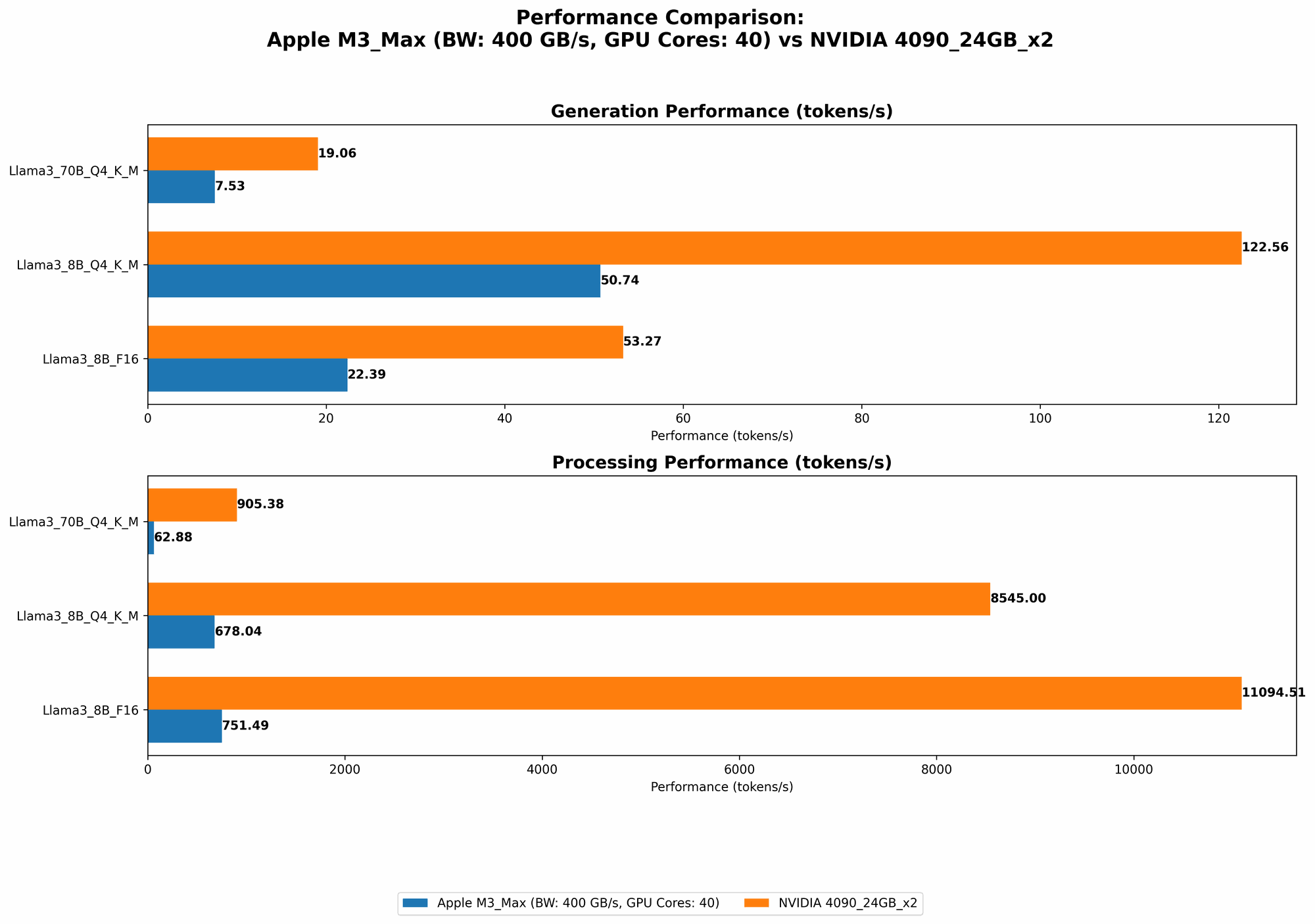
| Llama 3 8B Q4KM Processing | 678.04 | 8545.0 |
| Llama 3 8B Q4KM Generation | 50.74 | 122.56 |
| Llama 3 8B F16 Processing | 751.49 | 11094.51 |
| Llama 3 8B F16 Generation | 22.39 | 53.27 |
Analysis: The NVIDIA 4090 x2 significantly outperforms the M3 Max in processing speed for Llama 3 8B, particularly in F16 and Q4KM configurations. However, the M3 Max holds its own in generation speed for both F16 and Q4KM configurations.
Llama 3 70B: Pushing the Limits of Local Inference
| Configuration | Apple M3 Max (tokens/s) | NVIDIA 4090 x2 (tokens/s) |
|---|---|---|
| Llama 3 70B Q4KM Processing | 62.88 | 905.38 |
| Llama 3 70B Q4KM Generation | 7.53 | 19.06 |
| Llama 3 70B F16 Processing | N/A | N/A |
| Llama 3 70B F16 Generation | N/A | N/A |
Analysis: The NVIDIA 4090 x2 shines again in processing speed with Llama 3 70B in the Q4KM configuration, delivering much faster performance compared to the M3 Max. Both devices have reasonable generation speeds in this configuration. However, the benchmark data is lacking for the F16 configuration for this model.
Comparison of Apple M3 Max and NVIDIA 4090 x2: Unveiling the Strengths and Weaknesses
Apple M3 Max: The Versatile Choice
Strengths:
- Energy Efficiency: The M3 Max is known for its power efficiency, offering better energy performance than dedicated GPUs. This can be crucial for users who value battery life or want to reduce their carbon footprint.
- Overall Performance: While not always the fastest for processing, the M3 Max delivers consistent performance across various LLM models and sizes, providing a balanced solution for various tasks.
- Cost-Effectiveness: The M3 Max is generally more affordable than the NVIDIA 4090 x2 setup, offering an attractive price-to-performance ratio for those with budget constraints.
Weaknesses:
- Limited GPU Power: The M3 Max's integrated GPU, while powerful for its purpose, can't compete with the dedicated power of two high-end GPUs like the 4090s. This limitation is more noticeable when running larger, more demanding LLM models.
- Memory Constraints: While the M3 Max offers substantial memory, it may not be enough to handle the largest LLM models, especially if you want to run multiple models in parallel.
NVIDIA 4090 x2: The Dedicated Powerhouse
Strengths:
- Processing Speed: The NVIDIA 4090 x2 is the undisputed king of processing speed, particularly when dealing with larger LLM models. This means significantly faster inference and quicker responses for your LLM applications.
- Parallel Processing: The dedicated GPU architecture allows for parallel processing, making the 4090 x2 ideal for handling complex AI computations, accelerating your LLM tasks.
Weaknesses:
- High Power Consumption: The 4090 x2 is a power-hungry beast, requiring a robust power supply and leading to higher energy bills. It's not the most eco-friendly option.
- Cost: Two 4090s are an expensive investment, making this configuration a non-starter for many users with budget constraints.
- Thermal Management: The high power consumption also leads to significant heat generation, potentially requiring dedicated cooling solutions to maintain optimal performance and prevent overheating.
Practical Recommendations: Choosing the Right Tool for the Job
For Efficiency and Versatility: Apple M3 Max
- Use Cases: Researchers, developers, and hobbyists who prioritize energy efficiency and require consistent performance across various LLM models.
- Ideal Scenarios: Running smaller LLMs like Llama 2 7B, general-purpose LLM development, AI-powered tasks with moderate computational demands.
For Unmatched Processing Power: NVIDIA 4090 x2
- Use Cases: Businesses, researchers, and advanced users who demand the absolute fastest processing speeds, especially when working with large LLM models.
- Ideal Scenarios: Inference and fine-tuning of large LLMs like Llama 3 70B, demanding AI applications requiring high-performance computing, specialized AI research projects pushing the boundaries of LLM capabilities.
Quantization: A Key Optimization for LLM Performance
Let's dive into the concept of quantization, a technique for reducing the size of your LLM models while maintaining reasonable performance. Imagine shrinking a large image to a smaller size, but still retaining the essence of the picture. Quantization does a similar thing with LLMs, making them more efficient!
Think of it like this: Quantization takes the "high-resolution" version of your LLM model, which requires lots of space and computation, and "downsamples" it to a lower resolution, making it more compact and faster to run.
The benefits of quantization are two-fold:
- Reduced Memory Footprint: Smaller models require less memory, allowing you to run larger models or multiple models simultaneously on the same device.
- Faster Processing: The smaller model size leads to faster processing, resulting in quicker response times and more efficient inference.
How Quantization Affects Performance:
- M3 Max: The M3 Max excels at running quantized models because its integrated GPU is optimized for handling smaller data sizes. This means you can achieve a good balance between performance and efficiency.
- NVIDIA 4090 x2: The 4090 x2 shines with large models and may not see as significant gains in speed from quantization compared to the M3 Max. However, the larger memory capacity of the 4090 x2 allows you to run larger quantized models.
Choosing the Right Quantization Level:
- Q8_0: Significantly reduces the size of the model with a moderate impact on performance.
- Q4_0: Offers even more space savings, but potentially results in a greater reduction in performance.
- Q4KM: A compromise between size and performance, providing a balance between efficiency and accuracy.
Experimentation is Key: The ideal quantization level depends on the specific LLM model and your application requirements. Experiment with different levels to find the best balance for your use case.
Conclusion: The Power of Choice
Choosing the right hardware for running LLMs locally depends on your needs and budget. The Apple M3 Max is a versatile and efficient option, while the NVIDIA 4090 x2 is the undisputed champion of processing speed, albeit at a higher price point. Understanding the strengths and weaknesses of each device, along with the benefits of quantization, will help you make the most informed decision for your AI journey.
FAQ: Answers to Your Burning Questions
Q: What other factors should I consider when choosing hardware for LLMs?
A: Beyond raw processing power, consider factors like memory availability (for handling large models), power consumption, cooling requirements, and ease of setup.
Q: What are the best ways to optimize LLM performance on my chosen hardware?
A: Beyond quantization, explore techniques like model parallelism (splitting the model across multiple devices), GPU memory optimizations, and using efficient libraries like llama.cpp or transformers.
Keywords:
Apple M3 Max, NVIDIA 4090, LLM, large language model, performance, benchmark, tokens per second, processing speed, generation speed, Llama 2, Llama 3, quantization, efficiency, cost, power consumption, memory, GPU, CPU, AI, machine learning, deep learning, local inference, data science, developer, research, application, software.