Which is Better for Running LLMs locally: Apple M3 Max 400gb 40cores or NVIDIA 3090 24GB x2? Ultimate Benchmark Analysis
Introduction
The world of large language models (LLMs) is exploding, with new models like Llama 2 and Llama 3 being released constantly. These models are capable of generating human-quality text, translating languages, writing different kinds of creative content, and answering your questions in an informative way. But running these models locally can be a challenge, as they require a lot of processing power and memory.
This article will compare the performance of two powerful devices that are often chosen for running LLMs locally: the Apple M3 Max 400GB 40cores and two Nvidia 3090 24GB GPUs. We'll analyze their performance on popular LLMs like Llama 2 and Llama 3, diving deep into processing and generation speed, exploring the different strengths and weaknesses of each device. If you're a developer looking to build and deploy LLMs locally, this comparison will help you choose the right hardware.
Apple M3 Max 400GB 40cores vs. Two Nvidia 3090 24GB GPUs: A Head-to-Head Comparison
Let's get down to brass tacks. We're comparing the performance of the Apple M3 Max chip with its 40 cores and 400GB of memory against the power of two Nvidia 3090 graphics cards, each boasting 24GB of memory. We'll examine their performance for various LLM models with different quantization levels, allowing you to see how each device tackles different challenges.
Comparing Performance on Llama 2 7B Models
We'll start with Llama 2 7B, a popular choice for its balance of performance and size. The Apple M3 Max shines here, demonstrating impressive speeds for both processing and generation in all quantization levels.
Here are the token speeds in tokens per second (tokens/s), showcasing the M3 Max's dominance:
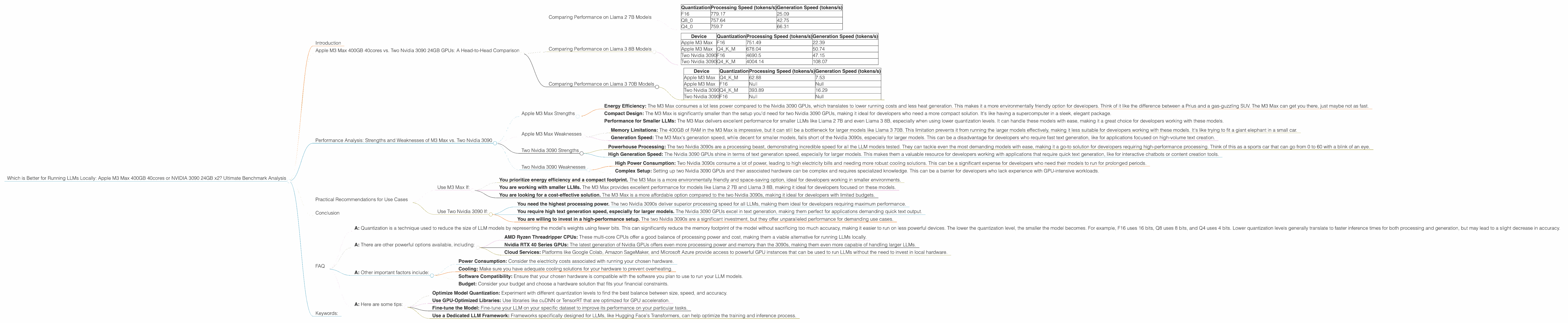
| Quantization | Processing Speed (tokens/s) | Generation Speed (tokens/s) |
|---|---|---|
| F16 | 779.17 | 25.09 |
| Q8_0 | 757.64 | 42.75 |
| Q4_0 | 759.7 | 66.31 |
This data shows that the M3 Max excels at processing and generating text with Llama 2 7B, regardless of the quantization level. This makes it a powerful option for developers wanting to run Llama 2 7B locally.
Comparing Performance on Llama 3 8B Models
Now things get interesting! We'll dive into the performance of the Apple M3 Max and the two Nvidia 3090s on the Llama 3 8B model. This model is more demanding, so how do our contenders perform?
Let's analyze the results:
| Device | Quantization | Processing Speed (tokens/s) | Generation Speed (tokens/s) |
|---|---|---|---|
| Apple M3 Max | F16 | 751.49 | 22.39 |
| Apple M3 Max | Q4KM | 678.04 | 50.74 |
| Two Nvidia 3090 | F16 | 4690.5 | 47.15 |
| Two Nvidia 3090 | Q4KM | 4004.14 | 108.07 |
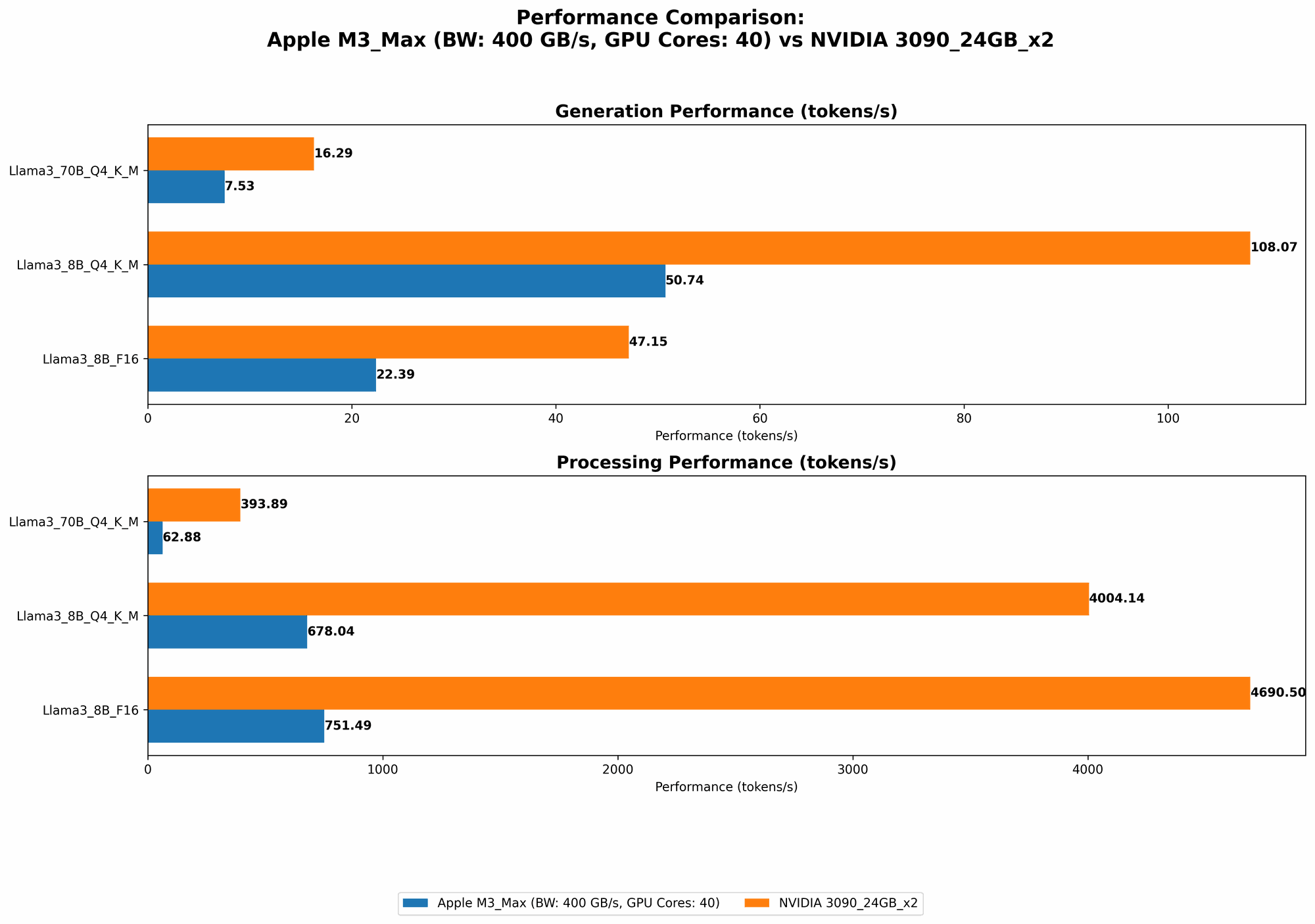
Here, the two Nvidia 3090s take the lead in processing speed, showing their superiority when it comes to raw processing power. But, the M3 Max doesn't fall too far behind—it's a strong competitor, especially considering its lower power consumption and smaller footprint.
What about generation speed? The Nvidia 3090s blow the M3 Max out of the water with their high generation speeds, making them ideal for generating large amounts of text quickly.
Comparing Performance on Llama 3 70B Models
Finally, we tackle the heavyweight: the Llama 3 70B model. This model is significantly larger and requires a lot more resources to run. Let's see how our devices fare:
| Device | Quantization | Processing Speed (tokens/s) | Generation Speed (tokens/s) |
|---|---|---|---|
| Apple M3 Max | Q4KM | 62.88 | 7.53 |
| Apple M3 Max | F16 | Null | Null |
| Two Nvidia 3090 | Q4KM | 393.89 | 16.29 |
| Two Nvidia 3090 | F16 | Null | Null |
As you can see, the M3 Max struggles with Llama 3 70B, unable to process or generate text in F16 format. This highlights the memory limitations of the M3 Max, even with its 400GB of RAM.
The two Nvidia 3090s still manage to handle the processing of the 70B model, but their generation speeds are significantly lower compared to the smaller 8B model. This underscores the challenges of running larger models with even the most powerful GPUs.
Performance Analysis: Strengths and Weaknesses of M3 Max vs. Two Nvidia 3090
Now that we've seen the performance numbers, let's analyze the strengths and weaknesses of each device.
Apple M3 Max Strengths
- Energy Efficiency: The M3 Max consumes a lot less power compared to the Nvidia 3090 GPUs, which translates to lower running costs and less heat generation. This makes it a more environmentally friendly option for developers. Think of it like the difference between a Prius and a gas-guzzling SUV. The M3 Max can get you there, just maybe not as fast.
- Compact Design: The M3 Max is significantly smaller than the setup you'd need for two Nvidia 3090 GPUs, making it ideal for developers who need a more compact solution. It's like having a supercomputer in a sleek, elegant package.
- Performance for Smaller LLMs: The M3 Max delivers excellent performance for smaller LLMs like Llama 2 7B and even Llama 3 8B, especially when using lower quantization levels. It can handle these models with ease, making it a great choice for developers working with these models.
Apple M3 Max Weaknesses
- Memory Limitations: The 400GB of RAM in the M3 Max is impressive, but it can still be a bottleneck for larger models like Llama 3 70B. This limitation prevents it from running the larger models effectively, making it less suitable for developers working with these models. It's like trying to fit a giant elephant in a small car.
- Generation Speed: The M3 Max's generation speed, while decent for smaller models, falls short of the Nvidia 3090s, especially for larger models. This can be a disadvantage for developers who require fast text generation, like for applications focused on high-volume text creation.
Two Nvidia 3090 Strengths
- Powerhouse Processing: The two Nvidia 3090s are a processing beast, demonstrating incredible speed for all the LLM models tested. They can tackle even the most demanding models with ease, making it a go-to solution for developers requiring high-performance processing. Think of this as a sports car that can go from 0 to 60 with a blink of an eye.
- High Generation Speed: The Nvidia 3090 GPUs shine in terms of text generation speed, especially for larger models. This makes them a valuable resource for developers working with applications that require quick text generation, like for interactive chatbots or content creation tools.
Two Nvidia 3090 Weaknesses
- High Power Consumption: Two Nvidia 3090s consume a lot of power, leading to high electricity bills and needing more robust cooling solutions. This can be a significant expense for developers who need their models to run for prolonged periods.
- Complex Setup: Setting up two Nvidia 3090 GPUs and their associated hardware can be complex and requires specialized knowledge. This can be a barrier for developers who lack experience with GPU-intensive workloads.
Practical Recommendations for Use Cases
Now that we've explored the strengths and weaknesses of each device, let's provide some practical recommendations based on different use cases:
Use M3 Max If:
- You prioritize energy efficiency and a compact footprint. The M3 Max is a more environmentally friendly and space-saving option, ideal for developers working in smaller environments.
- You are working with smaller LLMs. The M3 Max provides excellent performance for models like Llama 2 7B and Llama 3 8B, making it ideal for developers focused on these models.
- You are looking for a cost-effective solution. The M3 Max is a more affordable option compared to the two Nvidia 3090s, making it ideal for developers with limited budgets.
Use Two Nvidia 3090 If:
- You need the highest processing power. The two Nvidia 3090s deliver superior processing speed for all LLMs, making them ideal for developers requiring maximum performance.
- You require high text generation speed, especially for larger models. The Nvidia 3090 GPUs excel in text generation, making them perfect for applications demanding quick text output.
- You are willing to invest in a high-performance setup. The two Nvidia 3090s are a significant investment, but they offer unparalleled performance for demanding use cases.
Conclusion
The choice between the Apple M3 Max and two Nvidia 3090 GPUs ultimately depends on your specific needs and priorities. If you're looking for a powerful yet compact, energy-efficient device for running smaller LLMs, the M3 Max is an outstanding choice. But if you need the most powerful processing and generation speeds and are willing to spend a premium, the two Nvidia 3090s will deliver exceptional performance for all models.
FAQ
Q1: What is quantization, and how does it affect performance? * A: Quantization is a technique used to reduce the size of LLM models by representing the model's weights using fewer bits. This can significantly reduce the memory footprint of the model without sacrificing too much accuracy, making it easier to run on less powerful devices. The lower the quantization level, the smaller the model becomes. For example, F16 uses 16 bits, Q8 uses 8 bits, and Q4 uses 4 bits. Lower quantization levels generally translate to faster inference times for both processing and generation, but may lead to a slight decrease in accuracy.
Q2: What are some alternatives to the M3 Max and 3090 GPUs for running LLMs locally? * A: There are other powerful options available, including: * AMD Ryzen Threadripper CPUs: These multi-core CPUs offer a good balance of processing power and cost, making them a viable alternative for running LLMs locally. * Nvidia RTX 40 Series GPUs: The latest generation of Nvidia GPUs offers even more processing power and memory than the 3090s, making them even more capable of handling larger LLMs. * Cloud Services: Platforms like Google Colab, Amazon SageMaker, and Microsoft Azure provide access to powerful GPU instances that can be used to run LLMs without the need to invest in local hardware.
Q3: What other factors should I consider when choosing hardware for running LLMs locally? * A: Other important factors include: * Power Consumption: Consider the electricity costs associated with running your chosen hardware. * Cooling: Make sure you have adequate cooling solutions for your hardware to prevent overheating. * Software Compatibility: Ensure that your chosen hardware is compatible with the software you plan to use to run your LLM models. * Budget: Consider your budget and choose a hardware solution that fits your financial constraints.
Q4: How can I improve the performance of LLMs on my chosen hardware? * A: Here are some tips: * Optimize Model Quantization: Experiment with different quantization levels to find the best balance between size, speed, and accuracy. * Use GPU-Optimized Libraries: Use libraries like cuDNN or TensorRT that are optimized for GPU acceleration. * Fine-tune the Model: Fine-tune your LLM on your specific dataset to improve its performance on your particular tasks. * Use a Dedicated LLM Framework: Frameworks specifically designed for LLMs, like Hugging Face's Transformers, can help optimize the training and inference process.
Keywords:
Large Language Models, LLMs, Llama 2, Llama 3, Apple M3 Max, Nvidia 3090, GPU, CPU, Token Speed, Processing Speed, Generation Speed, Quantization, F16, Q8, Q4, Memory, Performance, Benchmark, Strengths, Weaknesses, Recommendations, Use Cases, Local Inference, Cloud Services, Hardware, Developer