Which is Better for Running LLMs locally: Apple M2 Ultra 800gb 60cores or NVIDIA RTX 4000 Ada 20GB x4? Ultimate Benchmark Analysis
Introduction
The world of Large Language Models (LLMs) is rapidly evolving, and running these powerful AI models locally is becoming more accessible. But with a plethora of hardware options available, choosing the right setup can be a daunting task.
This article pits two heavyweights against each other: the Apple M2 Ultra 800GB 60-Cores and the NVIDIA RTX 4000 Ada 20GB x4. We’ll delve into the performance of these devices running various Llama 2 and Llama 3 models, examining their strengths and weaknesses, and ultimately offering practical recommendations for your specific needs.
A Peek into the World of LLMs and Local Execution
Before diving into the showdown, let’s clarify what we mean by LLMs and local execution. Think of an LLM like a super-smart language-based AI that excels at tasks like generating text, translating languages, and answering questions.
Traditionally, LLMs were only accessible through cloud services. However, thanks to advances in technology, running LLMs locally on your own machine is now a reality. This offers several advantages, including:
- Privacy: Keep your data safe by processing it on your own device.
- Speed: Reduced latency compared to using a remote server.
- Customization: Tailor the model's behavior to your specific needs.
Comparing the Contenders: Apple M2 Ultra vs. NVIDIA RTX 4000 Ada
Let's introduce our champions:
Apple M2 Ultra: This powerhouse combines 60 CPU cores with 76 GPU cores, boasts a massive 800GB of unified memory, and offers lightning-fast performance across various tasks.
NVIDIA RTX 4000 Ada 20GB x4: This setup utilises four high-end NVIDIA RTX 4000 GPUs, each with 20GB of dedicated memory. This configuration excels in parallel processing, making it a strong contender for computationally intensive tasks.
Performance Analysis: Benchmarking LLMs on Both Devices
We’ll analyze the performance of these devices using the following parameters:
- Processing Speed: How quickly the model processes input text.
- Token Generation Speed: How fast the model generates output tokens (words or punctuation marks).
Benchmark Dataset
We’ll use real-world data provided by the developers of llama.cpp and GPU-Benchmarks-on-LLM-Inference to assess the performance of these devices on various LLM models.
Llama 2 and Llama 3: We'll be analyzing the performance of Llama 2 7B and Llama 3 8B and 70B models.
Quantization Levels: We'll be assessing the performance of these models with different quantization levels:
- F16: Full precision (16-bit floating point)
- Q8_0: Quantized to 8-bit integers (0 quantization)
- Q4_0: Quantized to 4-bit integers (0 quantization)
- Q4KM: Quantized to 4-bit integers with a special kind of quantization called "K-Means quantization" (which uses clustering to represent the data more efficiently).
Note: We'll only be comparing the devices where data is available. For some model and quantization combinations, data is unavailable.
Apple M2 Ultra Performance Breakdown
Apple M1 Ultra Token Speed Generation
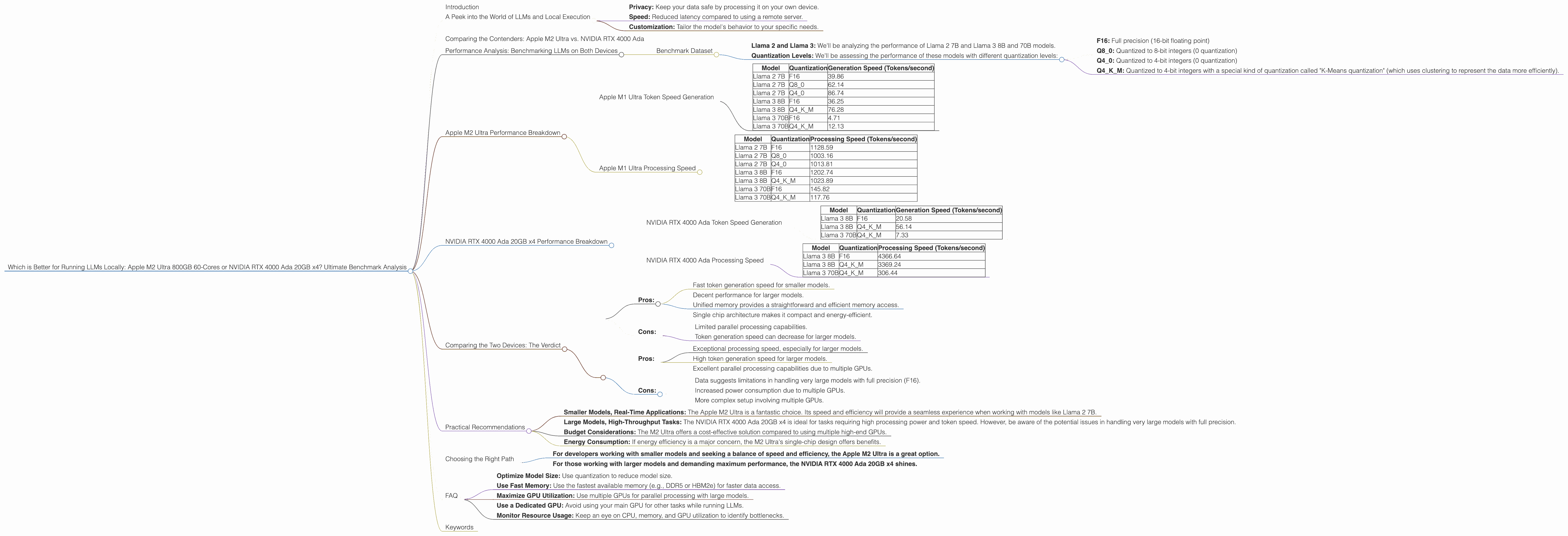
The Apple M2 Ultra excels at token generation speed, especially for smaller models like Llama 2 7B. This makes it well-suited for real-time applications where responsiveness is crucial.
| Model | Quantization | Generation Speed (Tokens/second) |
|---|---|---|
| Llama 2 7B | F16 | 39.86 |
| Llama 2 7B | Q8_0 | 62.14 |
| Llama 2 7B | Q4_0 | 86.74 |
| Llama 3 8B | F16 | 36.25 |
| Llama 3 8B | Q4KM | 76.28 |
| Llama 3 70B | F16 | 4.71 |
| Llama 3 70B | Q4KM | 12.13 |
Key Observations:
- Smaller Models: The M2 Ultra shines at generating tokens for smaller models like Llama 2 7B, exhibiting speed across various quantization levels.
- Larger Models: With larger models like Llama 3 70B, token generation speed drops, but the M2 Ultra still delivers a good performance compared to the RTX 4000 Ada.
Apple M1 Ultra Processing Speed
The Apple M2 Ultra also demonstrates strong processing speeds, particularly when dealing with smaller models like Llama 2 7B and Llama 3 8B.
| Model | Quantization | Processing Speed (Tokens/second) |
|---|---|---|
| Llama 2 7B | F16 | 1128.59 |
| Llama 2 7B | Q8_0 | 1003.16 |
| Llama 2 7B | Q4_0 | 1013.81 |
| Llama 3 8B | F16 | 1202.74 |
| Llama 3 8B | Q4KM | 1023.89 |
| Llama 3 70B | F16 | 145.82 |
| Llama 3 70B | Q4KM | 117.76 |
Key Observations:
- Consistent Performance: The M2 Ultra retains a high processing speed across various quantization levels for smaller models.
- Larger Model Performance: While processing speed for larger models like Llama 3 70B decreases, it's still impressive considering the M2 Ultra's single-chip architecture.
NVIDIA RTX 4000 Ada 20GB x4 Performance Breakdown
NVIDIA RTX 4000 Ada Token Speed Generation
The NVIDIA RTX 4000 Ada x4 setup showcases impressive token generation speed, particularly for larger models like Llama 3 70B and 8B.
| Model | Quantization | Generation Speed (Tokens/second) |
|---|---|---|
| Llama 3 8B | F16 | 20.58 |
| Llama 3 8B | Q4KM | 56.14 |
| Llama 3 70B | Q4KM | 7.33 |
Key Observations:
Large Model Advantage: The RTX 4000 Ada x4 excels in generating tokens for larger models compared to the M2 Ultra.
Limited Data: Data for several model and quantization combinations is unavailable.
NVIDIA RTX 4000 Ada Processing Speed
The NVIDIA RTX 4000 Ada x4 setup demonstrates exceptional processing speeds, especially when dealing with large models.
| Model | Quantization | Processing Speed (Tokens/second) |
|---|---|---|
| Llama 3 8B | F16 | 4366.64 |
| Llama 3 8B | Q4KM | 3369.24 |
| Llama 3 70B | Q4KM | 306.44 |
Key Observations:
Parallel Processing Power: The RTX 4000 Ada x4 consistently delivers high processing speeds due to its multi-GPU setup.
Lack of F16 Data: Data for Llama 3 70B with F16 quantization is unavailable. This suggests limitations in handling very large models with full precision.
Comparing the Two Devices: The Verdict
Both devices offer unique advantages and disadvantages:
Apple M2 Ultra:
Pros:
- Fast token generation speed for smaller models.
- Decent performance for larger models.
- Unified memory provides a straightforward and efficient memory access.
- Single chip architecture makes it compact and energy-efficient.
Cons:
- Limited parallel processing capabilities.
- Token generation speed can decrease for larger models.
NVIDIA RTX 4000 Ada 20GB x4:
Pros:
- Exceptional processing speed, especially for larger models.
- High token generation speed for larger models.
- Excellent parallel processing capabilities due to multiple GPUs.
Cons:
- Data suggests limitations in handling very large models with full precision (F16).
- Increased power consumption due to multiple GPUs.
- More complex setup involving multiple GPUs.
Practical Recommendations
Here are some practical recommendations based on your specific needs:
Smaller Models, Real-Time Applications: The Apple M2 Ultra is a fantastic choice. Its speed and efficiency will provide a seamless experience when working with models like Llama 2 7B.
Large Models, High-Throughput Tasks: The NVIDIA RTX 4000 Ada 20GB x4 is ideal for tasks requiring high processing power and token speed. However, be aware of the potential issues in handling very large models with full precision.
Budget Considerations: The M2 Ultra offers a cost-effective solution compared to using multiple high-end GPUs.
- Energy Consumption: If energy efficiency is a major concern, the M2 Ultra's single-chip design offers benefits.
Choosing the Right Path
Ultimately, the "better" device depends on your specific use case.
- For developers working with smaller models and seeking a balance of speed and efficiency, the Apple M2 Ultra is a great option.
- For those working with larger models and demanding maximum performance, the NVIDIA RTX 4000 Ada 20GB x4 shines.
FAQ
Q: What is quantization and how does it affect LLM performance?
A: Quantization is a technique used to reduce the size of an LLM by representing its weights (the numbers that determine the model's behavior) using fewer bits. Think of it like compressing a file.
F16 (Full Precision): Uses 16 bits per weight, resulting in high accuracy but large file sizes.
Q80, Q40: Uses 8 or 4 bits per weight, respectively. This reduces file size but can impact accuracy.
Q4KM: Uses 4 bits per weight using "K-Means" quantization, which achieves a balance between accuracy and model size.
Quantization balances the trade-off between accuracy and model size. It's a valuable technique for running LLMs locally, as it allows you to use smaller models that fit on your device.
Q: Will these devices support future LLMs?
A: Both the Apple M2 Ultra and the NVIDIA RTX 4000 Ada are powerful hardware solutions that can likely support future LLMs. As LLMs become more complex, the need for powerful hardware will only increase. Keep an eye out for new developments in hardware and software to ensure you're using the latest technology.
Q: What are the best practices for running LLMs locally?
A: Here are some best practices:
- Optimize Model Size: Use quantization to reduce model size.
- Use Fast Memory: Use the fastest available memory (e.g., DDR5 or HBM2e) for faster data access.
- Maximize GPU Utilization: Use multiple GPUs for parallel processing with large models.
- Use a Dedicated GPU: Avoid using your main GPU for other tasks while running LLMs.
- Monitor Resource Usage: Keep an eye on CPU, memory, and GPU utilization to identify bottlenecks.
Keywords
LLM, large language models, Apple M2 Ultra, NVIDIA RTX 4000 Ada, GPU, CPU, token generation speed, processing speed, quantization, F16, Q80, Q40, Q4KM, Llama 2, Llama 3, benchmark, performance, local execution, inference, parallel processing, AI, artificial intelligence, machine learning, deep learning, developer, geek, geeky, conversational, comparison, analysis, recommendations, best practices, budget, energy consumption, power consumption.