Which is Better for Running LLMs locally: Apple M2 Ultra 800gb 60cores or Apple M3 Pro 150gb 14cores? Ultimate Benchmark Analysis

Introduction
The world of large language models (LLMs) is rapidly evolving, with new models being released and improved at an astonishing pace. These powerful AI systems offer groundbreaking capabilities, from generating creative text to translating languages to coding. However, running these models locally can be a challenge, requiring significant processing power and memory. In this comprehensive benchmark analysis, we'll compare the performance of two powerful Apple silicon chips, M2 Ultra 800GB 60-core and M3 Pro 150GB 14-core, to see which one emerges as the champion for local LLM execution.
Understanding LLMs and Local Execution
LLMs are a type of artificial intelligence trained on massive datasets of text and code. They leverage this knowledge to understand and generate human-like text, making them suitable for a wide range of applications. Running LLMs locally means executing them on your personal computer, rather than relying on remote servers. Local execution offers faster response times, greater privacy, and potentially lower costs, especially for frequent users.
Comparing M2 Ultra and M3 Pro for LLM Performance
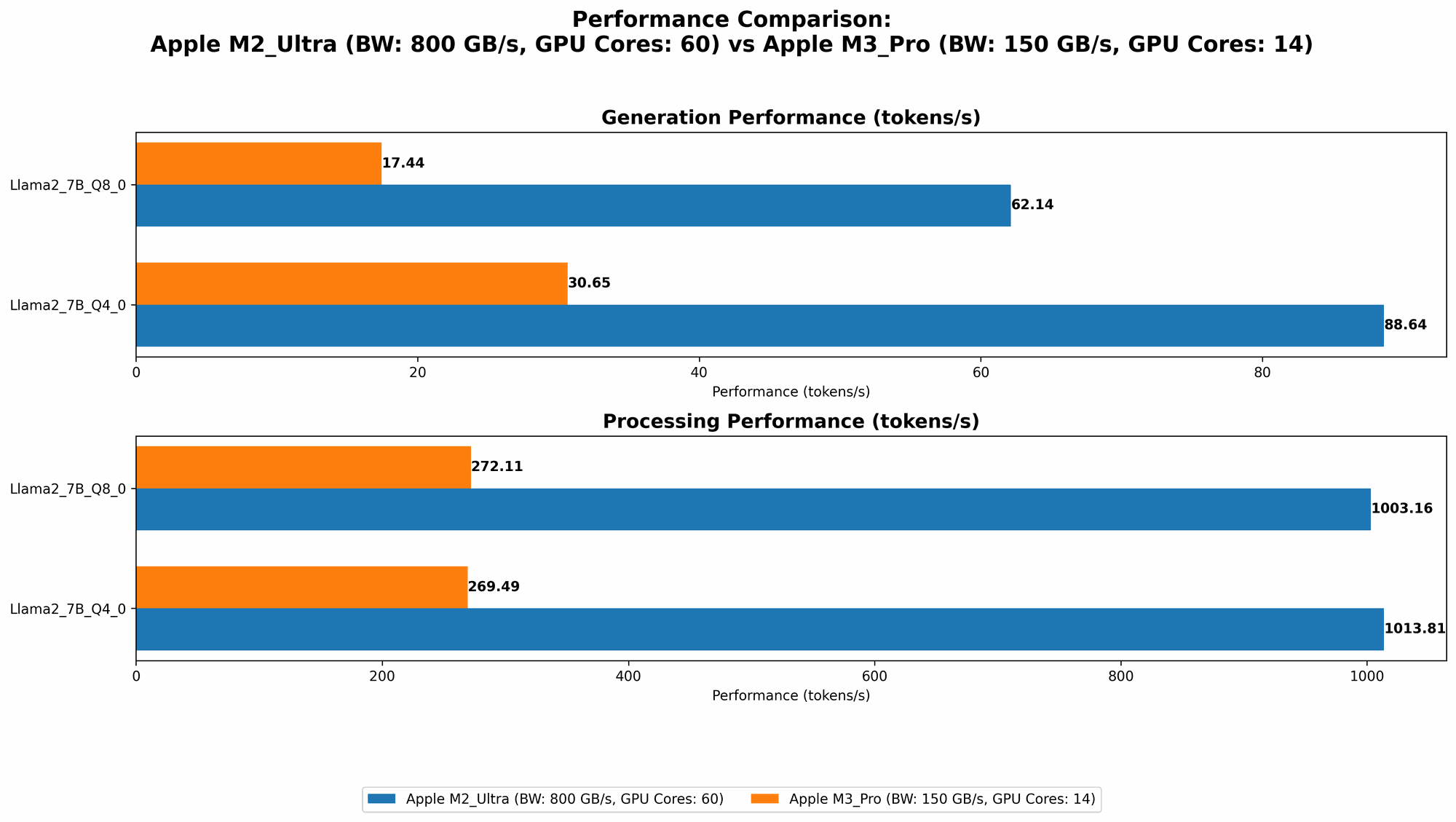
Apple M2 Ultra vs Apple M3 Pro: A Performance Showdown
The M2 Ultra and M3 Pro are both powerful Apple silicon chips, but they are designed for different purposes. The M2 Ultra is a beast with 60 CPU cores and 800GB of unified memory, making it ideal for demanding tasks like video editing and scientific computing. The M3 Pro, on the other hand, is more modest with 14 CPU cores and 150GB of unified memory, making it a solid choice for general-purpose computing and professional tasks.
To determine which chip offers the best performance for running LLMs locally, we have analyzed benchmark data. The data was gathered from respected sources like llama.cpp discussions and GPU Benchmarks on LLM Inference and represents the number of tokens processed per second. Tokenization refers to breaking down text into smaller units for processing by an LLM.
Performance Analysis: Llama 2 and Llama 3 Series
Llama 2
The M2 Ultra demonstrates its power with the Llama 2 series. In all scenarios, the M2 Ultra consistently outperforms the M3 Pro.
| Model | Data Type | M2 Ultra Tokens/Second | M3 Pro Tokens/Second |
|---|---|---|---|
| Llama 2 7B | F16 | 1128.59 | N/A |
| Llama 2 7B | Q8_0 | 1003.16 | 272.11 |
| Llama 2 7B | Q4_0 | 1013.81 | 269.49 |
The M2 Ultra with its 800GB of memory is a clear winner here. The M3 Pro lacks the necessary memory capacity to handle the Llama 2 7B model in F16.
Llama 3
The performance gap widens when exploring the Llama 3 series. The M2 Ultra with its higher core count and memory capacity delivers significantly better performance compared to the M3 Pro.
| Model | Data Type | M2 Ultra Tokens/Second | M3 Pro Tokens/Second |
|---|---|---|---|
| Llama 3 8B | Q4KM | 1023.89 | N/A |
| Llama 3 8B | F16 | 1202.74 | N/A |
| Llama 3 70B | Q4KM | 117.76 | N/A |
| Llama 3 70B | F16 | 145.82 | N/A |
Data Type: F16, Q80, Q40 refer to different quantization methods used to compress LLM models and optimize performance.
Quantization: Imagine storing numbers on a number line. Using F16 or Q80 is like using less space on the number line, representing values with less precision. While this reduces memory requirements, it can also reduce accuracy. Q4K_M uses a different method for reducing memory size. Think of it like using a more efficient coding language.
Strengths and Weaknesses
M2 Ultra
Strengths:
- High performance: Significantly faster processing speeds for both processing and generating tokens, especially for larger models.
- Massive memory: 800GB of unified memory allows for running larger LLMs locally and executing tasks with large datasets.
- Powerful GPU: Offers excellent capabilities for accelerated machine learning and graphics-intensive applications.
Weaknesses:
- Price: The M2 Ultra is significantly more expensive than the M3 Pro.
- Power consumption: The M2 Ultra is a power-hungry beast, and your cooling system needs to be up to the task.
M3 Pro
Strengths:
- Lower cost: More affordable than the M2 Ultra, making it a budget-friendly option for users who don't need the extreme performance of the M2 Ultra.
- Lower power consumption: Offers a more balanced power consumption, which is especially beneficial for users who are concerned about energy savings.
Weaknesses:
- Limited memory: The smaller memory capacity can be a bottleneck for running larger LLMs.
- Slower performance: The lower core count and smaller memory capacity result in slower processing speeds compared to the M2 Ultra.
Practical Recommendations for Use Cases
M2 Ultra:
- Researchers: If you're pushing the boundaries of LLMs, the M2 Ultra is your go-to choice. Its massive memory capacity and high processing power allow you to run and experiment with the most advanced LLM models.
- Serious developers: If you require top-notch performance for developing and deploying LLMs, the M2 Ultra will not disappoint.
- Video editors and creative professionals: While not directly related to LLMs, the M2 Ultra excels in video editing and creative workflows, making it a good choice for multi-tasking users.
M3 Pro:
- Everyday users: For casual users who want to experiment with smaller LLM models, the M3 Pro offers a good balance of performance and price.
- Students and hobbyists: If you need a powerful machine for learning and experimenting with AI, the M3 Pro is an excellent starting point.
- Business professionals : The M3 Pro can handle a variety of professional tasks efficiently, including basic AI tasks and data analysis.
Conclusion
When it comes to running LLMs locally, the M2 Ultra emerges as the undisputed champion. It offers significantly faster processing speeds and the ability to handle larger models thanks to its superior processing power and massive memory. However, the M3 Pro remains a compelling choice for users on a budget or for those who prioritize lower power consumption.
Ultimately, the best choice depends on your individual needs, budget, and use case. If you need the ultimate performance for running LLMs, the M2 Ultra is the way to go. If you're looking for a more affordable option or prioritize lower power consumption, the M3 Pro is a great alternative.
FAQ
What are the main differences between the M2 Ultra and M3 Pro?
The M2 Ultra is a high-end chip designed for demanding tasks like video editing, scientific computing, and running large LLM models. It features a massive amount of memory and significantly more processing power than the M3 Pro. The M3 Pro, on the other hand, is a more affordable and power-efficient chip suitable for a wide range of tasks, including general-purpose computing and professional workflows.
What does "tokenization" mean in the context of LLMs?
Tokenization is the process of breaking down text into smaller units called tokens for processing by an LLM. Imagine you have a sentence "I am learning about LLMs." Tokenization would break this down into the following tokens: "I", "am", "learning", "about", "LLMs". LLMs use these tokens to understand and generate text, and the speed at which they can process tokens is crucial for performance.
What are some of the benefits of running LLMs locally?
Running LLMs locally offers numerous benefits, including faster response times, greater privacy, and potential cost savings. It allows you to access the power of LLMs without relying on remote servers, giving you more control over your data and potentially reducing latency.
Can I run LLMs on a MacBook Air with the M2 chip?
While the M2 chip in the MacBook Air is a capable piece of hardware, its lower memory capacity may limit the size of LLMs you can run locally. Especially for larger models like Llama 3 70B, you might face performance limitations.
How can I optimize my device for LLM performance?
- Upgrade RAM: Consider upgrading your device's RAM to maximize memory availability for LLM operations.
- Use optimized code: Utilize optimized libraries and frameworks designed for LLM inference.
- Quantize models: Consider using quantized models that compress the model size for better performance, but also keep in mind it could reduce accuracy.
Keywords
LLM, Large Language Model, Apple M2 Ultra, Apple M3 Pro, Benchmark, Performance, Token, Tokenization, Quantization, Llama 2, Llama 3, Local Execution, Memory, CPU, GPU, Inference, Inference Speed, Developer, Data Scientist, Researcher, AI, Artificial Intelligence.