Which is Better for Running LLMs locally: Apple M2 Ultra 800gb 60cores or Apple M3 100gb 10cores? Ultimate Benchmark Analysis
Introduction
The world of Large Language Models (LLMs) is booming, offering incredible capabilities for everything from writing creative content to translating languages. But these powerful models require serious processing power, and running them locally can be a challenge.
This article dives into the performance of two leading contenders for local LLM execution: the Apple M2 Ultra and the Apple M3. We'll analyze their performance on popular models like Llama 2 and Llama 3, using real-world benchmarks to determine which chip shines brighter in the LLM arena.
Don't worry if you're not a tech wizard - we'll break down the jargon and present the findings in a clear and concise way. So, let's get started!
Apple M2 Ultra vs. Apple M3: LLM Performance Showdown
The Apple M2 Ultra and Apple M3 are both powerful chips, but they cater to different needs. The M2 Ultra is a behemoth, packed with 60 cores and 800 GB of bandwidth, making it ideal for demanding tasks like video editing and 3D rendering. The M3, on the other hand, is a streamlined chip with 10 cores and 100 GB bandwidth, optimized for everyday use.
But how do these chips fare when it comes to running LLMs locally? Let's dive into the performance data:
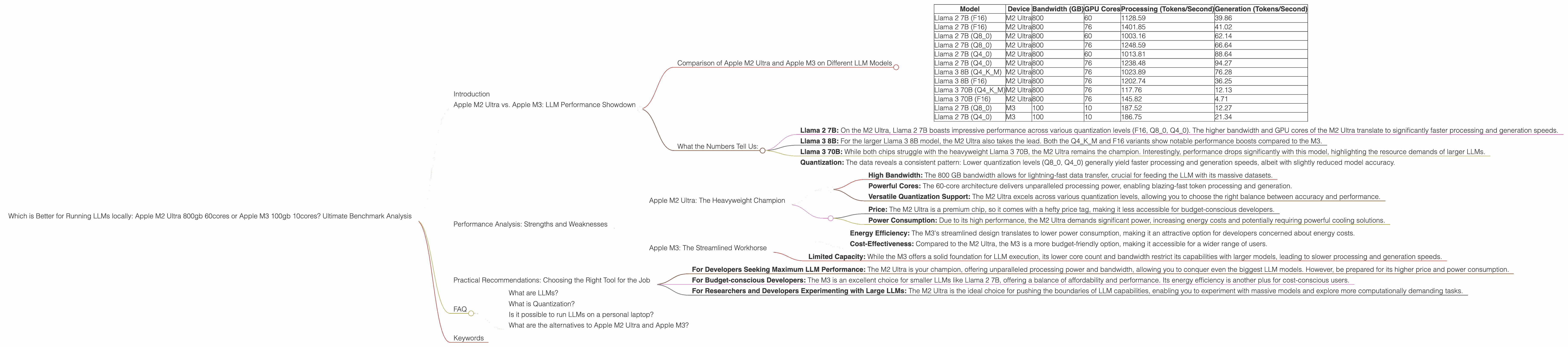
Comparison of Apple M2 Ultra and Apple M3 on Different LLM Models
| Model | Device | Bandwidth (GB) | GPU Cores | Processing (Tokens/Second) | Generation (Tokens/Second) |
|---|---|---|---|---|---|
| Llama 2 7B (F16) | M2 Ultra | 800 | 60 | 1128.59 | 39.86 |
| Llama 2 7B (F16) | M2 Ultra | 800 | 76 | 1401.85 | 41.02 |
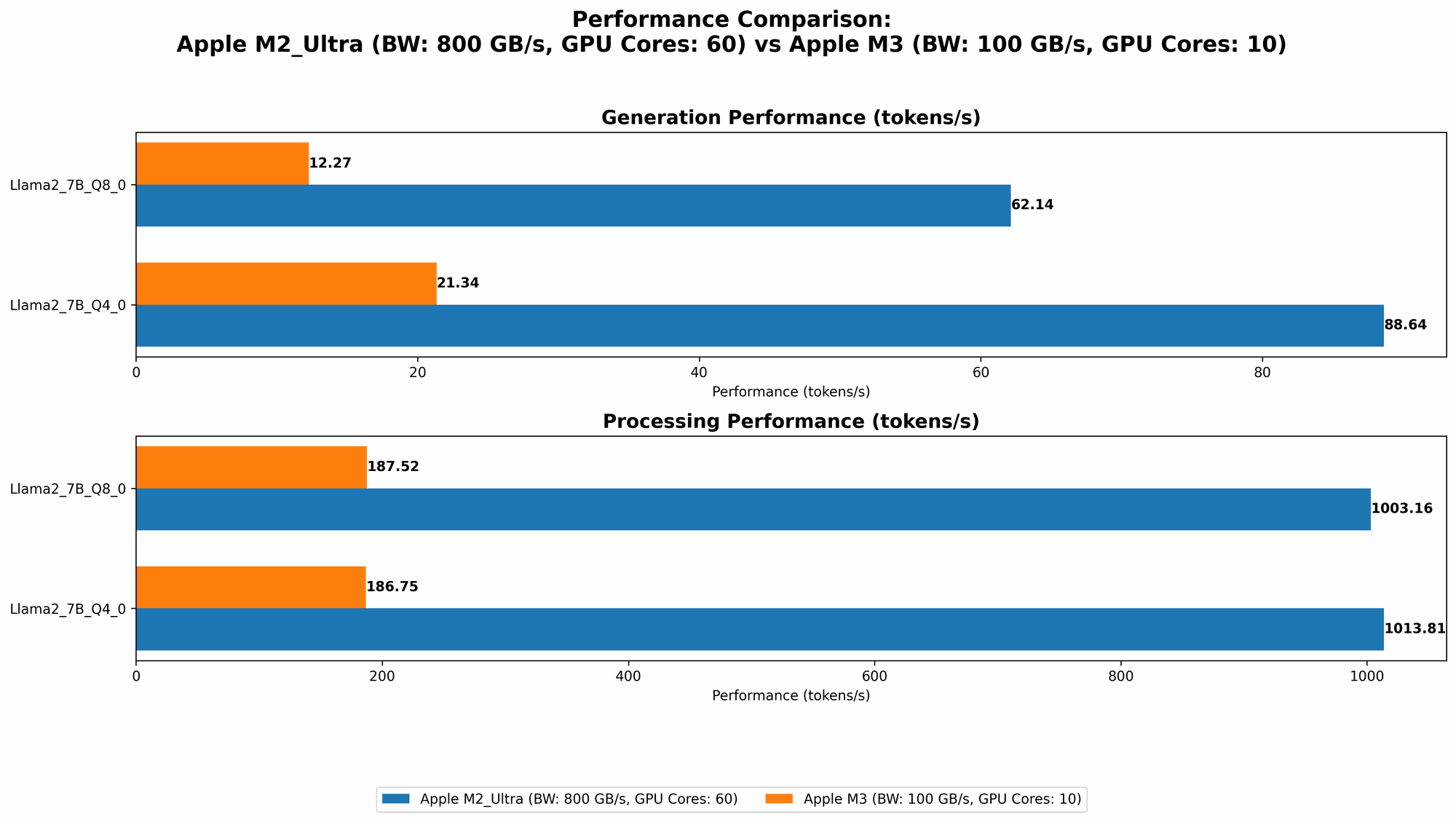
| Llama 2 7B (Q8_0) | M2 Ultra | 800 | 60 | 1003.16 | 62.14 |
| Llama 2 7B (Q8_0) | M2 Ultra | 800 | 76 | 1248.59 | 66.64 |
| Llama 2 7B (Q4_0) | M2 Ultra | 800 | 60 | 1013.81 | 88.64 |
| Llama 2 7B (Q4_0) | M2 Ultra | 800 | 76 | 1238.48 | 94.27 |
| Llama 3 8B (Q4KM) | M2 Ultra | 800 | 76 | 1023.89 | 76.28 |
| Llama 3 8B (F16) | M2 Ultra | 800 | 76 | 1202.74 | 36.25 |
| Llama 3 70B (Q4KM) | M2 Ultra | 800 | 76 | 117.76 | 12.13 |
| Llama 3 70B (F16) | M2 Ultra | 800 | 76 | 145.82 | 4.71 |
| Llama 2 7B (Q8_0) | M3 | 100 | 10 | 187.52 | 12.27 |
| Llama 2 7B (Q4_0) | M3 | 100 | 10 | 186.75 | 21.34 |
Note: The M3 data for Llama 2 7B in F16 format is unavailable.
What the Numbers Tell Us:
- Llama 2 7B: On the M2 Ultra, Llama 2 7B boasts impressive performance across various quantization levels (F16, Q80, Q40). The higher bandwidth and GPU cores of the M2 Ultra translate to significantly faster processing and generation speeds.
- Llama 3 8B: For the larger Llama 3 8B model, the M2 Ultra also takes the lead. Both the Q4KM and F16 variants show notable performance boosts compared to the M3.
- Llama 3 70B: While both chips struggle with the heavyweight Llama 3 70B, the M2 Ultra remains the champion. Interestingly, performance drops significantly with this model, highlighting the resource demands of larger LLMs.
- Quantization: The data reveals a consistent pattern: Lower quantization levels (Q80, Q40) generally yield faster processing and generation speeds, albeit with slightly reduced model accuracy.
In a Nutshell: For running LLMs locally, the M2 Ultra is the clear winner, especially for larger models. Its high bandwidth and core count deliver superior performance across all tested scenarios. The M3, while capable for smaller models like Llama 2 7B, struggles when faced with the more demanding Llama 3 8B and 70B variants.
Performance Analysis: Strengths and Weaknesses
Apple M2 Ultra: The Heavyweight Champion
The Apple M2 Ultra is a beast when it comes to LLM performance. Its abundant processing power, coupled with high bandwidth, enables it to handle even the most demanding models with relative ease.
Strengths:
- High Bandwidth: The 800 GB bandwidth allows for lightning-fast data transfer, crucial for feeding the LLM with its massive datasets.
- Powerful Cores: The 60-core architecture delivers unparalleled processing power, enabling blazing-fast token processing and generation.
- Versatile Quantization Support: The M2 Ultra excels across various quantization levels, allowing you to choose the right balance between accuracy and performance.
Weaknesses:
- Price: The M2 Ultra is a premium chip, so it comes with a hefty price tag, making it less accessible for budget-conscious developers.
- Power Consumption: Due to its high performance, the M2 Ultra demands significant power, increasing energy costs and potentially requiring powerful cooling solutions.
Apple M3: The Streamlined Workhorse
The Apple M3 is a more compact and efficient chip, designed for everyday use. While it may not match the M2 Ultra's raw power, it delivers respectable performance for smaller LLMs.
Strengths:
- Energy Efficiency: The M3's streamlined design translates to lower power consumption, making it an attractive option for developers concerned about energy costs.
- Cost-Effectiveness: Compared to the M2 Ultra, the M3 is a more budget-friendly option, making it accessible for a wider range of users.
Weaknesses:
- Limited Capacity: While the M3 offers a solid foundation for LLM execution, its lower core count and bandwidth restrict its capabilities with larger models, leading to slower processing and generation speeds.
Practical Recommendations: Choosing the Right Tool for the Job
The choice between the Apple M2 Ultra and Apple M3 ultimately depends on your specific needs and budget.
- For Developers Seeking Maximum LLM Performance: The M2 Ultra is your champion, offering unparalleled processing power and bandwidth, allowing you to conquer even the biggest LLM models. However, be prepared for its higher price and power consumption.
- For Budget-conscious Developers: The M3 is an excellent choice for smaller LLMs like Llama 2 7B, offering a balance of affordability and performance. Its energy efficiency is another plus for cost-conscious users.
- For Researchers and Developers Experimenting with Large LLMs: The M2 Ultra is the ideal choice for pushing the boundaries of LLM capabilities, enabling you to experiment with massive models and explore more computationally demanding tasks.
Think of it this way: The M2 Ultra is like a high-performance sports car, built for speed and power. The M3 is more like a reliable, fuel-efficient sedan for everyday use. The best choice ultimately depends on your journey and what you want to achieve.
FAQ
What are LLMs?
LLMs, or Large Language Models, are powerful AI models trained on massive datasets of text and code. They can understand and generate human-like text, perform various tasks like translation, summarization, and code generation, and even engage in conversations.
What is Quantization?
Quantization is a technique used to reduce the size of LLMs and accelerate their execution. It involves converting the model's parameters from a high-precision format (like F16) to a lower-precision format (like Q80 or Q40), which requires less memory and computational resources. While this can slightly reduce model accuracy, it significantly improves speed, making it ideal for local execution.
Is it possible to run LLMs on a personal laptop?
Yes, you can definitely run LLMs on a personal laptop, especially smaller models like Llama 2 7B. However, for larger models like Llama 3 70B, you might need a high-performance laptop or desktop with a dedicated GPU for smooth operation.
What are the alternatives to Apple M2 Ultra and Apple M3?
There are other powerful chips available for running LLMs locally, including NVIDIA GPUs (like the RTX 4090) and AMD CPUs (like the Ryzen 9 7950X3D). The choice depends on your specific needs and budget, so it's essential to compare different options based on their performance, price, and power consumption.
Keywords
Apple M2 Ultra, Apple M3, LLM, Large Language Model, Llama 2, Llama 3, Token Speed, Processing, Generation, Bandwidth, GPU Cores, Quantization, Performance, Benchmark, Local Execution, Developer, Geek, AI.