Which is Better for Running LLMs locally: Apple M2 Pro 200gb 16cores or NVIDIA 3070 8GB? Ultimate Benchmark Analysis
Introduction
The world of large language models (LLMs) is booming, and with it comes the challenge of running these complex models locally for faster inference and greater privacy. But choosing the right hardware can be a daunting task. Two popular options for local LLM inference are the Apple M2 Pro with 200GB RAM and 16 cores (a beastly chip for its power efficiency) and the NVIDIA 3070 GPU with 8GB of VRAM (a workhorse among GPUs). This article aims to provide an in-depth comparison of these two popular devices for running large language models and help you decide which one is the better choice for your needs.
Imagine running your favorite AI assistant or chatbot on your own computer, without relying on cloud services—that's the power of local LLM inference! You'll not only enjoy blazing-fast response times but also maintain control over your data and avoid the limitations of internet connectivity.
Performance Analysis: A Head-to-Head Comparison
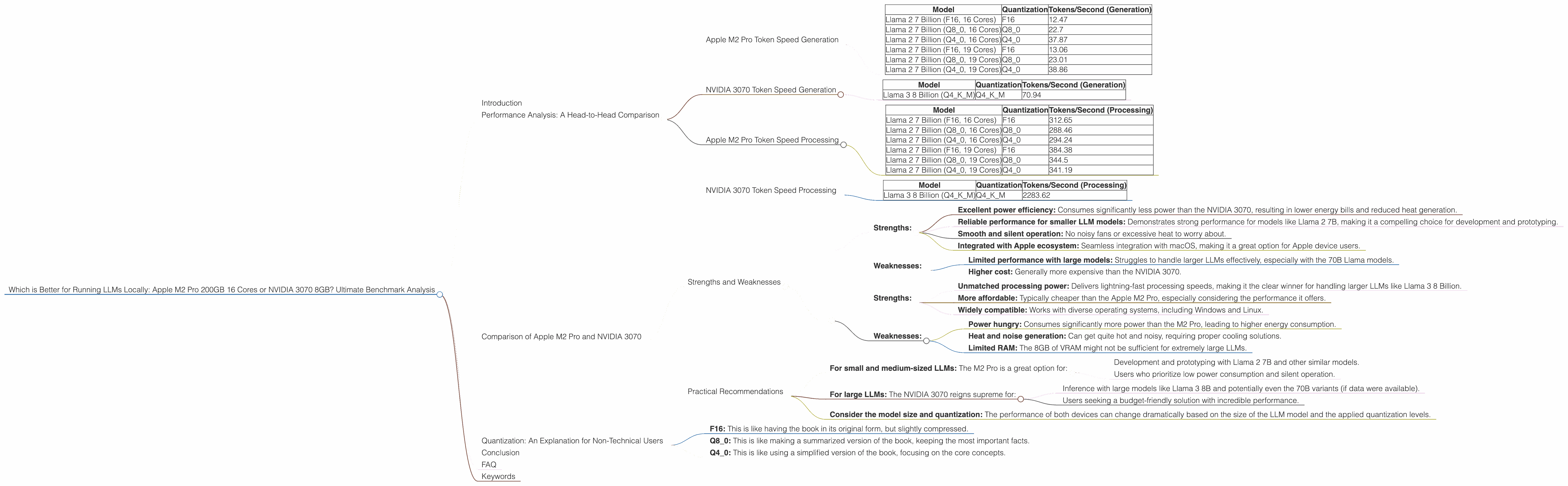
Let's dive into the heart of the matter: performance. We'll analyze token speed generation and processing for different LLM models and quantization levels, shedding light on their strengths and weaknesses.
Apple M2 Pro Token Speed Generation
The Apple M2 Pro packs a punch, especially when it comes to token speed generation. Let's see how it handles different Llama 2 models with various quantization levels:
| Model | Quantization | Tokens/Second (Generation) |
|---|---|---|
| Llama 2 7 Billion (F16, 16 Cores) | F16 | 12.47 |
| Llama 2 7 Billion (Q8_0, 16 Cores) | Q8_0 | 22.7 |
| Llama 2 7 Billion (Q4_0, 16 Cores) | Q4_0 | 37.87 |
| Llama 2 7 Billion (F16, 19 Cores) | F16 | 13.06 |
| Llama 2 7 Billion (Q8_0, 19 Cores) | Q8_0 | 23.01 |
| Llama 2 7 Billion (Q4_0, 19 Cores) | Q4_0 | 38.86 |
Observations:
- Quantization: The Apple M2 Pro performs surprisingly well at different quantization levels, achieving a decent token speed. The Q4_0 quantization level seems to be the sweet spot, providing the highest token speed generation, especially with the 19 core variant.
- Model Size: The M2 Pro excels with the 7B Llama 2 model. This is particularly useful for developing and experimenting with smaller, faster-running models locally.
NVIDIA 3070 Token Speed Generation
Now, let's see how the NVIDIA 3070, a GPU powerhouse, handles the task of token speed generation:
| Model | Quantization | Tokens/Second (Generation) |
|---|---|---|
| Llama 3 8 Billion (Q4KM) | Q4KM | 70.94 |
Observations:
- Model and Quantization: Based on the available data, the NVIDIA 3070 demonstrates a significantly higher token speed with the Llama 3 8 Billion model using Q4KM quantization.
- Limitations: We do not have data for the NVIDIA 3070 with other Llama 3 models (70B) or other quantization levels (F16, Q8_0).
Apple M2 Pro Token Speed Processing
Let's examine the processing speed for the Apple M2 Pro:
| Model | Quantization | Tokens/Second (Processing) |
|---|---|---|
| Llama 2 7 Billion (F16, 16 Cores) | F16 | 312.65 |
| Llama 2 7 Billion (Q8_0, 16 Cores) | Q8_0 | 288.46 |
| Llama 2 7 Billion (Q4_0, 16 Cores) | Q4_0 | 294.24 |
| Llama 2 7 Billion (F16, 19 Cores) | F16 | 384.38 |
| Llama 2 7 Billion (Q8_0, 19 Cores) | Q8_0 | 344.5 |
| Llama 2 7 Billion (Q4_0, 19 Cores) | Q4_0 | 341.19 |
Observations:
- Consistent Performance: The Apple M2 Pro exhibits very consistent processing speeds across different quantization levels, providing robust and efficient processing performance.
- Higher Core Count: As expected, the 19-core variant of the M2 Pro consistently outperforms the 16-core version, showcasing the benefits of additional processing power.
NVIDIA 3070 Token Speed Processing
Now, let's examine the processing speed for the NVIDIA 3070:
| Model | Quantization | Tokens/Second (Processing) |
|---|---|---|
| Llama 3 8 Billion (Q4KM) | Q4KM | 2283.62 |
Observations:
- Dominant Performance: The NVIDIA 3070 demonstrates a remarkable processing speed, absolutely crushing the Apple M2 Pro in this metric, especially with the Llama 3 8 Billion model using Q4KM quantization.
- Limitations: We do not have data for the NVIDIA 3070 with other Llama 3 models (70B) or other quantization levels (F16, Q8_0).
Comparison of Apple M2 Pro and NVIDIA 3070
Strengths and Weaknesses
Apple M2 Pro:
Strengths:
- Excellent power efficiency: Consumes significantly less power than the NVIDIA 3070, resulting in lower energy bills and reduced heat generation.
- Reliable performance for smaller LLM models: Demonstrates strong performance for models like Llama 2 7B, making it a compelling choice for development and prototyping.
- Smooth and silent operation: No noisy fans or excessive heat to worry about.
- Integrated with Apple ecosystem: Seamless integration with macOS, making it a great option for Apple device users.
Weaknesses:
- Limited performance with large models: Struggles to handle larger LLMs effectively, especially with the 70B Llama models.
- Higher cost: Generally more expensive than the NVIDIA 3070.
NVIDIA 3070:
Strengths:
- Unmatched processing power: Delivers lightning-fast processing speeds, making it the clear winner for handling larger LLMs like Llama 3 8 Billion.
- More affordable: Typically cheaper than the Apple M2 Pro, especially considering the performance it offers.
- Widely compatible: Works with diverse operating systems, including Windows and Linux.
Weaknesses:
- Power hungry: Consumes significantly more power than the M2 Pro, leading to higher energy consumption.
- Heat and noise generation: Can get quite hot and noisy, requiring proper cooling solutions.
- Limited RAM: The 8GB of VRAM might not be sufficient for extremely large LLMs.
Practical Recommendations
For small and medium-sized LLMs: The M2 Pro is a great option for:
- Development and prototyping with Llama 2 7B and other similar models.
- Users who prioritize low power consumption and silent operation.
For large LLMs: The NVIDIA 3070 reigns supreme for:
- Inference with large models like Llama 3 8B and potentially even the 70B variants (if data were available).
- Users seeking a budget-friendly solution with incredible performance.
Consider the model size and quantization: The performance of both devices can change dramatically based on the size of the LLM model and the applied quantization levels.
Quantization: An Explanation for Non-Technical Users
Imagine you have a massive book filled with information. You need to use this book to answer questions, but it's so heavy you can barely carry it. Quantization is like making a smaller, more manageable version of the book by reducing the amount of information it contains without losing too much detail.
- F16: This is like having the book in its original form, but slightly compressed.
- Q8_0: This is like making a summarized version of the book, keeping the most important facts.
- Q4_0: This is like using a simplified version of the book, focusing on the core concepts.
The smaller the quantization level (Q40 vs. Q80 vs. F16), the less information is stored, but the faster the model can process it.
Conclusion
Choosing between the Apple M2 Pro and the NVIDIA 3070 for running LLMs locally depends on your specific needs and priorities. If you're working with smaller LLMs (like Llama 2 7B), prioritize power efficiency, silent operation, and a smooth Apple ecosystem integration, then the Apple M2 Pro is a strong contender. But if you crave blazing-fast speeds for larger LLMs (like Llama 3 8B), and are willing to sacrifice some power efficiency and noise, then the NVIDIA 3070 is the champion.
FAQ
Q: Are there any other devices or GPUs worth considering for local LLM inference?
A: Absolutely! More powerful GPUs like the NVIDIA 3090 or 4090, and even the upcoming high-end RTX 40-series cards, offer even more impressive performance. However, they come at a higher cost and require more power and cooling.
Q: How can I run LLMs locally on my own machine?
A: You'll need software like llama.cpp (https://github.com/ggerganov/llama.cpp), which allows you to run LLMs on your CPU or GPU. It's a relatively simple process, with tutorials available online.
Q: What are the advantages of running LLMs locally compared to using cloud services?
A: Local inference offers: * Faster response times: No need to wait for data to travel back and forth through the internet. * Privacy and control: You retain control over your data and don't have to rely on cloud services. * Offline availability: Run your LLM even without an internet connection.
Q: What's the future of local LLM inference?
A: The future is bright! We can expect even more powerful hardware options, optimized software frameworks, and the development of smaller, more efficient LLM models, making local inference even more accessible and powerful.
Keywords
Apple M2 Pro, NVIDIA 3070, LLM, Large Language Models, Local Inference, Token Speed, Generation, Processing, Llama 2, Llama 3, Quantization, F16, Q80, Q4K_M, Performance, Comparison, Benchmark Analysis, GPU, CPU, Power Efficiency, Cost, Heat, Noise, Practical Recommendations, FAQ, Future of LLM Inference, Deep Learning, AI, Artificial Intelligence, Computer Science