Which is Better for Running LLMs locally: Apple M2 Pro 200gb 16cores or Apple M2 Max 400gb 30cores? Ultimate Benchmark Analysis

Introduction
The world of Large Language Models (LLMs) is exploding, with models like ChatGPT and Bard becoming household names. But what if you want to run these powerful models locally? This is where the need for specialized hardware comes in. Apple's M2 Pro and M2 Max chips are popular choices for LLM enthusiasts, boasting impressive performance and power efficiency. This article dives deep into a comparison between the Apple M2 Pro 200GB 16 cores and the Apple M2 Max 400GB 30 cores, analyzing their performance when running Llama 2 models locally.
We will compare the performance of these chips based on benchmark data, examining how each device handles different LLM models. Our analysis will help you navigate the world of local LLM deployment, providing insights into which device is best suited for your specific needs.
Comparing the Apple M2 Pro and Apple M2 Max: A Head-to-Head Performance Analysis
Apple M2 Pro vs. Apple M2 Max: A Breakdown
Let's start with the basics. Both the Apple M2 Pro and M2 Max are powerful chips designed for demanding tasks like video editing, 3D rendering, and yes, running large language models. However, they differ in core count, memory bandwidth, and overall performance.
- Apple M2 Pro: This chip typically has 16 cores (12 performance cores and 4 efficiency cores) and boasts up to 200GB/s memory bandwidth. It’s a powerful chip, perfect for many tasks but may struggle slightly with the heaviest workloads.
- Apple M2 Max: This chip packs a punch with 30 cores (18 performance cores and 12 efficiency cores) and a whopping 400GB/s of memory bandwidth. This chip is more powerful and handles even the most demanding tasks with ease.
Performance Analysis: Apple M2 Pro and Apple M2 Max for Llama 2 Models
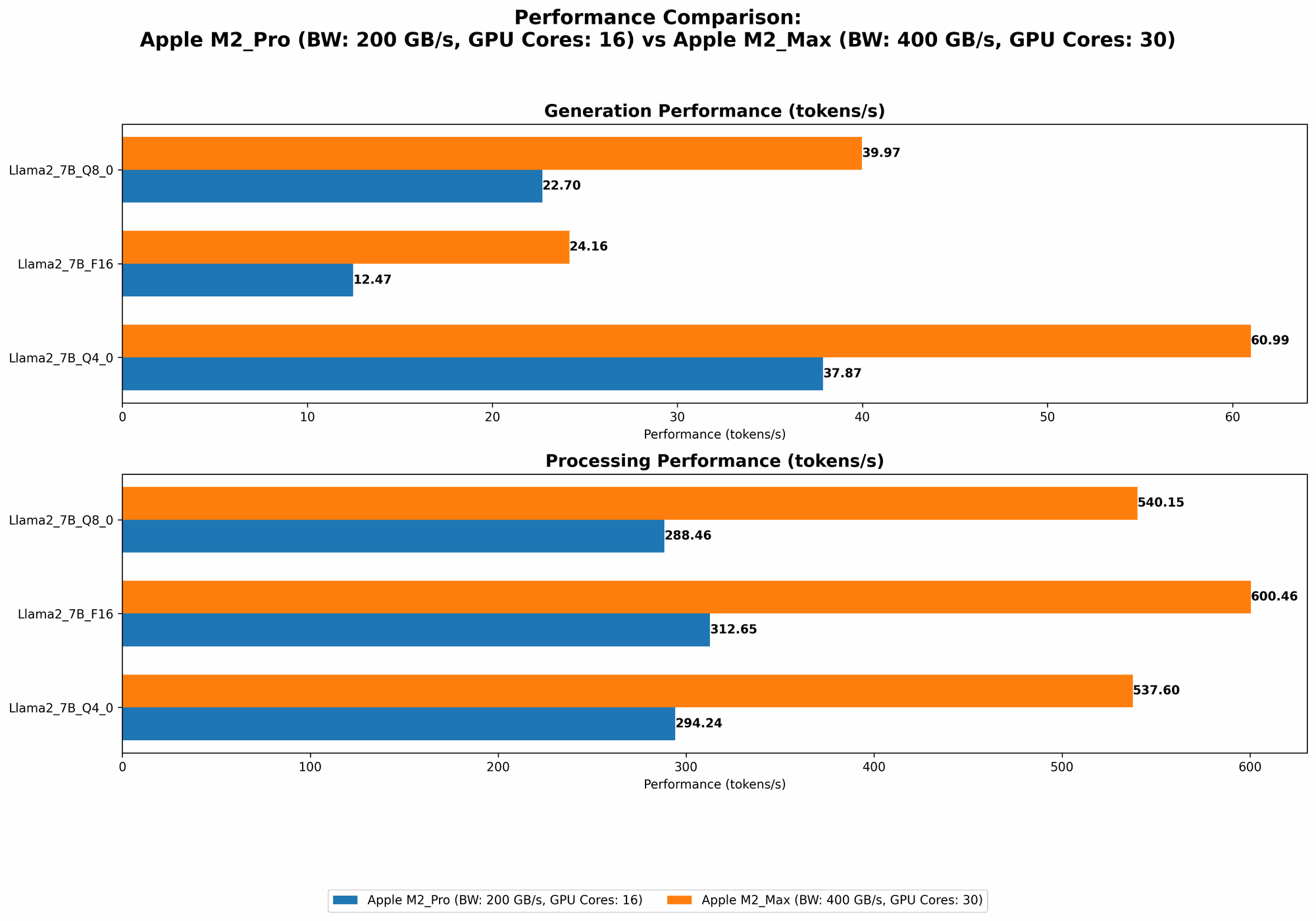
To understand the performance differences between the M2 Pro and M2 Max, we've compiled benchmark data comparing the tokens per second (tokens/s) generated by each chip when running a Llama 2 model. Tokens are the fundamental units of text in LLM models, and are measured in terms of their processing and generation speeds. The benchmark data used comes from Performance of llama.cpp on various devices and GPU Benchmarks on LLM Inference.
The data is presented below in a user-friendly table. For clarity, the data represents tokens/s and is sorted by the "Llama27BQ40Generation" column.
| Configuration | Llama27BF16_Processing (tokens/s) | Llama27BF16_Generation (tokens/s) | Llama27BQ80Processing (tokens/s) | Llama27BQ80Generation (tokens/s) | Llama27BQ40Processing (tokens/s) | Llama27BQ40Generation (tokens/s) |
|---|---|---|---|---|---|---|
| M2 Max (400GB, 38 Cores) | 755.67 | 24.65 | 677.91 | 41.83 | 671.31 | 65.95 |
| M2 Max (400GB, 30 Cores) | 600.46 | 24.16 | 540.15 | 39.97 | 537.6 | 60.99 |
| M2 Pro (200GB, 19 Cores) | 384.38 | 13.06 | 344.5 | 23.01 | 341.19 | 38.86 |
| M2 Pro (200GB, 16 Cores) | 312.65 | 12.47 | 288.46 | 22.7 | 294.24 | 37.87 |
Key Observations:
- M2 Max outperforms M2 Pro: Across the board, the M2 Max demonstrates a significantly higher token processing and generation speed. This difference is particularly evident in the "Llama27BQ40Generation" column, where the M2 Max achieves nearly double the speed of the M2 Pro.
- More cores, more speed: The higher core count of the M2 Max is evident in the increased performance. This means that with more cores, the device can tackle larger models and complex tasks with greater speed and efficiency.
- Memory bandwidth is a big factor: The M2 Max's larger memory bandwidth (400GB/s versus 200GB/s) is a key factor in its performance edge. It can transfer data faster, leading to a smoother and more responsive execution of large language models.
- Quantization impacts performance: Quantization is a technique used to reduce the memory footprint and computational cost of LLMs. In our analysis, using Q4_0 (4-bit quantization) leads to a significant increase in the speed of both devices. However, the M2 Max still maintains a larger performance gap compared to the M2 Pro.
Understanding Quantization: A Simplified Explanation
Think of quantization like compressing a file. You reduce the file size, making it smaller and faster to load, but you might lose some information in the process. Similarly, quantization compresses the information within an LLM model, reducing its size and making it easier and faster to process.
The different levels of quantization (F16, Q80, Q40) represent the number of bits used to represent each value in the model. Lower numbers represent a smaller file size and faster processing speed, but may lead to a slight decrease in model accuracy.
Practical Recommendations: Which Device is Right for You?
Apple M2 Pro: A Great Starting Point
- Best for: LLM beginners and users working with smaller models like Llama 2 7B (7 billion parameters). It provides good performance at a more affordable price point.
- Use cases: Experimenting with LLMs, generating responses for smaller-scale tasks, and learning about local LLM deployment.
Apple M2 Max: The Powerhouse
- Best for: Developers working with larger models such as Llama 2 13B (13 billion parameters) and above, and those who require high-performance LLM applications.
- Use cases: Running LLM-powered applications demanding high throughput, real-time chatbots, and building complex LLM-based services.
FAQ: Your Burning Questions Answered
What are the trade-offs between performance and cost?
Generally, a higher core count and memory bandwidth translate to better performance, but also lead to a higher price tag. The Apple M2 Max, with its 30 cores and 400GB/s of memory bandwidth, is a premium device, while the Apple M2 Pro provides a more budget-friendly option. Ultimately, the best choice depends on your specific LLM application and budget.
What are the limitations of running LLMs locally?
While running LLMs locally offers greater control and privacy, it can be resource intensive. You'll need a powerful device like the Apple M2 Pro or M2 Max, and may face challenges in managing large models and heavy computations. Additionally, if you're working with models that require extensive data, you might need to consider cloud-based solutions for better scalability and cost-effectiveness.
What are some other alternatives for running LLMs locally?
Besides Apple's M2 chips, there are other options available:
- Nvidia GPUs: Nvidia GPUs are also popular for running LLMs locally. Models like the RTX 4090 offer excellent performance for demanding LLM workloads, but can be expensive.
- AMD CPUs: AMD CPUs like the Ryzen 9 7950X3D provide high performance for LLM inference at a more affordable price point.
Keywords
Llama 2, Apple M2 Pro, Apple M2 Max, LLM, Large Language Model, Quantization, F16, Q80, Q40, Token Speed, Performance, Benchmark, Local LLM, Inference, GPU, CPU, AI, Machine Learning