Which is Better for Running LLMs locally: Apple M2 100gb 10cores or Apple M2 Pro 200gb 16cores? Ultimate Benchmark Analysis

Introduction
The world of Large Language Models (LLMs) is exploding. We're seeing incredible progress in the field, with new models emerging every day that can do things we never thought possible, like writing code, summarizing text, translating languages, and even creating art. However, running these massive models locally on your machine can be a challenge. You need a powerful computer with a lot of RAM and a fast GPU to handle the processing demands. This is where Apple's M2 and M2 Pro chips come in.
This article will compare the performance of Apple's M2 and M2 Pro chips when running popular LLMs, like Llama 2, locally. We'll analyze the benchmark data and break down the performance differences, highlighting the strengths and weaknesses of each chip. By the end, you'll have a clear understanding of which chip is best for your needs and how to choose the right setup for your LLM projects.
Performance Comparison: Apple M2 vs M2 Pro
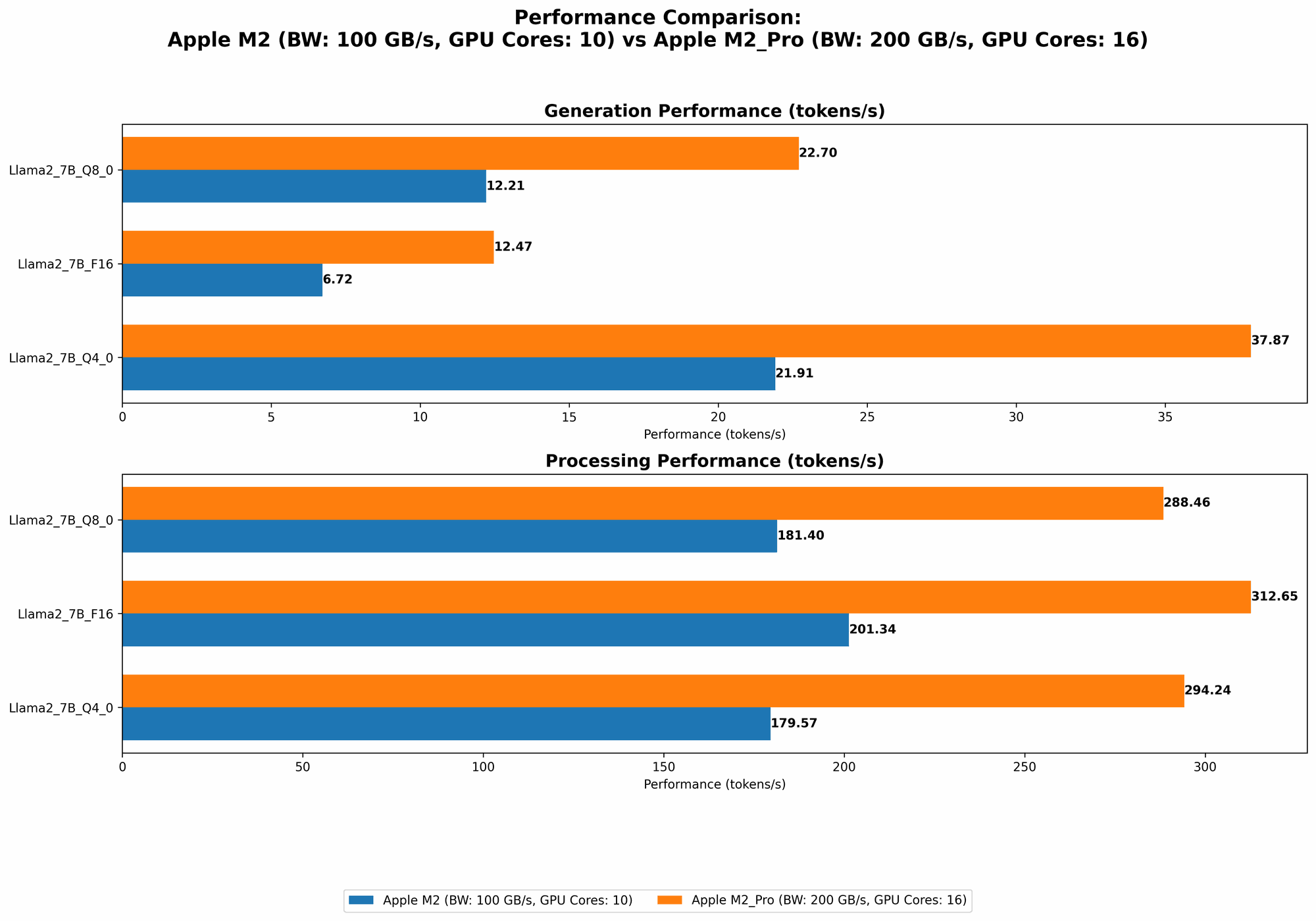
Let's dive into the data and see how these two chips stack up against each other in the world of LLM inference. The provided JSON data showcases the performance in terms of tokens per second for different Llama 2 model sizes and quantization levels. Here's a user-friendly table summarizing the key findings:
| Configuration | Llama 2 7B (Tokens/Second) |
|---|---|
| Apple M2 (100GB, 10 Cores) | |
| - F16 Processing | 201.34 |
| - F16 Generation | 6.72 |
| - Q8_0 Processing | 181.4 |
| - Q8_0 Generation | 12.21 |
| - Q4_0 Processing | 179.57 |
| - Q4_0 Generation | 21.91 |
| Apple M2 Pro (200GB, 16 Cores) | |
| - F16 Processing | 312.65 |
| - F16 Generation | 12.47 |
| - Q8_0 Processing | 288.46 |
| - Q8_0 Generation | 22.7 |
| - Q4_0 Processing | 294.24 |
| - Q4_0 Generation | 37.87 |
| Apple M2 Pro (200GB, 19 Cores) | |
| - F16 Processing | 384.38 |
| - F16 Generation | 13.06 |
| - Q8_0 Processing | 344.5 |
| - Q8_0 Generation | 23.01 |
| - Q4_0 Processing | 341.19 |
| - Q4_0 Generation | 38.86 |
Apple M2 Token Speed Generation: A Closer Look
The Apple M2 is a solid choice for running LLMs locally, especially if you're on a tighter budget. It offers a decent performance for processing and generation, but the M2 Pro shines in these areas.
Key Takeaways:
- Processing: The M2 demonstrates respectable processing speeds, but the M2 Pro significantly surpasses it with its higher core count and memory bandwidth. This translates to a faster processing of text, allowing for quicker analysis and responses.
- Generation: The M2 struggles to keep up with the M2 Pro in token generation, which is crucial for interactive prompts and generating longer outputs. The M2 Pro provides a more fluid and responsive experience when engaging with LLMs.
- Quantization: The M2 delivers better performance under F16 (half-precision floating-point format) for processing, while the M2 Pro shines with the Q80 and Q40 quantization levels. This is crucial for memory efficiency, allowing you to squeeze more data into the available memory. Think of it as using smaller containers to pack the same amount of goods, making it more efficient to run the model.
Apple M2 Pro: The Powerhouse for LLM Inference
The Apple M2 Pro truly stands out as a powerhouse for working with LLMs locally. Its increased memory bandwidth and larger core count offer significant benefits, translating to faster processing and smoother generation.
Key Takeaways:
- Faster Processing: The M2 Pro's larger core count and memory bandwidth give it a significant edge in processing speed, allowing for swifter computations and analysis of large text inputs.
- Enhanced Generation: The M2 Pro's performance edge is most evident in token generation, offering a much faster and more responsive experience when generating text. This makes it ideal for interactive use cases, rapid prototyping, and complex tasks requiring large outputs.
- Memory Efficiency: The M2 Pro excels in memory efficiency, especially at the Q80 and Q40 quantization levels. This is critical for running larger and more complex models locally without hitting memory limitations.
Practical Recommendations: Choosing the Right Chip for Your LLM Project
So, which chip should you choose? Here's a breakdown to help you make the best decision:
Choose the Apple M2 if:
- You're on a budget: The M2 offers decent performance at a more affordable price point.
- You're working with smaller LLMs: The M2 can handle smaller models effectively, which might be sufficient for basic tasks, like text summarization or translation.
- You don't need super fast generation speeds: If your primary focus is on processing text quickly, the M2's generation performance might be sufficient.
Choose the Apple M2 Pro if:
- You need the fastest possible performance: The M2 Pro delivers superior processing and generation speeds for running LLM models locally.
- You're working with larger and more complex models: The M2 Pro's memory efficiency allows you to comfortably run larger LLMs with increased complexity.
- You need smooth and responsive generation: If you require rapid and interactive generation, the M2 Pro is the clear winner.
Conclusion: The M2 Pro Stands Out in the LLM Arena
In the battle of the Apple chips, the M2 Pro emerges as the champion for running LLMs locally. Its superior performance, especially in token generation, memory efficiency, and handling larger models, makes it an ideal choice for developers and researchers working with LLMs.
While the M2 offers a solid performance for smaller models and budget-conscious users, the M2 Pro delivers the speed and efficiency required for a seamless and productive LLM workflow.
FAQs: Your LLM-Related Questions Answered
What does "quantization" mean in the context of LLMs?
Quantization is a technique used to reduce the size of LLM models by representing the numbers (weights) in the model in a more compact format. Imagine you have a massive book filled with numbers, and you want to make it smaller. Quantization is like replacing those numbers with smaller ones, sacrificing some precision but making the book easier to carry around. It's a clever way to pack the same information into a smaller space, allowing you to run larger models on limited resources.
What is the best way to choose the right LLM for my project?
Choosing the right LLM depends on your specific needs. Here are some factors to consider:
- Task: What do you want the LLM to do? Do you need it for text summarization, translation, code generation, or something else?
- Model Size: Smaller models are generally faster and cheaper to run, but larger models can be more powerful.
- Data Requirements: Some LLMs require a lot of data to be trained effectively, while others can be fine-tuned with less data.
- Availability: Some LLMs are publicly available, while others are only accessible through APIs or through commercial providers.
Can I run LLMs on a standard computer with a standard CPU?
Yes, you can technically run LLMs on a standard computer with a standard CPU. However, the performance will be much slower than using a GPU-powered device like the Apple M2 or M2 Pro. For smooth and efficient LLM performance, it's generally recommended to use a device with a dedicated GPU.
Keywords
LLM, Large Language Models, Apple M2, Apple M2 Pro, Performance, Benchmark, Token Speed, Generation, Processing, Quantization, F16, Q80, Q40, Inference, Local, Development, Research, NLP, Natural Language Processing, AI, Artificial Intelligence, Computer Hardware, Technology, GPU, CPU, Memory Bandwidth, Core Count, Memory Efficiency