Which is Better for Running LLMs locally: Apple M1 Ultra 800gb 48cores or NVIDIA RTX A6000 48GB? Ultimate Benchmark Analysis
Introduction
The world of large language models (LLMs) is exploding, and with it comes the need for powerful hardware to run these complex models locally. Two popular contenders for LLM performance are the Apple M1 Ultra 800GB 48-core processor and the NVIDIA RTX A6000 48GB GPU. But which one reigns supreme in the LLM speed race?
This article will delve into a head-to-head comparison of these two heavyweights, analyzing their performance on popular LLMs like Llama 2 and Llama 3. We'll explore how their different architectures, memory configurations, and processing capabilities impact their speed and efficiency, ultimately helping you choose the right device for your LLM endeavors.
Think of choosing the right hardware for LLMs like picking the right car for a road trip: A powerful SUV like the M1 Ultra might be ideal for long drives with lots of passengers and luggage, while a sleek sports car like the RTX A6000 might be better suited for speed and agility on shorter trips. We'll help you navigate this exciting terrain and find the best fit for your specific needs!
Comparison of Apple M1 Ultra and NVIDIA RTX A6000 for LLM Performance
Let's dive into the heart of the matter – a data-driven comparison of the M1 Ultra and RTX A6000's capabilities when running Large Language Models. We'll use real-world benchmarks to understand how these devices handle various LLM models and configurations:
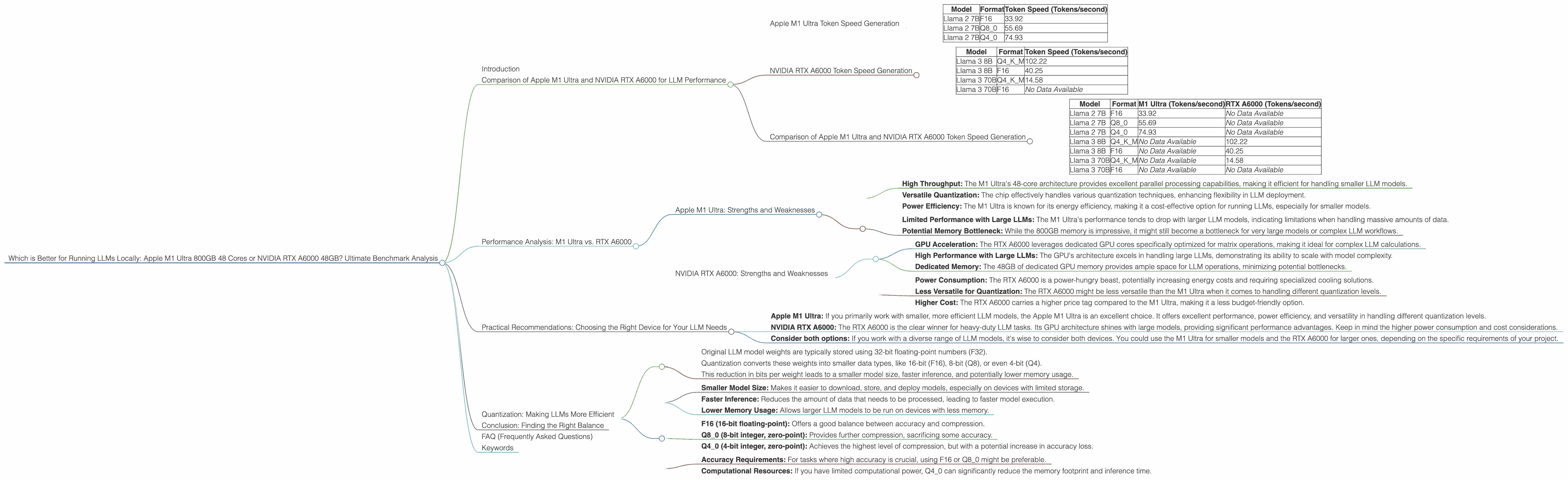
Apple M1 Ultra Token Speed Generation
The Apple M1 Ultra's 48-core architecture boasts high throughput for parallel processing, making it a strong contender for LLM workloads. Here's how it fares on different Llama 2 models with varying quantization levels:
| Model | Format | Token Speed (Tokens/second) |
|---|---|---|
| Llama 2 7B | F16 | 33.92 |
| Llama 2 7B | Q8_0 | 55.69 |
| Llama 2 7B | Q4_0 | 74.93 |
Observations:
- The M1 Ultra excels in token generation speed for Llama 2 7B models, particularly with Q4_0 quantization. This indicates that the Apple chip can effectively handle smaller LLM models with optimized compression techniques.
- The M1 Ultra demonstrates strong performance across different quantization levels, suggesting its versatility for various LLM workloads.
NVIDIA RTX A6000 Token Speed Generation
The NVIDIA RTX A6000 is a powerhouse GPU designed for demanding workloads, including AI and deep learning. Let's see how it handles Llama 3 models:
| Model | Format | Token Speed (Tokens/second) |
|---|---|---|
| Llama 3 8B | Q4KM | 102.22 |
| Llama 3 8B | F16 | 40.25 |
| Llama 3 70B | Q4KM | 14.58 |
| Llama 3 70B | F16 | No Data Available |
Observations:
- The RTX A6000 outperforms the M1 Ultra on Llama 3 models, particularly the 8B model. This is likely due to the GPU's specialized architecture optimized for matrix operations, a core task in LLM inference.
- The RTX A6000 demonstrates its strength in handling larger LLMs, although the difference in performance between 8B and 70B models is significant. This hints at potential scaling limitations for extremely large LLMs.
Comparison of Apple M1 Ultra and NVIDIA RTX A6000 Token Speed Generation
Here's a side-by-side comparison of the two devices for better understanding:
| Model | Format | M1 Ultra (Tokens/second) | RTX A6000 (Tokens/second) |
|---|---|---|---|
| Llama 2 7B | F16 | 33.92 | No Data Available |
| Llama 2 7B | Q8_0 | 55.69 | No Data Available |
| Llama 2 7B | Q4_0 | 74.93 | No Data Available |
| Llama 3 8B | Q4KM | No Data Available | 102.22 |
| Llama 3 8B | F16 | No Data Available | 40.25 |
| Llama 3 70B | Q4KM | No Data Available | 14.58 |
| Llama 3 70B | F16 | No Data Available | No Data Available |
Key Takeaways:
- The M1 Ultra excels in token generation for smaller LLMs, particularly Llama 2 7B with Q4_0 quantization.
- The RTX A6000 shines with larger LLMs like Llama 3 8B.
- There is a lack of data on the RTX A6000's performance with F16 format for Llama 3 70B.
Performance Analysis: M1 Ultra vs. RTX A6000
Now let's go beyond just token speeds and dive deeper into the performance characteristics of these devices.
Apple M1 Ultra: Strengths and Weaknesses
Strengths:
- High Throughput: The M1 Ultra's 48-core architecture provides excellent parallel processing capabilities, making it efficient for handling smaller LLM models.
- Versatile Quantization: The chip effectively handles various quantization techniques, enhancing flexibility in LLM deployment.
- Power Efficiency: The M1 Ultra is known for its energy efficiency, making it a cost-effective option for running LLMs, especially for smaller models.
Weaknesses:
- Limited Performance with Large LLMs: The M1 Ultra's performance tends to drop with larger LLM models, indicating limitations when handling massive amounts of data.
- Potential Memory Bottleneck: While the 800GB memory is impressive, it might still become a bottleneck for very large models or complex LLM workflows.
NVIDIA RTX A6000: Strengths and Weaknesses
Strengths:
- GPU Acceleration: The RTX A6000 leverages dedicated GPU cores specifically optimized for matrix operations, making it ideal for complex LLM calculations.
- High Performance with Large LLMs: The GPU's architecture excels in handling large LLMs, demonstrating its ability to scale with model complexity.
- Dedicated Memory: The 48GB of dedicated GPU memory provides ample space for LLM operations, minimizing potential bottlenecks.
Weaknesses:
- Power Consumption: The RTX A6000 is a power-hungry beast, potentially increasing energy costs and requiring specialized cooling solutions.
- Less Versatile for Quantization: The RTX A6000 might be less versatile than the M1 Ultra when it comes to handling different quantization levels.
- Higher Cost: The RTX A6000 carries a higher price tag compared to the M1 Ultra, making it a less budget-friendly option.
Practical Recommendations: Choosing the Right Device for Your LLM Needs
For Developers Working with Smaller LLMs (e.g., Llama 2 7B):
- Apple M1 Ultra: If you primarily work with smaller, more efficient LLM models, the Apple M1 Ultra is an excellent choice. It offers excellent performance, power efficiency, and versatility in handling different quantization levels.
For Developers Working with Larger LLMs (e.g., Llama 3 8B and above):
- NVIDIA RTX A6000: The RTX A6000 is the clear winner for heavy-duty LLM tasks. Its GPU architecture shines with large models, providing significant performance advantages. Keep in mind the higher power consumption and cost considerations.
For Developers Working with a Variety of LLMs:
- Consider both options: If you work with a diverse range of LLM models, it's wise to consider both devices. You could use the M1 Ultra for smaller models and the RTX A6000 for larger ones, depending on the specific requirements of your project.
Quantization: Making LLMs More Efficient
Quantization is a technique that reduces the size of LLM models by compressing their weights. This is like replacing a high-resolution image with a lower-resolution version while retaining the essential features.
How Quantization Works:
- Original LLM model weights are typically stored using 32-bit floating-point numbers (F32).
- Quantization converts these weights into smaller data types, like 16-bit (F16), 8-bit (Q8), or even 4-bit (Q4).
- This reduction in bits per weight leads to a smaller model size, faster inference, and potentially lower memory usage.
Benefits of Quantization:
- Smaller Model Size: Makes it easier to download, store, and deploy models, especially on devices with limited storage.
- Faster Inference: Reduces the amount of data that needs to be processed, leading to faster model execution.
- Lower Memory Usage: Allows larger LLM models to be run on devices with less memory.
Quantization Levels:
- F16 (16-bit floating-point): Offers a good balance between accuracy and compression.
- Q8_0 (8-bit integer, zero-point): Provides further compression, sacrificing some accuracy.
- Q4_0 (4-bit integer, zero-point): Achieves the highest level of compression, but with a potential increase in accuracy loss.
Choosing the Right Quantization Level:
The choice of quantization level depends on the trade-off between model size, inference speed, and accuracy. Consider the following:
- Accuracy Requirements: For tasks where high accuracy is crucial, using F16 or Q8_0 might be preferable.
- Computational Resources: If you have limited computational power, Q4_0 can significantly reduce the memory footprint and inference time.
Conclusion: Finding the Right Balance
Choosing the best device for running LLMs locally is a balancing act between performance, efficiency, and cost. The Apple M1 Ultra shines with its versatility and efficiency, particularly for smaller LLM models, while the NVIDIA RTX A6000 dominates with its power and scalability for larger, more complex models.
Ultimately, the ideal device for your LLM needs depends on your specific project requirements, budget, and desired level of performance. By understanding the strengths and weaknesses of each device, you can make an informed decision that will empower your LLM journey.
FAQ (Frequently Asked Questions)
Q: What is the best device for running LLMs locally?
A: The best device depends on the specific LLM model you're using and your desired level of performance. The M1 Ultra is ideal for smaller models, while the RTX A6000 excels with larger LLMs.
Q: What are the benefits of running LLMs locally?
A: Running LLMs locally offers benefits like greater privacy, faster response times, and the ability to customize model settings.
Q: What is quantization, and why is it important for LLMs?
A: Quantization compresses LLM models, reducing their size and speeding up inference while potentially sacrificing some accuracy. It's essential for running large models on devices with limited resources.
Q: What are some other factors to consider when choosing a device for LLMs?
A: Other factors include the cost of the device, its power consumption, and the availability of software support.
Q: What are the future trends in LLM hardware?
A: Future trends include advancements in GPU architecture, higher-capacity memory, and specialized hardware designed specifically for LLM inference.
Keywords
LLMs, Large Language Models, Apple M1 Ultra, NVIDIA RTX A6000, Token Speed, Quantization, F16, Q80, Q40, Performance, Comparison, Inference, Local, Hardware, GPU, CPU, Benchmark, Speed, Efficiency, Cost, Power Consumption, Memory, Trade-off, Future Trends.