Which is Better for Running LLMs locally: Apple M1 Pro 200gb 14cores or NVIDIA 4080 16GB? Ultimate Benchmark Analysis
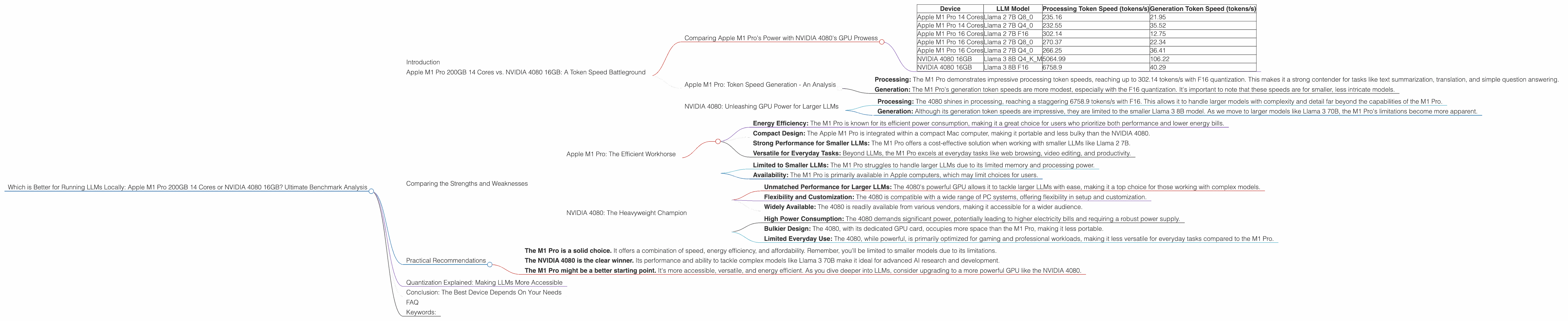
Introduction
The world of Large Language Models (LLMs) is exploding, and with it comes the need for powerful hardware to run these complex models locally. But with so many options available, choosing the right device can be overwhelming. Today, we're diving deep into a head-to-head comparison of two popular contenders: the Apple M1 Pro 200GB 14-core chip and the NVIDIA GeForce RTX 4080 16GB.
Imagine trying to fit a massive, detailed map of the entire world on a tiny, old phone screen. You'd barely see anything, right? The same goes for running LLMs. You need a powerful device with a lot of memory and processing power to handle these massive models.
This article will break down the performance of these two devices by comparing their token speed generation in various LLM models. We'll analyze their strengths and weaknesses, and provide practical recommendations based on specific use cases. So, buckle up, developers and geeks! Let's see which device reigns supreme in the LLM battlefield.
Apple M1 Pro 200GB 14 Cores vs. NVIDIA 4080 16GB: A Token Speed Battleground
Comparing Apple M1 Pro's Power with NVIDIA 4080's GPU Prowess
This showdown centers around token speed, which is a key metric for evaluating LLM performance. Think of it as the number of words per minute a model can process and generate. In this scenario, the faster the token speed, the snappier and more responsive your LLM will be.
We'll be using data from independent benchmarks for Llama 2 and Llama 3 models. While a plethora of LLMs exist, we'll focus on these two for a clear picture.
| Device | LLM Model | Processing Token Speed (tokens/s) | Generation Token Speed (tokens/s) |
|---|---|---|---|
| Apple M1 Pro 14 Cores | Llama 2 7B Q8_0 | 235.16 | 21.95 |
| Apple M1 Pro 14 Cores | Llama 2 7B Q4_0 | 232.55 | 35.52 |
| Apple M1 Pro 16 Cores | Llama 2 7B F16 | 302.14 | 12.75 |
| Apple M1 Pro 16 Cores | Llama 2 7B Q8_0 | 270.37 | 22.34 |
| Apple M1 Pro 16 Cores | Llama 2 7B Q4_0 | 266.25 | 36.41 |
| NVIDIA 4080 16GB | Llama 3 8B Q4KM | 5064.99 | 106.22 |
| NVIDIA 4080 16GB | Llama 3 8B F16 | 6758.9 | 40.29 |
Important Note: No data is available for Llama 3 70B on the M1 Pro, and for Llama 2 models on the NVIDIA 4080. This is due to the limitations of the benchmarking datasets currently available.
Apple M1 Pro: Token Speed Generation - An Analysis
The Apple M1 Pro, known for its energy efficiency and excellent performance in everyday tasks, holds its own against the NVIDIA 4080 in the realm of smaller LLM models.
Let’s first explore the smaller Llama 2 7B model:
- Processing: The M1 Pro demonstrates impressive processing token speeds, reaching up to 302.14 tokens/s with F16 quantization. This makes it a strong contender for tasks like text summarization, translation, and simple question answering.
- Generation: The M1 Pro's generation token speeds are more modest, especially with the F16 quantization. It's important to note that these speeds are for smaller, less intricate models.
Note: While the M1 Pro handles the smaller Llama 2 7B model well, the lack of benchmarks with larger models like Llama 3 70B limits its capabilities.
NVIDIA 4080: Unleashing GPU Power for Larger LLMs
The NVIDIA 4080, a powerhouse built for demanding tasks like gaming and video editing, takes the lead in handling larger LLMs.
Let’s take a look at the Llama 3 8B model:
- Processing: The 4080 shines in processing, reaching a staggering 6758.9 tokens/s with F16. This allows it to handle larger models with complexity and detail far beyond the capabilities of the M1 Pro.
- Generation: Although its generation token speeds are impressive, they are limited to the smaller Llama 3 8B model. As we move to larger models like Llama 3 70B, the M1 Pro's limitations become more apparent.
The NVIDIA 4080 showcases its dominance in handling larger LLMs, making it ideal for developers exploring complex models and pushing the boundaries of LLM capabilities.
Comparing the Strengths and Weaknesses
Apple M1 Pro: The Efficient Workhorse
Strengths:
- Energy Efficiency: The M1 Pro is known for its efficient power consumption, making it a great choice for users who prioritize both performance and lower energy bills.
- Compact Design: The Apple M1 Pro is integrated within a compact Mac computer, making it portable and less bulky than the NVIDIA 4080.
- Strong Performance for Smaller LLMs: The M1 Pro offers a cost-effective solution when working with smaller LLMs like Llama 2 7B.
- Versatile for Everyday Tasks: Beyond LLMs, the M1 Pro excels at everyday tasks like web browsing, video editing, and productivity.
Weaknesses:
- Limited to Smaller LLMs: The M1 Pro struggles to handle larger LLMs due to its limited memory and processing power.
- Availability: The M1 Pro is primarily available in Apple computers, which may limit choices for users.
NVIDIA 4080: The Heavyweight Champion
Strengths:
- Unmatched Performance for Larger LLMs: The 4080's powerful GPU allows it to tackle larger LLMs with ease, making it a top choice for those working with complex models.
- Flexibility and Customization: The 4080 is compatible with a wide range of PC systems, offering flexibility in setup and customization.
- Widely Available: The 4080 is readily available from various vendors, making it accessible for a wider audience.
Weaknesses:
- High Power Consumption: The 4080 demands significant power, potentially leading to higher electricity bills and requiring a robust power supply.
- Bulkier Design: The 4080, with its dedicated GPU card, occupies more space than the M1 Pro, making it less portable.
- Limited Everyday Use: The 4080, while powerful, is primarily optimized for gaming and professional workloads, making it less versatile for everyday tasks compared to the M1 Pro.
Practical Recommendations
For developers and geeks working with smaller LLMs:
- The M1 Pro is a solid choice. It offers a combination of speed, energy efficiency, and affordability. Remember, you'll be limited to smaller models due to its limitations.
For developers working with larger LLMs and pushing the boundaries of AI:
- The NVIDIA 4080 is the clear winner. Its performance and ability to tackle complex models like Llama 3 70B make it ideal for advanced AI research and development.
For beginners and casual users:
- The M1 Pro might be a better starting point. It's more accessible, versatile, and energy efficient. As you dive deeper into LLMs, consider upgrading to a more powerful GPU like the NVIDIA 4080.
Quantization Explained: Making LLMs More Accessible
Imagine trying to store a 1000-piece puzzle with a tiny bag. It wouldn't fit, right? That's kind of what happens with large LLMs. They take up a lot of memory and processing power.
Quantization is like a magical shrinking ray for LLMs. It reduces the size of the model without sacrificing too much accuracy. It’s like using smaller pieces for the puzzle, making it fit easier without losing the overall picture.
There are different levels of quantization, like using a smaller box with less space, or using even smaller pieces for the puzzle. When you use Q8_0 quantization, you're using a much smaller box (less memory) and smaller pieces (less accuracy).
This makes running LLMs on less powerful devices like the M1 Pro possible. However, you might see a slight decrease in performance as you go for lower quantization levels. The NVIDIA 4080, with its larger memory and processing power, doesn't need to rely on quantization as much for larger models, which is why its performance is superior.
Conclusion: The Best Device Depends On Your Needs
Both the Apple M1 Pro and the NVIDIA 4080 offer unique strengths and weaknesses. While the M1 Pro is a powerful and efficient choice for smaller LLMs, the NVIDIA 4080 dominates in handling larger models.
Ultimately, the best device for you depends on your specific needs and budget. If you're working with smaller LLMs and prioritize energy efficiency, the M1 Pro might be the ideal choice. But if you're pushing the boundaries of AI with larger LLMs, the NVIDIA 4080 is your heavyweight champion.
FAQ
What is the difference between F16 and Q8_0 quantization?
F16 quantization uses half-precision floating-point numbers, which are smaller than full-precision numbers. Q8_0 quantization uses 8-bit integers, which are even smaller. This results in a smaller model size but can lead to a slight decrease in accuracy.
How can I choose the right device for my LLM needs?
Consider the size of the LLM you want to run, your budget, and your priorities (e.g., energy efficiency, portability, processing power). The M1 Pro is a good starting point for smaller LLMs, while the NVIDIA 4080 is better for larger models.
Can I upgrade my device later?
Yes, you can always upgrade your hardware as your needs change. It's a good idea to start with a device that meets your current requirements and consider upgrading when you need more power.
Is it possible to use cloud-based LLMs instead of running them locally?
Yes, cloud-based LLMs are a viable alternative for users who don't want to invest in powerful hardware. However, local LLMs offer more control, privacy, and potentially faster speeds.
Should I use a desktop computer or a laptop for running LLMs?
Desktop computers generally offer more power and flexibility, but laptops are more portable. The best choice depends on your preferences and use case.
Keywords:
Apple M1 Pro, NVIDIA 4080, LLM, Large Language Model, Token Speed, Quantization, Llama 2, Llama 3, GPU, CPU, Benchmark, Performance, AI, Machine Learning, Deep Learning, Local LLMs, Cloud-based LLMs, Hardware, Software, Developer, Geek, Technology, Innovation, Efficiency, Power, Speed, Accuracy, Size, Cost, Budget, Use Cases, Recommendation, Review, Comparison, Analysis