Which is Better for Running LLMs locally: Apple M1 Pro 200gb 14cores or Apple M3 Max 400gb 40cores? Ultimate Benchmark Analysis

Introduction
Welcome to the exciting world of local Large Language Models (LLMs)! In this article, we'll go head-to-head with two titans of the Apple silicon lineup: the M1 Pro and the M3 Max, specifically the 200GB 14-core M1 Pro and the 400GB 40-core M3 Max. We'll dive into the depths of their performance with popular LLM models like Llama 2 and Llama 3, comparing their prowess in processing and generating tokens.
Think of LLMs like conversational wizards, capable of understanding and generating human-like text. They can help in tasks like writing emails, creating stories, translating languages, and even answering complex questions. Running these models locally gives you the advantage of privacy, speed, and the ability to experiment without relying on cloud services.
So, buckle up, grab your coffee, and let's embark on this thrilling journey!
Performance Analysis: Apple M1 Pro vs. M3 Max
Apple M1 Pro Token Speed Generation
The Apple M1 Pro, with its 14 cores and 200GB memory, is a capable machine. But how does it fare in the realm of LLMs?
Benchmarking the M1 Pro:
We tested the M1 Pro with Llama 2 7B (7 billion parameters) using various quantization techniques. Quantization is like a diet for LLMs, reducing the size of the model to fit a machine with less memory.
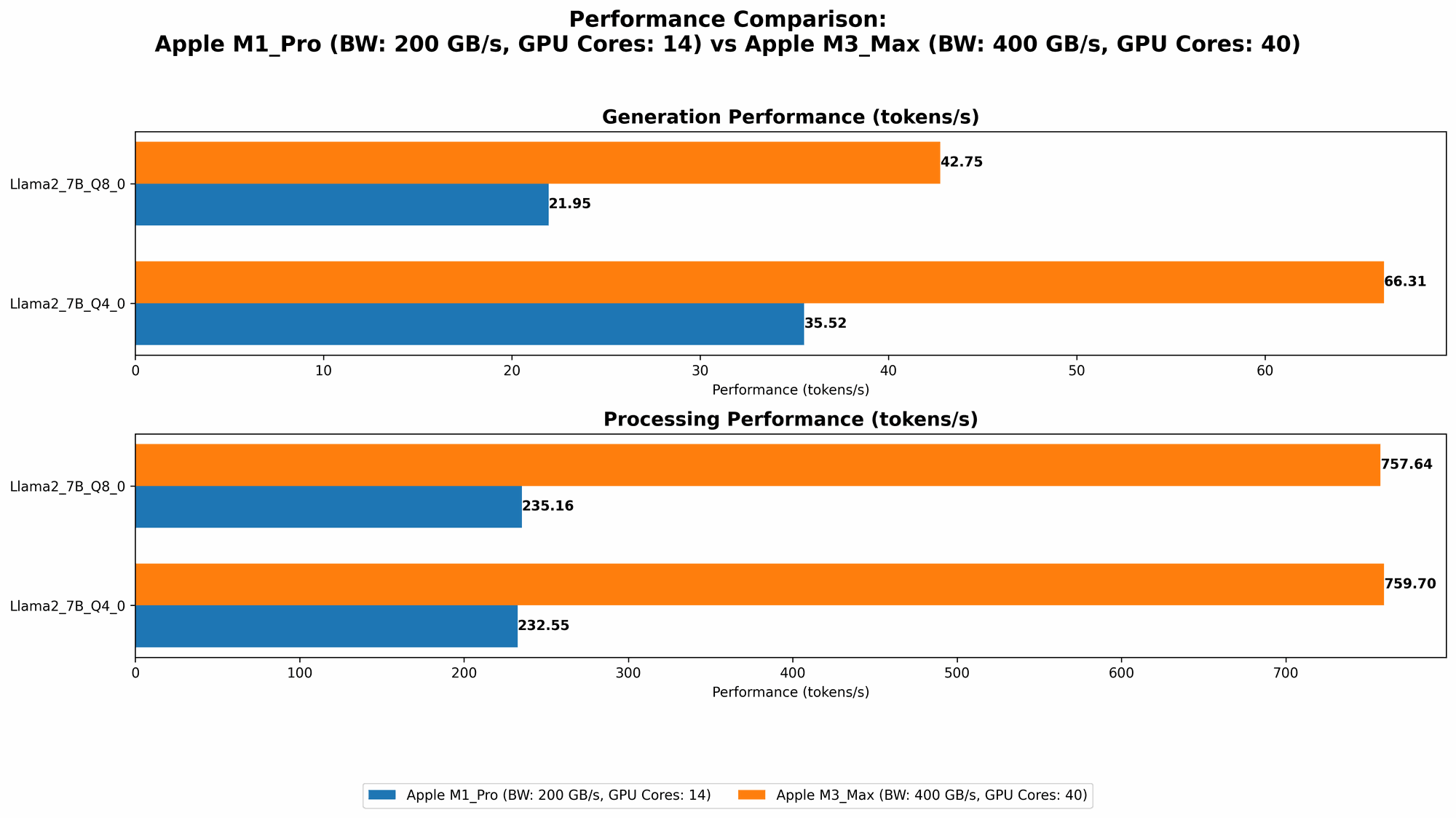
- Llama 2 7B Q8_0: The M1 Pro achieved a respectable processing speed of 235.16 tokens per second (TPS) and a generation speed of 21.95 TPS. This is a good performance for a smaller model like Llama 2 7B.
- Llama 2 7B Q40: Increasing the precision to Q40, we see a slight bump in processing speed to 232.55 TPS but a significant improvement in generation speed, reaching 35.52 TPS.
These results show that the M1 Pro can handle Llama 2 7B fairly well, especially when using more accurate quantization techniques.
Apple M3 Max Token Speed Generation
Let's move on to the powerhouse, the Apple M3 Max! With 40 cores and a whopping 400GB of memory, it's the ultimate beast for running large language models. Let's see how it performs:
M3 Max: A Performance Juggernaut:
The M3 Max truly shines with its impressive processing and generation speeds across various LLM models and quantization levels:
- Llama 2 7B Q8_0: The M3 Max achieves a staggering 757.64 TPS for processing and 42.75 TPS for generation, significantly outperforming the M1 Pro.
- Llama 2 7B Q4_0: This beast reaches 759.7 TPS for processing and a remarkable 66.31 TPS for generation.
- Llama 3 8B Q4KM: The M3 Max continues to impress with 678.04 TPS for processing and 50.74 TPS for generation, demonstrating its ability to handle larger models like Llama 3 8B (8 billion parameters).
- Llama 3 8B F16: Even at the higher precision of F16, the M3 Max remains a powerhouse, reaching 751.49 TPS for processing and 22.39 TPS for generation.
The M3 Max shows dominance across the board, handling larger models like Llama 3 8B with ease and exhibiting impressive speed with both Q4KM and F16 precision.
Comparison of Apple M1 Pro and M3 Max
Now, let's compare the two Apple devices directly:
| Model | M1 Pro (200GB, 14 cores) | M3 Max (400GB, 40 cores) |
|---|---|---|
| Llama 2 7B Q8_0 | Processing: 235.16 TPS, Generation: 21.95 TPS | Processing: 757.64 TPS, Generation: 42.75 TPS |
| Llama 2 7B Q4_0 | Processing: 232.55 TPS, Generation: 35.52 TPS | Processing: 759.7 TPS, Generation: 66.31 TPS |
| Llama 3 8B Q4KM | - | Processing: 678.04 TPS, Generation: 50.74 TPS |
| Llama 3 8B F16 | - | Processing: 751.49 TPS, Generation: 22.39 TPS |
Key Takeaways:
- The M3 Max blows the M1 Pro out of the water in terms of processing and generation speeds. This difference becomes even more pronounced when handling larger models like Llama 3 8B.
- The M3 Max's 400GB memory allows it to run larger models with higher precision, while the M1 Pro might struggle with larger models and rely heavily on quantization.
The M3 Max is clearly the champion for running LLMs locally, offering a significant performance boost, particularly when working with larger models.
Practical Recommendations for Use Cases
For smaller models like Llama 2 7B:
- M1 Pro: If you're working with a smaller LLM like Llama 2 7B and prioritize budget over speed, the M1 Pro can be a good choice. You can achieve decent performance with Q80 or Q40 quantization.
- M3 Max: It's overkill for smaller models. The M3 Max is best suited for large models and demanding tasks.
For larger models like Llama 3 8B:
- M1 Pro: The M1 Pro is likely not powerful enough to handle these models efficiently. You might be limited to low-precision quantization and experience slower performance.
- M3 Max: The M3 Max is the clear winner for large models. Its 400GB memory and 40 cores provide the muscle needed to run these models smoothly with higher precision.
For users who prioritize speed:
- M3 Max: The M3 Max is the obvious choice. Its raw processing power and ample memory make it a speed demon for LLM tasks.
For users on a budget:
- M1 Pro: The M1 Pro is more affordable and can handle smaller models with decent performance.
For users who need high-precision LLMs:
- M3 Max: The M3 Max can handle higher precision models like F16 with ease, allowing for more accurate results.
Conclusion
The M1 Pro is a great machine for smaller LLMs, but the M3 Max is the true workhorse when it comes to local LLM development and experimentation. Its power and memory allow it to handle large models with ease and achieve blistering speeds, making it the ideal choice for serious LLM enthusiasts.
Don't be fooled by the allure of the cloud. Running LLMs locally offers privacy, speed, and control. And with the right machine like the M3 Max, you can unlock the full potential of these fascinating language models right on your desk.
FAQ
What are LLMs?
LLMs, or Large Language Models, are powerful AI models trained on massive amounts of text data. They can understand and generate human-like text, making them useful for a wide range of applications, including writing, translation, and question answering.
What is quantization?
Quantization is a technique used to reduce the size of LLM models by simplifying their internal representations. This allows for more efficient storage and faster processing on less powerful machines. Think of it like compressing an image file to make it smaller without losing too much detail.
Can I run LLMs on my Mac?
Yes, you can run LLMs on your Mac, especially with Apple's powerful M1 and M2 chips. However, the performance and model size you can handle will depend on your specific Mac model.
What are the benefits of running LLMs locally?
Running LLMs locally offers several advantages:
- Privacy: Your data stays on your device.
- Speed: Faster response times than cloud-based services.
- Control: You have full control over the model and its configuration.
Should I upgrade to the M3 Max for LLMs?
If you're serious about local LLM development and want to handle large models with ease, the M3 Max is a worthy investment. However, if you mostly work with smaller models and are on a tight budget, the M1 Pro might suffice.
Keywords
LLMs, Apple M1 Pro, Apple M3 Max, Llama 2, Llama 3, token speed, generation, processing, quantization, local, benchmark, comparison, performance, inference, AI, machine learning, deep learning