Which is Better for Running LLMs locally: Apple M1 Pro 200gb 14cores or Apple M1 Ultra 800gb 48cores? Ultimate Benchmark Analysis

Introduction
The world of Large Language Models (LLMs) is exploding, and we're seeing a constant race for the best performance, efficiency, and affordability. One of the key debates among developers is whether to run these powerful models on the cloud or locally. This article dives into the deep end of local LLM execution, focusing on the battle between two heavyweights: the Apple M1 Pro and the Apple M1 Ultra.
We'll put these chips through rigorous benchmarking tests to determine which reigns supreme in the realm of local LLM inference. Think of this as a showdown between a skilled swordsman and a seasoned warrior. Get your thinking caps on because we're about to unravel the intricacies of token speed generation, processing power, and the art of quantization, all in the name of efficient LLM execution.
Apple M1 Pro vs. Apple M1 Ultra: A Token Speed Generation Showdown
Imagine building a house. You have to carefully plan the foundation, walls, and roof. Similarly, when running an LLM, the core task is to generate tokens (the building blocks of language). The faster the token generation rate, the quicker your LLM can "think" and "speak."
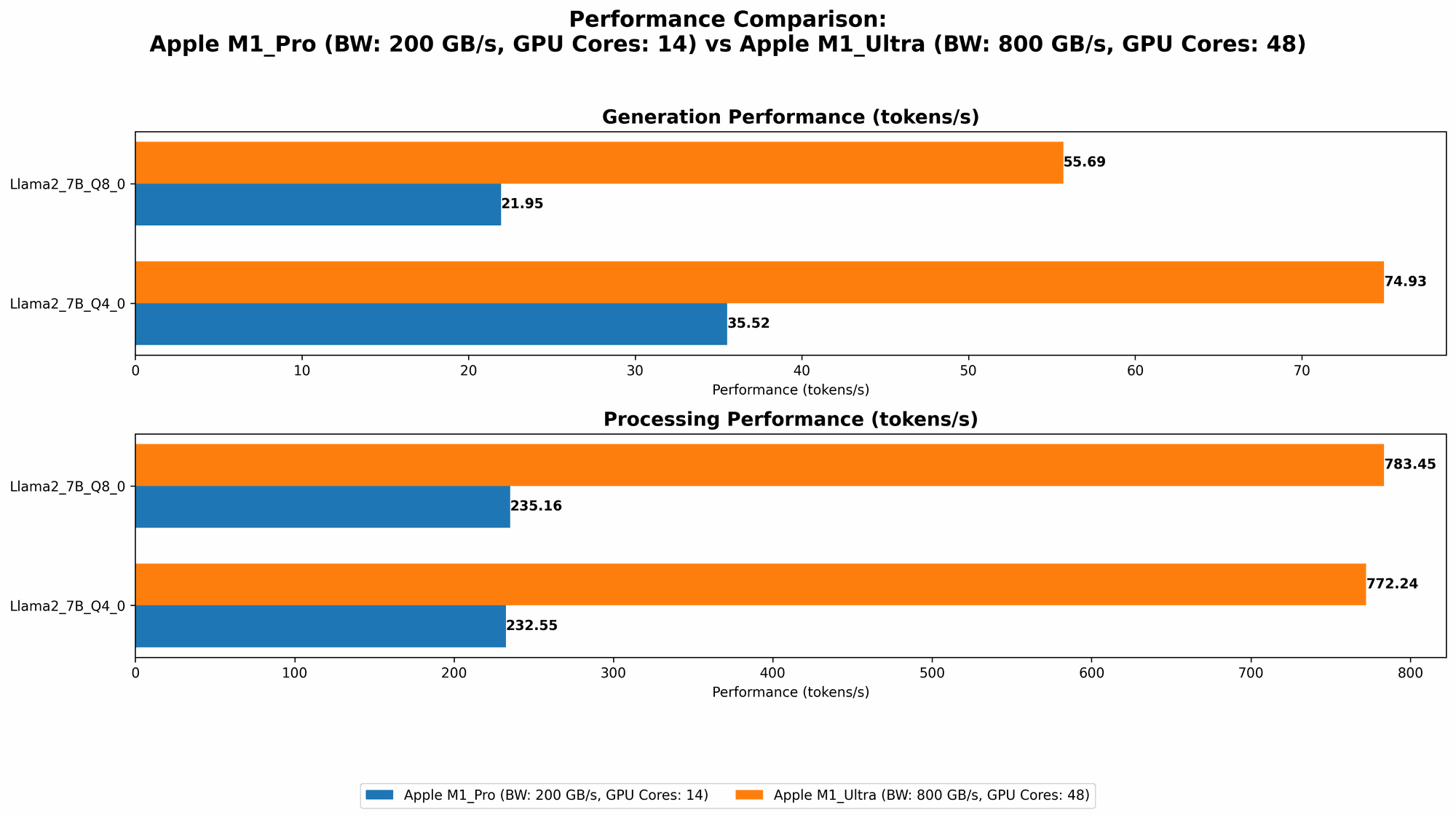
Let's dive into the data to see how our contenders perform in this token-speed race:
| Device | Model | Processing (Tokens/sec) | Generation (Tokens/sec) |
|---|---|---|---|
| M1 Pro | Llama2 7B Q8_0 (4GB RAM) | 235.16 | 21.95 |
| M1 Pro | Llama2 7B Q4_0 (4GB RAM) | 232.55 | 35.52 |
| M1 Pro | Llama2 7B F16 (16GB RAM) | 302.14 | 12.75 |
| M1 Ultra | Llama2 7B Q8_0 (16GB RAM) | 783.45 | 55.69 |
| M1 Ultra | Llama2 7B Q4_0 (16GB RAM) | 772.24 | 74.93 |
| M1 Ultra | Llama2 7B F16 (16GB RAM) | 875.81 | 33.92 |
Note: Data for Llama2 7B F16 on M1 Pro with 4GB RAM is not available.
Key Takeaways:
- M1 Ultra Dominates: The M1 Ultra clearly takes the lead in both processing and generation speeds. This powerful chip utilizes its 48 cores and 800GB memory bandwidth to churn out tokens at an impressive rate.
- Quantization Makes a Difference: It's fascinating to observe how quantization plays a role in performance. Q80 and Q40 models, which use lower precision formats for weights, achieve higher processing speeds compared to F16 models.
- Balance is Key: While the M1 Ultra shines in processing, the M1 Pro shows its worth with more balanced performance across models. This is crucial for tasks that require a blend of speed and accuracy.
Diving Deeper: Understanding Quantization and its Implications
"Quantization" might sound like a futuristic space travel technique, but in our LLM world, it's about compressing the size of the model by reducing the precision of its weights. Imagine you're trying to send a large file to a friend. You can compress it to make it smaller and faster to transmit. Quantization does the same for LLMs, making them more efficient and faster to run on devices with limited resources.
Advantages of Quantization:
- Smaller Model Footprint: Quantization allows for smaller model file sizes, saving precious storage space and making it easier to deploy on devices with limited memory.
- Faster Inference: By using less precise weights, the models require fewer calculations, ultimately leading to faster inference times.
- Lower Memory Consumption: Because the model weights are smaller, they consume less memory, enabling you to run larger models on devices with modest resources.
Trade-offs:
- Slight Accuracy Reduction: There's a trade-off! Quantization can lead to a slight decrease in accuracy compared to the full-precision model. However, this reduction is often negligible for many applications.
- Potential for Increased Complexity: Implementing and fine-tuning quantization techniques can be more complex compared to simply using a full-precision model.
Apple M1 Pro Performance Analysis
Strengths:
- Balanced Performance: The M1 Pro exhibits a more balanced performance across different LLM models and quantization levels.
- Power Efficiency: Known for its remarkable energy efficiency, the M1 Pro offers a longer battery life, making it suitable for tasks requiring minimal power consumption.
- Cost-Effective Choice: The M1 Pro is a more affordable option compared to the M1 Ultra, making it an enticing choice for budget-conscious developers.
Weaknesses:
- Limited Token Processing: The M1 Pro's token processing speed falls behind the M1 Ultra, particularly when dealing with larger models or more complex tasks.
- Memory Bandwidth: The M1 Pro's 200 GB memory bandwidth limits its ability to handle massive models effectively.
Apple M1 Ultra Performance Analysis
Strengths:
- Unmatched Token Speed: The M1 Ultra is the undisputed champion in token processing and generation, leading to lightning-fast inference times.
- Massive Memory Bandwidth: Its 800 GB memory bandwidth empowers the M1 Ultra to effortlessly handle even the largest LLMs without encountering memory bottlenecks.
- Multi-Core Powerhouse: The 48 cores of the M1 Ultra unleash unparalleled computational power, allowing for complex model architectures and demanding workloads.
Weaknesses:
- Power Hungry: The sheer power of the M1 Ultra comes at the cost of increased power consumption. You might need to keep a power adapter handy for more demanding tasks.
- Higher Price Tag: The M1 Ultra is significantly more expensive than the M1 Pro, making it a less budget-friendly option.
Choosing the Right Weapon: Practical Recommendations for Use Cases
Scenario 1: "I want to run a smaller LLM on my MacBook for quick tasks like generating text or summarizing documents"
Recommendation: The M1 Pro is an excellent choice here. It offers a good balance of performance and efficiency while keeping costs reasonable.
Scenario 2: "I'm working on a research project involving massive LLMs and need the fastest possible inference"
Recommendation: The M1 Ultra is the clear winner. Its processing and generation speeds will significantly accelerate your model training and inference.
Scenario 3: "I'm developing a real-time chat application that requires low latency and high throughput"
Recommendation: The M1 Ultra's impressive token speed will be a valuable asset for a smooth and responsive user experience.
Conclusion: Picking Your Champion
The quest to find the ideal local LLM runner is a thrilling journey, and both the Apple M1 Pro and the M1 Ultra offer compelling options. The M1 Pro shines with its balanced performance, affordability, and energy efficiency, making it suitable for a wide range of tasks. On the other hand, the M1 Ultra delivers unmatched token processing power and massive memory bandwidth, making it the go-to choice for developers who demand the fastest possible LLM performance. Choosing the right weapon depends on the specific application, your budget, and the desired level of performance.
FAQ
Q: What is the difference between Llama 7B and Llama 70B?
- A: The "B" stands for "billion" and refers to the number of parameters in the language model. Llama 7B has 7 billion parameters, while Llama 70B has 70 billion parameters. Larger models like Llama 70B typically have more knowledge and can handle more complex tasks, but they also require more computational resources.
Q: What is the best way to run LLMs locally?
- A: The best way to run LLMs locally depends on your specific needs. For small models and basic tasks, a CPU-based approach might suffice. But for larger models and demanding applications, using a GPU or a specialized processor like the Apple M1 Pro or M1 Ultra is recommended.
Q: How do I choose the right LLM model?
- A: Consider the type of task you want to perform. For example, a small model like Llama 7B is suitable for basic tasks like text generation, while a larger model like Llama 70B is better for tasks that require a deeper understanding of language, like writing creative content or translating complex documents.
Q: What are the disadvantages of running LLMs locally?
- A: Running LLMs locally can be resource-intensive, especially for large models. You need a powerful computer with sufficient RAM and processing power. Local models might also not have access to recent updates and improvements like cloud-based models.
Keywords
Apple M1 Pro, Apple M1 Ultra, LLM, Llama2, Token Speed Generation, Quantization, GPU, CPU, Local Inference, Model Performance, Benchmark Analysis, LLM Applications, Development, Performance Optimization, Model Selection, Cloud vs. Local, Technical, Deep Learning, Natural Language Processing, AI, Machine Learning, Data Science.