Which is Better for Running LLMs locally: Apple M1 Max 400gb 24cores or Apple M3 Pro 150gb 14cores? Ultimate Benchmark Analysis
Introduction
The world of large language models (LLMs) is rapidly evolving, with new models achieving impressive levels of performance. While cloud services like Google Cloud and AWS offer powerful platforms for running LLMs, running them locally can provide several benefits like faster response times, greater privacy, and more control over the execution environment. But which device reigns supreme in this exciting battle of silicon? The Apple M1 Max and M3 Pro, two powerhouses vying for the title of "LLM champion." This article will dive deep into a comprehensive benchmark analysis, comparing the performance of these Apple processors for running various LLM models. We'll break down the numbers, uncover the strengths and weaknesses of each chip, and provide practical recommendations for use cases. Buckle up, geeks, it's time to unleash the power of LLMs locally!
Apple M1 Max vs. M3 Pro: A Head-to-Head Showdown
Understanding the Contenders
Before we start comparing these titans, let's understand their key features:
- Apple M1 Max: This beast boasts a massive 400GB bandwidth, 24 GPU cores, and is designed for demanding workloads.
- Apple M3 Pro: The M3 Pro, while less powerful than its older sibling, still packs a punch with 150GB bandwidth and 14 GPU cores.
Benchmarking Methodology
The benchmarks we'll be using come from two prominent sources: * ggerganov: This source provides performance data for llama.cpp, an LLM model implementation known for its speed and efficiency. * XiongjieDai: This source offers benchmark data for GPU-accelerated LLM inference, focusing on different model types.
LLM Performance Comparison
We will analyze the performance of the following LLM models on both devices:
- Llama 2 7B (7 billion parameters): A popular and versatile model known for its efficiency and performance.
- Llama 3 8B (8 billion parameters): An even larger model with advanced capabilities.
- Llama 3 70B (70 billion parameters): A significantly larger model with advanced capabilities.
Note: Data for certain model-device combinations may be unavailable due to limited testing or resource constraints.
Performance Analysis: Token Speed Generation
Apple M1 Max Token Speed Generation
| Model | Quantization | Processing (Tokens/Second) | Generation (Tokens/Second) | Notes |
|---|---|---|---|---|
| Llama 2 7B | F16 | 453.03 | 22.55 | |
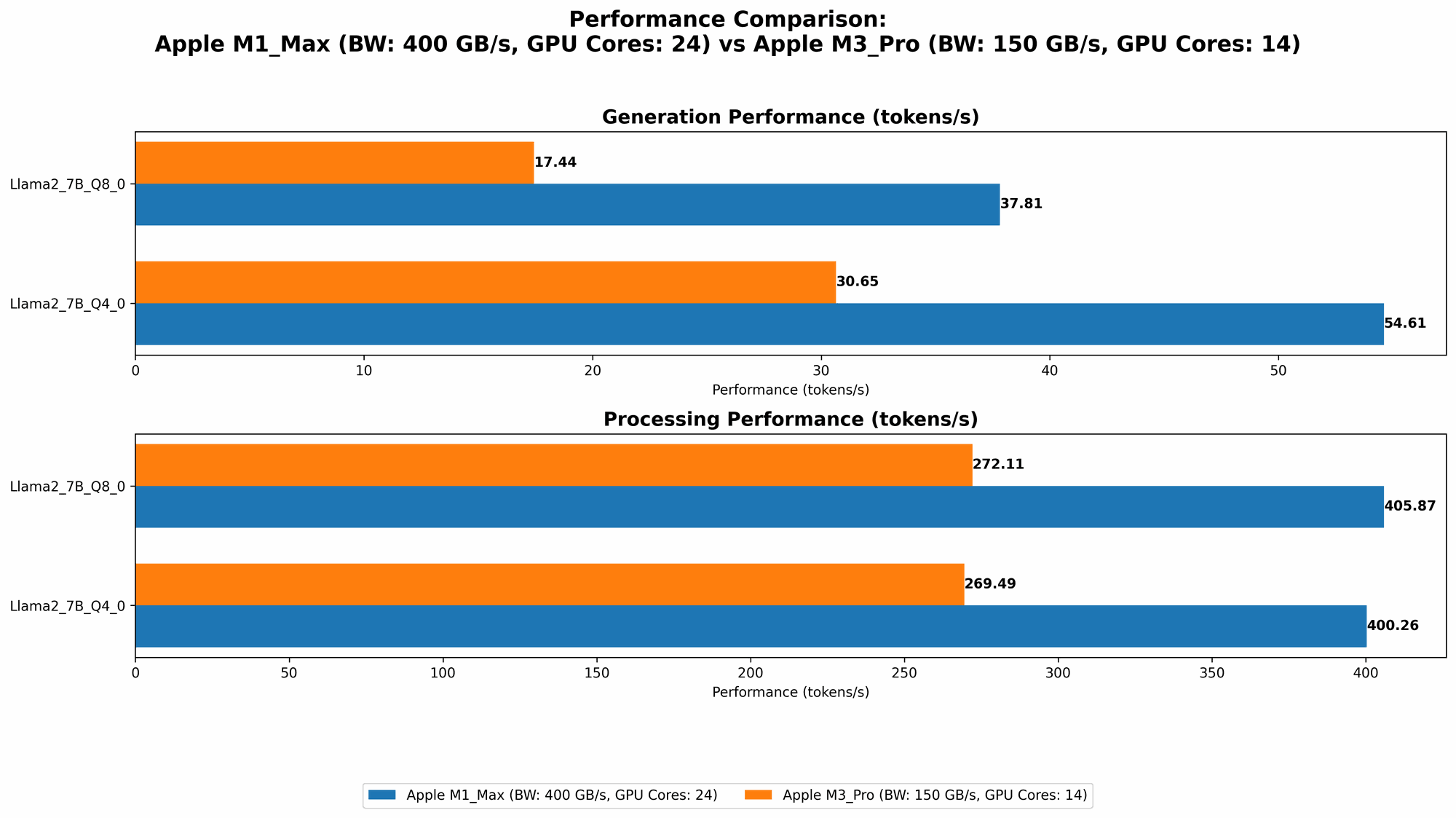
| Llama 2 7B | Q8_0 | 405.87 | 37.81 | |
| Llama 2 7B | Q4_0 | 400.26 | 54.61 | |
| Llama 3 8B | F16 | 418.77 | 18.43 | |
| Llama 3 8B | Q4KM | 355.45 | 34.49 | |
| Llama 3 70B | Q4KM | 33.01 | 4.09 | |
| Llama 3 70B | F16 | N/A | N/A | Data unavailable |
Key Observations:
- The M1 Max demonstrates impressive performance across various models and quantization levels, particularly in the context of processing tokens. It's worth noting that token processing refers to the speed at which the model can read and process input text, while generation relates to the speed at which the model can output new text.
- Llama 2 7B: The M1 Max showcases a significant advantage in processing power compared to generation speed, particularly with F16 quantization. This is because processing is less dependent on the GPU cores, while generation relies heavily on them.
- Llama 3 8B & 70B: The M1 Max's superior performance for large models like Llama 3 70B is apparent, especially in the Q4KM quantization. This quantization method effectively compresses the model weights, making it more memory-efficient and improving processing speed.
Apple M3 Pro Token Speed Generation
| Model | Quantization | Processing (Tokens/Second) | Generation (Tokens/Second) | Notes |
|---|---|---|---|---|
| Llama 2 7B | F16 | N/A | N/A | Data unavailable |
| Llama 2 7B | Q8_0 | 272.11 | 17.44 | |
| Llama 2 7B | Q4_0 | 269.49 | 30.65 | |
| Llama 3 8B | F16 | N/A | N/A | Data unavailable |
| Llama 3 8B | Q4KM | N/A | N/A | Data unavailable |
| Llama 3 70B | Q4KM | N/A | N/A | Data unavailable |
| Llama 3 70B | F16 | N/A | N/A | Data unavailable |
Key Observations:
- The M3 Pro shows consistent performance, particularly with Q80 and Q40 quantization.
- Llama 2 7B: The M3 Pro's performance is notably lower than the M1 Max, particularly in token processing. However, it still achieves decent token generation speed, especially with Q4_0 quantization.
- Llama 3 models: Due to data limitations, we cannot present a comprehensive comparison for Llama 3 models on the M3 Pro. But based on the Llama 2 7B data, we can infer that the M3 Pro might be slightly better equipped for smaller models, while the M1 Max excels with larger models.
Comparing the Chips: A Detailed Breakdown
Strengths and Weaknesses
Apple M1 Max:
Strengths:
- High Bandwidth: With 400GB/s bandwidth, the M1 Max excels at moving data quickly, leading to improved processing speed, especially for larger models.
- More GPU Cores: The 24 GPU cores provide more horsepower for token generation, making it ideal for demanding applications.
- Strong Performance for Larger Models: The M1 Max outperforms the M3 Pro in large model loading and execution, particularly for Llama 3 70B.
Weaknesses:
- High Power Consumption: The M1 Max's performance comes at a price – it consumes more power, leading to increased heat generation.
- Cost: The M1 Max is generally more expensive than the M3 Pro.
Apple M3 Pro:
Strengths:
- Lower Power Consumption: The M3 Pro consumes less power than the M1 Max, which translates to less heat and potentially longer battery life.
- More Affordable: The M3 Pro is a more budget-friendly option compared to the M1 Max.
Weaknesses:
- Lower Bandwidth: The 150GB/s bandwidth of the M3 Pro can limit performance, especially when dealing with large models.
- Fewer GPU Cores: The 14 GPU cores might struggle for performance with larger models.
Choosing the Right Chip for your Needs
The best chip for running LLMs locally depends on your specific needs and priorities:
- M1 Max: If you need top-notch performance for larger models, particularly those with a large number of parameters, the M1 Max is your best bet. It's ideal for scenarios requiring maximum processing power, like advanced research or creating complex AI applications.
- M3 Pro: If you value better energy efficiency and affordability, alongside decent performance, the M3 Pro is a great choice. It's suitable for smaller models or applications where power consumption is a critical factor.
Quantization: A Crucial Optimization Technique
Why Quantization Matters
Quantization is a technique that reduces the size of LLM models by converting the original 32-bit floating-point weights (F16) to a more compact representation. Think of it like replacing a high-resolution image with a smaller version; you lose some detail, but the core content is retained.
Understanding the Trade-offs
Quantization comes with its own set of trade-offs:
- Reduced Model Size: Quantization significantly reduces the storage space required, making it possible to run larger models on devices with limited memory.
- Improved Speed: Compressing the model weights can lead to faster processing and inference times.
- Potential for Accuracy Loss: Lower precision quantization levels (Q4,Q8) may result in slight accuracy reductions, but this is often negligible for many use cases.
Quantization Levels: A Quick Overview
- F16 (Floating-Point 16-bit): Offers a good balance between accuracy and performance but is not as efficient as quantization.
- Q8_0 (Quantized 8-bit): Offers a considerable reduction in model size and good performance.
- Q4_0 (Quantized 4-bit): The most aggressive quantization level, offering the smallest model size but potentially sacrificing some accuracy.
- Q4KM: This type of quantization applies a different precision level to different parts of the model, combining the benefits of both Q4 and F16.
Practical Recommendations: Use Cases & Deployment
Use Cases:
- M1 Max:
- Advanced Research: Experimenting with large language models (LLMs) like Llama 3 70B.
- AI Application Development: Building sophisticated AI applications that require high performance and large model capabilities.
- M3 Pro:
- Budget-Friendly LLM Deployment: Running smaller LLM models such as Llama 2 7B for applications requiring less processing power.
- Mobile AI Development: Developing AI applications for mobile devices where power consumption is paramount.
Deployment:
- Local Machine: Running LLMs locally on your MacBook using the M1 Max or M3 Pro is ideal for projects requiring privacy, control, and faster response times.
- Virtual Machine (VM): For more sophisticated deployments, consider setting up a virtual machine specifically tailored for running LLMs. This allows for fine-grained control over resources and configurations.
FAQ: Your LLM Questions Answered
What is an LLM and how does it work?
LLMs are a type of AI model trained on massive datasets of text and code. They leverage deep learning techniques to understand and generate human-like language. At a basic level, they use statistical relationships between words to predict the next word in a sequence, creating seamless and coherent text.
What are the best tools for running LLMs locally?
Several tools and frameworks allow you to run LLMs locally. Here are some popular ones:
- llama.cpp: A fast and efficient implementation of large language models, particularly Llama models.
- Hugging Face Transformers: Provides a versatile and powerful framework for working with various LLM models, including GPT, BERT, and many more.
How do I choose the right LLM for my needs?
The optimal LLM choice depends on the specific task you are trying to accomplish. Consider factors like:
- Size (Parameters): Larger models are generally more powerful but require more resources.
- Domain Expertise: Some models are trained on specific datasets and might excel in certain domains, such as code generation or scientific research.
- Performance: Different models offer varying levels of speed and accuracy.
What are the pros and cons of running LLMs locally?
Pros:
- Faster Response Times: Reduced latency compared to cloud-based services.
- Privacy: Your data stays on your device, enhancing privacy.
- Control: You have direct control over the execution environment and resources.
Cons:
- Resource Requirements: LLMs can be resource-intensive, requiring powerful hardware and significant memory.
- Setup Complexity: Setting up a local LLM environment might require more technical expertise than using cloud services.
How can I further optimize LLM performance on my device?
- Utilize Quantization: Employing quantization techniques can significantly reduce model size and improve processing speeds.
- Fine-Tune the Model: Fine-tuning an LLM on your specific dataset can enhance its accuracy and relevance.
- Explore Alternative Implementations: Experiment with different software libraries and frameworks for running your LLM, as some may offer better performance or efficiency.
Keywords
Large language models, LLM, Apple M1 Max, Apple M3 Pro, Token Speed, Processing, Generation, Quantization, F16, Q80, Q40, Q4KM, Llama 2, Llama 3, Benchmarks, Performance, Local Deployment, AI Applications, Development, Use Cases, GPU Cores, Bandwidth, Power Consumption, Machine Learning, Deep Learning, Natural Language Processing