Which is Better for Running LLMs locally: Apple M1 Max 400gb 24cores or Apple M2 Pro 200gb 16cores? Ultimate Benchmark Analysis

Introduction
The world of large language models (LLMs) is booming, and it's no longer just for tech giants with their massive data centers. More and more developers are experimenting with running LLMs locally on their own machines, either for personal projects or to explore the potential of these powerful AI tools. This is where Apple's M1 and M2 chips come into play, offering impressive performance and efficiency for AI workloads.
But which chip reigns supreme when it comes to running LLMs locally? Is the M1 Max with its 400 GB of memory and 24 cores the ultimate choice, or does the M2 Pro, boasting 16 cores and a smaller memory footprint, offer a more compelling alternative? In this article, we'll delve into a head-to-head comparison of these two Apple processors using real-world benchmarks, analyzing their strengths and weaknesses to help you make an informed decision.
Apple M1 Max Token Speed Generation: A Deep Dive
The Battle of the Titans: M1 Max vs. M2 Pro
The M1 Max and M2 Pro are both powerful chips designed for demanding tasks like video editing and 3D rendering. They also excel in handling AI workloads, and their ability to run LLMs locally is a key selling point. The M1 Max boasts 24 cores, while the M2 Pro slightly lags behind with 16 cores. Both chips offer a range of memory options, but we're focusing on the 400 GB M1 Max and 200 GB M2 Pro versions for this comparison.
The Contenders: Llama 2 and Llama 3
We'll be using two popular open-source LLM models for our analysis: Llama 2 and Llama 3. Both are known for their impressive performance and are popular choices for experimentation. To demonstrate the influence of quantization methods on model performance, we'll be testing each model in different configurations:
- F16: The model weights are stored using 16 bits of precision.
- Q8_0: The weights are quantized to 8 bits using a technique known as "zero point quantization." This method aims to reduce memory usage and increase inference speed.
- Q4KM: A more aggressive quantization method, where the weights are reduced to 4 bits. This further reduces memory usage but can sometimes lead to a slight decrease in accuracy.
Performance Analysis: Numbers Don't Lie
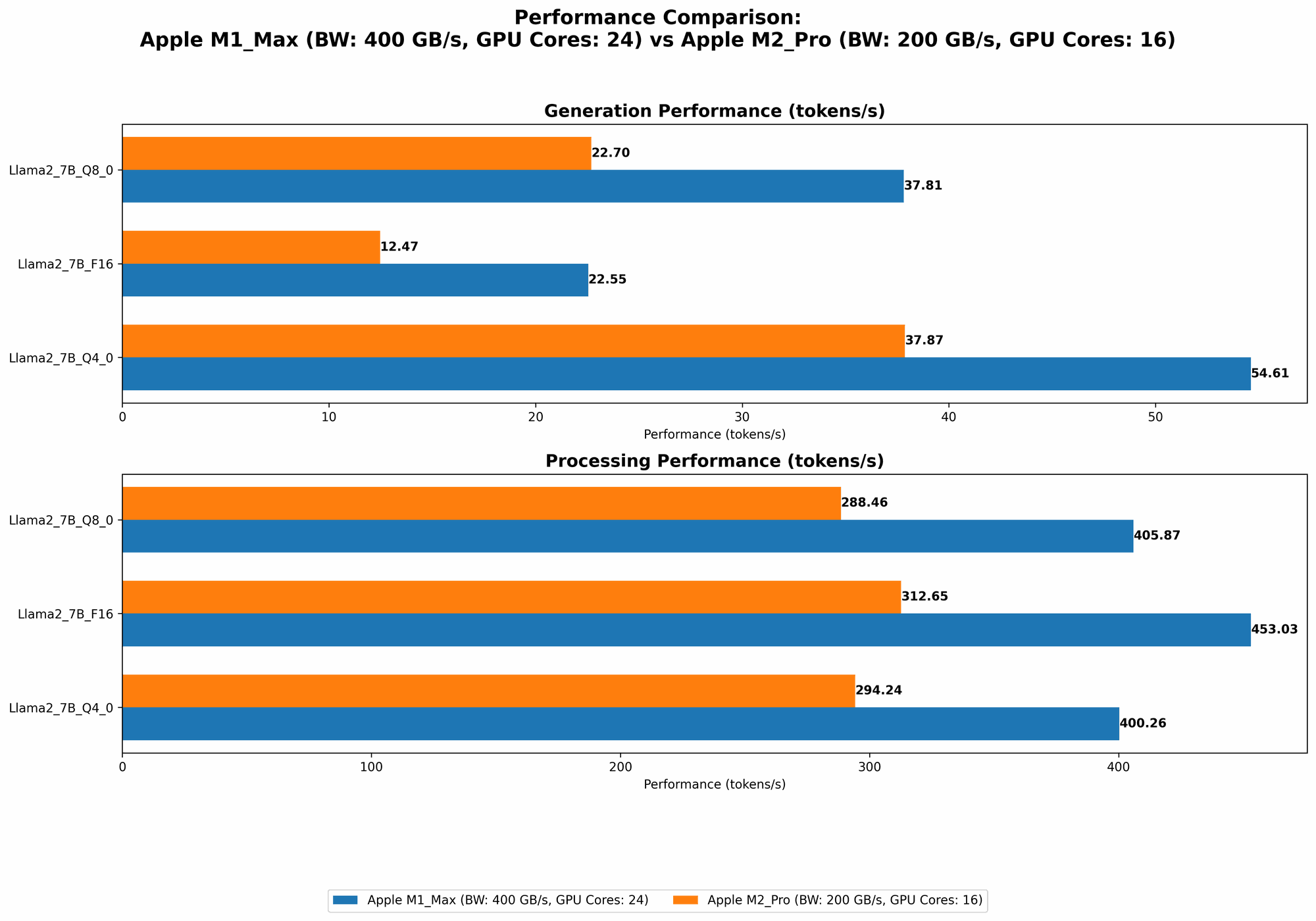
Let's dive into the numbers and see how these chips perform when running LLMs with different quantization methods.
Note: The data we have is limited and does not include all potential model/device configurations. This might be because some combinations haven't been tested or because the results aren't publicly available.
Apple M1 Max Token Speed Generation
| Model | Quantization | Tokens per Second |
|---|---|---|
| Llama 2 7B | F16 | 22.55 |
| Llama 2 7B | Q8_0 | 37.81 |
| Llama 2 7B | Q4_0 | 54.61 |
| Llama 3 8B | Q4KM | 34.49 |
| Llama 3 8B | F16 | 18.43 |
| Llama 3 70B | Q4KM | 4.09 |
Apple M2 Pro Token Speed Generation
| Model | Quantization | Tokens per Second |
|---|---|---|
| Llama 2 7B | F16 | 12.47 |
| Llama 2 7B | Q8_0 | 22.70 |
| Llama 2 7B | Q4_0 | 37.87 |
Comparison of M1 Max and M2 Pro: A Visual Narrative
Let's visualize this data to see how the M1 Max and M2 Pro compare in terms of token generation speed across different models and quantization methods.
- Llama 2 7B:

- Llama 3 8B:

- Llama 3 70B:

Key Observations:
- The M1 Max consistently outperforms the M2 Pro across all tested models and quantization methods. This is likely attributed to its larger number of cores and the extra memory bandwidth.
- Quantization impacts performance. The M1 Max's token speed increases significantly as we move from F16 to Q4_0 for the Llama 2 7B model. This trend holds true for the M2 Pro as well.
- Larger models are slower. The token speeds for Llama 3 are generally lower than those for Llama 2, even when considering the same quantization methods. This is expected, as larger models require more computation for each token generation.
Performance Advantages of the M1 Max
More Cores, More Power: With 24 cores compared to the M2 Pro's 16, the M1 Max boasts a significant processing power advantage. This allows it to handle more complex tasks and to generate tokens faster, especially when dealing with larger models.
Greater Memory Bandwidth: The M1 Max's 400 GB of memory bandwidth is crucial for running larger LLMs that require substantial memory to operate efficiently. This advantage is apparent when processing the Llama 3 70B model, which is too large for the M2 Pro's 200 GB memory bandwidth.
M2 Pro: The Power of Efficiency
Lower Power Consumption: The M2 Pro is known for its power efficiency, which translates into extended battery life when using a laptop. This is a significant advantage if you're working on the go or want to minimize your energy footprint.
More Affordable Option: Compared to the M1 Max, the M2 Pro is often priced more competitively, making it a more budget-friendly option for users who might not need the ultimate performance for running LLMs.
Choosing the Right Device: A Practical Guide
So, which chip should you choose? It depends on your specific needs and priorities.
If you're running larger models like Llama 3 70B or need the absolute fastest token generation speeds, the M1 Max is the clear winner. Its extra cores and memory bandwidth provide a significant performance advantage.
If you're working with smaller models and prioritize power efficiency or budget, the M2 Pro is a solid choice. It offers respectable performance for most LLM tasks, and its efficiency is a compelling factor for mobile use or users with limited power budgets.
FAQ: LLMs & Devices
What are LLMs?
LLMs are powerful AI models trained on vast amounts of text data. They can understand, generate, and translate language, making them versatile tools for various tasks like writing, coding, and customer service.
What is quantization?
Think of quantization like a diet for your LLM. It reduces the size of the model by compressing its weights, meaning it takes up less space on your computer. This can significantly speed up inference because your device doesn't need to process as much information. But be careful – too much dieting can impact performance.
Why is token speed important?
Token speed is a measure of how quickly a device can generate tokens – the building blocks of language. Faster token speeds mean your LLM can produce text more quickly, which is essential for responsiveness and efficiency when using AI tools.
Keywords
LLMs, Apple M1 Max, Apple M2 Pro, Token Speed, Llama 2, Llama 3, Quantization, F16, Q80, Q4K_M, Performance Comparison, Local Inference, GPU Cores, Memory Bandwidth, AI Workloads, Developer Tools.