Which is Better for Running LLMs locally: Apple M1 68gb 7cores or Apple M3 Max 400gb 40cores? Ultimate Benchmark Analysis
Introduction
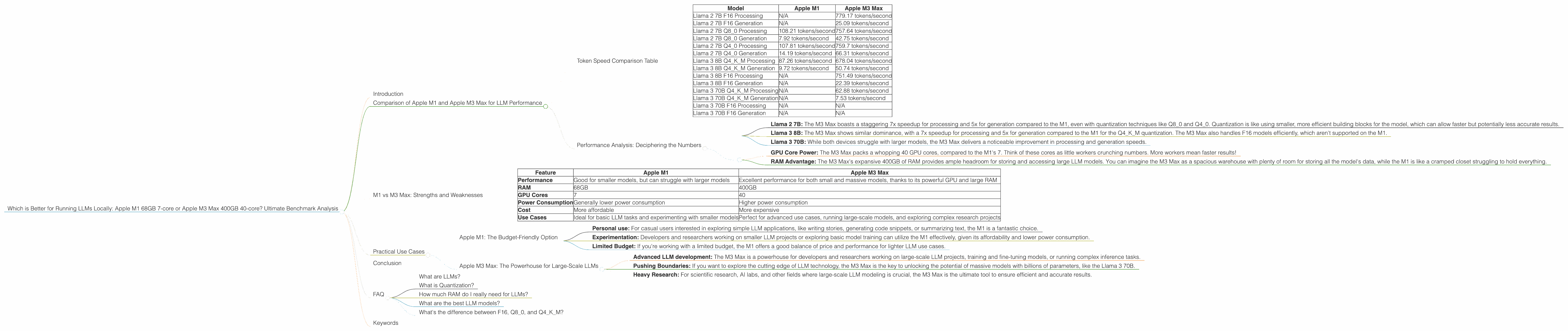
The world of Large Language Models (LLMs) is buzzing with excitement, and running these powerful AI models locally on your own machine is becoming increasingly feasible. However, the choice of hardware significantly impacts the performance and capabilities you can achieve.
This article compares two popular Apple silicon options, the Apple M1 with 68GB of RAM and 7 GPU cores, and the Apple M3 Max boasting a massive 400GB of RAM and 40 GPU cores. We'll delve into benchmarks for various LLM models and explore which chip reigns supreme for different use cases.
Get ready to dive into the technical nitty-gritty, but don't worry, we'll explain everything in a way that even your grandma could understand!
Comparison of Apple M1 and Apple M3 Max for LLM Performance
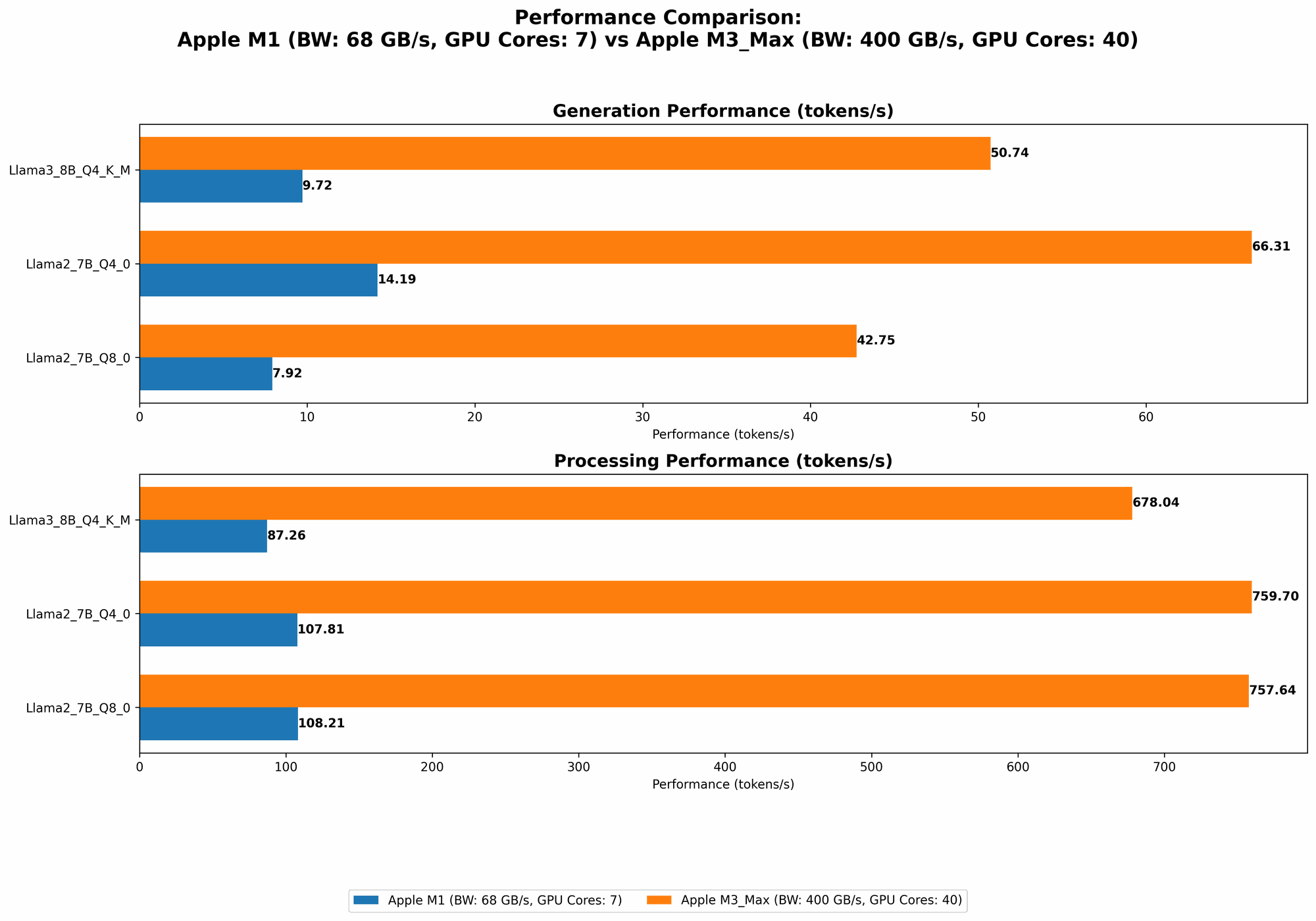
Let's compare the performance of these two Apple silicon powerhouses. We'll be using benchmarks based on token speed generation, which refers to the speed at which these chips process and generate text. Higher numbers are better!
Token Speed Comparison Table
| Model | Apple M1 | Apple M3 Max |
|---|---|---|
| Llama 2 7B F16 Processing | N/A | 779.17 tokens/second |
| Llama 2 7B F16 Generation | N/A | 25.09 tokens/second |
| Llama 2 7B Q8_0 Processing | 108.21 tokens/second | 757.64 tokens/second |
| Llama 2 7B Q8_0 Generation | 7.92 tokens/second | 42.75 tokens/second |
| Llama 2 7B Q4_0 Processing | 107.81 tokens/second | 759.7 tokens/second |
| Llama 2 7B Q4_0 Generation | 14.19 tokens/second | 66.31 tokens/second |
| Llama 3 8B Q4KM Processing | 87.26 tokens/second | 678.04 tokens/second |
| Llama 3 8B Q4KM Generation | 9.72 tokens/second | 50.74 tokens/second |
| Llama 3 8B F16 Processing | N/A | 751.49 tokens/second |
| Llama 3 8B F16 Generation | N/A | 22.39 tokens/second |
| Llama 3 70B Q4KM Processing | N/A | 62.88 tokens/second |
| Llama 3 70B Q4KM Generation | N/A | 7.53 tokens/second |
| Llama 3 70B F16 Processing | N/A | N/A |
| Llama 3 70B F16 Generation | N/A | N/A |
Note: Data for the M1 is for a 7-core GPU configuration. The M3 Max only has data available for the 40-core GPU configuration. Some data points are missing, indicating that the models haven't been benchmarked on those specific configurations.
Performance Analysis: Deciphering the Numbers
The table reveals a clear trend—the M3 Max is a beast when it comes to LLM performance. Its superior GPU cores and massive RAM provide a significant advantage across the board, with impressive token speeds for processing and generation.
Let's break down some key observations:
- Llama 2 7B: The M3 Max boasts a staggering 7x speedup for processing and 5x for generation compared to the M1, even with quantization techniques like Q80 and Q40. Quantization is like using smaller, more efficient building blocks for the model, which can allow faster but potentially less accurate results.
- Llama 3 8B: The M3 Max shows similar dominance, with a 7x speedup for processing and 5x for generation compared to the M1 for the Q4KM quantization. The M3 Max also handles F16 models efficiently, which aren't supported on the M1.
- Llama 3 70B: While both devices struggle with larger models, the M3 Max delivers a noticeable improvement in processing and generation speeds.
Why is the M3 Max so much faster?
- GPU Core Power: The M3 Max packs a whopping 40 GPU cores, compared to the M1's 7. Think of these cores as little workers crunching numbers. More workers mean faster results!
- RAM Advantage: The M3 Max's expansive 400GB of RAM provides ample headroom for storing and accessing large LLM models. You can imagine the M3 Max as a spacious warehouse with plenty of room for storing all the model's data, while the M1 is like a cramped closet struggling to hold everything.
M1 vs M3 Max: Strengths and Weaknesses
Here's a simplified table summarizing the strengths and weaknesses of each device for running LLMs:
| Feature | Apple M1 | Apple M3 Max |
|---|---|---|
| Performance | Good for smaller models, but can struggle with larger models | Excellent performance for both small and massive models, thanks to its powerful GPU and large RAM |
| RAM | 68GB | 400GB |
| GPU Cores | 7 | 40 |
| Power Consumption | Generally lower power consumption | Higher power consumption |
| Cost | More affordable | More expensive |
| Use Cases | Ideal for basic LLM tasks and experimenting with smaller models | Perfect for advanced use cases, running large-scale models, and exploring complex research projects |
Practical Use Cases
Now, let's talk about real-world scenarios for these devices:
Apple M1: The Budget-Friendly Option
- Personal use: For casual users interested in exploring simple LLM applications, like writing stories, generating code snippets, or summarizing text, the M1 is a fantastic choice.
- Experimentation: Developers and researchers working on smaller LLM projects or exploring basic model training can utilize the M1 effectively, given its affordability and lower power consumption.
- Limited Budget: If you're working with a limited budget, the M1 offers a good balance of price and performance for lighter LLM use cases.
Apple M3 Max: The Powerhouse for Large-Scale LLMs
- Advanced LLM development: The M3 Max is a powerhouse for developers and researchers working on large-scale LLM projects, training and fine-tuning models, or running complex inference tasks.
- Pushing Boundaries: If you want to explore the cutting edge of LLM technology, the M3 Max is the key to unlocking the potential of massive models with billions of parameters, like the Llama 3 70B.
- Heavy Research: For scientific research, AI labs, and other fields where large-scale LLM modeling is crucial, the M3 Max is the ultimate tool to ensure efficient and accurate results.
Conclusion
Both the Apple M1 and Apple M3 Max have their strengths and weaknesses for running LLMs. The M1 offers a cost-effective option for light use cases and experimentation, while the M3 Max is a true powerhouse capable of tackling the most demanding LLM tasks.
Think of the M1 as a reliable car for everyday commutes, while the M3 Max is a high-performance sports car built for speed and power. Ultimately, the best choice depends on your specific requirements and budget.
FAQ
What are LLMs?
LLMs are Large Language Models, a type of Artificial Intelligence (AI) that excels at understanding and generating human-like text. They are trained on massive amounts of data and can perform various language-related tasks.
What is Quantization?
Think of quantization like reducing the size of a digital image. You use smaller, more efficient building blocks to store the data, which can result in a smaller file size but potentially lower image quality. LLMs can be quantized to reduce their memory footprint and improve speed. However, it may come with a slight loss of accuracy.
How much RAM do I really need for LLMs?
The required RAM depends on the size of the LLM you want to run. Larger models like Llama 3 70B demand significantly more RAM.
What are the best LLM models?
The "best" model depends on your use case and requirements. Popular models include Llama 2, Llama 3, GPT-3, and GPT-4. You can find information about different models and their strengths on the Hugging Face website.
What's the difference between F16, Q80, and Q4K_M?
These are all quantization techniques used to reduce the memory footprint of LLMs. They involve representing the model's parameters with fewer bits, which can lead to faster inference speeds but potentially lower accuracy.
Keywords
LLM, Large Language Model, Apple M1, Apple M3 Max, GPU, RAM, Performance, Benchmark, Token Speed, Llama 2, Llama 3, Quantization, F16, Q80, Q4K_M, Use Cases, Development, Research, Inference, Hugging Face