Which is Better for AI Development: NVIDIA RTX A6000 48GB or NVIDIA RTX 6000 Ada 48GB? Local LLM Token Speed Generation Benchmark

Introduction
Welcome to the world of local LLM development! If you're diving into the fascinating realm of large language models (LLMs) and building your own AI applications, you're likely considering the best hardware to fuel your projects. Two popular choices for heavy-duty AI development are the NVIDIA RTX A6000 48GB and the NVIDIA RTX 6000 Ada 48GB. Both boast impressive specs, but which one reigns supreme when it comes to running LLMs locally? This article will delve into a head-to-head benchmark, comparing their token generation speeds for various LLM models and configurations. We'll explore how these two titans perform, analyze their strengths and weaknesses, and provide practical recommendations for choosing the right tool for your AI development needs.
Understanding LLM Token Speed Generation
Before we dive into the benchmarks, let's quickly define what we mean by "token speed generation." Think of an LLM like a sophisticated word processor. When you type, the model processes every word and punctuation (like full stops, spaces, etc.), breaking them down into individual units called "tokens." Tokens are the building blocks of language for LLMs. Token speed generation, therefore, refers to how quickly the GPU can process these tokens, determining how fast your LLM can generate text, translate languages, or perform other tasks.
NVIDIA RTX A6000 48GB vs. NVIDIA RTX 6000 Ada 48GB: Performance Comparison
Llama 3 Models: 8 Billion Parameter (8B) and 70 Billion Parameter (70B)
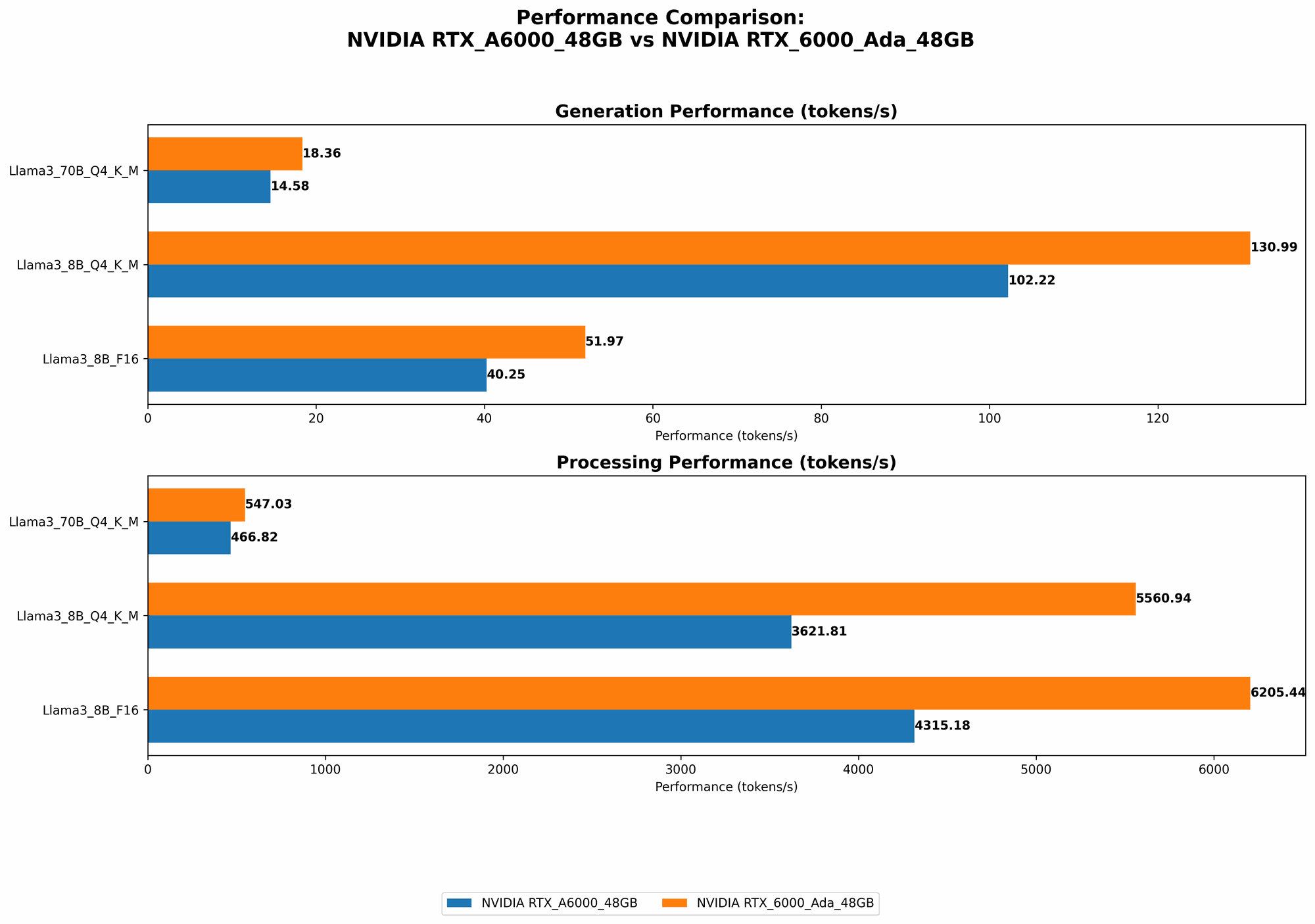
The following table presents the token speed generation results for both the NVIDIA RTX A6000 48GB and the NVIDIA RTX 6000 Ada 48GB when processing Llama 3 models with different configurations:
| Model | Device | Quantization | Generation (Tokens/sec) | Processing (Tokens/sec) |
|---|---|---|---|---|
| Llama 3 8B | RTX A6000 48GB | Q4KM | 102.22 | 3621.81 |
| Llama 3 8B | RTX A6000 48GB | F16 | 40.25 | 4315.18 |
| Llama 3 70B | RTX A6000 48GB | Q4KM | 14.58 | 466.82 |
| Llama 3 8B | RTX 6000 Ada 48GB | Q4KM | 130.99 | 5560.94 |
| Llama 3 8B | RTX 6000 Ada 48GB | F16 | 51.97 | 6205.44 |
| Llama 3 70B | RTX 6000 Ada 48GB | Q4KM | 18.36 | 547.03 |
Note: No data is available for the F16 configuration of the Llama 3 70B model. The Llama 3 8B model has the fastest inference performance with the Q4KM configuration, while the Llama 70B model takes longer to deliver outputs, but the numbers are still quite good.
Performance Analysis: RTX 6000 Ada 48GB Takes the Lead
The data clearly shows that the NVIDIA RTX 6000 Ada 48GB consistently outperforms the RTX A6000 48GB in both token generation and processing speeds across various LLM models and configurations. This is likely due to the Ada architecture's advancements, delivering a significant boost in performance.
However, let's break down the performance differences further:
Quantization:
- Both GPUs demonstrate better performance when using Q4KM quantization compared to F16. This technique involves compressing the model's weights to reduce memory consumption and speed up processing. It's like packing your suitcase more efficiently, allowing you to fit more clothes (data)!
- The RTX 6000 Ada 48GB shows a more significant advantage when using Q4KM quantization, indicating its ability to handle this technique more effectively.
Model Size:
- The RTX 6000 Ada 48GB consistently outperforms the RTX A6000 48GB in both 8B and 70B models.
- For the Llama 70B model, the performance difference is less pronounced compared to the 8B model, suggesting that the RTX 6000 Ada 48GB might have a slight edge when handling larger models.
Strengths and Weaknesses
NVIDIA RTX 6000 Ada 48GB:
Strengths:
- Faster Token Generation and Processing: The Ada architecture delivers a significant speed boost, making it a clear winner for fast LLM performance.
- Handles Both Small and Large Models: It exhibits strong performance across different LLM sizes, from 8B to 70B.
Weaknesses:
- Higher Price: It might be more expensive than the RTX A6000 48GB.
NVIDIA RTX A6000 48GB:
Strengths:
- Mature and Reliable: It's a well-established GPU with a proven track record.
- More Affordable: It might be a more budget-friendly option.
Weaknesses:
- Slower Performance: It falls behind the RTX 6000 Ada 48GB in terms of speed.
Practical Recommendations for Use Cases
If you need the fastest possible token generation speeds and are willing to invest in top-of-the-line hardware, the NVIDIA RTX 6000 Ada 48GB is the clear choice. It's a powerful beast capable of handling demanding LLM projects with ease, making it ideal for:
- Real-time Applications: For applications requiring rapid response times, such as chatbots or live translation services, the Ada architecture's speed is a must-have.
- Large Model Training: If you're training large LLMs, the extra processing power of the RTX 6000 Ada 48GB can significantly reduce training time.
If you're on a tighter budget and prioritize a reliable and well-established card, the NVIDIA RTX A6000 48GB remains a solid option. Despite being slightly slower, it's still a capable GPU for:
- Smaller LLM Projects: For projects using models with fewer parameters, you can still achieve impressive results with the RTX A6000 48GB.
- General AI Development: It's a versatile GPU suitable for a wide range of AI development tasks.
Beyond the Benchmarks: Factors to Consider
While token speed is a crucial factor, other considerations can influence your decision:
- Memory: Both GPUs boast 48GB of GDDR6 memory, making them suitable for handling large LLMs. However, if you're working with exceptionally massive models or require extensive memory for other tasks, you might need to consider GPUs with even higher memory capacity.
- Power Consumption: The RTX 6000 Ada 48GB might consume more power than the RTX A6000 48GB. This could be a factor if you're concerned about energy efficiency or have limited power supply.
- Specific LLM Requirements: Some LLMs might have specific hardware requirements or perform better with particular GPU architectures. Research the requirements of the LLM you plan to use to make an informed decision.
Conclusion: Choosing the Right Weapon for Your AI Arsenal
The choice between the NVIDIA RTX A6000 48GB and the NVIDIA RTX 6000 Ada 48GB ultimately boils down to your budget, performance needs, and specific LLM requirements. While the RTX 6000 Ada 48GB delivers superior speed, the RTX A6000 48GB remains a solid option for those looking for a more budget-friendly solution.
Think of your AI projects like battles in a grand war. The RTX 6000 Ada 48GB is like a powerful new tank, ready to conquer any challenge with its cutting-edge technology. The RTX A6000 48GB is akin to a well-tested and reliable cavalry unit, capable of handling most battles effectively.
Choosing the right GPU is a crucial step in equipping your AI arsenal. By understanding the strengths and weaknesses of each card and considering your project's specific demands, you can select the perfect weapon to unleash the full power of your LLMs.
FAQ
Q: What is quantization? A: Quantization is a technique commonly used in machine learning to compress the weights of a model, reducing its memory footprint and often speeding up inference. It's like summarizing a long novel into a shorter version while retaining the essential plot points.
Q: How do I choose the right LLM for my project? A: The best LLM for your project depends on your specific needs. Consider factors like:
- Task: What do you want your LLM to accomplish (e.g., translation, text generation, code completion)?
- Model Size: How accurate and powerful does your LLM need to be? Larger models often offer better performance but require more resources.
- Language Support: Does the LLM support the languages you're working with?
Q: Can I run LLMs on a CPU? A: While you can run LLMs on a CPU, it's generally much slower compared to using a GPU. GPUs are designed for parallel processing, which is essential for efficiently handling the complex calculations involved in LLM inference. Think of it like using a single worker to build a house versus having a whole team working together, the team will get it done much faster!
Q: Are there other GPUs for LLM development? A: Yes, many other GPUs are suitable for LLM development, ranging from more affordable options to high-end cards. Research different GPU models and compare their specifications and benchmarks to find the best fit for your project.
Keywords
NVIDIA RTX A6000 48GB, NVIDIA RTX 6000 Ada 48GB, LLM, Large Language Models, AI Development, Token Speed Generation, Benchmark, Quantization, Llama 3, 8B, 70B, GPU, Performance, Processing, Inference, Recommendations, FAQ, Keywords.