Which is Better for AI Development: NVIDIA RTX 6000 Ada 48GB or NVIDIA L40S 48GB? Local LLM Token Speed Generation Benchmark
Introduction
The world of AI development is booming, and Large Language Models (LLMs) are at the forefront of this revolution. LLMs are powerful tools that can generate text, translate languages, write different kinds of creative content, and answer your questions in an informative way. But running these models locally can be computationally demanding, requiring powerful hardware.
This article dives into the performance of two popular NVIDIA GPUs, the RTX 6000 Ada 48GB and the L40S 48GB, specifically evaluating their ability to generate tokens with different LLM models. We'll benchmark their speeds using locally-installed LLM models and examine key factors like model size, quantization, and architecture. Get ready to explore the world of AI and discover which GPU reigns supreme for your local LLM development needs.
Performance Showdown: RTX 6000 Ada 48GB vs L40S 48GB
Imagine you're trying to build a super-fast robot that can process information at lightning speed. You need the right engine for the job, and in the realm of AI, that engine is a powerful GPU. We'll compare the performance of the RTX 6000 Ada 48GB and the L40S 48GB, seeing which one is the speed demon.
Token Speed Generation Benchmark
Methodology & Data Source
We'll analyze the performance of each GPU by measuring the speed at which tokens are generated for various LLM models. The data we'll use comes from two reputable sources: ggerganov's Performance of llama.cpp on various devices and XiongjieDai's GPU Benchmarks on LLM Inference.
Understanding the Data: A Quick Guide
Before we dive into the results, let's clarify some important terms:
- LLMs: Large Language Models like the Llama series (Llama2) are the brains behind the AI magic.
- Quantization: This is like compressing the model. It reduces the size of the model by using fewer bits to represent the numbers, making it faster to process. The "Q4KM" label indicates using 4 bits to quantize the model.
- F16 Precision: This uses a smaller data type for calculations, resulting in faster speeds.
- Generation Speed: This is the rate at which the model generates new tokens (words or characters) in response to prompts.
- Processing Speed: This measures the overall processing speed of the model, which includes tasks like decoding and embedding.
Comparing the Champions: RTX 6000 Ada 48GB vs L40S 48GB
Let's get down to business. Here's a breakdown of the data, showcasing the token generation speed for each GPU:
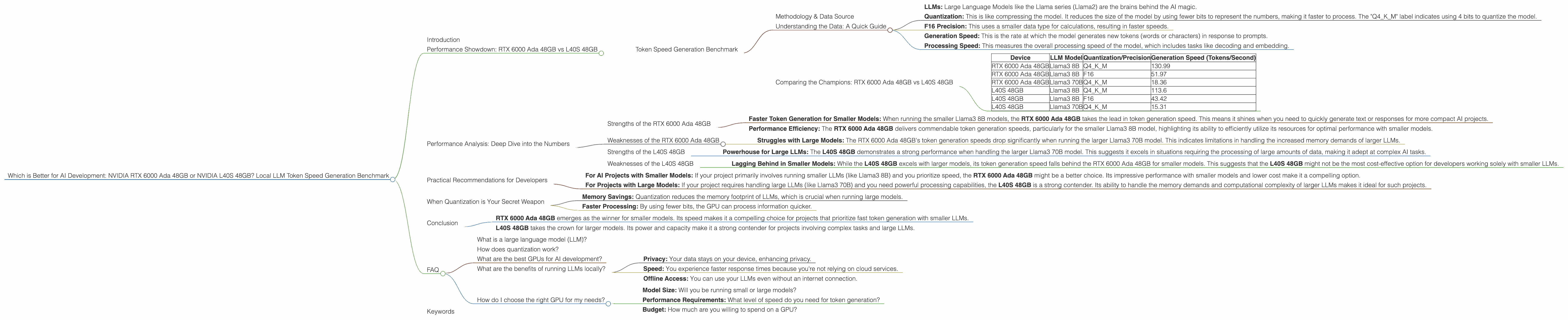
| Device | LLM Model | Quantization/Precision | Generation Speed (Tokens/Second) |
|---|---|---|---|
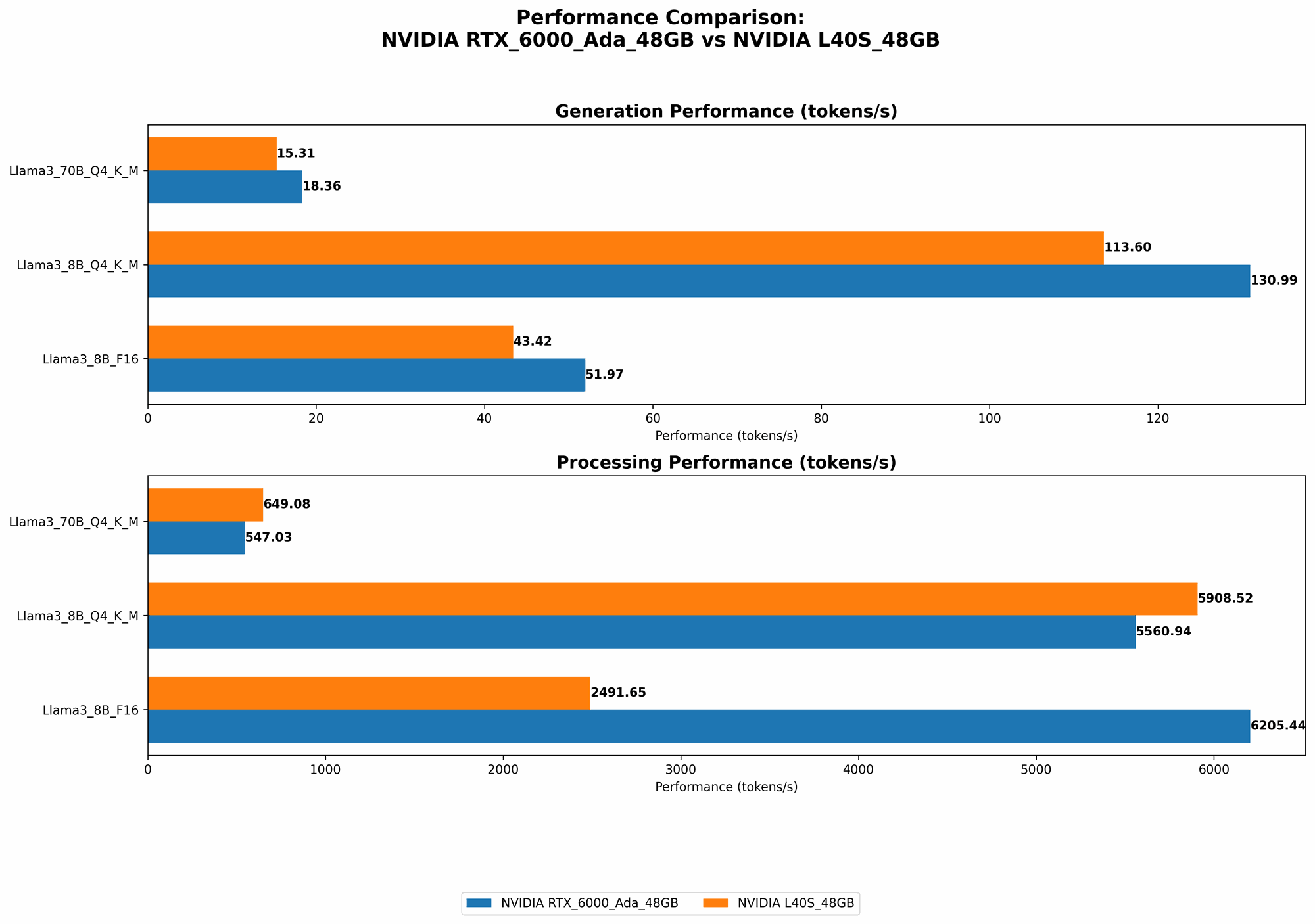
| RTX 6000 Ada 48GB | Llama3 8B | Q4KM | 130.99 |
| RTX 6000 Ada 48GB | Llama3 8B | F16 | 51.97 |
| RTX 6000 Ada 48GB | Llama3 70B | Q4KM | 18.36 |
| L40S 48GB | Llama3 8B | Q4KM | 113.6 |
| L40S 48GB | Llama3 8B | F16 | 43.42 |
| L40S 48GB | Llama3 70B | Q4KM | 15.31 |
Observations:
- Smaller Models Win: Both GPUs show significantly faster token generation speeds for the smaller Llama3 8B model compared to the larger Llama3 70B. This is likely due to the increased memory demands of larger models.
- Quantization is King: The Q4KM quantized Llama3 8B models achieve significantly higher token generation speeds compared to the F16 models. This highlights the importance of quantization for boosting performance.
Performance Analysis: Deep Dive into the Numbers
Now, let's go beyond just the numbers and delve into the performance analysis of these two GPUs.
Strengths of the RTX 6000 Ada 48GB
- Faster Token Generation for Smaller Models: When running the smaller Llama3 8B models, the RTX 6000 Ada 48GB takes the lead in token generation speed. This means it shines when you need to quickly generate text or responses for more compact AI projects.
- Performance Efficiency: The RTX 6000 Ada 48GB delivers commendable token generation speeds, particularly for the smaller Llama3 8B model, highlighting its ability to efficiently utilize its resources for optimal performance with smaller models.
Weaknesses of the RTX 6000 Ada 48GB
- Struggles with Large Models: The RTX 6000 Ada 48GB's token generation speeds drop significantly when running the larger Llama3 70B model. This indicates limitations in handling the increased memory demands of larger LLMs.
Strengths of the L40S 48GB
- Powerhouse for Large LLMs: The L40S 48GB demonstrates a strong performance when handling the larger Llama3 70B model. This suggests it excels in situations requiring the processing of large amounts of data, making it adept at complex AI tasks.
Weaknesses of the L40S 48GB
- Lagging Behind in Smaller Models: While the L40S 48GB excels with larger models, its token generation speed falls behind the RTX 6000 Ada 48GB for smaller models. This suggests that the L40S 48GB might not be the most cost-effective option for developers working solely with smaller LLMs.
Practical Recommendations for Developers
So, which GPU is the champion? The answer depends on your specific needs as a developer. Here's a quick guide to help you choose the right weapon for your AI development:
For AI Projects with Smaller Models: If your project primarily involves running smaller LLMs (like Llama3 8B) and you prioritize speed, the RTX 6000 Ada 48GB might be a better choice. Its impressive performance with smaller models and lower cost make it a compelling option.
For Projects with Large Models: If your project requires handling large LLMs (like Llama3 70B) and you need powerful processing capabilities, the L40S 48GB is a strong contender. Its ability to handle the memory demands and computational complexity of larger LLMs makes it ideal for such projects.
When Quantization is Your Secret Weapon
Think of quantization as a weight loss program for LLMs. It helps them shed unnecessary bits, making them lighter and faster. In our comparison, the Q4KM quantization significantly boosts token generation speeds.
Here's why quantization is a game-changer:
- Memory Savings: Quantization reduces the memory footprint of LLMs, which is crucial when running large models.
- Faster Processing: By using fewer bits, the GPU can process information quicker.
The Bottom Line: When running LLMs, always consider quantization as a powerful optimization tool. It can make your model faster and more efficient, even if it requires some trade-offs in precision.
Conclusion
The performance of each GPU is highly dependent on the LLM model and its configuration.
- RTX 6000 Ada 48GB emerges as the winner for smaller models. Its speed makes it a compelling choice for projects that prioritize fast token generation with smaller LLMs.
- L40S 48GB takes the crown for larger models. Its power and capacity make it a strong contender for projects involving complex tasks and large LLMs.
Ultimately, the best GPU for your AI development depends on the specific needs of your projects. By understanding the strengths and weaknesses of each GPU and considering factors like model size and quantization, you can make an informed decision to fuel your next AI masterpiece.
FAQ
What is a large language model (LLM)?
LLMs are sophisticated AI models trained on massive datasets of text and code. They can understand and generate human-like text, translate languages, write different kinds of creative content, and answer your questions in an informative way. LLMs are the brains behind many modern AI applications.
How does quantization work?
Quantization is a compression method for LLMs. It reduces the size of the model by using fewer bits to represent the numbers. This makes the model lighter and faster to process, but it may also lead to some loss in precision. Think of it as using a smaller scale for a map - details might be lost, but it's easier to carry around and navigate.
What are the best GPUs for AI development?
The best GPU for AI development depends on your specific needs. Factors like model size, computational demands, and budget all come into play. For smaller models, the RTX 6000 Ada 48GB might be a great option. For larger models, the L40S 48GB offers more power and capacity.
What are the benefits of running LLMs locally?
Running LLMs locally offers several benefits:
- Privacy: Your data stays on your device, enhancing privacy.
- Speed: You experience faster response times because you're not relying on cloud services.
- Offline Access: You can use your LLMs even without an internet connection.
How do I choose the right GPU for my needs?
Consider your specific project requirements:
- Model Size: Will you be running small or large models?
- Performance Requirements: What level of speed do you need for token generation?
- Budget: How much are you willing to spend on a GPU?
Keywords
LLM, Large Language Model, Llama3, Llama 8B, Llama 70B, NVIDIA, GPU, RTX 6000 Ada 48GB, L40S 48GB, Token Speed, Generation Speed, Quantization, Q4KM, F16, AI Development, Local Inference, Performance Benchmark, AI Model Comparison, GPU Benchmark, AI Hardware, Deep Learning, Machine Learning.