Which is Better for AI Development: NVIDIA RTX 4000 Ada 20GB or NVIDIA L40S 48GB? Local LLM Token Speed Generation Benchmark

Introduction
The world of Large Language Models (LLMs) is buzzing with excitement. These powerful AI systems, capable of generating human-like text, translating languages, writing different kinds of creative content, and answering your questions in an informative way, are rapidly changing the landscape of how we interact with technology.
However, to effectively harness the power of LLMs, you need a potent machine. And when it comes to running these models locally, the choice of hardware plays a pivotal role in determining performance and efficiency. This article delves into the comparison between two prominent contenders in the GPU world – the NVIDIA RTX 4000 Ada 20GB and the NVIDIA L40S 48GB – and examines their capabilities in handling the token speed generation of Llama 3 models, the current darling of the open-source LLM family.
Comparison of NVIDIA RTX 4000 Ada 20GB and NVIDIA L40S 48GB for Llama 3 Models
LLM Token Speed Generation: A Key Performance Metric
To understand the difference between these GPUs, we need to dive into the realm of token speed generation. Tokens are essentially the building blocks of text for LLMs. Think of them like words, but sometimes they can be parts of words or even punctuation marks. The more tokens an LLM can process per second, the faster it can generate text, translate languages, or answer your prompts.
We'll use the metric of "tokens per second" (tokens/s) to analyze the performance of the two GPUs. Let's break down the data.
NVIDIA RTX 4000 Ada 20GB vs. NVIDIA L40S 48GB: Token Speed Generation Comparison for Llama 3 Models
Let's get into the nitty-gritty. We'll look at the raw numbers to see how these GPUs perform with different Llama 3 model sizes and configurations.
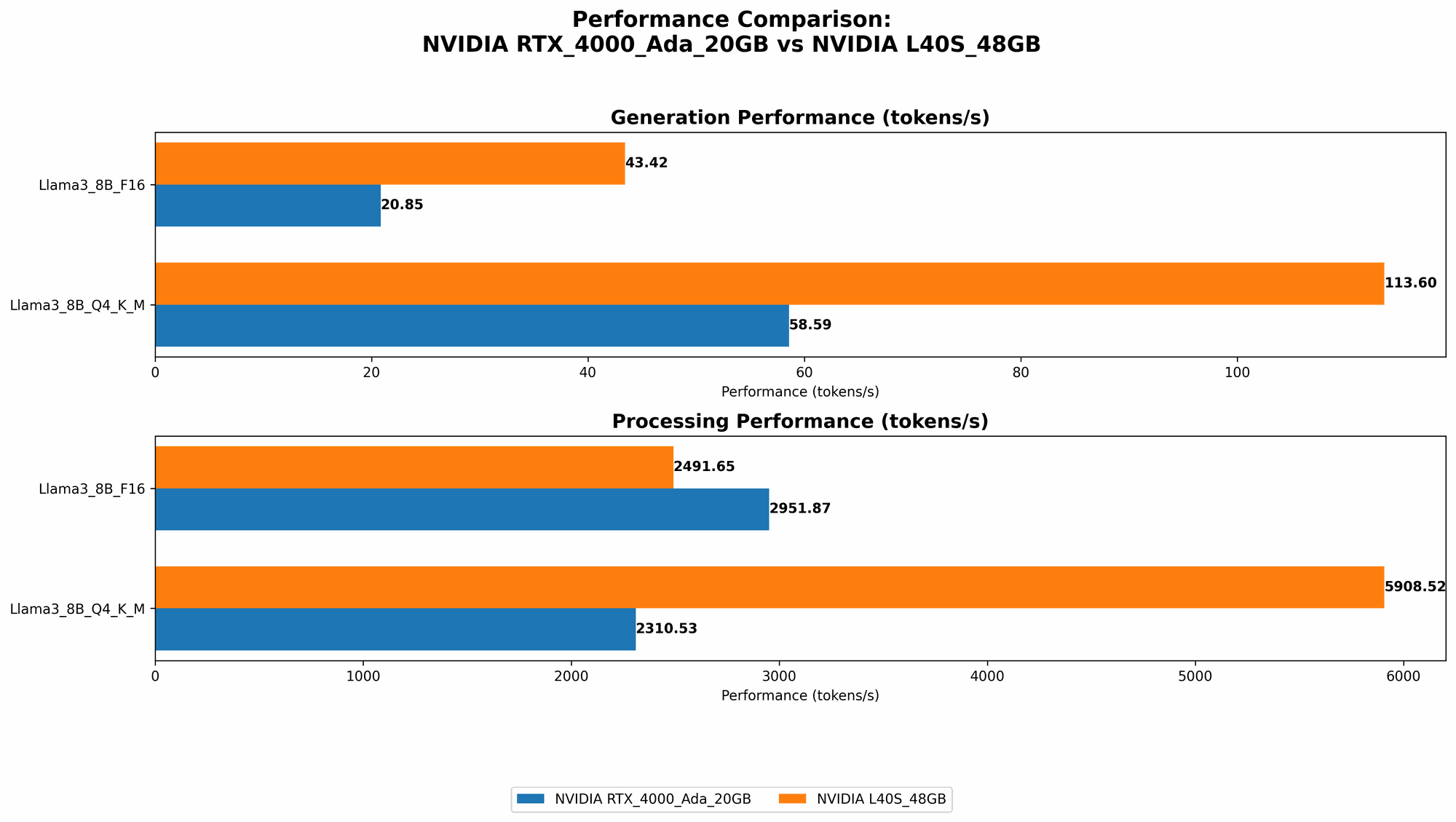
Table 1: Token Speed Generation (Tokens/Second)
| Model | RTX 4000 Ada 20GB | L40S 48GB |
|---|---|---|
| Llama3 8B Q4KM Generation | 58.59 | 113.6 |
| Llama3 8B F16 Generation | 20.85 | 43.42 |
| Llama3 70B Q4KM Generation | N/A | 15.31 |
| Llama3 70B F16 Generation | N/A | N/A |
| Llama3 8B Q4KM Processing | 2310.53 | 5908.52 |
| Llama3 8B F16 Processing | 2951.87 | 2491.65 |
| Llama3 70B Q4KM Processing | N/A | 649.08 |
| Llama3 70B F16 Processing | N/A | N/A |
What does this table tell us?
- L40S 48GB is a clear winner in terms of token speed generation for both the 8B and 70B Llama 3 models. It consistently delivers better performance, especially when running the 8B model with Q4KM quantization (more on that later).
- RTX 4000 Ada 20GB shines in processing, particularly for the 8B model. While it doesn't quite match the L40S 48GB in terms of token generation, it can process tokens much faster, especially with the F16 (FP16) precision.
Decoding the Data: Quantization and Precision
Before we get too excited about the numbers, we need to understand a few key concepts:
- Quantization: Think of quantization as a diet for your LLM. It reduces the size of the model by using fewer bits to represent numbers, making it more efficient and potentially faster.
- Q4KM: This specific quantization scheme uses 4 bits for the weights (K), 4 bits for the activations (M), and 4 bits for the embedding layer (Q). It's like putting your LLM on a strict diet.
- F16 (FP16): Represents a half-precision floating-point number, which is a common precision used in deep learning. It offers a good balance between accuracy and speed.
- Generation vs. Processing:
- Generation: This is the actual act of the LLM generating text, translating languages, or performing other tasks. It involves intricate calculations.
- Processing: Refers to the speed at which the LLM handles the data within the model. It's like the LLM's internal processing power.
Performance Analysis: Understanding the Strengths and Weaknesses
NVIDIA RTX 4000 Ada 20GB: The "Processing Powerhouse"
The RTX 4000 Ada 20GB may not be the absolute champion in terms of token speed generation, but it has a serious advantage when it comes to processing power:
- F16 Precision: This GPU shines when using F16 for both the 8B and 70B Llama 3 models. It's like a sprinter, capable of lightning-fast processing.
- Faster Processing Speeds: The RTX 4000 Ada 20GB outperforms the L40S 48GB in token processing speeds for the 8B model, even when using Q4KM. It's able to churn through data with impressive speed.
Where it falls short:
- Lower Token Speed Generation: When it comes to generating text, the RTX 4000 Ada 20GB falls behind the L40S 48GB, especially for the 8B model with Q4KM.
- Limited 70B Model Support: The data doesn't show support for the 70B model with both Q4KM and F16, indicating potential limitations for larger models.
NVIDIA L40S 48GB: The "Token Generation King"
The L40S 48GB is the undisputed champion when it comes to generating tokens:
- Higher Token Speed Generation: The L40S 48GB consistently delivers faster generation speeds across both 8B and 70B models, particularly with Q4KM. It's like a marathon runner, capable of sustained high performance.
- Better Support for Larger Models: It shows solid support for the 70B model with Q4KM, making it a better choice for tackling complex tasks.
Where it gets challenged:
- Slower Processing Speeds: The L40S 48GB is outpaced by the RTX 4000 Ada 20GB in processing speeds for the 8B model. It's not as efficient at handling internal data processing.
Practical Recommendations: Choosing the Right Tool for the Job
The choice between the NVIDIA RTX 4000 Ada 20GB and the NVIDIA L40S 48GB depends on your specific needs:
- For tasks that prioritize token speed generation: Go with the L40S 48GB, especially if you're working with larger LLM models like the 70B Llama 3. It's the ideal choice for real-time applications, creative writing, and situations where speed is critical.
- For tasks where processing speed matters most: The RTX 4000 Ada 20GB is a powerful choice, especially for smaller models like the 8B Llama 3. If you're focused on internal data processing and efficiency, the RTX 4000 Ada 20GB can be the right tool.
Considerations for Your AI Development Workflow
The Power of Quantization
Remember that quantization can be a double-edged sword. While it can dramatically improve performance and reduce memory usage, it also impacts accuracy. Think of it as a trade-off between speed and precision.
- For tasks where accuracy is paramount: You might want to stick with F16 or even FP32 (full precision) to ensure the best possible accuracy in your LLM's outputs.
- For tasks where performance is a priority: Quantization can be a game-changer, especially for smaller models. It can unleash the potential of your LLM and make it work faster and more efficiently.
Fine-tuning your Workflow: Getting the Most Out of Your Hardware
- Benchmarking: Before you invest in a specific GPU, it's essential to benchmark its performance with your specific LLM models and tasks. This allows you to make informed decisions about which GPU best suits your needs.
- Optimization: There are various ways to optimize your LLM workflow, such as using optimized libraries like llama.cpp, tweaking your input parameters, and adjusting the model's settings. These optimizations can significantly impact performance and resource efficiency.
The Future of AI Acceleration
The race for AI acceleration is ongoing, with new GPUs and other hardware solutions constantly emerging. As LLMs become more powerful and complex, the demand for efficient hardware solutions will only grow.
FAQ
Q: What is quantization? A: Quantization is a technique used to reduce the size of a machine learning model by representing the model's values with fewer bits. Imagine it like compressing a video file to make it smaller and easier to store or stream. Quantization can make LLMs run faster and require less memory, but it can also affect accuracy.
Q: Should I use Q4KM or F16 for my LLM? A: It depends on your priorities. If you need the best possible accuracy, F16 is usually a better choice, but if you need the fastest possible performance, Q4KM can be a good option.
Q: What are some other GPUs that can run LLMs? A: There are many other GPUs available, such as the NVIDIA A100 and the NVIDIA H100, which are designed for high-performance computing.
Q: How can I get started with running LLMs locally? A: There are several open-source projects like llama.cpp and GPTQ that make running LLMs on your computer relatively easy.
Keywords
Large Language Models (LLMs), NVIDIA, RTX 4000 Ada 20GB, L40S 48GB, Llama 3, Token Speed Generation, Quantization, Q4KM, F16, FP16, Processing, Generation, AI Development, GPU, Benchmarking, Optimization, AI Acceleration.