Which is Better for AI Development: NVIDIA 4090 24GB x2 or NVIDIA L40S 48GB? Local LLM Token Speed Generation Benchmark
Introduction
Running large language models (LLMs) locally has exploded in popularity, offering developers the ability to experiment and customize without relying on cloud-based services. But choosing the right hardware can be tricky, especially when comparing powerful graphics cards like the NVIDIA 409024GBx2 and the NVIDIA L40S_48GB.
This article delves into the performance of these two beasts, comparing their token speed generation for popular LLM models like Llama 3. We'll break down the numbers, analyze strengths and weaknesses, and provide practical recommendations for your AI development projects.
Performance Breakdown: Tokens per Second Showdown
Comparing NVIDIA 409024GBx2 and NVIDIA L40S_48GB
To understand the performance difference between these two GPUs, we'll focus on Llama 3 models, comparing token generation speeds for both 8B and 70B versions. The data below showcases token speed, which is the number of tokens processed per second, reflecting how quickly the model can generate text.
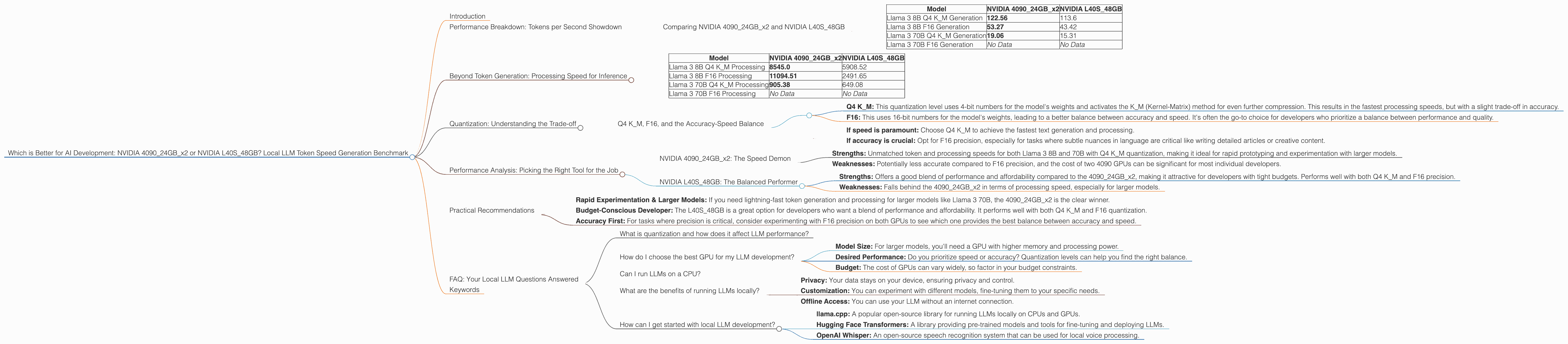
| Model | NVIDIA 409024GBx2 | NVIDIA L40S_48GB |
|---|---|---|
| Llama 3 8B Q4 K_M Generation | 122.56 | 113.6 |
| Llama 3 8B F16 Generation | 53.27 | 43.42 |
| Llama 3 70B Q4 K_M Generation | 19.06 | 15.31 |
| Llama 3 70B F16 Generation | No Data | No Data |
Observations:
- 409024GBx2 Dominates in Token Generation: For both Llama 3 8B and 70B models with Q4 KM quantization, the 409024GB_x2 delivers significantly higher token speeds, indicating faster text generation overall.
- F16 Performance: A Similar Story: While we lack data for Llama 3 70B with F16 precision, for the 8B model, the 409024GBx2 again outperforms the L40S_48GB.
- Quantization Impact: The performance difference between Q4 KM and F16 precision is substantial, showcasing the trade-off between speed and model accuracy. Q4 KM offers faster generation at the cost of potentially less accuracy.
Beyond Token Generation: Processing Speed for Inference
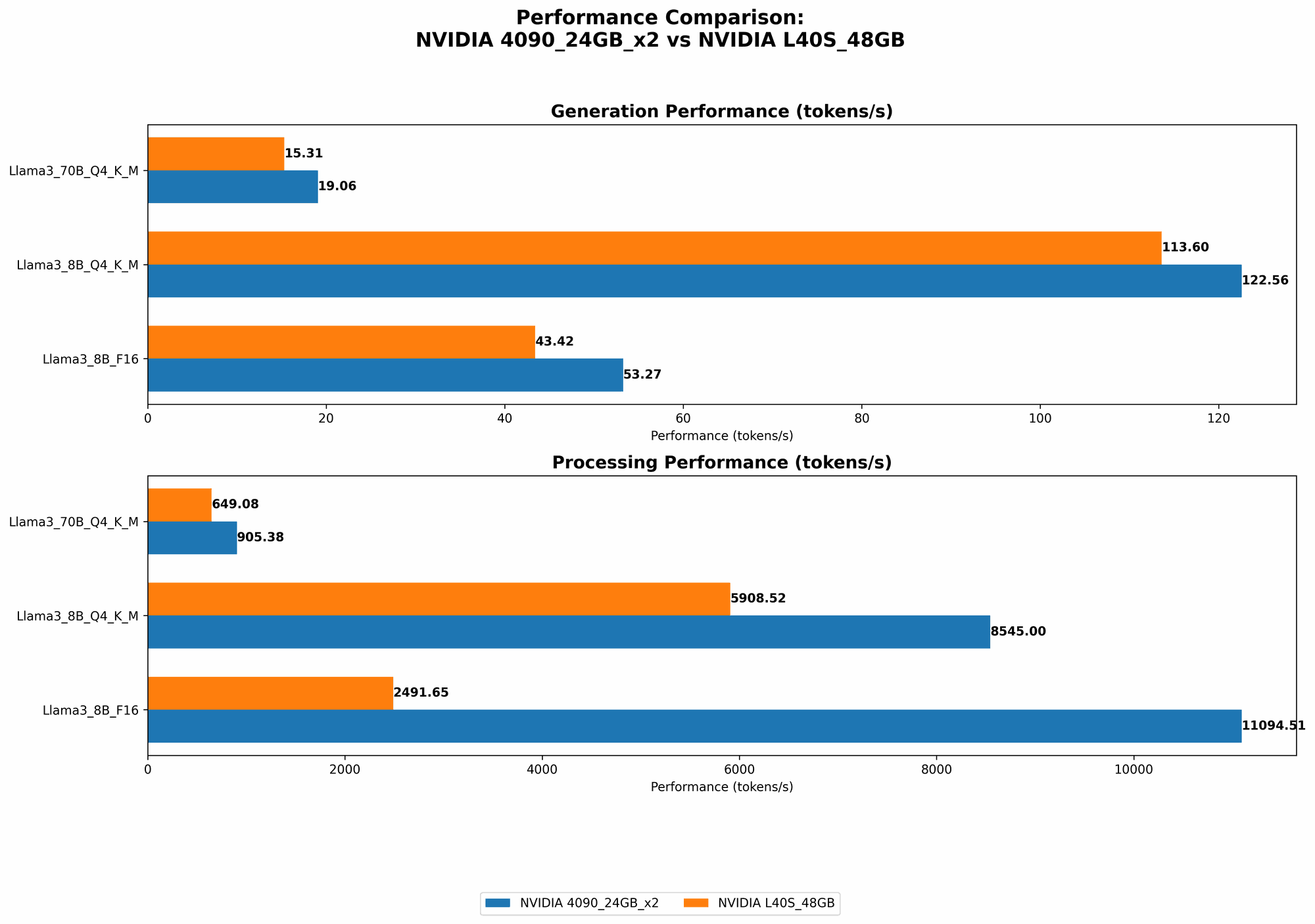
While token generation is crucial for text output, we also need to look at the overall processing speed, which includes both token generation and the time required for internal calculations.
| Model | NVIDIA 409024GBx2 | NVIDIA L40S_48GB |
|---|---|---|
| Llama 3 8B Q4 K_M Processing | 8545.0 | 5908.52 |
| Llama 3 8B F16 Processing | 11094.51 | 2491.65 |
| Llama 3 70B Q4 K_M Processing | 905.38 | 649.08 |
| Llama 3 70B F16 Processing | No Data | No Data |
Observations:
- 409024GBx2 Outperforms L40S48GB: For both Llama 3 8B and 70B models with Q4 KM quantization, the 409024GBx2 exhibits significantly faster processing speeds, indicating a smoother and more efficient inference workflow.
- F16 Precision Variations: Interestingly, the 409024GBx2 shows exceptionally high processing speed for Llama 3 8B with F16 precision, potentially due to its architecture. The L40S_48GB struggles in comparison, highlighting that F16 performance can vary greatly between GPUs.
- Larger Model Speed Differences: The gap in processing speed between the two GPUs is more pronounced for larger models like Llama 3 70B, suggesting that the 409024GBx2 might be better suited for handling complex LLMs with a high number of parameters.
Quantization: Understanding the Trade-off
Quantization is like a secret code that helps make LLMs smaller and faster. Think of it as simplifying the complex language of your AI model into a more basic vocabulary. This is achieved by reducing the size of the numbers used in the model, which in turn speeds up operations without sacrificing too much accuracy.
Q4 K_M, F16, and the Accuracy-Speed Balance
- Q4 KM: This quantization level uses 4-bit numbers for the model's weights and activates the KM (Kernel-Matrix) method for even further compression. This results in the fastest processing speeds, but with a slight trade-off in accuracy.
- F16: This uses 16-bit numbers for the model's weights, leading to a better balance between accuracy and speed. It's often the go-to choice for developers who prioritize a balance between performance and quality.
Remember, the choice between quantization levels hinges on the specific use case:
- If speed is paramount: Choose Q4 K_M to achieve the fastest text generation and processing.
- If accuracy is crucial: Opt for F16 precision, especially for tasks where subtle nuances in language are critical like writing detailed articles or creative content.
Performance Analysis: Picking the Right Tool for the Job
NVIDIA 409024GBx2: The Speed Demon
- Strengths: Unmatched token and processing speeds for both Llama 3 8B and 70B with Q4 K_M quantization, making it ideal for rapid prototyping and experimentation with larger models.
- Weaknesses: Potentially less accurate compared to F16 precision, and the cost of two 4090 GPUs can be significant for most individual developers.
NVIDIA L40S_48GB: The Balanced Performer
- Strengths: Offers a good blend of performance and affordability compared to the 409024GBx2, making it attractive for developers with tight budgets. Performs well with both Q4 K_M and F16 precision.
- Weaknesses: Falls behind the 409024GBx2 in terms of processing speed, especially for larger models.
Practical Recommendations
- Rapid Experimentation & Larger Models: If you need lightning-fast token generation and processing for larger models like Llama 3 70B, the 409024GBx2 is the clear winner.
- Budget-Conscious Developer: The L40S48GB is a great option for developers who want a blend of performance and affordability. It performs well with both Q4 KM and F16 quantization.
- Accuracy First: For tasks where precision is critical, consider experimenting with F16 precision on both GPUs to see which one provides the best balance between accuracy and speed.
FAQ: Your Local LLM Questions Answered
What is quantization and how does it affect LLM performance?
Quantization is a technique used to reduce the size of the numbers used in an LLM model. This has the effect of making the model smaller and faster, as it requires less memory and processing power. However, it can also lead to a slight decrease in accuracy.
How do I choose the best GPU for my LLM development?
The best GPU for your project depends on your specific needs. Consider these factors:
- Model Size: For larger models, you'll need a GPU with higher memory and processing power.
- Desired Performance: Do you prioritize speed or accuracy? Quantization levels can help you find the right balance.
- Budget: The cost of GPUs can vary widely, so factor in your budget constraints.
Can I run LLMs on a CPU?
Yes, you can run LLMs on a CPU, but it will be much slower than using a GPU. GPUs are designed for parallel processing, which is ideal for handling the intensive calculations required by LLMs.
What are the benefits of running LLMs locally?
Running LLMs locally offers several advantages:
- Privacy: Your data stays on your device, ensuring privacy and control.
- Customization: You can experiment with different models, fine-tuning them to your specific needs.
- Offline Access: You can use your LLM without an internet connection.
How can I get started with local LLM development?
There are several resources available to help you get started with local LLM development:
- llama.cpp: A popular open-source library for running LLMs locally on CPUs and GPUs.
- Hugging Face Transformers: A library providing pre-trained models and tools for fine-tuning and deploying LLMs.
- OpenAI Whisper: An open-source speech recognition system that can be used for local voice processing.
Keywords
LLM, Large Language Model, GPU, NVIDIA, 409024GBx2, L40S48GB, llama.cpp, token speed, generation, processing, quantization, Q4 KM, F16, accuracy, performance, AI development, inference.