Which is Better for AI Development: NVIDIA 4080 16GB or NVIDIA RTX A6000 48GB? Local LLM Token Speed Generation Benchmark
Introduction
The world of Large Language Models (LLMs) is rapidly evolving, with new models and applications emerging every day. These powerful AI systems require significant computational resources to run effectively, and the choice of hardware can make a big difference in performance. This article compares the NVIDIA 4080 16GB and NVIDIA RTX A6000 48GB, two popular GPUs that developers use for running LLMs locally. We'll dive deep into their performance, analyzing token generation speed and processing capabilities for different LLM models and configurations.
Imagine you're building a personalized chatbot to answer questions about your favorite hobby, say, knitting. You'd want a GPU that can quickly process the language and deliver a satisfying response, right? Well, let's find out which of our two contenders is better suited for this task and many others.
Data and Methodology
We'll use real-world benchmarks focusing on token generation speed for various Llama family models running on the NVIDIA 4080 16GB and NVIDIA RTX A6000 48GB, capturing performance with different quantization and precision settings.
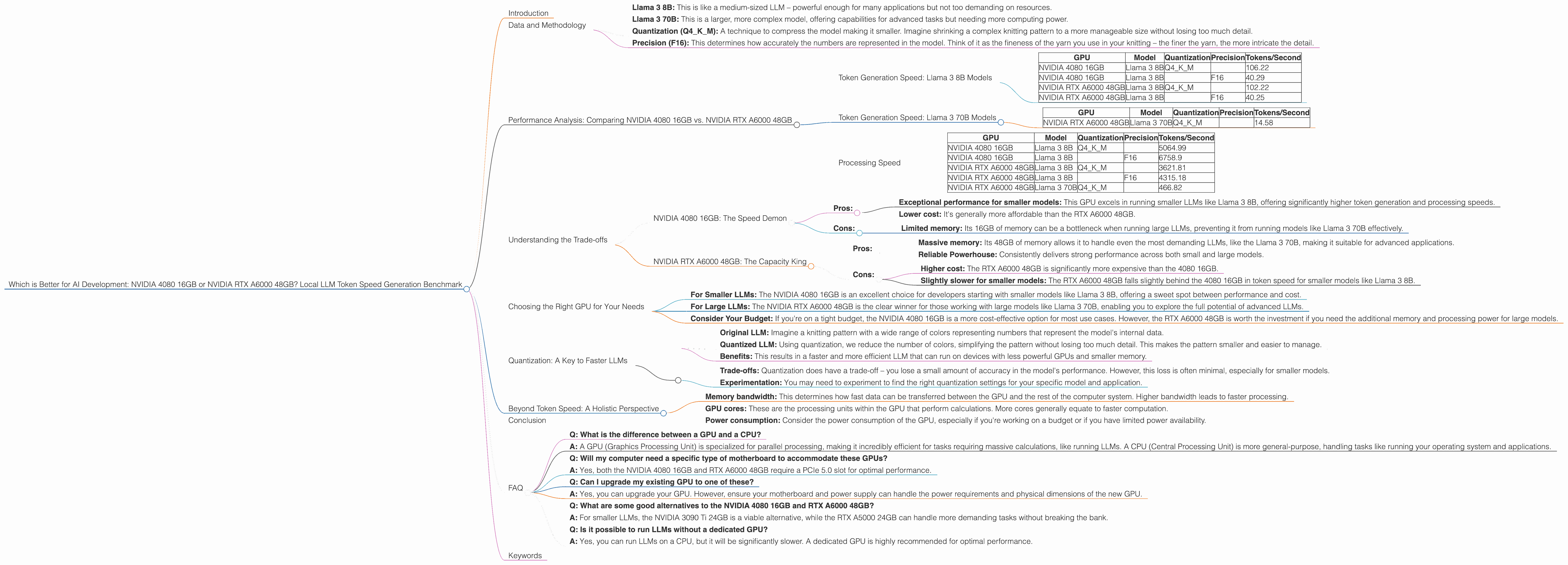
- Llama 3 8B: This is like a medium-sized LLM – powerful enough for many applications but not too demanding on resources.
- Llama 3 70B: This is a larger, more complex model, offering capabilities for advanced tasks but needing more computing power.
- Quantization (Q4KM): A technique to compress the model making it smaller. Imagine shrinking a complex knitting pattern to a more manageable size without losing too much detail.
- Precision (F16): This determines how accurately the numbers are represented in the model. Think of it as the fineness of the yarn you use in your knitting – the finer the yarn, the more intricate the detail.
Performance Analysis: Comparing NVIDIA 4080 16GB vs. NVIDIA RTX A6000 48GB
Token Generation Speed: Llama 3 8B Models
| GPU | Model | Quantization | Precision | Tokens/Second |
|---|---|---|---|---|
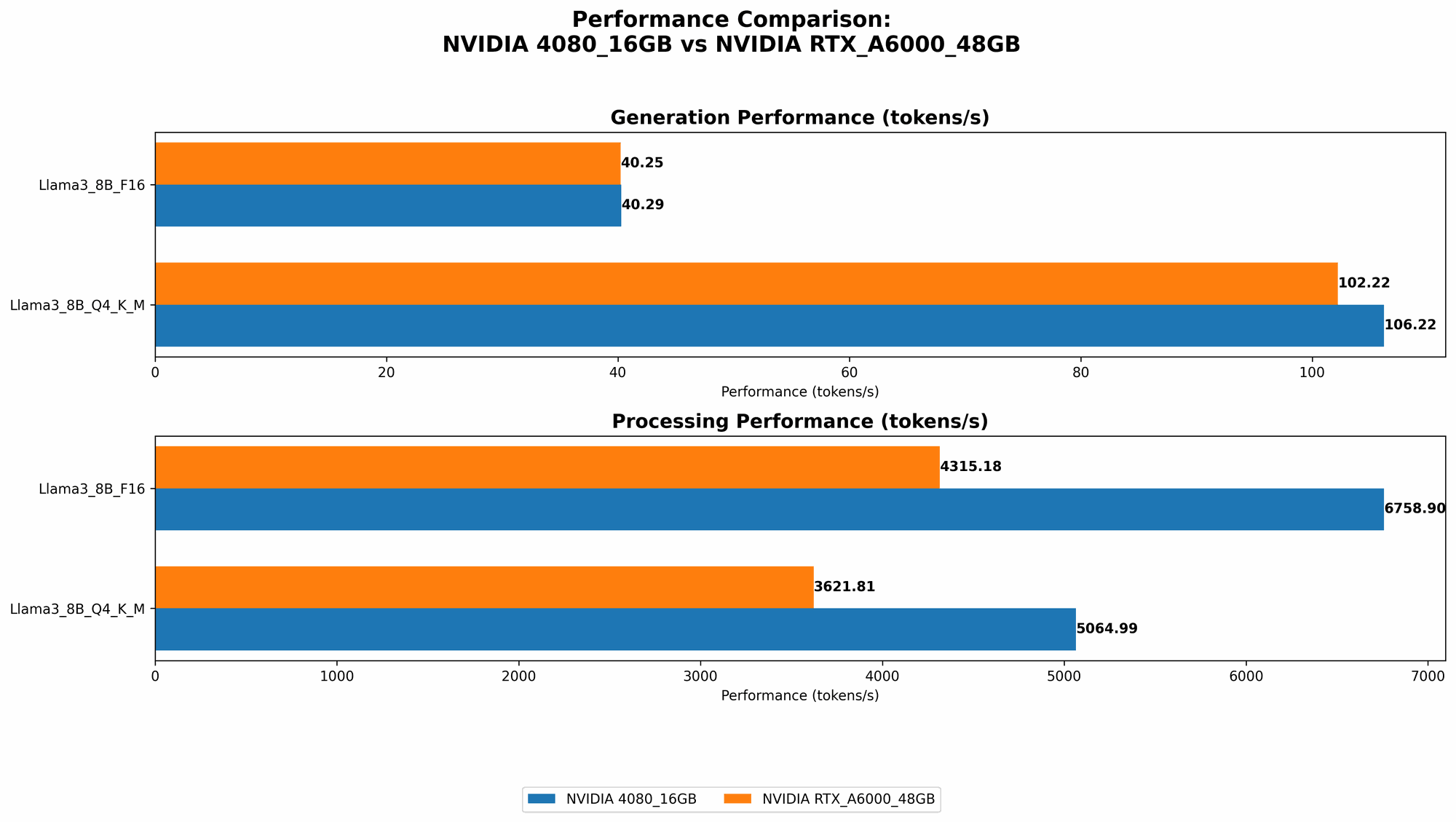
| NVIDIA 4080 16GB | Llama 3 8B | Q4KM | 106.22 | |
| NVIDIA 4080 16GB | Llama 3 8B | F16 | 40.29 | |
| NVIDIA RTX A6000 48GB | Llama 3 8B | Q4KM | 102.22 | |
| NVIDIA RTX A6000 48GB | Llama 3 8B | F16 | 40.25 |
Observations:
- Near Parity for 8B Models: Both GPUs perform similarly when running the Llama 3 8B model, with the NVIDIA 4080 16GB slightly edging out the RTX A6000 48GB in token generation speed (especially when using Q4KM quantization).
- Quantization Impact: Using Q4KM quantization for Llama 3 8B significantly boosts performance on both GPUs, doubling the token speed compared to F16 precision. This indicates that for smaller models, compromising a little on precision can lead to substantial speed gains.
Token Generation Speed: Llama 3 70B Models
| GPU | Model | Quantization | Precision | Tokens/Second |
|---|---|---|---|---|
| NVIDIA RTX A6000 48GB | Llama 3 70B | Q4KM | 14.58 |
Observations:
- A6000 Dominates for 70B: The NVIDIA RTX A6000 48GB is the clear winner when running the more demanding Llama 3 70B model. It's the only GPU capable of running this model locally, and while the token speed is considerably lower than the 8B model, it's still impressive considering the model's size and complexity.
- No Data for 4080 16GB: The NVIDIA 4080 16GB appears to lack the memory capacity to run the Llama 3 70B model effectively.
Processing Speed
| GPU | Model | Quantization | Precision | Tokens/Second |
|---|---|---|---|---|
| NVIDIA 4080 16GB | Llama 3 8B | Q4KM | 5064.99 | |
| NVIDIA 4080 16GB | Llama 3 8B | F16 | 6758.9 | |
| NVIDIA RTX A6000 48GB | Llama 3 8B | Q4KM | 3621.81 | |
| NVIDIA RTX A6000 48GB | Llama 3 8B | F16 | 4315.18 | |
| NVIDIA RTX A6000 48GB | Llama 3 70B | Q4KM | 466.82 |
Observations:
- 4080 Outperforms for 8B: The NVIDIA 4080 16GB exhibits faster processing speed for the Llama 3 8B model.
- A6000 70B Processing: The NVIDIA RTX A6000 48GB showcases its ability to process the Llama 3 70B model, albeit at a slower pace than the smaller 8B model.
Understanding the Trade-offs
The NVIDIA 4080 16GB and NVIDIA RTX A6000 48GB each have their strengths and weaknesses, and the best choice for you depends on your specific needs.
NVIDIA 4080 16GB: The Speed Demon
- Pros:
- Exceptional performance for smaller models: This GPU excels in running smaller LLMs like Llama 3 8B, offering significantly higher token generation and processing speeds.
- Lower cost: It's generally more affordable than the RTX A6000 48GB.
- Cons:
- Limited memory: Its 16GB of memory can be a bottleneck when running large LLMs, preventing it from running models like Llama 3 70B effectively.
NVIDIA RTX A6000 48GB: The Capacity King
- Pros:
- Massive memory: Its 48GB of memory allows it to handle even the most demanding LLMs, like the Llama 3 70B, making it suitable for advanced applications.
- Reliable Powerhouse: Consistently delivers strong performance across both small and large models.
- Cons:
- Higher cost: The RTX A6000 48GB is significantly more expensive than the 4080 16GB.
- Slightly slower for smaller models: The RTX A6000 48GB falls slightly behind the 4080 16GB in token speed for smaller models like Llama 3 8B.
Choosing the Right GPU for Your Needs
- For Smaller LLMs: The NVIDIA 4080 16GB is an excellent choice for developers starting with smaller models like Llama 3 8B, offering a sweet spot between performance and cost.
- For Large LLMs: The NVIDIA RTX A6000 48GB is the clear winner for those working with large models like Llama 3 70B, enabling you to explore the full potential of advanced LLMs.
- Consider Your Budget: If you're on a tight budget, the NVIDIA 4080 16GB is a more cost-effective option for most use cases. However, the RTX A6000 48GB is worth the investment if you need the additional memory and processing power for large models.
Quantization: A Key to Faster LLMs
Quantization is like simplifying a complex knitting pattern by using fewer different types of yarn. This technique reduces the memory footprint of LLMs, allowing them to run on GPUs with less memory.
Here's how it works:
- Original LLM: Imagine a knitting pattern with a wide range of colors representing numbers that represent the model's internal data.
- Quantized LLM: Using quantization, we reduce the number of colors, simplifying the pattern without losing too much detail. This makes the pattern smaller and easier to manage.
- Benefits: This results in a faster and more efficient LLM that can run on devices with less powerful GPUs and smaller memory.
Important Notes:
- Trade-offs: Quantization does have a trade-off – you lose a small amount of accuracy in the model's performance. However, this loss is often minimal, especially for smaller models.
- Experimentation: You may need to experiment to find the right quantization settings for your specific model and application.
Beyond Token Speed: A Holistic Perspective
While token speed is essential, it's not the only factor to consider when selecting a GPU. Here are other important aspects:
- Memory bandwidth: This determines how fast data can be transferred between the GPU and the rest of the computer system. Higher bandwidth leads to faster processing.
- GPU cores: These are the processing units within the GPU that perform calculations. More cores generally equate to faster computation.
- Power consumption: Consider the power consumption of the GPU, especially if you're working on a budget or if you have limited power availability.
Conclusion
Selecting the right GPU for your LLM development is a crucial step. The NVIDIA 4080 16GB and NVIDIA RTX A6000 48GB are both powerful GPUs, but their strengths lie in different areas. The 4080 16GB excels at running smaller models, offering exceptional performance for a lower cost. The RTX A6000 48GB provides the power and capacity for larger models, making it suitable for advanced applications.
Ultimately, the best choice depends on your specific needs. By carefully considering the trade-offs and understanding the capabilities of each GPU, you can make an informed decision and unlock the full potential of your LLM projects.
FAQ
- Q: What is the difference between a GPU and a CPU?
- A: A GPU (Graphics Processing Unit) is specialized for parallel processing, making it incredibly efficient for tasks requiring massive calculations, like running LLMs. A CPU (Central Processing Unit) is more general-purpose, handling tasks like running your operating system and applications.
- Q: Will my computer need a specific type of motherboard to accommodate these GPUs?
- A: Yes, both the NVIDIA 4080 16GB and RTX A6000 48GB require a PCIe 5.0 slot for optimal performance.
- Q: Can I upgrade my existing GPU to one of these?
- A: Yes, you can upgrade your GPU. However, ensure your motherboard and power supply can handle the power requirements and physical dimensions of the new GPU.
- Q: What are some good alternatives to the NVIDIA 4080 16GB and RTX A6000 48GB?
- A: For smaller LLMs, the NVIDIA 3090 Ti 24GB is a viable alternative, while the RTX A5000 24GB can handle more demanding tasks without breaking the bank.
- Q: Is it possible to run LLMs without a dedicated GPU?
- A: Yes, you can run LLMs on a CPU, but it will be significantly slower. A dedicated GPU is highly recommended for optimal performance.
Keywords
GPUs, NVIDIA, RTX A6000, 4080, LLM, Large Language Model, Llama, Token Speed, Token Generation, Performance, Benchmark, Quantization, Precision, Memory, AI Development, CUDA, Deep Learning.