Which is Better for AI Development: NVIDIA 4080 16GB or NVIDIA L40S 48GB? Local LLM Token Speed Generation Benchmark
Introduction
The world of Artificial Intelligence (AI) is abuzz with the excitement surrounding Large Language Models (LLMs). These powerful AI models, capable of generating human-like text, translating languages, and even writing different kinds of creative content, are transforming various industries. To unleash the potential of these LLMs, developers need powerful hardware to run them efficiently.
This article delves into the performance of two popular GPUs, the NVIDIA GeForce RTX 4080 16GB and the NVIDIA L40S 48GB, for local execution of LLMs. We'll analyze their token generation speed and processing capabilities, comparing their strengths and weaknesses to guide you in choosing the best GPU for your AI development endeavors.
Comparison of NVIDIA 408016GB and NVIDIA L40S48GB
Token Generation Performance
Let's dive into the heart of the matter: how fast can these GPUs generate tokens, the building blocks of text, for different LLM models? Our analysis focuses on two popular LLMs: Llama 3 8B and Llama 3 70B. We'll be looking at both quantized models (Q4KM) and float16 models (F16) to understand how these different representation formats impact performance.
NVIDIA 4080 16GB Performance
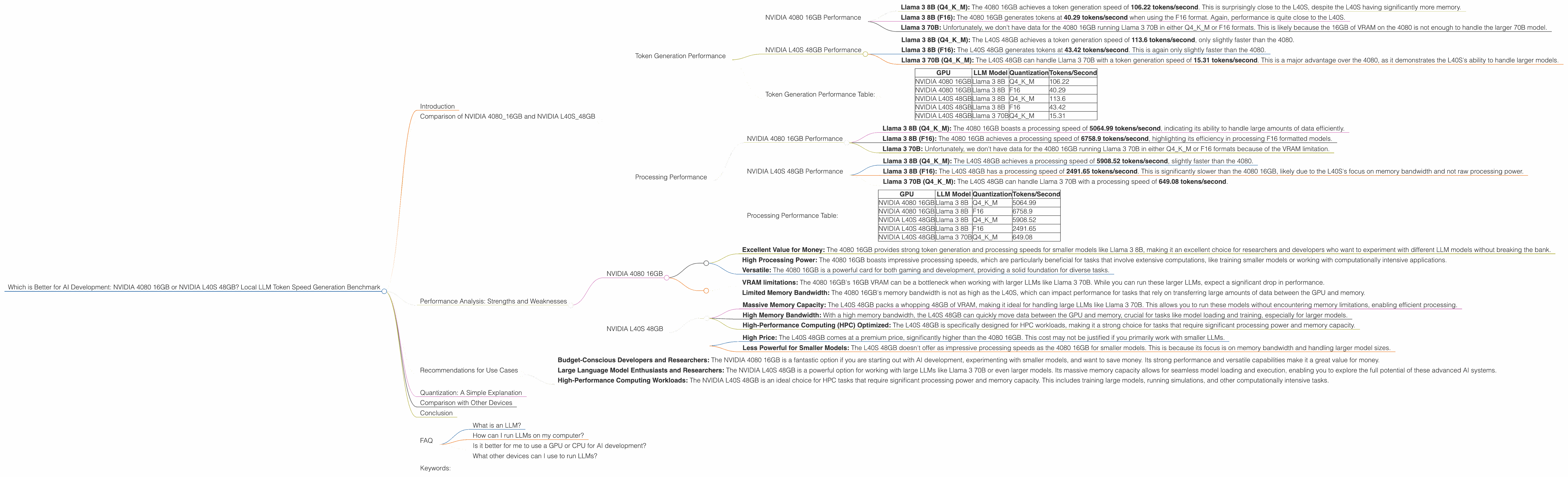
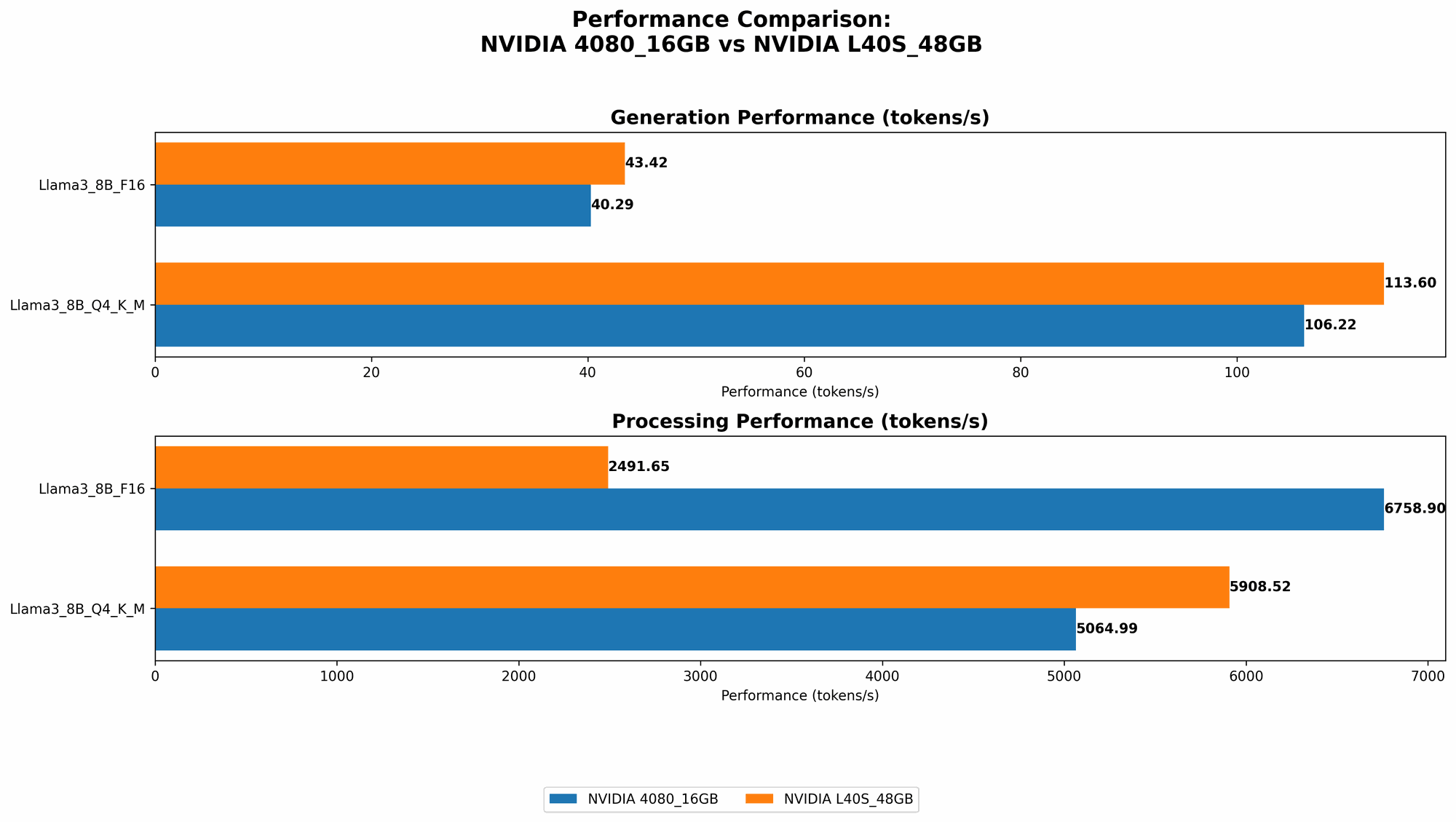
- Llama 3 8B (Q4KM): The 4080 16GB achieves a token generation speed of 106.22 tokens/second. This is surprisingly close to the L40S, despite the L40S having significantly more memory.
- Llama 3 8B (F16): The 4080 16GB generates tokens at 40.29 tokens/second when using the F16 format. Again, performance is quite close to the L40S.
- Llama 3 70B: Unfortunately, we don't have data for the 4080 16GB running Llama 3 70B in either Q4KM or F16 formats. This is likely because the 16GB of VRAM on the 4080 is not enough to handle the larger 70B model.
NVIDIA L40S 48GB Performance
- Llama 3 8B (Q4KM): The L40S 48GB achieves a token generation speed of 113.6 tokens/second, only slightly faster than the 4080.
- Llama 3 8B (F16): The L40S 48GB generates tokens at 43.42 tokens/second. This is again only slightly faster than the 4080.
- Llama 3 70B (Q4KM): The L40S 48GB can handle Llama 3 70B with a token generation speed of 15.31 tokens/second. This is a major advantage over the 4080, as it demonstrates the L40S's ability to handle larger models.
Token Generation Performance Table:
| GPU | LLM Model | Quantization | Tokens/Second |
|---|---|---|---|
| NVIDIA 4080 16GB | Llama 3 8B | Q4KM | 106.22 |
| NVIDIA 4080 16GB | Llama 3 8B | F16 | 40.29 |
| NVIDIA L40S 48GB | Llama 3 8B | Q4KM | 113.6 |
| NVIDIA L40S 48GB | Llama 3 8B | F16 | 43.42 |
| NVIDIA L40S 48GB | Llama 3 70B | Q4KM | 15.31 |
Key takeaway:
The L40S 48GB is significantly better when it comes to handling larger LLMs like Llama3 70B. However, for smaller models like Llama3 8B, the 4080 16GB offers comparable performance at a much lower price point.
Processing Performance
While token generation speed is important, it's not the only metric to consider. Processing performance also plays a crucial role in the overall speed of LLM execution. This refers to how quickly the GPU can process the generated tokens and perform other computational tasks.
NVIDIA 4080 16GB Performance
- Llama 3 8B (Q4KM): The 4080 16GB boasts a processing speed of 5064.99 tokens/second, indicating its ability to handle large amounts of data efficiently.
- Llama 3 8B (F16): The 4080 16GB achieves a processing speed of 6758.9 tokens/second, highlighting its efficiency in processing F16 formatted models.
- Llama 3 70B: Unfortunately, we don't have data for the 4080 16GB running Llama 3 70B in either Q4KM or F16 formats because of the VRAM limitation.
NVIDIA L40S 48GB Performance
- Llama 3 8B (Q4KM): The L40S 48GB achieves a processing speed of 5908.52 tokens/second, slightly faster than the 4080.
- Llama 3 8B (F16): The L40S 48GB has a processing speed of 2491.65 tokens/second. This is significantly slower than the 4080 16GB, likely due to the L40S's focus on memory bandwidth and not raw processing power.
- Llama 3 70B (Q4KM): The L40S 48GB can handle Llama 3 70B with a processing speed of 649.08 tokens/second.
Processing Performance Table:
| GPU | LLM Model | Quantization | Tokens/Second |
|---|---|---|---|
| NVIDIA 4080 16GB | Llama 3 8B | Q4KM | 5064.99 |
| NVIDIA 4080 16GB | Llama 3 8B | F16 | 6758.9 |
| NVIDIA L40S 48GB | Llama 3 8B | Q4KM | 5908.52 |
| NVIDIA L40S 48GB | Llama 3 8B | F16 | 2491.65 |
| NVIDIA L40S 48GB | Llama 3 70B | Q4KM | 649.08 |
Key takeaway: The 4080 16GB excels in processing speed for smaller models, while the L40S 48GB shines when handling larger models, but its processing performance isn't as impressive for smaller models.
Performance Analysis: Strengths and Weaknesses
Let's break down the strengths and weaknesses of each GPU to provide a clearer picture of their suitability for different AI development scenarios:
NVIDIA 4080 16GB
Strengths:
- Excellent Value for Money: The 4080 16GB provides strong token generation and processing speeds for smaller models like Llama 3 8B, making it an excellent choice for researchers and developers who want to experiment with different LLM models without breaking the bank.
- High Processing Power: The 4080 16GB boasts impressive processing speeds, which are particularly beneficial for tasks that involve extensive computations, like training smaller models or working with computationally intensive applications.
- Versatile: The 4080 16GB is a powerful card for both gaming and development, providing a solid foundation for diverse tasks.
Weaknesses:
- VRAM limitations: The 4080 16GB's 16GB VRAM can be a bottleneck when working with larger LLMs like Llama 3 70B. While you can run these larger LLMs, expect a significant drop in performance.
- Limited Memory Bandwidth: The 4080 16GB's memory bandwidth is not as high as the L40S, which can impact performance for tasks that rely on transferring large amounts of data between the GPU and memory.
NVIDIA L40S 48GB
Strengths:
- Massive Memory Capacity: The L40S 48GB packs a whopping 48GB of VRAM, making it ideal for handling large LLMs like Llama 3 70B. This allows you to run these models without encountering memory limitations, enabling efficient processing.
- High Memory Bandwidth: With a high memory bandwidth, the L40S 48GB can quickly move data between the GPU and memory, crucial for tasks like model loading and training, especially for larger models.
- High-Performance Computing (HPC) Optimized: The L40S 48GB is specifically designed for HPC workloads, making it a strong choice for tasks that require significant processing power and memory capacity.
Weaknesses:
- High Price: The L40S 48GB comes at a premium price, significantly higher than the 4080 16GB. This cost may not be justified if you primarily work with smaller LLMs.
- Less Powerful for Smaller Models: The L40S 48GB doesn't offer as impressive processing speeds as the 4080 16GB for smaller models. This is because its focus is on memory bandwidth and handling larger model sizes.
Recommendations for Use Cases
Now let's break down which GPU is better suited for specific AI development use cases:
- Budget-Conscious Developers and Researchers: The NVIDIA 4080 16GB is a fantastic option if you are starting out with AI development, experimenting with smaller models, and want to save money. Its strong performance and versatile capabilities make it a great value for money.
- Large Language Model Enthusiasts and Researchers: The NVIDIA L40S 48GB is a powerful option for working with large LLMs like Llama 3 70B or even larger models. Its massive memory capacity allows for seamless model loading and execution, enabling you to explore the full potential of these advanced AI systems.
- High-Performance Computing Workloads: The NVIDIA L40S 48GB is an ideal choice for HPC tasks that require significant processing power and memory capacity. This includes training large models, running simulations, and other computationally intensive tasks.
Quantization: A Simple Explanation
Think of quantization as a way to compress a large model, like making it smaller and more compact. Imagine trying to fit a massive wardrobe into a small suitcase. You'd need to fold and compress your clothes to make them fit, right? Quantization does something similar with LLMs, reducing their memory footprint and allowing them to run on devices with less VRAM, like the 4080 16GB. The trade-off is a small reduction in accuracy.
Comparison with Other Devices
While this article focuses on comparing the NVIDIA 4080 16GB and L40S 48GB, other devices like the Apple M1, M1 Pro, and M1 Max processors can also be used for local LLM execution. However, these processors typically have less processing power and VRAM compared to dedicated GPUs, making them better suited for smaller models or tasks requiring less memory.
Conclusion
Choosing the right GPU for your AI development needs is crucial for unleashing the full potential of LLMs. The NVIDIA 4080 16GB is an excellent value for money option for developers working with smaller models, while the NVIDIA L40S 48GB excels at handling large, memory-intensive LLMs.
Remember to carefully consider your specific use cases, budget, and performance requirements to select the best GPU for your AI development journey.
FAQ
What is an LLM?
An LLM, or Large Language Model, is a type of AI model trained on massive amounts of text data. This allows them to generate text, translate languages, write different kinds of creative content, and answer your questions in an informative way, like a human would. Think of ChatGPT or Bard!
How can I run LLMs on my computer?
Running LLMs locally on your computer requires a powerful GPU with sufficient VRAM. This is because LLMs are computationally intensive and require a lot of memory to store their parameters.
Is it better for me to use a GPU or CPU for AI development?
GPUs are generally preferred for AI development due to their specialized architecture designed for parallel processing. They offer significantly faster performance for tasks like deep learning training and inference compared to CPUs.
What other devices can I use to run LLMs?
Besides GPUs, you can also use TPUs (Tensor Processing Units) specifically designed for machine learning workloads. Cloud-based platforms like Google Colab or Amazon SageMaker also offer access to powerful GPUs and TPUs for running LLMs.
Keywords:
NVIDIA 4080 16GB, NVIDIA L40S 48GB, LLM, Large Language Model, Token Generation Speed, Processing Performance, Llama 3 8B, Llama 3 70B, Quantization, F16, Q4KM, Local LLM, AI Development, GPU, VRAM, memory bandwidth, HPC, High-Performance Computing, AI development, machine learning, deep learning, inference, training, cloud computing.