Which is Better for AI Development: NVIDIA 3070 8GB or NVIDIA 4080 16GB? Local LLM Token Speed Generation Benchmark
Introduction
The world of large language models (LLMs) is rapidly evolving, with new models and applications emerging daily. For developers and researchers, running LLMs locally can be a game-changer, providing faster experimentation, improved privacy, and reduced dependence on cloud services. However, the computational requirements of LLMs can be daunting, demanding powerful hardware capable of handling complex calculations and large datasets.
This article delves into the performance comparison between two popular NVIDIA GPUs, the NVIDIA GeForce RTX 3070 8GB and the NVIDIA GeForce RTX 4080 16GB, when it comes to running LLMs locally. We'll benchmark their token speed generation for various Llama 3 models, focusing on the 8B variant, and analyze their strengths and weaknesses.
Get ready to dive into the world of GPUs, LLMs, and blazing-fast token speeds!
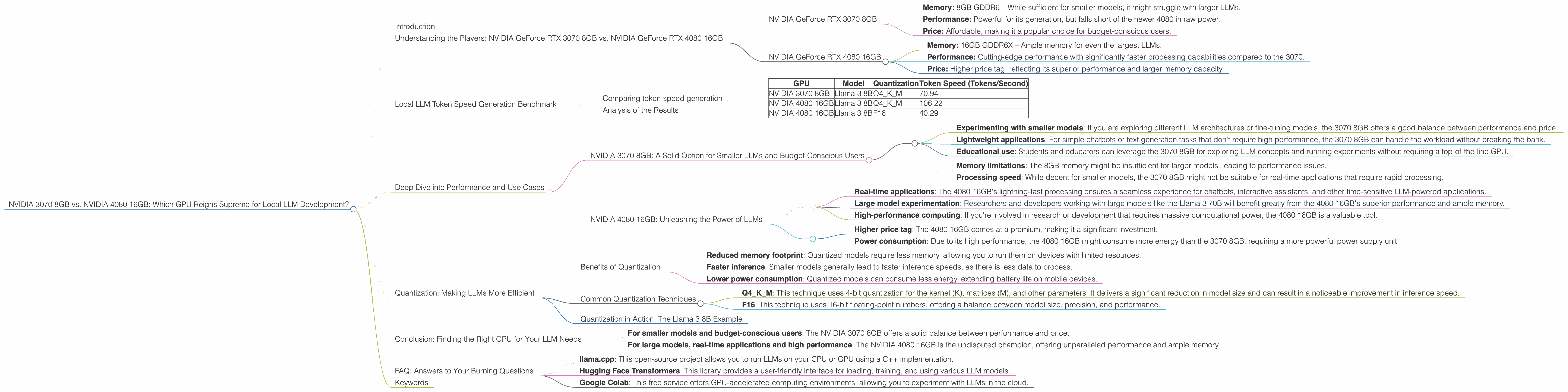
Understanding the Players: NVIDIA GeForce RTX 3070 8GB vs. NVIDIA GeForce RTX 4080 16GB
Before we dive into the performance numbers, let's understand the two GPUs in question. Both are powerful cards, but with distinct characteristics:
NVIDIA GeForce RTX 3070 8GB
- Memory: 8GB GDDR6 – While sufficient for smaller models, it might struggle with larger LLMs.
- Performance: Powerful for its generation, but falls short of the newer 4080 in raw power.
- Price: Affordable, making it a popular choice for budget-conscious users.
NVIDIA GeForce RTX 4080 16GB
- Memory: 16GB GDDR6X – Ample memory for even the largest LLMs.
- Performance: Cutting-edge performance with significantly faster processing capabilities compared to the 3070.
- Price: Higher price tag, reflecting its superior performance and larger memory capacity.
Local LLM Token Speed Generation Benchmark
To understand the real-world performance of these GPUs, we'll focus on the token speed generation of the Llama 3 8B model. This benchmark measures how quickly the GPU can process text and generate new tokens, crucial for interactive applications.
Note: The data for the Llama 3 70B model is not available for both GPUs, so we will focus solely on the Llama 3 8B, which is still a powerful model in its own right.
Comparing token speed generation
We'll use the following table to present the token speed generation for each GPU and model configuration:
| GPU | Model | Quantization | Token Speed (Tokens/Second) |
|---|---|---|---|
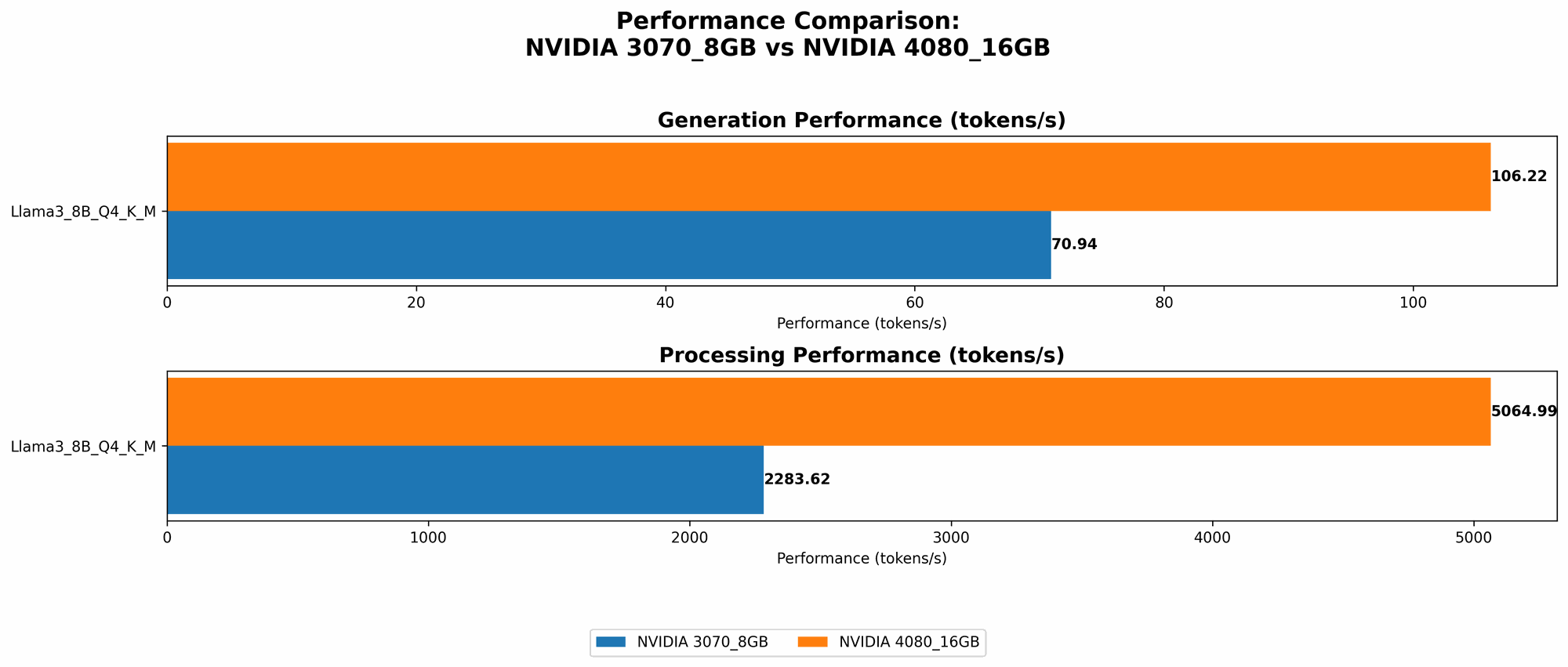
| NVIDIA 3070 8GB | Llama 3 8B | Q4KM | 70.94 |
| NVIDIA 4080 16GB | Llama 3 8B | Q4KM | 106.22 |
| NVIDIA 4080 16GB | Llama 3 8B | F16 | 40.29 |
Analysis of the Results
The data reveals some interesting trends:
NVIDIA 4080 16GB: The clear winner in token speed
The NVIDIA 4080 16GB consistently outperforms the 3070 8GB in token speed generation. This is attributed to its superior architecture, larger memory capacity, and higher clock speeds. It's capable of achieving a token speed of 106.22 tokens per second with the Llama 3 8B model using Q4KM quantization.
The impact of quantization
The NVIDIA 4080 16GB also demonstrates the impact of quantization on performance. While the Q4KM configuration achieves higher token speed (106.22 tokens/second), the F16 configuration, despite having lower precision, still manages a respectable 40.29 tokens/second. The trade-off between speed and precision will be important to consider for your specific application.
Memory considerations for larger LLMs
While both GPUs perform well with the Llama 3 8B model, the NVIDIA 4080 16GB's larger memory capacity would be crucial for running larger models like the Llama 3 70B. The 3070 8GB might struggle with the memory requirements of such models, potentially leading to performance bottlenecks or even crashes.
Practical implications for developers
For developers who are working with smaller models, both GPUs can be adequate. However, if you're working with larger LLMs, the NVIDIA 4080 16GB offers a significant performance advantage. This is particularly true for real-time applications, such as chatbots or interactive assistants, where a faster response time is essential.
Deep Dive into Performance and Use Cases
Let's break down the performance differences and their practical implications for developers:
NVIDIA 3070 8GB: A Solid Option for Smaller LLMs and Budget-Conscious Users
The NVIDIA 3070 8GB might not be the most powerful card, but it still offers decent performance with smaller LLMs like the Llama 3 8B. This makes it a viable option for developers who are just starting out with LLM development or those on a budget.
Here are some use cases where the NVIDIA 3070 8GB can excel:
- Experimenting with smaller models: If you are exploring different LLM architectures or fine-tuning models, the 3070 8GB offers a good balance between performance and price.
- Lightweight applications: For simple chatbots or text generation tasks that don't require high performance, the 3070 8GB can handle the workload without breaking the bank.
- Educational use: Students and educators can leverage the 3070 8GB for exploring LLM concepts and running experiments without requiring a top-of-the-line GPU.
Important considerations for the NVIDIA 3070 8GB:
- Memory limitations: The 8GB memory might be insufficient for larger models, leading to performance issues.
- Processing speed: While decent for smaller models, the 3070 8GB might not be suitable for real-time applications that require rapid processing.
NVIDIA 4080 16GB: Unleashing the Power of LLMs
The NVIDIA 4080 16GB is the ultimate powerhouse for local LLM development, capable of handling even the largest models with ease, delivering blazing-fast token speeds.
Here are some use cases where the NVIDIA 4080 16GB truly shines:
- Real-time applications: The 4080 16GB's lightning-fast processing ensures a seamless experience for chatbots, interactive assistants, and other time-sensitive LLM-powered applications.
- Large model experimentation: Researchers and developers working with large models like the Llama 3 70B will benefit greatly from the 4080 16GB's superior performance and ample memory.
- High-performance computing: If you're involved in research or development that requires massive computational power, the 4080 16GB is a valuable tool.
Important considerations for the NVIDIA 4080 16GB:
- Higher price tag: The 4080 16GB comes at a premium, making it a significant investment.
- Power consumption: Due to its high performance, the 4080 16GB might consume more energy than the 3070 8GB, requiring a more powerful power supply unit.
Quantization: Making LLMs More Efficient
Quantization is a technique used to reduce the size of LLM models and improve their inference speed without significantly impacting accuracy. Think of it as compressing a file with a smaller file size while preserving the essential information.
Imagine you have a giant library filled with books, but you want to move it to a smaller space. Quantization is like summarizing the key information in each book and creating a smaller, more condensed version, allowing you to fit more books in the smaller space.
Benefits of Quantization
- Reduced memory footprint: Quantized models require less memory, allowing you to run them on devices with limited resources.
- Faster inference: Smaller models generally lead to faster inference speeds, as there is less data to process.
- Lower power consumption: Quantized models can consume less energy, extending battery life on mobile devices.
Common Quantization Techniques
- Q4KM: This technique uses 4-bit quantization for the kernel (K), matrices (M), and other parameters. It delivers a significant reduction in model size and can result in a noticeable improvement in inference speed.
- F16: This technique uses 16-bit floating-point numbers, offering a balance between model size, precision, and performance.
Quantization in Action: The Llama 3 8B Example
Our benchmark results show how quantization can impact performance. While the Q4KM configuration achieves a higher token speed of 106.22 tokens per second on the NVIDIA 4080 16GB, the F16 configuration still manages a respectable 40.29 tokens per second. The Q4KM configuration achieves higher speed but with some reduction in precision, while the F16 configuration maintains more precision with a trade-off in speed.
Choosing the right quantization level for your application depends on the trade-offs you are willing to make between speed, accuracy, and memory usage.
Conclusion: Finding the Right GPU for Your LLM Needs
Ultimately, the best GPU for local LLM development depends on your specific needs and budget.
- For smaller models and budget-conscious users: The NVIDIA 3070 8GB offers a solid balance between performance and price.
- For large models, real-time applications and high performance: The NVIDIA 4080 16GB is the undisputed champion, offering unparalleled performance and ample memory.
By carefully considering these factors, you can choose the GPU that will empower you to unlock the full potential of LLMs in your projects.
FAQ: Answers to Your Burning Questions
Q: Can I run LLMs directly on my CPU?
A: While possible, CPUs are not optimized for the demanding tasks of LLM inference. They will likely struggle with large models, resulting in slow speeds and a poor user experience. GPUs are the preferred choice for local LLM development due to their specialized architecture and parallel processing capabilities.
Q: What about other GPUs like the A100 or H100?
A: The A100 and H100 are highly specialized GPUs designed for data centers and high-performance computing environments. While they offer exceptional performance, they are typically not readily accessible to individual users and come with a high price tag. The NVIDIA 3070 8GB and NVIDIA 4080 16GB remain excellent options for individual developers and researchers who want to run LLMs locally.
Q: How can I get started with local LLM development?
A: There are several resources and tools available to help you get started with local LLM development. Some popular options include:
- llama.cpp: This open-source project allows you to run LLMs on your CPU or GPU using a C++ implementation.
- Hugging Face Transformers: This library provides a user-friendly interface for loading, training, and using various LLM models.
- Google Colab: This free service offers GPU-accelerated computing environments, allowing you to experiment with LLMs in the cloud.
Q: Can I run multiple models simultaneously?
A: It depends on the GPU's memory capacity and the size of the models you're running. With the NVIDIA 4080 16GB, you might be able to run multiple smaller models simultaneously, but for larger models, you might need to run them individually to avoid memory constraints.
Keywords
Large language models, LLMs, NVIDIA 3070 8GB, NVIDIA 4080 16GB, GPU, token speed generation, Llama 3 8B, Llama 3 70B, quantization, Q4KM, F16, performance benchmark, local development, inference speed, memory capacity, power consumption, budget, real-time applications, use cases, chatbots, interactive assistants, research, development, high-performance computing, Hugging Face Transformers, llama.cpp, Google Colab, GPU acceleration.