Which is Better for AI Development: NVIDIA 3070 8GB or NVIDIA 3090 24GB? Local LLM Token Speed Generation Benchmark

Introduction
The world of large language models (LLMs) is exploding, and developers are eager to explore their potential. Running LLMs locally offers a great way to experiment and build custom applications without depending on cloud services. But choosing the right hardware can be a challenge, especially when it comes to GPUs.
This article dives deep into the performance of two popular NVIDIA GPUs: the 3070 8GB and the 3090 24GB, focusing on their token speed generation capabilities for local LLM development. We'll be benchmarking these GPUs using various Llama3 model configurations and analyzing the results to help you make an informed decision.
Let's get this GPU party started! 🎉
Comparison of NVIDIA 3070 8GB and NVIDIA 3090 24GB for LLM Token Generation Speed
Understanding Token Speed Generation
Think of token speed generation as the rate at which your GPU can process the building blocks of text – the tokens. The higher the token speed, the faster your LLM can generate text, translate languages, answer questions, and perform other tasks. It essentially dictates how quickly your AI can think and respond.
Data Analysis: Token Speed Generation Benchmarks
We'll analyze the token speed generation for the Llama3 8B model in both quantized (Q4) and float16 (F16) configurations.
Table 1: Llama3 8B Token Speed Generation (Tokens/Second)
| GPU Model | Configuration | Generation Speed | Processing Speed |
|---|---|---|---|
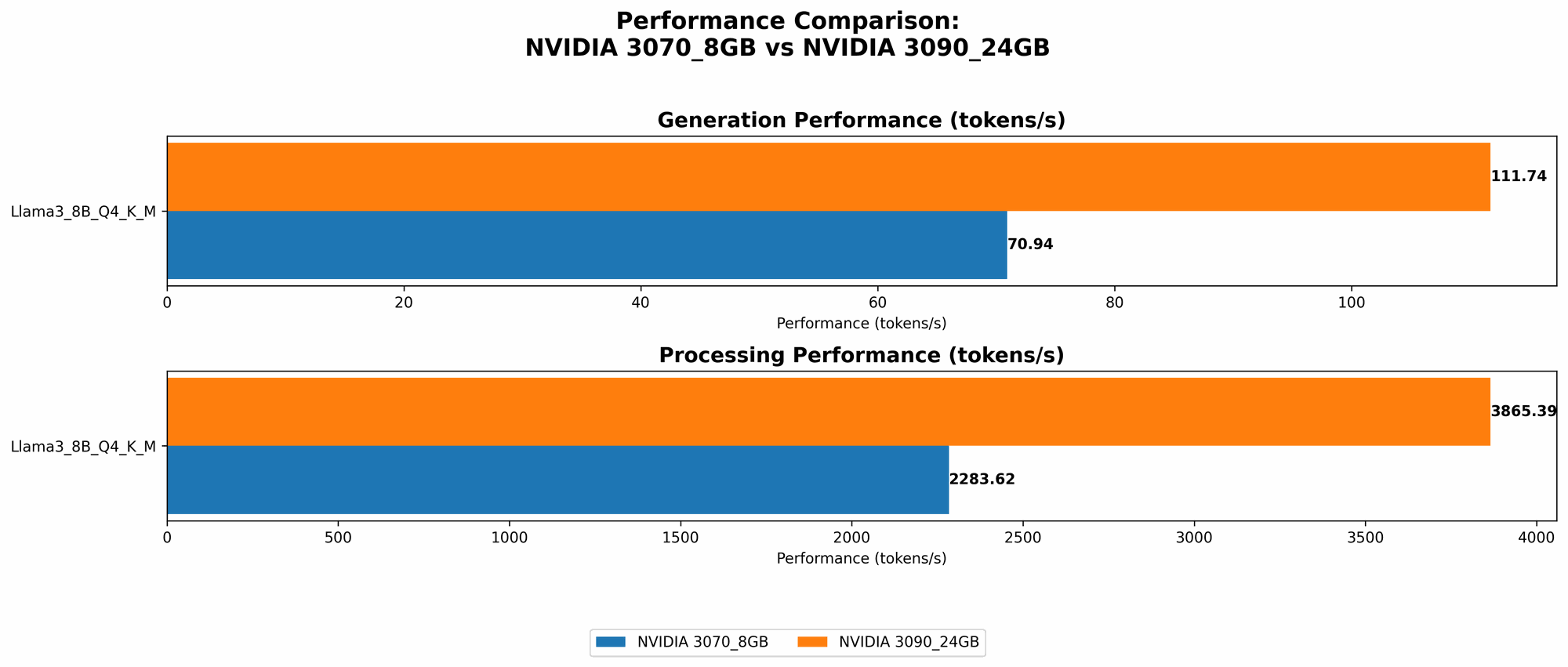
| NVIDIA 3070 8GB | Llama3 8B Q4 K_M | 70.94 | 2283.62 |
| NVIDIA 3090 24GB | Llama3 8B Q4 K_M | 111.74 | 3865.39 |
| NVIDIA 3090 24GB | Llama3 8B F16 | 46.51 | 4239.64 |
- 3070 8GB data is unavailable for F16 configuration.
- 3090 24GB data is unavailable for Llama3 70B models in both Q4 and F16 configurations.
Observations:
- Quantization (Q4): The 3090 24GB clearly outperforms the 3070 8GB in both generation and processing speeds. It generates tokens at about 58% faster than the 3070 8GB.
- Float16 (F16): While the 3090 24GB is faster in processing speeds, it's surprisingly slower in generation speed compared to the Q4 configuration. This highlights the trade-off between model precision and speed – F16 offers higher precision but at the cost of performance.
Important: These benchmarks are based on specific models and configurations. The actual performance may vary depending on the LLM, its size, and the implementation.
Performance Analysis: Breaking Down the Strengths and Weaknesses
Here's a breakdown of the performance based on the data:
NVIDIA 3070 8GB:
- Strengths:
- Cost-effective option for smaller LLMs and less demanding tasks.
- Weaknesses:
- Limited memory can hinder running larger models.
- Slower token generation speed compared to the 3090 24GB.
- Data unavailable for F16 configuration – might struggle with complex tasks.
NVIDIA 3090 24GB:
- Strengths:
- Powerful performance for both larger models and fast token generation.
- Handles Q4 and F16 configurations effectively.
- Significant memory capacity allows it to handle demanding models.
- Weaknesses:
- Higher cost compared to the 3070 8GB.
- Limited data on 70B models (might not be suitable for larger models).
Practical Recommendations:
- For smaller LLMs (8B) and faster experimentation: The 3070 8GB is a good starting point, especially if budget is a concern.
- For larger LLMs (70B) or demanding tasks: The 3090 24GB is the clear winner. Its high memory and faster token generation speed make it ideal for complex AI projects.
- If cost is a constraint and you want to explore F16: You might need to consider another GPU due to the limited data available for the 3070 8GB in F16 configuration.
Choosing the right GPU: Think about the size of the models you plan to use, the complexity of your applications, and your budget.
Deep Dive: Quantization and its Impact on LLM Performance
For those unfamiliar with the concept of quantization, let's break it down:
Imagine a model as a recipe for cooking a delicious AI dish. This recipe uses a wide range of ingredients, each with a unique level of precision, like the amount of salt, sugar, and other spices.
Quantization, in essence, simplifies the recipe by reducing the precision of some ingredients. Instead of using specific amounts of salt, you might use general terms like ‘a pinch’ or ‘a teaspoon’. This makes the recipe easier to follow and faster to cook, but it might slightly alter the final taste.
In the context of LLMs, quantization reduces the precision of the model's parameters (its weights and biases) by using fewer bits to store them. This results in smaller models (less memory), faster training and inference, and a slight reduction in accuracy.
Q4 vs F16: Q4 uses only 4 bits for each weight compared to F16 which uses 16 bits. This significant reduction in bits allows for faster processing, but also means that the model may lose some accuracy.
Real-world analogy: Imagine you're building a car. You can use high-precision parts, giving you a high-performance, complex, and expensive car. But you could also use simpler, lower-precision parts, which would make the car less expensive and easier to build, but maybe not as fast or powerful.
In the context of our benchmarks:
- The 3070 8GB only has data for the Llama3 8B Q4 model, highlighting the difficulty of running larger, more complex models with limited memory.
- The 3090 24GB, with its immense memory capacity, handles both Q4 and F16 configurations well.
The key takeaway is that quantization can be a great tool for speeding up your LLM development, especially if you're working on larger models or are constrained by memory. But it's crucial to carefully consider the potential trade-off between speed and accuracy.
Conclusion: Picking the Right GPU for You
Determining the best GPU for your local LLM development depends on your specific needs and budget. If you're working with smaller models and prioritize cost, the 3070 8GB might be a great choice. However, for larger LLMs, more complex projects, and pushing the boundaries of AI performance, the 3090 24GB is the undisputed champion.
Remember, the world of LLMs is constantly evolving. New models, techniques, and hardware are emerging all the time. Staying up to date with the latest trends and benchmarks will help you make informed decisions about the best tools for your projects.
FAQ
What are other factors that affect LLM performance besides the GPU?
The CPU, RAM, and even your operating system play a significant role in LLM performance. Additionally, the specific LLM architecture, its training data, and the code implementation can all impact speed and accuracy.
What are the best practices for optimizing LLM performance on local devices?
- Use a high-performance GPU with sufficient memory for your model.
- Choose an appropriate quantization level based on your accuracy requirements.
- Optimize your code and use efficient libraries for LLM execution.
- Ensure you have enough RAM to store the model and its activations.
- Consider using a dedicated hardware device like a cloud server or a GPU cluster if your requirements exceed the capabilities of your local setup.
Is it always better to use a more powerful GPU?
Not necessarily. If you are working with smaller models and have limited resources, a lower-powered GPU might be sufficient. The key is to find a balance between performance, budget, and your specific project needs.
What are some alternative GPUs for running LLMs?
Other popular GPU options include the NVIDIA GeForce RTX 3080, 3060 Ti, and the AMD Radeon RX 6800 series. You can research their benchmarks and compare them to the 3070 8GB and 3090 24GB to find the best fit for your needs.
Keywords
LLM, large language model, GPU, NVIDIA, 3070, 8GB, 3090, 24GB, token speed, generation, processing, Llama3, Q4, F16, quantization, float16, benchmark, performance, AI, development, local, model, speed, accuracy, memory, cost, budget, hardware, software, optimization, comparison, practical, recommendations, alternative, AMD, Radeon, RX 6800, RTX, GeForce.