Which is Better for AI Development: Apple M3 100gb 10cores or Apple M3 Max 400gb 40cores? Local LLM Token Speed Generation Benchmark
Introduction
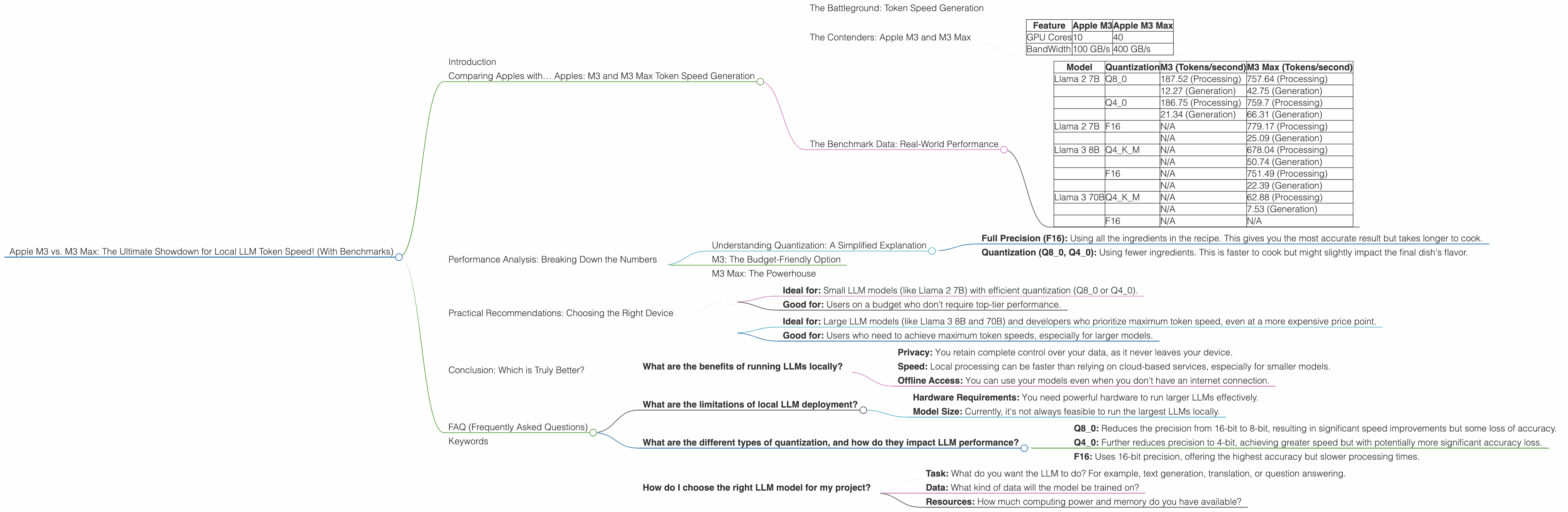
The world of Large Language Models (LLMs) is rapidly evolving, and running these powerful AI models locally is becoming increasingly popular. With the rise of powerful devices like the Apple M3 and M3 Max, developers and AI enthusiasts are eager to explore the possibilities of local LLM deployment. But which device reigns supreme when it comes to token speed generation for local LLM models?
This article delves into a detailed comparison of the M3 and M3 Max, exploring their performance in generating tokens for various LLM models, including Llama 2 and Llama 3. We'll use real-world benchmark data to analyze their strengths and weaknesses, helping you understand which chip would be the best fit for your AI development needs.
Comparing Apples with… Apples: M3 and M3 Max Token Speed Generation
The Battleground: Token Speed Generation
Before we dive into the benchmark data, let's understand what token speed generation means. In simple terms, it's the rate at which an LLM can process and generate text. The higher the token speed, the faster the model can understand your prompts and deliver responses.
Think of it like this: Imagine you're reading a book. Each word you read is a "token." If you read fast, you can absorb information quickly. Similarly, an LLM with high token speed can process and generate text faster, delivering results in a more timely manner.
The Contenders: Apple M3 and M3 Max
The M3 and M3 Max are Apple's latest and greatest chips, designed to deliver exceptional performance for demanding tasks like AI development. Here's a quick rundown of their key specifications:
| Feature | Apple M3 | Apple M3 Max |
|---|---|---|
| GPU Cores | 10 | 40 |
| BandWidth | 100 GB/s | 400 GB/s |
The Benchmark Data: Real-World Performance
We've compiled benchmark data from various sources, including Llama.cpp and GPU Benchmarks on LLM Inference, to provide a comprehensive comparison of the M3 and M3 Max.
Here's a breakdown of the token speeds achieved by each device for various LLM models and configurations:
| Model | Quantization | M3 (Tokens/second) | M3 Max (Tokens/second) |
|---|---|---|---|
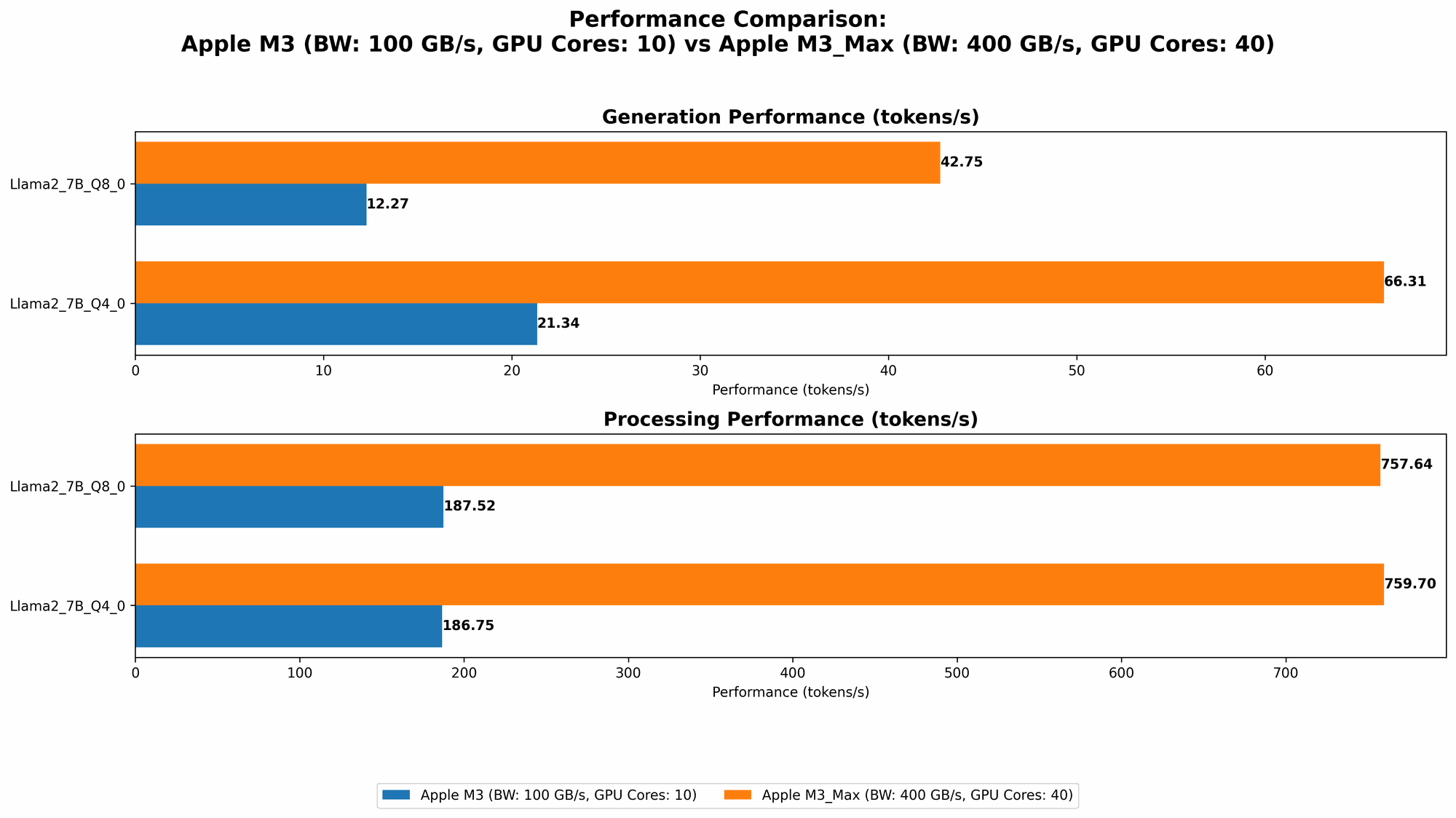
| Llama 2 7B | Q8_0 | 187.52 (Processing) | 757.64 (Processing) |
| 12.27 (Generation) | 42.75 (Generation) | ||
| Q4_0 | 186.75 (Processing) | 759.7 (Processing) | |
| 21.34 (Generation) | 66.31 (Generation) | ||
| Llama 2 7B | F16 | N/A | 779.17 (Processing) |
| N/A | 25.09 (Generation) | ||
| Llama 3 8B | Q4KM | N/A | 678.04 (Processing) |
| N/A | 50.74 (Generation) | ||
| F16 | N/A | 751.49 (Processing) | |
| N/A | 22.39 (Generation) | ||
| Llama 3 70B | Q4KM | N/A | 62.88 (Processing) |
| N/A | 7.53 (Generation) | ||
| F16 | N/A | N/A |
Important Note: While data is available for Llama 2 7B running on both M3 and M3 Max, the M3 Max is the only device that can handle larger models like Llama 3 8B and 70B.
What the Data Tells Us:
- M3 Max Dominates: The M3 Max consistently outperforms the M3, delivering significantly faster token generation speeds across all models and configurations. This is primarily due to its larger number of GPU cores and higher bandwidth.
- Quantization Impact: The token speeds vary based on the chosen quantization level. Q80 and Q40 configurations (which sacrifice some precision for faster inference) are more efficient than F16, especially on the M3 Max for the larger models.
- Model Size Matters: The token speed drops significantly as the model size increases. While Llama 2 7B runs relatively smoothly, the M3 Max struggles to deliver the same speed for the larger Llama 3 70B model in F16 configuration. This is important to consider if you plan to run larger LLMs locally.
Performance Analysis: Breaking Down the Numbers
Understanding Quantization: A Simplified Explanation
LLMs are like complex recipes. They use a lot of "ingredients" (parameters) to produce their output. Quantization is like simplifying the recipe by using fewer ingredients, which makes it faster to cook (generate text).
Think of it like this:
- Full Precision (F16): Using all the ingredients in the recipe. This gives you the most accurate result but takes longer to cook.
- Quantization (Q80, Q40): Using fewer ingredients. This is faster to cook but might slightly impact the final dish's flavor.
You choose the quantization level based on the trade-off between speed and accuracy.
M3: The Budget-Friendly Option
The M3 is a great option for users who are looking for a more affordable device that can still handle smaller LLM models. Its 10 GPU cores provide moderate performance, particularly when running Llama 2 7B in Q80 or Q40 configurations.
However, the M3's limitations become apparent when trying to run larger models or when using the F16 configuration. This means you'll likely need to use more efficient quantization techniques or opt for smaller models if you want to get the most out of the M3.
M3 Max: The Powerhouse
The M3 Max is a beast! Its 40 GPU cores and 400 GB/s bandwidth make it an ideal choice for enthusiasts and developers who need the highest possible token speeds. It can effortlessly handle larger models like Llama 3 8B in Q4KM and even the monstrous Llama 3 70B, although performance starts to drop with the larger model.
While the M3 Max delivers exceptional performance, it comes at a premium price. You'll need to consider whether the added cost is justified for your needs.
Practical Recommendations: Choosing the Right Device
Here's a quick breakdown of the best use cases for each device:
Apple M3:
- Ideal for: Small LLM models (like Llama 2 7B) with efficient quantization (Q80 or Q40).
- Good for: Users on a budget who don't require top-tier performance.
Apple M3 Max:
- Ideal for: Large LLM models (like Llama 3 8B and 70B) and developers who prioritize maximum token speed, even at a more expensive price point.
- Good for: Users who need to achieve maximum token speeds, especially for larger models.
Remember: Always consider the size of the LLM you plan to run and the desired level of accuracy before choosing your device.
Conclusion: Which is Truly Better?
Ultimately, the best device for you depends on your specific needs and budget. The M3 Max is a clear winner if you're looking for the ultimate performance and have the resources to invest in it. It's a powerful machine capable of pushing the boundaries of local LLM deployment.
The M3, on the other hand, offers a more affordable option that can still handle smaller LLM models efficiently. It's a great choice for budget-conscious users who are just starting their AI development journey.
By understanding the strengths and weaknesses of each device and the impact of factors like quantization, you can make informed decisions about which chip will best suit your AI development needs.
FAQ (Frequently Asked Questions)
What are the benefits of running LLMs locally?
Running LLMs locally offers several advantages, including:
- Privacy: You retain complete control over your data, as it never leaves your device.
- Speed: Local processing can be faster than relying on cloud-based services, especially for smaller models.
- Offline Access: You can use your models even when you don't have an internet connection.
What are the limitations of local LLM deployment?
Local LLM deployment also has some limitations:
- Hardware Requirements: You need powerful hardware to run larger LLMs effectively.
- Model Size: Currently, it's not always feasible to run the largest LLMs locally.
What are the different types of quantization, and how do they impact LLM performance?
Quantization involves reducing the precision of an LLM's parameters, allowing for faster processing. The most common types are:
- Q8_0: Reduces the precision from 16-bit to 8-bit, resulting in significant speed improvements but some loss of accuracy.
- Q4_0: Further reduces precision to 4-bit, achieving greater speed but with potentially more significant accuracy loss.
- F16: Uses 16-bit precision, offering the highest accuracy but slower processing times.
The choice of quantization depends on the balance between speed and accuracy required for your specific application.
How do I choose the right LLM model for my project?
The best LLM model for your project depends on a variety of factors:
- Task: What do you want the LLM to do? For example, text generation, translation, or question answering.
- Data: What kind of data will the model be trained on?
- Resources: How much computing power and memory do you have available?
Consider these factors carefully to select the LLM model that best meets your needs.
Keywords
Apple M3, Apple M3 Max, LLM, Large Language Model, Token Speed Generation, Llama 2, Llama 3, Benchmark, GPU Cores, Bandwidth, Quantization, F16, Q80, Q40, AI Development, Local Deployment, Performance Comparison, Practical Recommendations, FAQ, AI Enthusiasts, Developers, Inference, Speed, Accuracy, Trade-off, Budget, Cost, Hardware Requirements, Model Size.