Which is Better for AI Development: Apple M1 Ultra 800gb 48cores or Apple M3 Max 400gb 40cores? Local LLM Token Speed Generation Benchmark
Introduction
The world of AI development is rapidly evolving, with Large Language Models (LLMs) taking center stage. These powerful AI models are changing the way we interact with technology, from generating creative text to translating languages and answering complex questions. To harness the full potential of LLMs, we need powerful hardware that can handle the demanding computational requirements.
Apple's M-series chips, known for their exceptional performance and energy efficiency, are emerging as popular choices for AI developers. In this article, we'll delve into the performance of two leading contenders, the Apple M1 Ultra 800GB 48 Cores and the Apple M3 Max 400GB 40 Cores, by comparing their token speed generation capabilities for various LLM models.
We'll examine processing and generation speeds for different models like Llama 2 and Llama 3, analyzing their strengths and weaknesses, and providing practical recommendations for choosing the right chip for your AI development needs. Buckle up, it's time to dive into the fascinating world of AI hardware!
Apple M1 Ultra 800GB 48 Cores vs. Apple M3 Max 400GB 40 Cores: A Performance Showdown
Performance Comparison
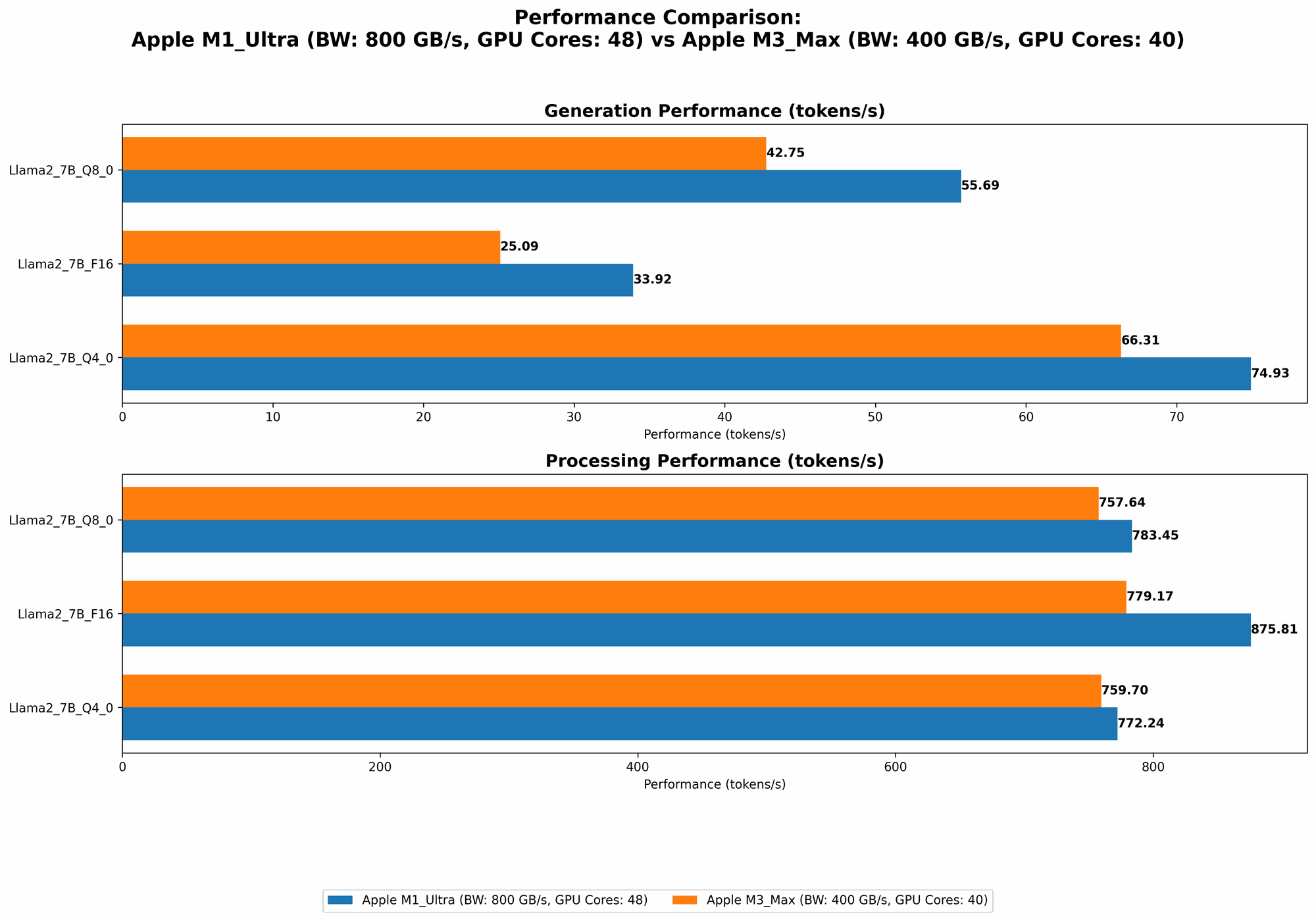
Let's break down the raw performance numbers and see how the M1 Ultra and M3 Max stack up against each other in the arena of local LLM token generation:
| Device | Model | Processing (Tokens/second) | Generation (Tokens/second) |
|---|---|---|---|
| M1 Ultra | Llama 2 7B F16 | 875.81 | 33.92 |
| M1 Ultra | Llama 2 7B Q8_0 | 783.45 | 55.69 |
| M1 Ultra | Llama 2 7B Q4_0 | 772.24 | 74.93 |
| M3 Max | Llama 2 7B F16 | 779.17 | 25.09 |
| M3 Max | Llama 2 7B Q8_0 | 757.64 | 42.75 |
| M3 Max | Llama 2 7B Q4_0 | 759.7 | 66.31 |
| M3 Max | Llama 3 8B Q4KM | 678.04 | 50.74 |
| M3 Max | Llama 3 8B F16 | 751.49 | 22.39 |
| M3 Max | Llama 3 70B Q4KM | 62.88 | 7.53 |
Data Source: Performance of llama.cpp on various devices (https://github.com/ggerganov/llama.cpp/discussions/4167) by ggerganov, GPU Benchmarks on LLM Inference (https://github.com/XiongjieDai/GPU-Benchmarks-on-LLM-Inference) by XiongjieDai
It's important to note that the M3 Max can handle larger models like the Llama 3 70B, while the M1 Ultra doesn't have data available for that model size. We'll discuss the implications of this later.
Apple M1 Ultra Token Speed Generation: A Deep Dive
The M1 Ultra demonstrates impressive performance in local LLM token generation, particularly with the Llama 2 7B model. It consistently delivers high processing and generation speeds across different quantization levels, making it a strong contender for developers working with smaller LLM models.
Here's a breakdown of M1 Ultra performance:
- Processing: The M1 Ultra exhibits exceptional processing power, achieving speeds exceeding 800 tokens per second for Llama 2 7B F16. It maintains a good level of performance even with quantization (Q80 and Q40), showing its versatility in handling different model sizes and precision levels.
- Generation: While the M1 Ultra shines in processing, its generation speeds are relatively lower, particularly with the F16 model. This means that while it can quickly process information, generating output might take slightly longer.
Apple M3 Max Token Speed Generation: Exploring the Larger Model Capability
The M3 Max demonstrates a different strength – its ability to handle larger models. While it doesn't quite match the M1 Ultra's raw speed in processing smaller models, it performs well with the Llama 3 8B, providing a good balance of processing and generation speed.
Here's a closer look at M3 Max performance:
- Processing: The M3 Max shows strong processing capabilities, reaching speeds of over 700 tokens per second for Llama 2 7B F16, but it falls short of the M1 Ultra's peak performance. However, it handles the larger Llama 3 8B with impressive efficiency, reaching over 678 tokens per second for the Q4KM model.
- Generation: The M3 Max exhibits a comparable performance to the M1 Ultra in terms of generation speed for Llama 2, but shows improvements with the Llama 3 8B, achieving 50.74 tokens per second for the Q4KM model.
Performance Analysis: Unveiling the Advantages and Disadvantages
Here's a deeper dive into the pros and cons of each chip to help you make an informed decision:
Apple M1 Ultra: Strengths and Weaknesses
Strengths:
- Exceptional Processing Speed: The M1 Ultra's high processing speeds are a significant asset for developers who prioritize rapid data processing.
- Versatility: The M1 Ultra delivers solid performance across a range of quantization levels, making it suitable for projects where you need to adjust model size and precision.
Weaknesses:
- Lower Generation Speed (for F16): The M1 Ultra's generation speed, particularly for the F16 format, could be a bottleneck for applications where real-time response is critical.
- Limited Support for Larger Models: The M1 Ultra's performance hasn't been tested extensively with larger models like Llama 3 70B, indicating potential limitations in handling very large models.
Apple M3 Max: Strengths and Weaknesses
Strengths:
- Larger Model Support: The M3 Max demonstrates the ability to process and generate tokens for larger models like Llama 3 70B, making it ideal for projects involving complex, computationally demanding LLMs.
- Balanced Performance: The M3 Max provides a good balance between processing and generation speeds, making it suitable for a wider range of AI development tasks.
Weaknesses:
- Lower Peak Processing Speed: The M3 Max doesn't reach the same peak processing speeds as the M1 Ultra for smaller models.
- Memory Limitations: The M3 Max's 400GB memory capacity might pose a challenge for projects requiring extensive data storage.
Choosing the Right Device for Your AI Project
Choosing between the M1 Ultra and M3 Max depends on your specific needs:
- Prioritize Speed for Smaller Models: If you're primarily working with smaller LLMs like Llama 2 7B and need maximum processing speed, the M1 Ultra might be the better choice.
- Working with Large Models: If your project involves larger LLMs like Llama 3 70B, the M3 Max's larger model support and balanced performance make it a more suitable option.
- Budget Considerations: The M1 Ultra might be a cheaper option for some users, but remember the M3 Max's ability to handle larger models might make it a worthwhile investment in the long run.
Practical Recommendations for AI Developers
Consider these practical recommendations when deciding:
- Model Choice: Carefully select the LLM model based on your project requirements. Smaller models can run efficiently on both chips.
- Quantization: Experiment with different quantization levels to optimize for speed and accuracy.
- Memory Considerations: If your project involves extensive data storage, consider the M3 Max's larger memory capacity.
- Performance Benchmarking: Benchmark both chips with your specific models and workloads to make an informed decision.
FAQ: Addressing Common Questions
1. What is "Quantization" and Why is it Important for LLM Models?
Quantization is a technique used to reduce the size of LLM models by representing the weights (numbers that define the model) using fewer bits. This allows models to run faster and more efficiently on devices with limited memory or processing power.
Imagine a model as a huge recipe book. Each number in the recipe represents a tiny ingredient. Quantization is like reducing the complexity of the recipe by using simpler ingredients, which makes it faster to cook and requires less space in the cookbook.
2. How Do I Choose the Right LLM Model for My Project?
Choosing the right LLM model depends on your specific needs:
- Model Size: Smaller models offer faster speeds and require less memory, while larger models boast advanced capabilities and richer knowledge.
- Domain Expertise: Some models specialize in specific domains, like medical text or code generation.
- Availability of Resources: Consider your computational resources and memory capacity before choosing a model.
3. What Are the Strengths and Weaknesses of the M1 Ultra and M3 Max for AI Development?
We've already covered this in detail above, but here's a quick summary:
M1 Ultra: - Strengths: High processing speeds, works well with smaller models, versatile quantization support. - Weaknesses: Lower generation speed with F16, limited support for larger models.
M3 Max: - Strengths: Handles larger models well, balanced performance, larger memory capacity. - Weaknesses: Lower peak processing speed compared to M1 Ultra, memory capacity might not be enough for some projects.
4. Can I Use an M1 Ultra for Research or Development?
Absolutely! The M1 Ultra is a powerful tool for AI research and development. Its high processing speeds and ability to handle smaller models efficiently make it ideal for experimenting with new ideas and building prototypes.
5. What are the Costs Associated with Using Apple M1 Chips for AI Development?
The cost of using M1 chips depends on the specific model and configuration you choose. However, Apple's M-series chips represent a significant investment compared to more traditional CPU-based options.
6. Is Local LLM Inference the Future of AI Development?
Local LLM inference has several advantages, including reduced latency, improved privacy, and offline capabilities. It's a promising approach for various applications, but there are still challenges with model size and computational resources.
Keywords
M1 Ultra, M3 Max, LLM, token speed generation, benchmark, LLMs, Llama 2, Llama 3, AI development, GPU, token processing, token generation, AI hardware, performance comparison, processing speed, generation speed, quantization, F16, Q80, Q40, local inference, Apple silicon, M-series, AI hardware, developers, geeks.