Which is Better for AI Development: Apple M1 Pro 200gb 14cores or NVIDIA RTX 6000 Ada 48GB? Local LLM Token Speed Generation Benchmark
Introduction
The world of AI development is evolving rapidly, with large language models (LLMs) like Llama 2 and Llama 3 at the forefront. These models require powerful hardware to run efficiently, leaving developers seeking the best devices for their needs.
In this article, we'll pit two popular options against each other: the Apple M1 Pro 200GB with 14 cores and the NVIDIA RTX 6000 Ada with 48GB of memory. We'll dive deep into their performance on local LLM token generation, analyze their strengths and weaknesses, and provide practical recommendations based on a benchmark of token speeds.
Think of this article as a guide for anyone who wants to build their own AI playground at home. We'll explore the nitty-gritty details of each device, analyze their performance, and help you make an informed decision based on your own specific needs. So, buckle up and get ready to learn!
Apple M1 Pro Token Speed Generation
The Apple M1 Pro, with its 14 cores and substantial memory, is known for its efficient power consumption and impressive performance in various tasks, including AI development. We'll now dive into its token generation capabilities for Llama 2 models.
M1 Pro 200GB 14 Cores - Llama 2: Quantization Impact
The M1 Pro excels when it comes to handling quantized LLMs, as seen in its token speeds for Llama 2:
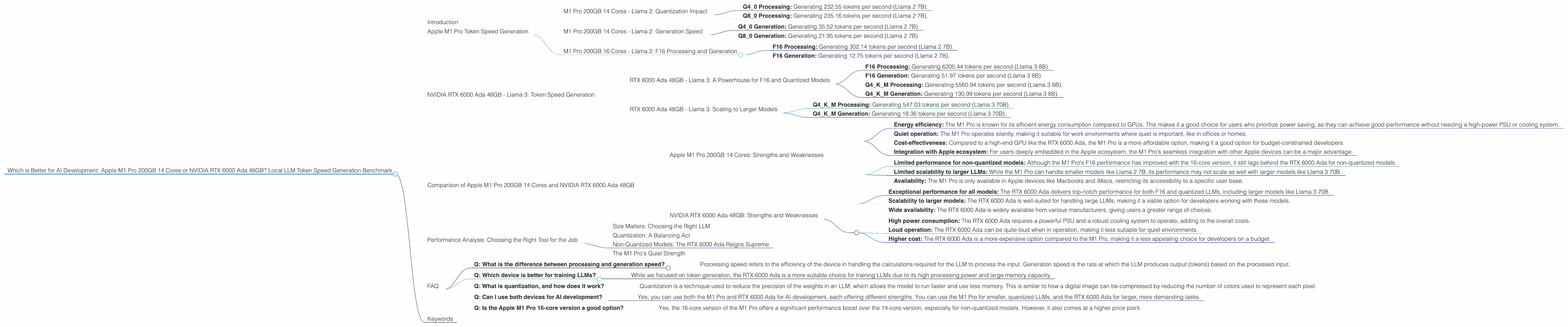
- Q4_0 Processing: Generating 232.55 tokens per second (Llama 2 7B).
- Q8_0 Processing: Generating 235.16 tokens per second (Llama 2 7B).
These numbers illustrate the power of quantization. LLMs are essentially complex mathematical models that learn how to understand and respond to text. Quantization involves reducing the precision of these models, like making a blurry photo a little less sharp, but in a way that doesn't significantly compromise their performance. In return for this slight reduction in quality, we get a significant boost in speed and efficiency. The M1 Pro thrives on these quantized models, leading to a quicker and smoother AI experience.
M1 Pro 200GB 14 Cores - Llama 2: Generation Speed
Now let's look at the generation speed of the M1 Pro for Llama 2 models:
- Q4_0 Generation: Generating 35.52 tokens per second (Llama 2 7B).
- Q8_0 Generation: Generating 21.95 tokens per second (Llama 2 7B).
While the generation speed is impressive for quantized models compared to other devices, the M1 Pro 14-core model doesn’t seem to perform as well with F16 (half-precision floating-point) Llama 2 7B models. The data for this configuration is currently unavailable.
M1 Pro 200GB 16 Cores - Llama 2: F16 Processing and Generation
The M1 Pro 16-core version shows a significant performance boost for Llama 2 7B in F16 format:
- F16 Processing: Generating 302.14 tokens per second (Llama 2 7B).
- F16 Generation: Generating 12.75 tokens per second (Llama 2 7B).
This data reinforces the fact that the M1 Pro 16-core version is a more powerful option compared to its 14-core counterpart, particularly when working with F16 models. However, it's worth noting that the token generation speed for F16 models is still slower than for quantized models.
NVIDIA RTX 6000 Ada 48GB - Llama 3: Token Speed Generation
The NVIDIA RTX 6000 Ada, a powerhouse GPU known for its processing capabilities, is a popular choice for AI development and LLM training. Now, let's delve into how this GPU fares in generating tokens for Llama 3 models.
RTX 6000 Ada 48GB - Llama 3: A Powerhouse for F16 and Quantized Models
The RTX 6000 Ada demonstrates exceptional speed for both F16 and quantized Llama 3 models:
- F16 Processing: Generating 6205.44 tokens per second (Llama 3 8B).
F16 Generation: Generating 51.97 tokens per second (Llama 3 8B).
Q4KM Processing: Generating 5560.94 tokens per second (Llama 3 8B).
- Q4KM Generation: Generating 130.99 tokens per second (Llama 3 8B).
These results highlight the RTX 6000 Ada's dominance in processing and generating tokens for Llama 3 models. Its GPU architecture is designed to handle the complex computations required for these models, resulting in impressive performance even with F16 models that require more computational resources.
RTX 6000 Ada 48GB - Llama 3: Scaling to Larger Models
The RTX 6000 Ada doesn't just shine with smaller models like Llama 3 8B. It also demonstrates commendable performance for larger models like Llama 3 70B:
- Q4KM Processing: Generating 547.03 tokens per second (Llama 3 70B).
- Q4KM Generation: Generating 18.36 tokens per second (Llama 3 70B).
While data for F16 models is unavailable, the RTX 6000 Ada's performance for quantized models is notable. It showcases the GPU's ability to handle larger models without sacrificing speed, reinforcing its strength as a choice for professional AI development.
Comparison of Apple M1 Pro 200GB 14 Cores and NVIDIA RTX 6000 Ada 48GB
Now that we've analyzed the token speeds of each device, let's compare their strengths and weaknesses to help you make an informed decision.
Apple M1 Pro 200GB 14 Cores: Strengths and Weaknesses
Strengths:
- Energy efficiency: The M1 Pro is known for its efficient energy consumption compared to GPUs. This makes it a good choice for users who prioritize power saving, as they can achieve good performance without needing a high-power PSU or cooling system.
- Quiet operation: The M1 Pro operates silently, making it suitable for work environments where quiet is important, like in offices or homes.
- Cost-effectiveness: Compared to a high-end GPU like the RTX 6000 Ada, the M1 Pro is a more affordable option, making it a good option for budget-constrained developers.
- Integration with Apple ecosystem: For users deeply embedded in the Apple ecosystem, the M1 Pro's seamless integration with other Apple devices can be a major advantage.
Weaknesses:
- Limited performance for non-quantized models: Although the M1 Pro's F16 performance has improved with the 16-core version, it still lags behind the RTX 6000 Ada for non-quantized models.
- Limited scalability to larger LLMs: While the M1 Pro can handle smaller models like Llama 2 7B, its performance may not scale as well with larger models like Llama 3 70B.
- Availability: The M1 Pro is only available in Apple devices like Macbooks and iMacs, restricting its accessibility to a specific user base.
NVIDIA RTX 6000 Ada 48GB: Strengths and Weaknesses
Strengths:
- Exceptional performance for all models: The RTX 6000 Ada delivers top-notch performance for both F16 and quantized LLMs, including larger models like Llama 3 70B.
- Scalability to larger models: The RTX 6000 Ada is well-suited for handling large LLMs, making it a viable option for developers working with these models.
- Wide availability: The RTX 6000 Ada is widely available from various manufacturers, giving users a greater range of choices.
Weaknesses:
- High power consumption: The RTX 6000 Ada requires a powerful PSU and a robust cooling system to operate, adding to the overall costs.
- Loud operation: The RTX 6000 Ada can be quite loud when in operation, making it less suitable for quiet environments.
- Higher cost: The RTX 6000 Ada is a more expensive option compared to the M1 Pro, making it a less appealing choice for developers on a budget.
Performance Analysis: Choosing the Right Tool for the Job
Now, let's break down the performance comparisons based on the data and translate those numbers into practical recommendations for developers.
Size Matters: Choosing the Right LLM
The first thing to consider is the size of the LLM you want to work with. If you're starting out or working with smaller models like Llama 2 7B, the M1 Pro could be a good choice, especially for quantized models. It offers good performance at an affordable price point and with the added benefit of energy efficiency and quiet operation.
However, if you're dealing with larger models like Llama 3 70B or want to experiment with more complex tasks, the RTX 6000 Ada is the clear champion. Its raw processing power and the ability to handle larger models without sacrificing speed make it a formidable tool for professional AI development.
Quantization: A Balancing Act
Quantization is a technique that helps optimize the performance of LLMs by reducing the precision of the model. While this can lead to slight decreases in accuracy, the benefits of increased speed and efficiency are often worth it.
The M1 Pro excels with quantized models, demonstrating impressive token speeds. If you're looking for a balance between performance and budget, the M1 Pro with its quantized model support could be a great option. However, the RTX 6000 Ada still holds its own with quantized models, achieving even higher token speeds.
Non-Quantized Models: The RTX 6000 Ada Reigns Supreme
For developers who prefer working with non-quantized models, the RTX 6000 Ada is the clear winner. Its GPU architecture is designed to handle the demands of F16 models, enabling faster processing and token generation speeds that are significantly higher than the M1 Pro.
The M1 Pro's Quiet Strength
While the RTX 6000 Ada takes the lead for performance, keep in mind the M1 Pro's strengths: quieter operation, energy efficiency, and lower cost. If you prioritize these factors and are not working with large LLMs or non-quantized models, the M1 Pro can be a suitable choice.
Think of it this way: the M1 Pro is like a sleek, efficient sports car, perfect for zipping around town and handling everyday tasks with grace. The RTX 6000 Ada is a powerful, high-performance race car built for speed and complex challenges on the track.
FAQ
- Q: What is the difference between processing and generation speed?
- Processing speed refers to the efficiency of the device in handling the calculations required for the LLM to process the input. Generation speed is the rate at which the LLM produces output (tokens) based on the processed input.
- Q: Which device is better for training LLMs?
- While we focused on token generation, the RTX 6000 Ada is a more suitable choice for training LLMs due to its high processing power and large memory capacity.
- Q: What is quantization, and how does it work?
- Quantization is a technique used to reduce the precision of the weights in an LLM, which allows the model to run faster and use less memory. This is similar to how a digital image can be compressed by reducing the number of colors used to represent each pixel.
- Q: Can I use both devices for AI development?
- Yes, you can use both the M1 Pro and RTX 6000 Ada for AI development, each offering different strengths. You can use the M1 Pro for smaller, quantized LLMs, and the RTX 6000 Ada for larger, more demanding tasks.
- Q: Is the Apple M1 Pro 16-core version a good option?
- Yes, the 16-core version of the M1 Pro offers a significant performance boost over the 14-core version, especially for non-quantized models. However, it also comes at a higher price point.
Keywords
LLM, Llama 2, Llama 3, Apple M1 Pro, NVIDIA RTX 6000 Ada, token speed, benchmark, performance, quantization, F16, Q4KM, AI development, GPU, CPU, processing, generation, efficiency, cost, power consumption, scalability, use cases, recommendations, large language models, AI, machine learning, deep learning, NLP, natural language processing, coding, software, hardware, technology, developers, geeks, tech enthusiasts, AI enthusiast, data science, data scientist, AI developer, NLP developer.