Which is Better for AI Development: Apple M1 Pro 200gb 14cores or NVIDIA A100 PCIe 80GB? Local LLM Token Speed Generation Benchmark
Introduction
The world of Artificial Intelligence (AI) is buzzing with excitement about Large Language Models (LLMs). These powerful AI models, like ChatGPT and Bard, can generate human-like text, translate languages, write different kinds of creative content, and answer your questions in an informative way. But running these models locally requires serious computing power. This article delves into the performance of two popular devices: the Apple M1 Pro (200GB, 14 cores) and the NVIDIA A100 PCIe 80GB, when it comes to running LLMs locally.
We'll compare the token generation speed of these devices for different LLM models and quantization levels. We'll also look at the trade-offs between these devices – who wins in terms of performance, price, and accessibility? Don't worry if you're not a tech wizard; we’ll explain everything in a way that's easy to understand.
Understanding the Battleground: LLM Models, Quantization, and Token Speed
Before we jump into the data, let's define a few key terms:
LLMs (Large Language Models): These are powerful AI models trained on massive datasets to understand and generate human-like text. Think of them as super-smart AI assistants that can write stories, translate languages, and even help you write code.
Quantization: Imagine you have a big image. To save space, you can compress it by reducing the number of colors it uses. Quantization does the same for LLMs – it reduces the precision of the numbers representing the model, making it smaller and faster. Think of it like this: the more you compress the image, the less detail you see, but it takes up less space.
Token Speed: This refers to the number of tokens (think of them as words or parts of words) an LLM can process per second. The higher the token speed, the faster the model can generate text.
Choosing the right device and model for your needs:
Imagine you're building a web application that needs to generate summaries of long articles quickly. You might choose a smaller model like Llama 7B with a faster device like the Apple M1 Pro. But if you want to create a more powerful, research-oriented chatbot with advanced capabilities, you might need a larger model like Llama 70B and a more powerful device like the NVIDIA A100.
Apple M1 Pro vs. NVIDIA A100: A Head-to-Head Comparison
The Apple M1 Pro (200GB, 14 cores) and the NVIDIA A100 PCIe 80GB are powerhouses in the world of local LLM execution. Let's see how they stack up in terms of token speed generation for different LLM models and quantization levels.
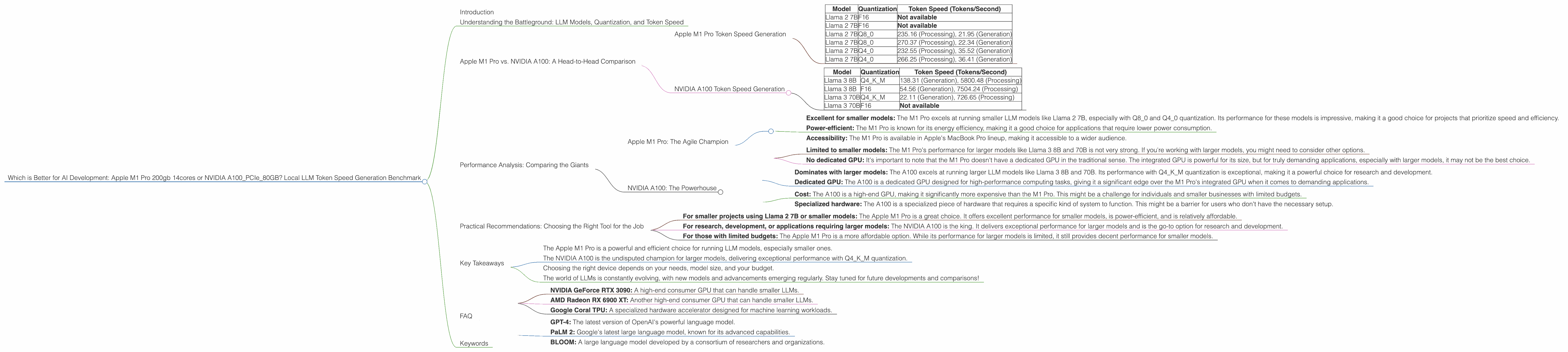
Apple M1 Pro Token Speed Generation
We'll start by looking at the Apple M1 Pro's performance. Here's a summary of the token speed generation for different LLM models and quantization levels:
| Model | Quantization | Token Speed (Tokens/Second) |
|---|---|---|
| Llama 2 7B | F16 | Not available |
| Llama 2 7B | F16 | Not available |
| Llama 2 7B | Q8_0 | 235.16 (Processing), 21.95 (Generation) |
| Llama 2 7B | Q8_0 | 270.37 (Processing), 22.34 (Generation) |
| Llama 2 7B | Q4_0 | 232.55 (Processing), 35.52 (Generation) |
| Llama 2 7B | Q4_0 | 266.25 (Processing), 36.41 (Generation) |
As you can see, the M1 Pro performs well in terms of token speed when running Llama 2 7B with Q80 and Q40 quantization. This makes it a solid option for projects that require a good balance of speed and accuracy for smaller models.
NVIDIA A100 Token Speed Generation
Now, let's see how the NVIDIA A100 PCIe 80GB fares. Here's a summary of its token speed generation for different LLM models and quantization levels:
| Model | Quantization | Token Speed (Tokens/Second) |
|---|---|---|
| Llama 3 8B | Q4KM | 138.31 (Generation), 5800.48 (Processing) |
| Llama 3 8B | F16 | 54.56 (Generation), 7504.24 (Processing) |
| Llama 3 70B | Q4KM | 22.11 (Generation), 726.65 (Processing) |
| Llama 3 70B | F16 | Not available |
The A100 shines when it comes to larger models like Llama 3 8B and 70B. In particular, its performance with Q4KM quantization is impressive. While the A100's generation speed is lower than the M1 Pro's for the Llama 2 7B model, it significantly outperforms the M1 Pro in both processing and generation speed when working with larger models.
Performance Analysis: Comparing the Giants
Now that we have a grasp of their token speed generation, let's delve into the strengths and weaknesses of each device:
Apple M1 Pro: The Agile Champion
Strengths: * Excellent for smaller models: The M1 Pro excels at running smaller LLM models like Llama 2 7B, especially with Q80 and Q40 quantization. Its performance for these models is impressive, making it a good choice for projects that prioritize speed and efficiency. * Power-efficient: The M1 Pro is known for its energy efficiency, making it a good choice for applications that require lower power consumption. * Accessibility: The M1 Pro is available in Apple's MacBook Pro lineup, making it accessible to a wider audience.
Weaknesses: * Limited to smaller models: The M1 Pro's performance for larger models like Llama 3 8B and 70B is not very strong. If you're working with larger models, you might need to consider other options. * No dedicated GPU: It's important to note that the M1 Pro doesn't have a dedicated GPU in the traditional sense. The integrated GPU is powerful for its size, but for truly demanding applications, especially with larger models, it may not be the best choice.
NVIDIA A100: The Powerhouse
Strengths: * Dominates with larger models: The A100 excels at running larger LLM models like Llama 3 8B and 70B. Its performance with Q4KM quantization is exceptional, making it a powerful choice for research and development. * Dedicated GPU: The A100 is a dedicated GPU designed for high-performance computing tasks, giving it a significant edge over the M1 Pro's integrated GPU when it comes to demanding applications.
Weaknesses: * Cost: The A100 is a high-end GPU, making it significantly more expensive than the M1 Pro. This might be a challenge for individuals and smaller businesses with limited budgets. * Specialized hardware: The A100 is a specialized piece of hardware that requires a specific kind of system to function. This might be a barrier for users who don't have the necessary setup.
Practical Recommendations: Choosing the Right Tool for the Job
So, which device is the right choice for you? It all depends on your specific needs and priorities. Here are some practical recommendations:
- For smaller projects using Llama 2 7B or smaller models: The Apple M1 Pro is a great choice. It offers excellent performance for smaller models, is power-efficient, and is relatively affordable.
- For research, development, or applications requiring larger models: The NVIDIA A100 is the king. It delivers exceptional performance for larger models and is the go-to option for research and development.
- For those with limited budgets: The Apple M1 Pro is a more affordable option. While its performance for larger models is limited, it still provides decent performance for smaller models.
Key Takeaways
Let's summarize the key points of this comparison:
- The Apple M1 Pro is a powerful and efficient choice for running LLM models, especially smaller ones.
- The NVIDIA A100 is the undisputed champion for larger models, delivering exceptional performance with Q4KM quantization.
- Choosing the right device depends on your needs, model size, and your budget.
- The world of LLMs is constantly evolving, with new models and advancements emerging regularly. Stay tuned for future developments and comparisons!
FAQ
Q: What is the best device for running LLMs locally?
A: There's no one-size-fits-all answer. It depends on your budget, the specific model you're using, and your performance requirements. For smaller models (like Llama 2 7B), the Apple M1 Pro is a good option. For larger models (like Llama 3 8B and 70B), the NVIDIA A100 excels.
Q: What is the difference between processing and generation speed?
A: Processing speed refers to the speed at which the LLM can process the input text (e.g., the prompt you give it). Generation speed refers to the speed at which the LLM can generate output text (e.g., the response you get).
Q: What is quantization, and why is it important?
A: Quantization is a technique to reduce the precision of the numbers representing an LLM, making it smaller and faster. It's like compressing an image to make it smaller and faster to load.
Q: Can I use both the Apple M1 Pro and NVIDIA A100 together?
A: It's possible to use both devices in combination. For example, you could use the M1 Pro for quick experimentation and the A100 for running larger models and more demanding applications.
Q: What are some other devices that can run LLMs locally?
A: Other devices that can run LLMs locally include:
- NVIDIA GeForce RTX 3090: A high-end consumer GPU that can handle smaller LLMs.
- AMD Radeon RX 6900 XT: Another high-end consumer GPU that can handle smaller LLMs.
- Google Coral TPU: A specialized hardware accelerator designed for machine learning workloads.
Q: What are the latest LLM models available?
A: The LLM landscape is constantly changing, with new models being released regularly. Some of the latest popular models include:
- GPT-4: The latest version of OpenAI's powerful language model.
- PaLM 2: Google's latest large language model, known for its advanced capabilities.
- BLOOM: A large language model developed by a consortium of researchers and organizations.
Keywords
Apple M1 Pro, NVIDIA A100, LLM, Large Language Model, Token Speed, Generation, Processing, Quantization, F16, Q80, Q40, Llama 2, Llama 3, AI Development, Local Inference, Benchmark, Performance Analysis, Recommendation, Comparison, Hardware, GPU, GPU Cores, Power Consumption, Efficiency, Accessibility, Cost, Specialized Hardware.